
1. ข้อมูลด้านความปลอดภัย
โปรดอ่านคำแนะนำทั้งหมดอย่างละเอียดก่อนประกอบและใช้งาน เก็บคู่มือนี้ไว้เพื่อใช้อ้างอิงในอนาคต
- จำเป็นต้องประกอบ: This desk requires self-assembly. Follow the provided assembly instructions meticulously to prevent injuries.
- น้ำหนักจำกัด: This desk is not designed to carry heavy objects. The maximum weight capacity is approximately 17 kg (37.5 lbs) to ensure stability.
- การกำกับดูแล: Children should be supervised while using the desk, especially during adjustments.
- การจัดวาง: วางโต๊ะบนพื้นผิวเรียบและมั่นคง
2. สินค้าหมดview
The TecTake Children's Desk is designed to provide a comfortable and adaptable workspace for various activities such as drawing, homework, and crafts. Its thoughtful design allows for height and tilt adjustments to suit the user's needs.
คุณสมบัติหลัก:
- การเอียงเดสก์ท็อป: The work surface can be tilted to provide an ergonomic position for different tasks.
- ปรับความสูง: The desk legs are adjustable in 7 steps, allowing the desk to grow with your child.
- ลิ้นชักในตัว: A convenient drawer provides storage for school supplies, drawing materials, and other items.
- Removable Stopper Strips: Two removable stopper strips on the lower edge of the desktop prevent materials from sliding off when the surface is tilted.
- โครงสร้างที่มั่นคง: Built with robust materials for durability and stability during daily use.
- มุมโค้งมน: The desktop features rounded corners for enhanced safety.
- ง่ายต่อการทำความสะอาด: The surface is washable with a damp ผ้า.

Figure 1: TecTake Children's Desk, showcasinก. การออกแบบและคุณสมบัติ

รูปที่ 2: เกินview of key features including adjustable height, tilting desktop, and storage.
3. การตั้งค่า
The desk comes with detailed assembly instructions in the package. Please refer to the included manual for step-by-step guidance on assembling your TecTake Children's Desk.
ขั้นตอนการประชุมสมัชชาใหญ่:
- แกะส่วนประกอบทั้งหมดออกและตรวจสอบตามรายการชิ้นส่วนในคู่มือที่ให้มา
- ประกอบโครงสร้างหลักโดยใช้ฮาร์ดแวร์ที่ให้มา
- Attach the desktop to the frame, ensuring the tilting mechanism is correctly installed.
- Install the storage drawer and stopper strips.
- ตรวจสอบให้แน่ใจว่าขันสกรูและตัวยึดทั้งหมดให้แน่นอย่างแน่นหนาก่อนใช้งาน

Figure 3: The desk's flexible design allows for various adjustments to suit user needs.
4. คู่มือการใช้งาน
4.1 การปรับความสูงของโต๊ะ
- Locate the height adjustment mechanisms on the desk legs.
- Carefully loosen the fasteners or pins that secure the legs at their current height.
- Adjust the desk to one of the 7 available height positions (from approximately 63 cm to 94 cm).
- Ensure both sides are adjusted to the same height and securely fasten the mechanisms before use.
4.2 Tilting the Desktop
- The desktop features a tilting mechanism for ergonomic positioning.
- To tilt, lift the desktop slightly and adjust it to the desired angle.
- Ensure the desktop is securely locked into place at the chosen angle.
- Utilize the two removable stopper strips to prevent items from sliding off the tilted surface.
4.3 การใช้งานลิ้นชักเก็บของ
- The integrated drawer provides convenient storage.
- Pull the drawer out to access its contents.
- Push the drawer back in until it is fully closed to keep items secure and maintain a tidy workspace.
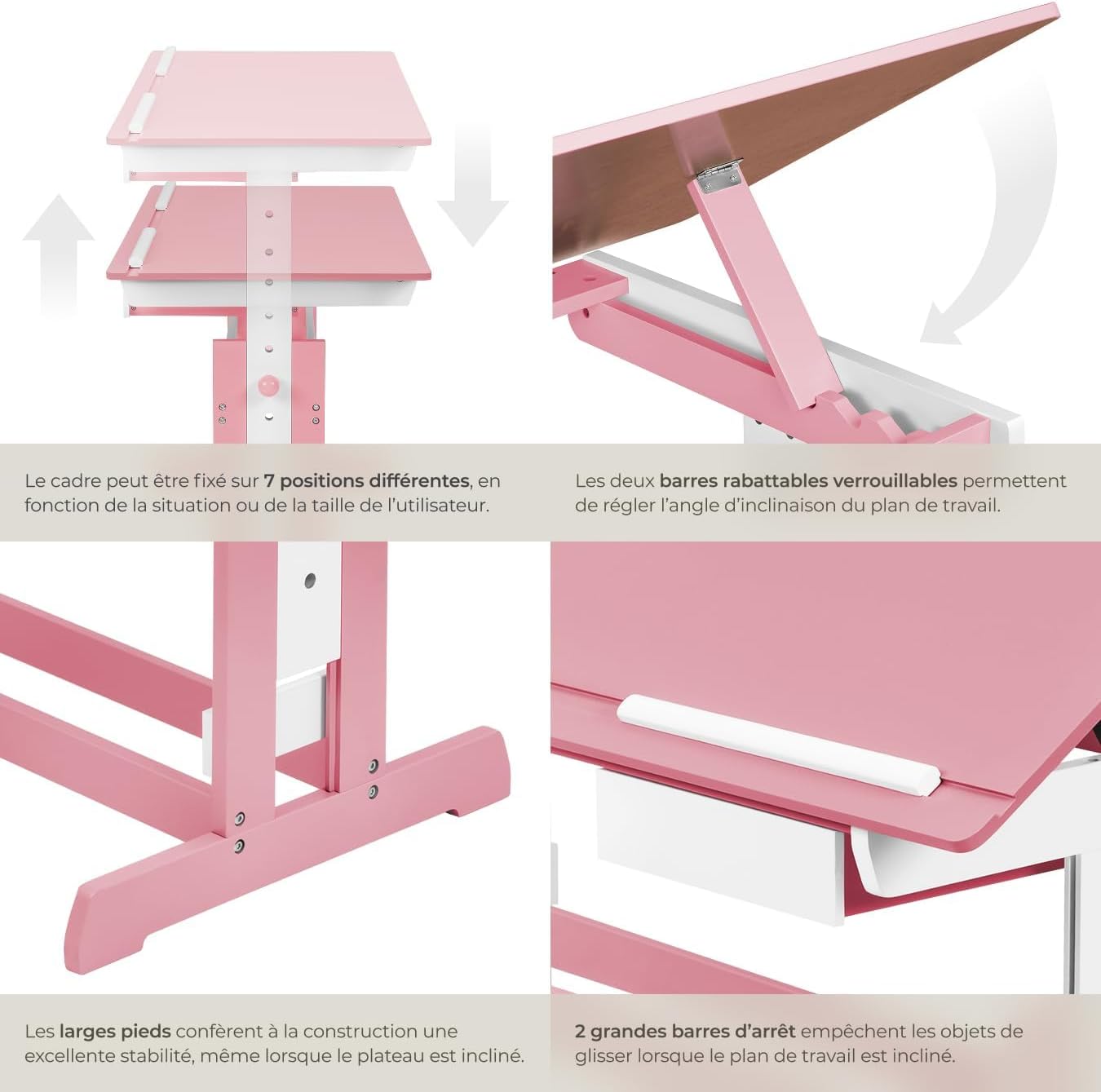
Figure 4: Close-up of the height adjustment and tilting mechanism.
5. การบำรุงรักษา
- การทำความสะอาด: เช็ดพื้นผิวโต๊ะด้วยน้ำยาทำความสะอาดamp ผ้า หลีกเลี่ยงน้ำยาทำความสะอาดที่มีฤทธิ์กัดกร่อนหรือสารเคมีรุนแรงที่อาจทำลายพื้นผิวได้
- การตรวจสอบ: ตรวจสอบสกรูและตัวยึดทั้งหมดเป็นระยะเพื่อให้แน่ใจว่ายังแน่นอยู่ ขันให้แน่นอีกครั้งหากจำเป็น
- หลีกเลี่ยงความชื้นที่มากเกินไป: Do not expose the desk to excessive moisture or direct sunlight for prolonged periods to prevent warping or discoloration.
6 การแก้ไขปัญหา
If you encounter any issues with your TecTake Children's Desk, please refer to the following common solutions:
- โต๊ะโยกเยก: Ensure the desk is placed on a level surface. Check that all assembly screws and bolts are securely tightened.
- Difficulty Adjusting Height/Tilt: Verify that no obstructions are present in the adjustment mechanisms. Ensure fasteners are sufficiently loosened before attempting to adjust.
- ชิ้นส่วนที่ขาดหายหรือเสียหาย: If any parts are missing or damaged upon arrival, please contact TecTake customer support for assistance.
7. ข้อมูลจำเพาะ
| คุณสมบัติ | ข้อมูลจำเพาะ |
|---|---|
| ยี่ห้อ | เทคเทค |
| หมายเลขรุ่น | 800117 |
| ขนาดพื้นผิวการทำงาน | ขนาดประมาณ 109 x 55 เซนติเมตร (43 x 21.7 นิ้ว) |
| ช่วงการปรับความสูง | Approx. 63 cm to 94 cm (24.8 to 37 inches) in 7 steps |
| Drawer Interior Dimensions (HxWxD) | ขนาดโดยประมาณ 6 x 27 x 22 ซม. (2.4 x 10.6 x 8.7 นิ้ว) |
| น้ำหนัก | ประมาณ 17 กก. (37.5 ปอนด์) |
| วัสดุ | Plywood (lacquered) / Metal |
| คุณสมบัติพิเศษ | Adjustable, Tilting Desktop |
| คำแนะนำในการดูแล | เช็ดด้วยโฆษณาamp ผ้า |

Figure 5: Detailed dimensions and technical specifications of the desk.
8. การรับประกันและการสนับสนุน
For warranty information, product support, or to order replacement parts, please refer to the documentation included with your purchase or visit the official TecTake webโปรดเตรียมหมายเลขรุ่น (800117) และวันที่ซื้อให้พร้อมเมื่อติดต่อฝ่ายสนับสนุน