
1. บทนำ
The Cellularline EASYSPORT GPS is a smartwatch designed for sports enthusiasts, enabling comprehensive monitoring of athletic performance. Its integrated GPS allows tracking of workout routes without needing a smartphone. The ultra-bright touch display ensures clear visibility of settings in various outdoor conditions. With IP68 certification, the Easysport GPS is suitable for use during showering or swimming, making it an ideal companion for achieving fitness goals.
2. เนื้อหาบรรจุภัณฑ์
กรุณาตรวจสอบว่าสินค้าทั้งหมดมีอยู่ในแพ็คเกจ:
- Cellularline EASYSPORT GPS Smartwatch
- Charging Cable / Charging Dock
- คู่มือการใช้งาน (เอกสารนี้)
3. สินค้าหมดview
Familiarize yourself with the components of your EASYSPORT GPS smartwatch.
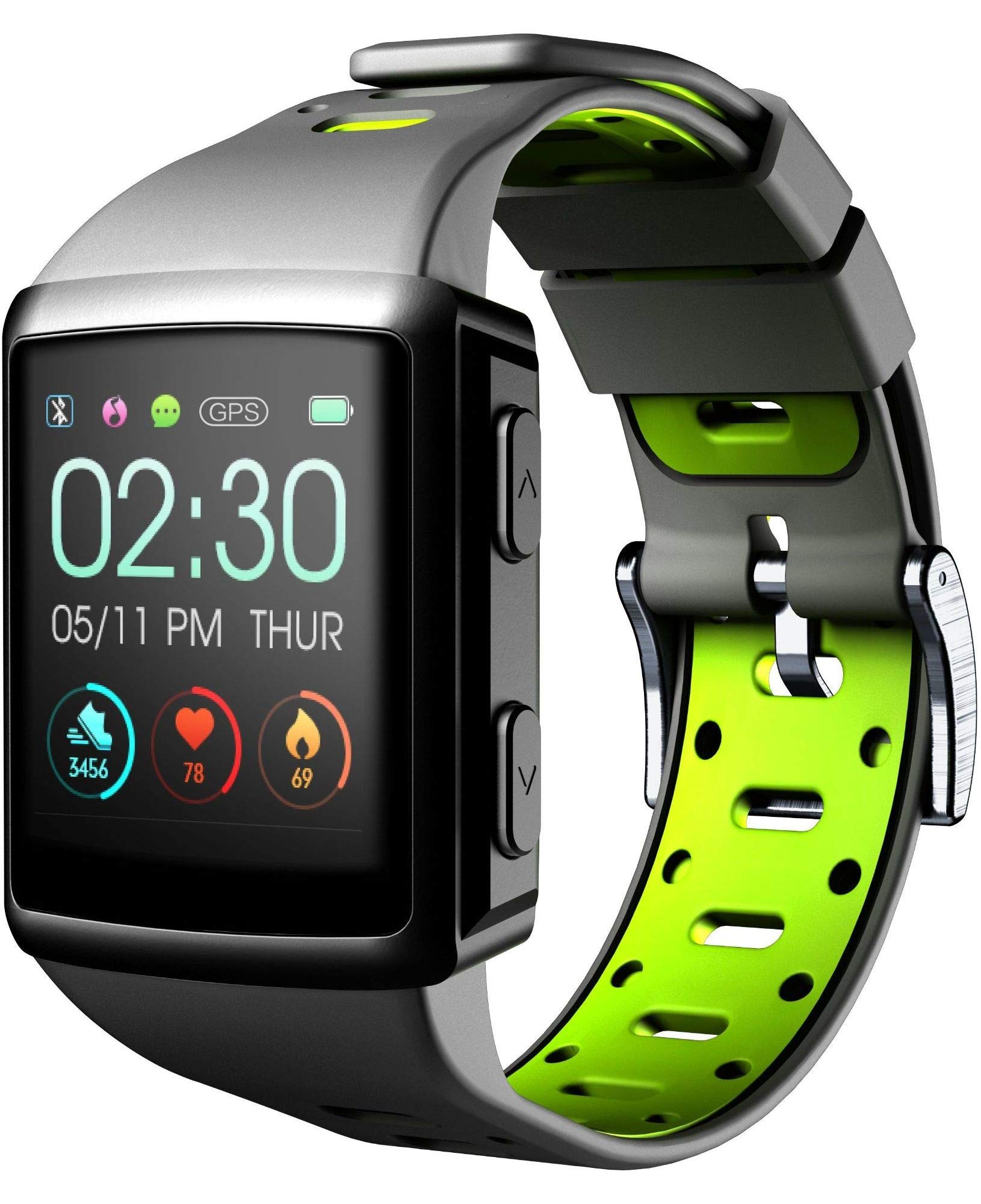
รูปที่ 3.1: ด้านหน้า view of the smartwatch display, showing current time, date, and activity metrics like steps, heart rate, and calories burned.

รูปที่ 3.2: มุม view of the smartwatch, highlighting the sporty lime and black silicone strap and the physical control buttons on the side.

รูปที่ 3.3: หลัง view of the smartwatch, illustrating the integrated heart rate (HR) sensor designed for continuous monitoring during activities.
4. การตั้งค่า
4.1 การชาร์จอุปกรณ์
Before first use, fully charge your EASYSPORT GPS smartwatch. A full charge typically takes approximately 3 hours.
- เสียบสายชาร์จเข้ากับแท่นชาร์จ
- Align the smartwatch with the charging dock's contacts until it securely snaps into place.
- Plug the USB end of the charging cable into a compatible USB power adapter (not included) or a computer's USB port.
- หน้าจอจะแสดงสถานะการชาร์จ

รูปที่ 4.1: The smartwatch connected to its charging dock, illustrating the charging process.
4.2 เปิด/ปิดเครื่อง
- การเปิดเครื่อง: กดปุ่มเปิด/ปิด (โดยปกติจะอยู่ด้านข้าง) ค้างไว้สองสามวินาทีจนกว่าหน้าจอจะสว่างขึ้น
- วิธีปิดเครื่อง: Navigate to the settings menu on the smartwatch, locate the "Power Off" option, and confirm. Alternatively, press and hold the power button until a power-off prompt appears, then confirm.
4.3 การจับคู่กับสมาร์ทโฟน
เพื่อให้สมาร์ทวอทช์ของคุณใช้งานได้อย่างเต็มประสิทธิภาพ โปรดเชื่อมต่อกับสมาร์ทโฟนของคุณผ่านบลูทูธ
- ตรวจสอบให้แน่ใจว่าได้เปิดใช้งาน Bluetooth บนสมาร์ทโฟนของคุณแล้ว
- Download and install the companion app for Cellularline EASYSPORT GPS from your smartphone's app store.
- เปิดแอปและทำตามคำแนะนำบนหน้าจอเพื่อสร้างบัญชีหรือเข้าสู่ระบบ
- In the app, select "Add Device" or "Pair New Device" and choose "EASYSPORT GPS" from the list of available devices.
- ยืนยันคำขอจับคู่บนสมาร์ทโฟนและสมาร์ทวอทช์ของคุณหากได้รับแจ้ง
5. คู่มือการใช้งาน
5.1 การนำทางแบบหน้าจอสัมผัส
The EASYSPORT GPS features a responsive touchscreen for intuitive navigation.
- ปัดขึ้น/ลง: เลื่อนดูเมนูหรือการแจ้งเตือน
- ปัดไปทางซ้าย/ขวา: เข้าถึงวิดเจ็ตต่างๆ หรือการตั้งค่าด่วน
- แตะ: เลือกสินค้าหรือยืนยันการดำเนินการ
- กดค้างไว้: May activate specific functions or customize watch faces.
5.2 การติดตามด้วย GPS
The integrated GPS allows you to track your distance and route during outdoor activities without needing your smartphone.
- Start an outdoor activity (e.g., running, cycling) from the sports mode menu on your smartwatch.
- ตรวจสอบให้แน่ใจว่าคุณอยู่ในพื้นที่เปิดโล่งเพื่อการรับสัญญาณ GPS ที่ดีที่สุด
- The smartwatch will automatically begin tracking your route and distance.
- Review your activity data, including maps, in the companion app after syncing.
5.3 Heart Rate Monitoring (HR Function)
The smartwatch continuously monitors your heart rate, providing valuable insights into your fitness and workout intensity.
- Ensure the smartwatch is worn snugly on your wrist, with the sensor making good contact with your skin.
- Access the heart rate widget or start a workout to view ข้อมูลอัตราการเต้นของหัวใจแบบเรียลไทม์
- Historical heart rate data can be viewระบุไว้ในแอปพลิเคชันคู่หู

รูปที่ 5.1: The smartwatch display showing heart rate data (e.g., 78 bpm) along with steps and calories, indicating active monitoring.
5.4 Notifications and Caller ID
Stay connected with full text notifications and caller ID directly on your wrist.
- Once paired with your smartphone, the smartwatch will display incoming call names (Caller ID) and full text of messages from WhatsApp, Twitter, and other social applications.
- Manage notification settings through the companion app on your smartphone.
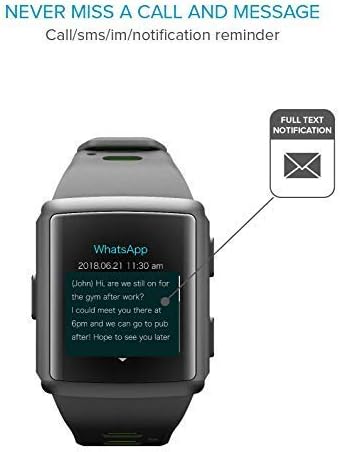
รูปที่ 5.2: The smartwatch screen showing a detailed WhatsApp message notification, demonstrating the full text display feature.
6. การบำรุงรักษา
6.1 Water Resistance (IP68 Certified)
The EASYSPORT GPS is IP68 certified, meaning it is resistant to dust and can withstand immersion in water up to 1.5 meters for 30 minutes. This makes it suitable for showering and swimming.
- Rinse the smartwatch with fresh water after exposure to chlorinated or salt water.
- ห้ามกดปุ่มใดๆ ใต้น้ำ
- Avoid exposing the device to hot water, steam, or high-pressure water jets.
- The water resistance is not permanent and may decrease over time with normal wear and tear.

รูปที่ 6.1: Visual representation of the smartwatch's IP68 certification, showing its suitability for water-related activities like swimming and showering.
6.2 การทำความสะอาด
Clean your smartwatch regularly to maintain its appearance and functionality.
- เช็ดหน้าจอและสายคล้องด้วยผ้านุ่มๆampผ้าที่ไม่เป็นขุย
- อย่าใช้สารเคมีรุนแรงหรือน้ำยาทำความสะอาดที่มีฤทธิ์กัดกร่อน
- ตรวจสอบให้แน่ใจว่าหน้าสัมผัสการชาร์จสะอาดและแห้งก่อนชาร์จ
7 การแก้ไขปัญหา
If you encounter issues with your EASYSPORT GPS smartwatch, try the following solutions:
| ปัญหา | วิธีแก้ปัญหาที่เป็นไปได้ |
|---|---|
| อุปกรณ์ไม่เปิดเครื่อง | Ensure the device is fully charged. Connect it to the charging dock and power source for at least 30 minutes. |
| ไม่สามารถจับคู่กับสมาร์ทโฟนได้ |
|
| GPS ไม่ติดตามอย่างแม่นยำ | ให้แน่ใจว่าคุณอยู่ในพื้นที่กลางแจ้งที่เปิดโล่งและมีน้ำใส view ของท้องฟ้า รอให้สัญญาณ GPS พร้อมใช้งานก่อนเริ่มกิจกรรมของคุณ |
| การแจ้งเตือนไม่ปรากฏ |
|
| การวัดอัตราการเต้นของหัวใจไม่แม่นยำ | ตรวจสอบให้แน่ใจว่าสวมสมาร์ทวอทช์กระชับพอดีกับข้อมือ ไม่แน่นหรือหลวมเกินไป ทำความสะอาดเซ็นเซอร์ด้านหลังของอุปกรณ์ด้วย |
8. ข้อมูลจำเพาะ
| คุณสมบัติ | รายละเอียด |
|---|---|
| ชื่อรุ่น | Easysport GPS |
| หมายเลขรุ่น | BTEASYSPORTHRGPSK |
| ยี่ห้อ | เซลลูล่าร์ไลน์ |
| เทคโนโลยีการเชื่อมต่อ | บลูทูธ |
| มาตรฐานการสื่อสารไร้สาย | บลูทูธ |
| จีพีเอส | จีพีเอสแบบบูรณาการ |
| ประเภทจอภาพ | หน้าจอสัมผัส LCD |
| ขนาดหน้าจอ | 2 นิ้ว |
| คุณสมบัติพิเศษ | Touchscreen, Heart Rate Monitor, GPS |
| ระดับความต้านทานต่อน้ำ | มาตรฐาน IP68 (กันน้ำได้ลึกถึง 1.5 เมตร) |
| วัสดุของวงดนตรี | ซิลิโคน |
| สี | มะนาว, ดำ |
| แอปพลิเคชั่นที่รองรับ | GPS (and companion app for notifications/data sync) |
| อุปกรณ์ที่รองรับ | สมาร์ทโฟน |
| กลุ่มเป้าหมาย | ผู้ใหญ่ทั้งชายและหญิง |
9. การรับประกันและการสนับสนุน
The Cellularline EASYSPORT GPS Smartwatch comes with a warranty as specified by the manufacturer. For detailed warranty information and support, please refer to the official Cellularline webเว็บไซต์หรือติดต่อฝ่ายบริการลูกค้าของพวกเขา
- ประเภทการรับประกัน: ตลอดอายุการใช้งาน
- For technical support, troubleshooting assistance, or warranty claims, please visit the Cellularline official webเว็บไซต์ or contact their authorized service center.