
1. บทนำ
The Zeblaze Vibe 4 Hybrid Smartwatch (Model SI-BW03) combines traditional watch aesthetics with smart features to help you monitor your daily activities and health. This manual provides detailed instructions on how to set up, operate, and maintain your device.
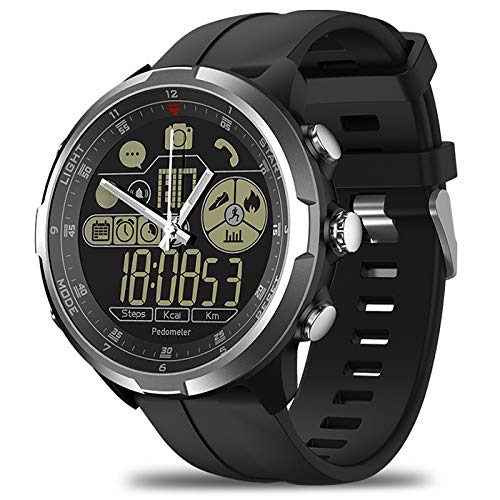
รูปที่ 1.1 : ด้านหน้า view of the Zeblaze Vibe 4 Hybrid Smartwatch.
2. สินค้าหมดview
The Zeblaze Vibe 4 Hybrid Smartwatch features a 1.24-inch FSTN high-resolution display and is equipped with a 610mAh button cell battery. Key functionalities include:
- การติดตามสุขภาพ: Pedometer, Heart Rate Monitor, Sleep Monitor, Sedentary Reminder, Drinking Reminder.
- การติดตามกิจกรรม: Displays time, date, steps, distance, and calories burned.
- การแจ้งเตือนอัจฉริยะ: Alarm reminders, message notifications (e.g., WeChat), anti-lost alerts.
- รีโมทคอนโทรล: Remote camera function for your smartphone.

รูปที่ 2.1: ด้านข้าง view of the smartwatch showing the control buttons.
3. การตั้งค่า
3.1 การเปิดเครื่องครั้งแรก
Your smartwatch is powered by a button cell battery. To activate, ensure the battery is correctly installed. Refer to the battery compartment on the back of the watch.
3.2 การจับคู่กับสมาร์ทโฟนของคุณ
- ตรวจสอบให้แน่ใจว่าได้เปิดใช้งาน Bluetooth บนสมาร์ทโฟนของคุณแล้ว
- Download and install the companion application for the Zeblaze Vibe 4 Hybrid Smartwatch from your phone's app store.
- Open the application and follow the on-screen instructions to search for and connect to your smartwatch. The watch will vibrate upon successful pairing.
- Once paired, the watch will synchronize time and date with your phone.

รูปที่ 3.1: ย้อนกลับ view of the smartwatch, displaying the sensor and model details.
4. คู่มือการใช้งาน
4.1 การนำทางพื้นฐาน
Use the physical buttons on the side of the watch to navigate through different functions and menus. Specific button functions are detailed within the companion app.
4.2 Activity Tracking (Pedometer, Distance, Calories)
The smartwatch automatically tracks your steps, distance traveled, and calories burned throughout the day. This data can be viewed directly on the watch display and in more detail within the connected smartphone application.
4.3 การตรวจวัดอัตราการเต้นของหัวใจ
The built-in HRM heart rate monitor provides real-time feedback on your heart rate. To get an accurate reading, ensure the watch is worn snugly on your wrist. Access this feature via the watch's menu or the companion app.
4.4 การตรวจสอบการนอนหลับ
Wear the smartwatch while sleeping to monitor your sleep patterns and quality. Detailed sleep analysis is available in the smartphone application.
4.5 Reminders (Sedentary, Drinking, Alarm)
- เตือนการนั่งเฉยๆ: The watch will vibrate to remind you to move if you have been inactive for a preset duration. Configure this setting in the app.
- คำเตือนเรื่องการดื่ม: Set reminders to drink water at regular intervals through the companion app.
- การเตือนปลุก: Set alarms via your smartphone application. The watch will vibrate at the set time.
4.6 การแจ้งเตือนอัจฉริยะ
When connected to your smartphone, the watch can display notifications for incoming messages (e.g., WeChat) and calls. Ensure notification permissions are granted in your phone's settings and the companion app.
4.7 การควบคุมกล้องจากระยะไกล
Use your smartwatch to remotely trigger your smartphone's camera shutter. Activate this feature through the watch's menu or the companion app.
4.8 Anti-Lost Function
If your paired smartphone moves more than 10 meters away from the smartwatch, the watch will beep to alert you, helping prevent loss of your phone.
5. การบำรุงรักษา
5.1 การทำความสะอาด
เช็ดนาฬิกาและสายนาฬิกาเป็นประจำด้วยผ้านุ่มและแห้ง สำหรับคราบฝังแน่น ให้เช็ดเบาๆamp สามารถใช้ผ้าเช็ดทำความสะอาดได้ แล้วจึงนำไปตากให้แห้ง หลีกเลี่ยงการใช้สารเคมีรุนแรงหรือวัสดุที่มีฤทธิ์กัดกร่อน
5.2 ความต้านทานต่อน้ำ
The Zeblaze Vibe 4 Hybrid Smartwatch has a degree of water resistance. However, it is not suitable for swimming or showering. Avoid prolonged exposure to water and do not press buttons underwater.
5.3 การเปลี่ยนแบตเตอรี่
The watch uses a button cell battery. When the battery is low, replace it with a new one of the same type (610mAh button cell). Consult a professional if you are unsure how to replace the battery.
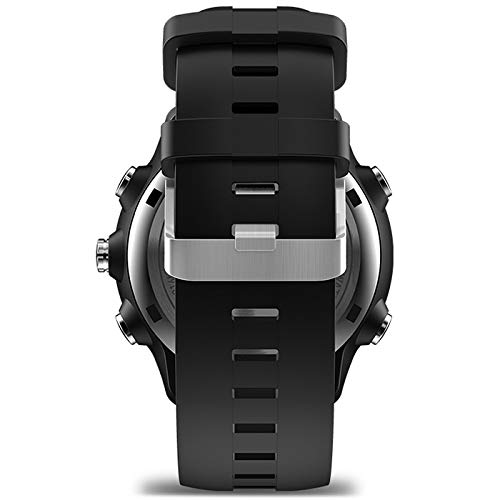
รูปที่ 5.1: ด้านข้าง view of the smartwatch, highlighting the strap design.
6 การแก้ไขปัญหา
- นาฬิกาไม่เชื่อมต่อกับโทรศัพท์: Ensure Bluetooth is enabled on both devices. Restart both the watch and your phone. Check if the companion app is running and has necessary permissions.
- ข้อมูลสุขภาพที่ไม่ถูกต้อง: Ensure the watch is worn correctly, snugly on the wrist, and the sensor is clean. Avoid excessive movement during heart rate measurements.
- ไม่มีการแจ้งเตือน: Verify that notification permissions are granted for the companion app and the specific apps you want notifications from, both in the app and your phone's system settings.
- อายุการใช้งานแบตเตอรี่สั้น: Ensure the battery is fully charged or replaced if it's a button cell. Reduce the frequency of certain features if possible.
7. ข้อมูลจำเพาะ
| ยี่ห้อ | Zeblaze (Manufacturer: SHANG TONG) |
| แบบอย่าง | SI-BW03 |
| แสดง | 1.24 inch FSTN high-resolution display |
| การเชื่อมต่อ | บลูทูธ 4.0 |
| แบตเตอรี่ | 610mAh Button Cell |
| อุปกรณ์ที่รองรับ | สมาร์ทโฟน |
| คุณสมบัติพิเศษ | Pedometer, Heart Rate Monitor, Sleep Monitor, Sedentary Reminder, Drinking Reminder, Remote Camera, Anti-lost, Message Reminder, Distance Tracker |
| อินเทอร์เฟซอุปกรณ์ | ปุ่ม |
| จีพีเอส | ไม่มีจีพีเอส |
8. การรับประกันและการสนับสนุน
สำหรับข้อมูลการรับประกันและการบริการลูกค้า โปรดดูเอกสารที่แนบมาพร้อมกับสินค้าที่ซื้อ หรือติดต่อผู้ค้าปลีก โปรดเก็บหลักฐานการซื้อไว้เพื่อใช้ในการเรียกร้องการรับประกัน