
1. สินค้าหมดview
The Sato One-Touch Timer TM-22 is a versatile digital timer designed for various timing needs, from kitchen use to laboratory applications. It combines ease of use with practical features to enhance your daily tasks.
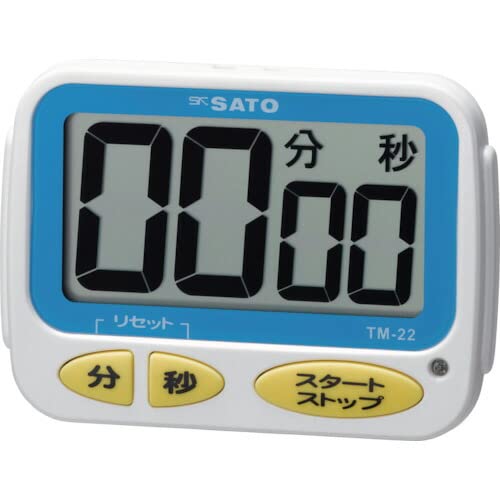
ภาพที่ 1: ด้านหน้า view of the Sato One-Touch Timer TM-22. The timer features a clear digital display and control buttons.
คุณสมบัติหลัก:
- Automatic Reset Alarm: The alarm sounds for 5 seconds at the set time and automatically resets to the initial set time.
- การดำเนินการที่เรียบง่าย: The primary key is for starting; no complex operations are required to stop the timer's alarm cycle.
- Dual Notification: Alerts users with both sound (70dB) and light.
- Drip-Proof Construction: Designed to resist splashes, making it suitable for kitchen environments.
- ตัวเลือกการติดตั้งหลายตัว: Equipped with a magnet on the back for attachment to metal surfaces and a strap for hanging.
- ฟังก์ชั่นนับถอยหลังและนับถอยหลัง: Supports both decreasinจี และเพิ่มขึ้นasing time measurements.
2. การตั้งค่า
การติดตั้งแบตเตอรี่:
The TM-22 timer requires one AAA battery for operation. A battery is included with the unit.
- หาฝาปิดช่องใส่แบตเตอรี่ที่ด้านหลังของตัวจับเวลา
- เลื่อนหรือปลดคลิปฝาครอบเพื่อเปิดช่อง
- ใส่แบตเตอรี่ AAA หนึ่งก้อน โดยตรวจสอบให้แน่ใจว่าขั้วบวก (+) และขั้วลบ (-) ตรงกับเครื่องหมายภายในช่องใส่แบตเตอรี่อย่างถูกต้อง
- ใส่ฝาปิดช่องใส่แบตเตอรี่กลับเข้าที่อย่างแน่นหนา
The timer should power on, and the display will show '00:00' or the last set time.
3. คู่มือการใช้งาน
The TM-22 timer features both countdown and count-up functionalities.
3.1. ตัวจับเวลาถอยหลัง
This function allows you to set a specific duration, and the timer will count down to zero.
- ตั้งเวลา: Use the 'M' (Minute) button and 'S' (Second) button to adjust the desired countdown duration. The timer can be set from 1 second up to 99 minutes and 59 seconds.
- เริ่มนับถอยหลัง: Press the 'START' button to begin the countdown.
- การแจ้งเตือน: When the time reaches zero, an alarm will sound for 5 seconds, accompanied by a flashing light.
- รีเซ็ตอัตโนมัติ: After the 5-second alarm, the timer automatically resets to the initial set time, ready for the next countdown without manual intervention.
- หยุดชั่วคราว/หยุด: To pause the countdown, press the 'START' button again. To resume, press 'START' once more. To clear the set time, press the 'RESET' button (if available) or hold the 'START' button for a few seconds.
3.2. Count-up Timer
This function measures elapsed time from zero.
- Start Count-up: Ensure the timer display shows '00:00'. If not, press the 'RESET' button to clear any previous settings. Press the 'START' button to begin counting upwards from zero.
- หยุดชั่วคราว/เล่นต่อ: To pause the count-up, press the 'START' button. To resume, press 'START' again.
- รีเซ็ต: To reset the count-up timer to '00:00', press the 'RESET' button (if available) or hold the 'START' button for a few seconds while paused.
4. การบำรุงรักษา
การทำความสะอาด:
To maintain the timer's appearance and functionality:
- Wipe the exterior of the timer with a soft, dry cloth.
- ห้ามใช้สารทำความสะอาดที่มีฤทธิ์กัดกร่อน ตัวทำละลาย หรือสารเคมี เนื่องจากอาจทำให้วัสดุเสียหายได้asing หรือจอแสดงผล
- The timer is drip-proof, but do not immerse it in water or expose it to heavy splashing.
การเปลี่ยนแบตเตอรี่:
Replace the battery when the display becomes dim or the timer's functions become erratic.
- Follow the battery installation steps outlined in the "2. Setup" section.
- Always use a fresh AAA battery.
- ทิ้งแบตเตอรี่ที่ใช้แล้วตามระเบียบข้อบังคับของท้องถิ่น
5 การแก้ไขปัญหา
If you encounter issues with your TM-22 timer, refer to the following common problems and solutions:
| ปัญหา | สาเหตุที่เป็นไปได้ | สารละลาย |
|---|---|---|
| ตัวจับเวลาไม่ทำงาน | แบตเตอรี่หมดหรือติดตั้งไม่ถูกต้อง | Check battery polarity. Replace with a new AAA battery. |
| Display is faint or flickering. | พลังงานแบตเตอรี่ต่ำ | เปลี่ยนแบตเตอรี่ AAA |
| สัญญาณเตือนภัยไม่ดัง | Volume obstruction or internal issue. | Ensure the speaker is not covered. Check battery level. If problem persists, contact support. |
| Timer does not reset automatically after alarm. | This feature is specific to the countdown function. | Ensure you are using the countdown function. For count-up, manual reset is required. |
6. ข้อมูลจำเพาะ
| คุณสมบัติ | รายละเอียด |
|---|---|
| หมายเลขรุ่น | ทีเอ็ม-22 |
| ระยะเวลาสูงสุด | 99 นาที 59 วินาที |
| Minimum Timing | 1 วินาที |
| ขนาด (สูง x กว้าง x ลึก) | 67 มม. x 93 มม. x 20 มม. |
| น้ำหนัก | 96 กรัม |
| แหล่งพลังงาน | แบตเตอรี่ AAA x 1 (รวมอยู่ด้วย) |
| ระดับเสียงปลุก | 70 เดซิเบล |
| ฟังก์ชั่น | Countdown, Count-up |
| คุณสมบัติพิเศษ | Drip-proof construction, Magnet on back, Hanging strap, Sound and light notification |
7. การรับประกันและการสนับสนุน
For warranty information, technical assistance, or customer support regarding your Sato One-Touch Timer TM-22, please contact your authorized retailer or the manufacturer, Sato Corporation. Keep your purchase receipt as proof of purchase.
Please visit the official Sato webเว็บไซต์นี้มีข้อมูลการสนับสนุนและรายละเอียดการติดต่อที่ทันสมัยที่สุด