
การแนะนำ
Thank you for choosing the SIMOLIO Kids Wireless Headphones Model JH-711. This manual provides essential information for the proper setup, operation, and maintenance of your headphones. Please read it carefully to ensure safe and optimal use.
คุณสมบัติผลิตภัณฑ์
- 3-Level Volume Limiting: Protects children's hearing with switchable volume limits (75dB for toddlers, 85dB for kids, 94dB for adults). This feature is active in both wired and wireless modes.
- การแยกเสียงรบกวน: Over-ear design provides passive noise reduction, helping to block external sounds for improved listening focus.
- Wireless & Wired Modes: Offers Bluetooth connectivity for wireless use and includes a 3.5mm audio cable for wired connection when the battery is depleted or for non-Bluetooth devices.
- ไมโครโฟนในตัว: Enables hands-free calling and voice chat.
- พอร์ตการแชร์เสียง: Allows another headphone to connect and share audio from the same device.
- ดีไซน์ทนทานและยืดหยุ่น: Constructed with memory stainless steel strips in the headband for impressive durability and flexibility, designed to withstand active use. Earmuffs feature an anti-shedding design.
- พับได้และกะทัดรัด: Easy to fold and store in the included EVA carrying case, ideal for travel and school.
- อายุการใช้งานแบตเตอรี่ยาวนาน: สามารถเล่นได้นานถึง 15 ชั่วโมงต่อการชาร์จเพียงครั้งเดียว

The headphones feature a 3-level volume limiter to protect hearing, adjustable for toddlers, kids, and adults.
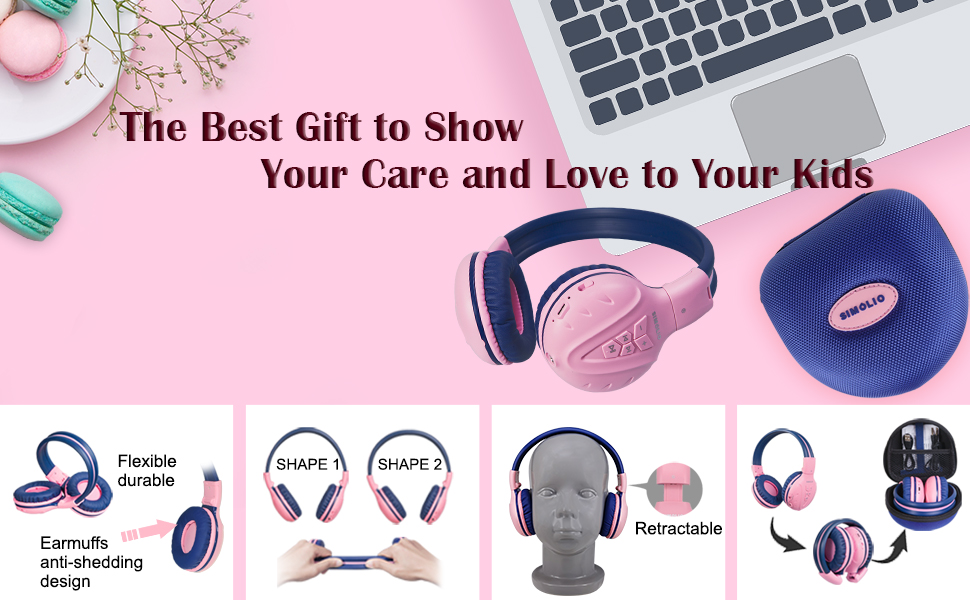
The flexible and durable design allows the headphones to withstand bending and twisting.
มีอะไรอยู่ในกล่อง
แพ็คเกจประกอบด้วยรายการต่อไปนี้:
- SIMOLIO Kids Wireless Headphones JH-711
- สายชาร์จ (USB)
- สาย AUX (สายสัญญาณเสียง 3.5 มม.)
- คู่มือการใช้งาน
- Carrying EVA Case
การตั้งค่า
1. การชาร์จหูฟัง
Before first use, fully charge the headphones. Connect the provided USB charging cable to the charging port on the headphones and to a USB power source (e.g., computer, wall adapter). The LED indicator will show charging status and turn off when fully charged.
2. การจับคู่บลูทู ธ
- ตรวจสอบให้แน่ใจว่าหูฟังปิดอยู่
- กดปุ่มมัลติฟังก์ชั่น (MFB) ค้างไว้จนกว่าไฟ LED จะกะพริบเป็นสีน้ำเงินและสีแดงสลับกัน ซึ่งแสดงว่าเข้าสู่โหมดจับคู่แล้ว
- บนอุปกรณ์ของคุณ (สมาร์ทโฟน แท็บเล็ต ฯลฯ) เปิดใช้งานบลูทูธและค้นหาอุปกรณ์ที่มีอยู่
- Select "SIMOLIO JH-711" from the list of devices.
- เมื่อเชื่อมต่อแล้ว ไฟ LED จะกะพริบเป็นสีน้ำเงินช้าๆ
3. การเชื่อมต่อแบบใช้สาย
To use the headphones in wired mode, connect one end of the 3.5mm AUX cable to the audio jack on the headphones and the other end to the audio output of your device. The headphones will automatically switch to wired mode, even if the battery is dead.

The headphones support both wireless Bluetooth mode and wired mode via the included AUX cable.
4. Volume Limiter Adjustment
Locate the 3-level volume limiter switch on the headphones. Adjust the switch to the desired maximum volume level:
- 75dB (S): Recommended for toddlers or very quiet environments.
- 85dB (M): Recommended for children in general listening environments.
- 94dB (L): Recommended for adults or noisy environments.

Adjust the physical switch to select the appropriate volume limit.
5. Using the Sharing Port
The headphones feature an additional sharing jack on the right side. To share audio, plug another headphone into this port. This allows two users to listen to the same audio source simultaneously.

Connect another headphone to the sharing port to share audio with a friend.
คำแนะนำการใช้งาน
1. เปิด/ปิดเครื่อง
- เปิดเครื่อง: กดปุ่ม MFB ค้างไว้ประมาณ 3 วินาที จนกว่าไฟ LED จะสว่างขึ้น
- หมดแรง: กดปุ่ม MFB ค้างไว้ประมาณ 3 วินาที จนกว่าไฟ LED จะดับลง
2. การเล่นเพลง
- เล่น/หยุดชั่วคราว: กด MFB สั้น ๆ
- เพลงถัดไป: กดปุ่ม "+" สั้นๆ
- แทร็กก่อนหน้า: กดปุ่ม "-" สั้นๆ
- ปรับระดับเสียงขึ้น: กดปุ่ม "+" ค้างไว้
- ลดเสียงลง: กดปุ่ม "-" ค้างไว้
3. การจัดการการโทร
เมื่อเชื่อมต่อผ่านบลูทูธ:
- รับ/วางสาย: กด MFB สั้น ๆ
- ปฏิเสธสาย: กดปุ่ม MFB ค้างไว้

ไมโครโฟนในตัวช่วยให้สามารถโทรแบบแฮนด์ฟรีได้
การซ่อมบำรุง
- ทำความสะอาดหูฟังด้วยผ้านุ่มและแห้ง ห้ามใช้น้ำยาทำความสะอาดหรือสารละลายที่มีฤทธิ์กัดกร่อน
- หลีกเลี่ยงการให้หูฟังสัมผัสกับอุณหภูมิที่สูงหรือความชื้นสูงหรือแสงแดดโดยตรง
- Store the headphones in the provided EVA carrying case when not in use to protect them from dust and damage.
- ห้ามพยายามถอดประกอบหรือดัดแปลงหูฟัง เพราะจะทำให้การรับประกันเป็นโมฆะและอาจทำให้เกิดความเสียหายได้

The headphones fold compactly and fit into the included EVA case for easy storage and transport.
การแก้ไขปัญหา
| ปัญหา | สาเหตุที่เป็นไปได้ | สารละลาย |
|---|---|---|
| หูฟังไม่สามารถเปิดเครื่องได้ | แบตเตอรี่อ่อน | ชาร์จหูฟังให้เต็ม |
| ไม่สามารถจับคู่ผ่านบลูทูธได้ | หูฟังไม่ได้อยู่ในโหมดจับคู่ อุปกรณ์ Bluetooth ปิดอยู่ ห่างจากอุปกรณ์มากเกินไป | ตรวจสอบให้แน่ใจว่าหูฟังอยู่ในโหมดจับคู่ (ไฟสีแดง/น้ำเงินกะพริบ) เปิดบลูทูธของอุปกรณ์ ขยับหูฟังให้ใกล้กับอุปกรณ์มากขึ้น (ภายในระยะ 9 เมตร) |
| ไม่มีเสียงในโหมดไร้สาย | ระดับเสียงเบาเกินไป; ไม่ได้เชื่อมต่อ; เลือกเอาต์พุตเสียงไม่ถูกต้องบนอุปกรณ์ | Increase headphone and device volume. Re-pair headphones. Check device audio settings. |
| ไม่มีเสียงในโหมดใช้สาย | AUX cable not fully inserted; cable damaged; device volume too low. | Ensure AUX cable is securely connected at both ends. Try a different AUX cable. Increase device volume. |
ข้อมูลจำเพาะ
| คุณสมบัติ | รายละเอียด |
|---|---|
| ชื่อรุ่น | Kids Bluetooth Headphones JH-711 |
| เทคโนโลยีการเชื่อมต่อ | แบบไร้สาย (บลูทูธ), แบบมีสาย (แจ็ค 3.5 มม.) |
| เวอร์ชันบลูทูธ | 4.0 |
| ช่วงบลูทูธ | 9 เมตร |
| การควบคุมเสียงรบกวน | การแยกเสียง |
| ความไวต่อความรู้สึก | 94 เดซิเบล (สูงสุด) |
| อายุการใช้งานแบตเตอรี่ | 15 ชั่วโมง |
| เวลาในการชาร์จ | 3 ชั่วโมง |
| น้ำหนักสินค้า | 187 กรัม (6.6 ออนซ์) |
| ขนาดสินค้า | 5.51 x 3.15 x 5.31 นิ้ว |
| วัสดุ | Nylon, Stainless Steel (headband) |
| วัสดุของกระเป๋าใส่ | อีวา |
| คุณสมบัติพิเศษ | 3 Adjustable Volume Limited, Microphone, Durable, Flexible, Foldable, Wired & Wireless, Share Port, EVA Case |
วิดีโอผลิตภัณฑ์อย่างเป็นทางการ
วิดีโอนี้ให้ภาพที่ชัดเจนview of the SIMOLIO Bluetooth Headphones for Kids with Case JH-711, demonstrating its features and functionality.
การรับประกันและการสนับสนุน
SIMOLIO products are designed for quality and reliability. For specific warranty information, please refer to the warranty card included with your product or visit the official SIMOLIO website. If you encounter any issues or require technical assistance, please contact SIMOLIO customer support through their official channels.