
เทคเทค 800664
TecTake Electric Height-Adjustable Sit-Stand Desk User Manual
รุ่น: 800664 | ยี่ห้อ: TecTake
1. บทนำ
Thank you for choosing the TecTake Electric Height-Adjustable Sit-Stand Desk. This ergonomic desk is designed to optimize your workspace, allowing you to seamlessly switch between sitting and standing positions. Its robust construction and intelligent features provide comfort, stability, and versatility for various uses, including office work, gaming, and telecommuting. This manual provides essential information for the safe and efficient assembly, operation, and maintenance of your new desk.
2. ข้อมูลด้านความปลอดภัย
โปรดอ่านคำแนะนำด้านความปลอดภัยทั้งหมดอย่างละเอียดก่อนประกอบและใช้งาน การไม่ปฏิบัติตามคำแนะนำเหล่านี้อาจส่งผลให้เกิดการบาดเจ็บหรือความเสียหายต่อผลิตภัณฑ์ได้
- This electric sit-stand desk is designed for safe and efficient use. It features an adjustable anti-collision system and a stable structure, even when fully extended.
- The maximum supported weight is 125 กก. (275 ปอนด์)ห้ามบรรทุกน้ำหนักเกินขีดจำกัดนี้
- It is recommended to follow the provided assembly instructions precisely to ensure proper stability, especially when the desk is used in a high position.
- ขณะปรับความสูง ควรระวังอย่าให้มือหรือสิ่งของอยู่ใกล้ชิ้นส่วนที่กำลังเคลื่อนไหว
- ตรวจสอบให้แน่ใจว่าสายไฟไม่ถูกหนีบหรือชำรุดเสียหาย
- Do not allow children to operate the desk without adult supervision.
- ตัดการเชื่อมต่อไฟฟ้าก่อนทำความสะอาดหรือดำเนินการบำรุงรักษาใดๆ
3. สินค้าหมดview
The TecTake Electric Height-Adjustable Sit-Stand Desk frame is engineered for durability and ease of use. It features a robust steel construction, powerful motors, and an intuitive control panel.

Figure 3.1: Main Components. This image displays the complete desk frame, including the two lifting columns, the crossbar, the control panel, and the power supply unit. It illustrates the adjustable width and height capabilities.

Figure 3.2: Control Panel and Cable Management. รายละเอียด view of the intuitive control panel with its digital display, up/down arrows, memory presets (1, 2, 3), and alarm function (A). The image also highlights the spacious cable pass-through for organized wiring.
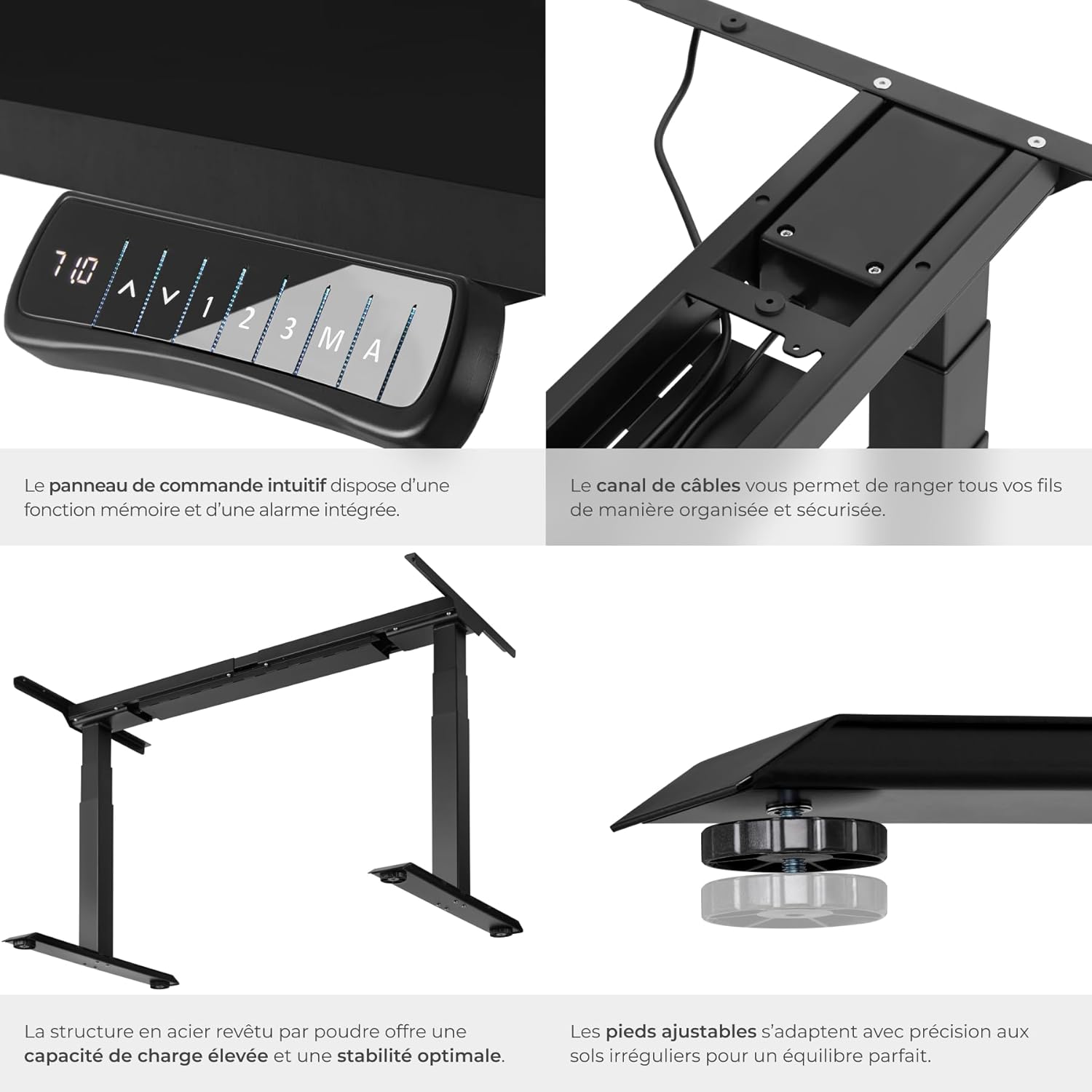
รูปที่ 3.3: คุณสมบัติหลัก Close-up shots demonstrating the intuitive control panel, the integrated cable channel for tidy wiring, the robust powder-coated steel structure for high load capacity and stability, and the adjustable feet for precise leveling on uneven floors.

Figure 3.4: Functional Highlights. This image visually explains the desk's key functionalities: continuously adjustable height, variable width to fit different tabletops, a load capacity of up to 125 kg, silent motors for discreet operation, an anti-collision system that stops movement upon obstruction, and 100% stability thanks to solid T-shaped feet.
4. คำแนะนำในการตั้งค่า
Assembly of the TecTake desk frame is straightforward. Please ensure you have all components and tools as indicated in the packaging. A tabletop is not included and must be purchased separately.
4.1 การแกะกล่องและการตรวจสอบส่วนประกอบ
- แกะส่วนประกอบทั้งหมดออกอย่างระมัดระวังแล้ววางไว้บนพื้นผิวที่สะอาดและนุ่มนวลเพื่อป้องกันรอยขีดข่วน
- Verify that all parts listed in the packing list are present. Refer to Figure 3.1 for a visual guide of the main components.
- Ensure the mounting material (screws, tools) is included as shown in the product information (refer to image 71GtxctSrjL._AC_SL1500_.jpg for reference).
4.2 การประกอบเฟรม
- Attach the lifting columns to the crossbar according to the instructions provided in the separate assembly manual (not included in this digital manual, but typically provided with the product).
- Secure the feet to the bottom of the lifting columns.
- Install the control panel in the designated slot on the frame.
- Connect all necessary cables (power, motor cables) to the control box and ensure they are properly routed through the cable management channels.
4.3 การติดตั้งโต๊ะ
- Place your chosen tabletop upside down on a soft, protected surface.
- Carefully position the assembled desk frame onto the tabletop, ensuring it is centered and aligned as desired.
- Mark the screw holes for attaching the tabletop to the frame.
- Pre-drill pilot holes if necessary (check tabletop material and thickness).
- ยึดโต๊ะเข้ากับเฟรมโดยใช้สกรูที่ให้มา
- Carefully flip the desk upright and place it in its desired location.
5. คู่มือการใช้งาน
Your TecTake Electric Sit-Stand Desk is equipped with an intuitive control panel for easy height adjustment and memory functions.
5.1 การปรับความสูงขั้นพื้นฐาน
- ต่อสายไฟเข้ากับเต้ารับไฟฟ้าที่เหมาะสม
- ใช้ ขึ้น (▲) และ ลง (▼) arrow buttons on the control panel to adjust the desk height. The digital display will show the current height.
- ปล่อยปุ่มเมื่อถึงระดับความสูงที่ต้องการ
5.2 ฟังก์ชันหน่วยความจำ
The desk allows you to save up to three preferred height positions for quick recall.
- ปรับความสูงของโต๊ะตามต้องการโดยใช้ปุ่มขึ้น/ลง
- กดปุ่ม 'เอ็ม' กดปุ่ม หน้าจอจะแสดง 'S-'
- Within 3 seconds, press one of the memory preset buttons ('1', '2', หรือ '3'). The display will show 'S-1', 'S-2', or 'S-3' to confirm the position has been saved.
- To recall a saved position, simply press the corresponding memory button ('1', '2', หรือ '3'โต๊ะจะเลื่อนไปยังความสูงที่บันทึกไว้โดยอัตโนมัติ
5.3 ฟังก์ชั่นปลุก
The alarm function (button 'A') can be used to remind you to change your position after a set period, promoting healthier work habits. Consult your product's specific manual for detailed instructions on setting and activating the alarm, as functionality may vary.
5.4 ระบบป้องกันการชน
The desk is equipped with an adjustable anti-collision system. If the desk encounters an obstacle during movement (up or down), it will automatically stop and reverse slightly to prevent damage. The sensitivity of this system may be adjustable; refer to your specific product manual for details on how to modify this setting if needed.
6. การบำรุงรักษา
Regular maintenance will help prolong the life of your TecTake desk.
- การทำความสะอาด: Wipe the desk frame and tabletop with a soft, damp ผ้า หลีกเลี่ยงน้ำยาทำความสะอาดที่มีฤทธิ์กัดกร่อนหรือตัวทำละลายที่อาจทำลายพื้นผิวได้
- การจัดการสายเคเบิล: Periodically check that all cables are securely connected and not pinched or frayed. Re-route cables if necessary to prevent damage.
- การตรวจสอบเสถียรภาพ: Ensure all screws and bolts remain tight. If the desk feels wobbly, check and tighten all connections.
- การดูแลมอเตอร์: The motors are designed for maintenance-free operation. Avoid overloading the desk beyond its specified weight capacity.
7 การแก้ไขปัญหา
If you encounter issues with your desk, try the following solutions before contacting support.
| ปัญหา | สาเหตุที่เป็นไปได้ | สารละลาย |
|---|---|---|
| โต๊ะไม่ขยับ | Power cable disconnected; Overload; Motor overheating. | Check power connection. Reduce weight on desk. Allow motors to cool down for 20 minutes. |
| โต๊ะเคลื่อนไหวไม่สม่ำเสมอหรือมีเสียงผิดปกติ | การเชื่อมต่อหลวม; สิ่งกีดขวาง; การกระจายน้ำหนักไม่สม่ำเสมอ | Check and tighten all assembly screws. Remove any obstructions. Redistribute weight evenly on the tabletop. |
| Anti-collision system triggers too easily. | การตั้งค่าความไวสูงเกินไป | Refer to your specific product manual for instructions on adjusting anti-collision sensitivity. |
| ฟังก์ชันหน่วยความจำใช้งานไม่ได้ | ขั้นตอนการบันทึกไม่ถูกต้อง | Ensure you press 'M' then the preset number within 3 seconds. |
8. ข้อมูลจำเพาะ
Key technical specifications for the TecTake Electric Height-Adjustable Sit-Stand Desk (Model 800664):
| คุณสมบัติ | ข้อมูลจำเพาะ |
|---|---|
| ยี่ห้อ | เทคเทค |
| หมายเลขรุ่น | 800664 |
| สี | สีดำ |
| ขนาดสินค้า (กว้าง x ยาว x สูง) | 68 x 190 x 123 ซม. (ประมาณ 26.8 x 74.8 x 48.4 นิ้ว) |
| น้ำหนัก | 31 กิโลกรัม (ประมาณ 68.3 ปอนด์) |
| วัสดุ | เหล็กเคลือบผง |
| ความจุในการรับน้ำหนัก | 125 กก. (ประมาณ 275 ปอนด์) |
| ความเร็วในการยก | 38 มม./วินาที |
| เล่มที่tage | 100 – 240 โวลต์ |
| กำลังมอเตอร์ | 40 วัตต์ |
| ช่วงความสูงที่สามารถปรับได้ | 58 - 123 ซม. (ประมาณ 22.8 - 48.4 นิ้ว) |
| ช่วงความกว้างที่ปรับได้ | 110 - 190 ซม. (ประมาณ 43.3 - 74.8 นิ้ว) |
| Recommended Tabletop Dimensions | 120 x 60 cm to 200 x 80 cm |
| คุณสมบัติพิเศษ | Adjustable, Memory Function (3 positions), Alarm Function, Anti-collision System, Silent Motors |
9. การรับประกันและการสนับสนุน
For warranty information, please refer to the documentation provided with your purchase or contact your retailer. TecTake products typically come with a manufacturer's warranty covering defects in materials and workmanship.
If you require further assistance, have questions about assembly, operation, or troubleshooting that are not covered in this manual, please contact TecTake customer support or your point of purchase. Keep your purchase receipt and model number handy for faster service.
For more information, you may visit the official TecTake store on Amazon: ร้านค้า TecTake บน Amazon
Ask a question about this manual
Ask about setup, troubleshooting, compatibility, parts, safety, or missing instructions. Manuals+ will review the question and use this page’s manual context to help answer it.