
1. บทนำ
This manual provides essential instructions for the safe and efficient use of your KOAMTAC KDC280 Barcode Data Collector. The KDC280 is a compact and versatile device designed for collecting 1D and 2D barcode data, offering flexible connectivity options via Bluetooth and USB. Please read this manual thoroughly before operating the device and retain it for future reference.
2. ข้อมูลด้านความปลอดภัย
- อย่าวางอุปกรณ์ไว้ในที่ที่มีอุณหภูมิสูงหรือต่ำเกินไป ความชื้น หรือสารกัดกร่อน
- หลีกเลี่ยงการทำเครื่องตกหรือได้รับแรงกระแทกรุนแรง
- อย่าพยายามถอดประกอบหรือดัดแปลงอุปกรณ์ การกระทำเช่นนี้จะทำให้การรับประกันเป็นโมฆะและอาจทำให้เกิดความเสียหายได้
- Use only the charging cradle and accessories provided or approved by KOAMTAC.
- เก็บอุปกรณ์ให้ห่างจากสนามแม่เหล็กแรงสูง
- ทิ้งแบตเตอรี่ตามระเบียบข้อบังคับในท้องถิ่น
3. เนื้อหาบรรจุภัณฑ์
Verify that all items are present in your KDC280 package:
- KOAMTAC KDC280 Barcode Data Collector
- USB ดองเกิลบลูทูธ
- แท่นชาร์จ
- สาย USB
- สายคล้องคอ
- คู่มือฉบับย่อ

Image: The KOAMTAC KDC280 data collector shown with its charging cradle, USB Bluetooth dongle, and lanyard.
4. สินค้าหมดview
The KDC280 is a miniature barcode data collector capable of reading both 1D and 2D barcodes. It features a small display for user feedback and navigation buttons. Its primary function is to scan and store barcode data or transmit it in real-time to a host device via Bluetooth or USB.
ภาพ: ภาพระยะใกล้ view of the KDC280 device, its charging cradle, and the USB Bluetooth dongle.
5. การตั้งค่า
5.1. Charging the KDC280
Before initial use, fully charge the KDC280 battery. Place the KDC280 into the charging cradle. Connect the USB cable to the charging cradle and then to a power source (e.g., computer USB port or USB wall adapter). The device's display will indicate charging status.
5.2. Connecting via USB Bluetooth Dongle
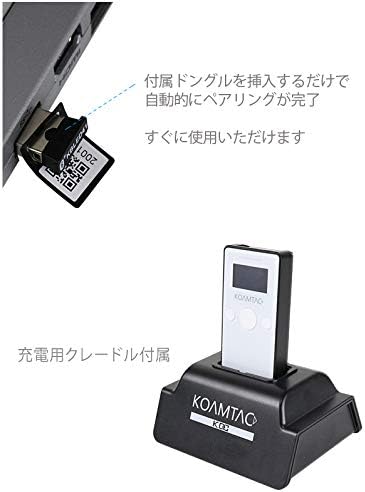
For quick and automatic pairing with a host device, use the included USB Bluetooth dongle.
- Insert the USB Bluetooth dongle into an available USB port on your computer or host device.
- Power on the KDC280.
- The KDC280 will automatically detect and pair with the dongle. A confirmation message will appear on the KDC280's display once pairing is successful. The device is then ready for immediate use.

Image: Illustration showing the USB Bluetooth dongle being inserted into a port, enabling automatic pairing with the KDC280. The charging cradle is also visible.
5.3. Connecting via Standard Bluetooth
To connect to a host device without the dongle, follow the standard Bluetooth pairing procedure:
- Ensure Bluetooth is enabled on your host device (e.g., smartphone, tablet, computer).
- On the KDC280, navigate to the Bluetooth menu and select 'Pairing Mode'.
- On your host device, search for available Bluetooth devices. Select 'KDC280' from the list.
- ปฏิบัติตามคำแนะนำบนหน้าจอเพื่อดำเนินการจับคู่ให้เสร็จสมบูรณ์
6. Operating the KDC280
6.1. การเปิด/ปิดเครื่อง
- วิธีเปิดเครื่อง: กดปุ่มเปิด/ปิดค้างไว้จนกว่าหน้าจอจะสว่างขึ้น
- To power off: Press and hold the power button until the 'Power Off' option appears on the display, then confirm.
6.2. การสแกนบาร์โค้ด
- Point the KDC280's scanner window at the barcode.
- Press the scan button. A successful scan will typically be indicated by a beep and/or a green LED light.
- The scanned data will appear on the KDC280's display and/or be transmitted to the connected host device.
6.3. การโอนข้อมูล
When connected via Bluetooth, scanned data is typically transmitted in real-time to the host application. If operating in batch mode (data stored internally), connect the KDC280 via USB to a computer and use the provided utility software to download the stored data.
7. การบำรุงรักษา
7.1. การทำความสะอาด
- เช็ดเครื่องเบาๆงamp ผ้า. อย่าใช้สารเคมีที่รุนแรงหรือน้ำยาทำความสะอาดที่มีฤทธิ์กัดกร่อน
- Ensure the scanner window is clean and free of dust or smudges for optimal scanning performance.
7.2. การดูแลแบตเตอรี่
- หลีกเลี่ยงการปล่อยแบตเตอรี่จนหมดบ่อยครั้ง
- ควรเก็บอุปกรณ์ไว้ในที่แห้งและเย็นหากไม่ได้ใช้งานเป็นเวลานาน
- If the battery performance significantly degrades, contact support for replacement options.
8 การแก้ไขปัญหา
8.1. อุปกรณ์ไม่เปิดเครื่อง
- Ensure the battery is charged. Connect the device to the charging cradle and a power source.
- ตรวจสอบให้แน่ใจว่าได้กดปุ่มเปิด/ปิดค้างไว้อย่างถูกต้องแล้ว
8.2. Unable to Scan Barcodes
- Check if the scanner window is clean and unobstructed.
- Ensure the barcode is not damaged or poorly printed.
- Verify the device is in the correct scanning mode.
8.3. Connection Issues (Bluetooth/USB)
- บลูทูธ: Ensure the KDC280 is in pairing mode or already paired. Check Bluetooth settings on the host device. Restart both devices.
- ดองเกิล USB: Ensure the dongle is fully inserted and recognized by the host device. Restart the KDC280 and reinsert the dongle.
- สาย USB: Try a different USB port or cable. Ensure drivers are correctly installed if required by your operating system.
9. ข้อมูลจำเพาะ
| ยี่ห้อ | โคแอมแทค |
| แบบอย่าง | เคดีซี280 |
| ความเข้ากันได้ของบาร์โค้ด | บาร์โค้ด 1 มิติ และ 2 มิติ |
| การเชื่อมต่อ | บลูทูธ, สาย USB |
| แหล่งพลังงาน | ใช้พลังงานจากแบตเตอรี่ |
| อุปกรณ์เสริมที่รวมอยู่ด้วย | USB Bluetooth Dongle, Charging Cradle |
10. การรับประกันและการสนับสนุน
For warranty information, technical support, or service inquiries, please refer to the warranty card included with your product or visit the official KOAMTAC webโดยทั่วไปแล้ว ข้อมูลติดต่อฝ่ายบริการลูกค้าจะอยู่ในเว็บไซต์ของผู้ผลิต webเว็บไซต์.