
การแนะนำ
This manual provides instructions for the setup, operation, and maintenance of your Zelotes T20 Ergonomic Vertical Mouse. Please read this manual thoroughly before using the product to ensure proper function and longevity.
สินค้าเกินview
The Zelotes T20 is an ergonomic vertical mouse designed to promote a natural hand and wrist posture, reducing strain during extended use. It features adjustable DPI settings and multiple programmable buttons for enhanced control.

Figure 1: Zelotes T20 Ergonomic Vertical Mouse. This image displays the overall design of the mouse, highlighting its vertical orientation and LED lighting.
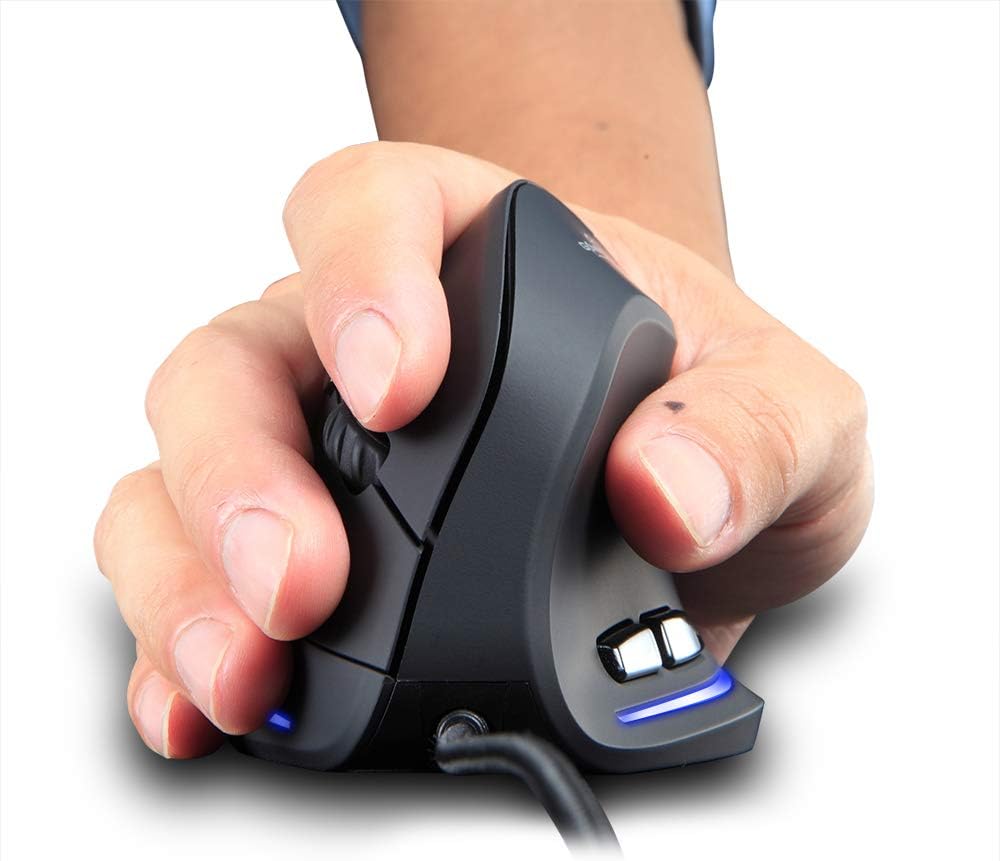
Figure 2: Proper hand placement on the Zelotes T20 mouse. This image illustrates how the vertical design allows for a natural handshake grip, intended to reduce wrist strain.

Figure 3: Ergonomic comparison. This diagram contrasts the natural wrist posture with a vertical mouse against the twisted posture often associated with traditional horizontal mice, emphasizing fatigue reduction.
เนื้อหาแพ็คเกจ
ตรวจสอบว่ามีรายการทั้งหมดอยู่ในแพ็คเกจ:
- 1 x Zelotes Ergonomic Vertical Mouse
- 1 x คู่มือการใช้งาน (เอกสารนี้)
การตั้งค่า
- เชื่อมต่อเมาส์: Plug the USB cable of the Zelotes T20 mouse into an available USB port on your computer.
- การติดตั้งไดร์เวอร์: The mouse is plug-and-play. Your operating system should automatically detect and install the necessary drivers. No additional software installation is typically required.
- ถอดฟิล์มป้องกันออก: Before use, locate and remove the protective film from the "Bigfoot pads" on the underside of the mouse for optimal gliding performance.

Figure 4: Underside of the mouse. This image shows the Teflon material pads and indicates the location of the protective film that should be removed before initial use.
คำแนะนำการใช้งาน
ปุ่มฟังก์ชั่น
The Zelotes T20 mouse features 6 buttons for various functions:
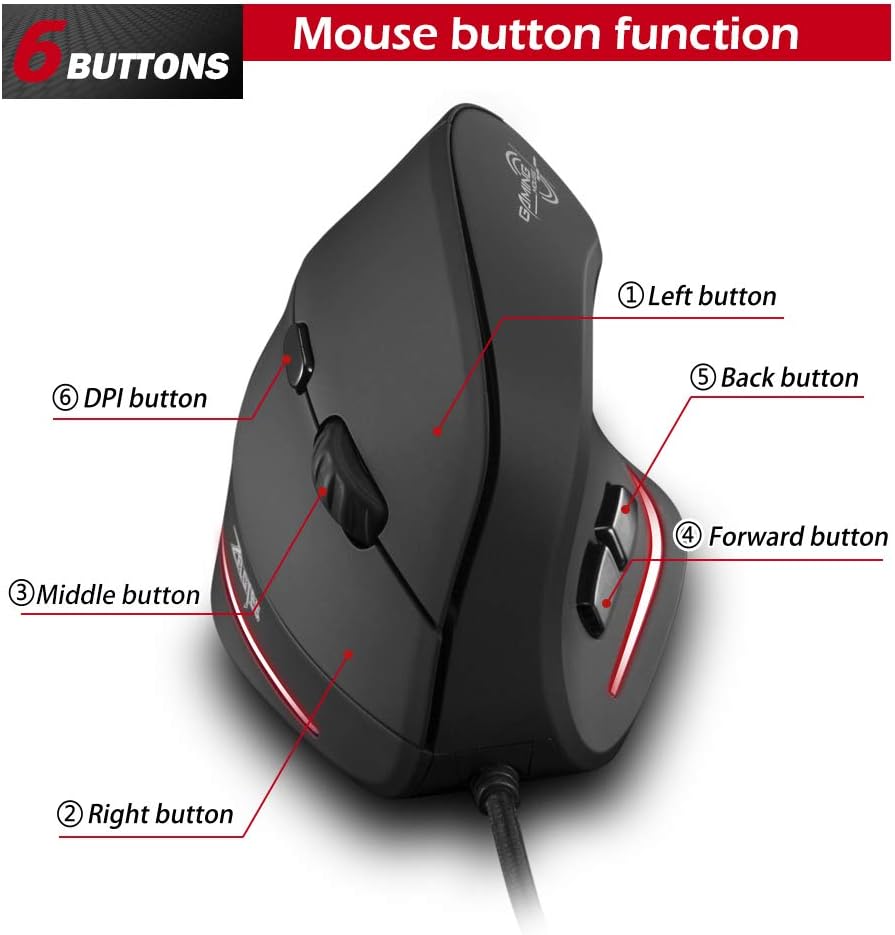
Figure 5: Mouse button layout. This diagram labels each of the six buttons: Left, Right, Middle (scroll wheel click), Forward, Back, and DPI adjustment button.
- ปุ่มซ้าย: ฟังก์ชั่นคลิกซ้ายมาตรฐาน
- ปุ่มขวา: ฟังก์ชั่นคลิกขวามาตรฐาน
- ปุ่มกลาง (ล้อเลื่อน): ล้อเลื่อนที่สามารถคลิกได้สำหรับฟังก์ชันการคลิกกลาง
- ปุ่มไปข้างหน้า: นำทางไปข้างหน้าใน web เบราว์เซอร์หรือ file นักสำรวจ
- ปุ่มย้อนกลับ: นำทางย้อนกลับใน web เบราว์เซอร์หรือ file นักสำรวจ
- ปุ่ม DPI: ปรับความไวของเมาส์ (DPI)
การปรับค่า DPI (ความไว)
The mouse offers four adjustable DPI settings to suit different tasks and preferences. Press the DPI button (Button 6 in Figure 5) to cycle through the settings. Each DPI level is indicated by a specific LED light color:
- 1200 จุดต่อนิ้ว: Blue light hint
- 1600 จุดต่อนิ้ว: Dark purple light hint
- 2400 จุดต่อนิ้ว: Red light hint
- 3200 จุดต่อนิ้ว: Light purple light hint
The light will stay on for approximately 3 seconds when switching DPI settings to indicate the current level.

Figure 6: DPI adjustment and LED indicators. This image illustrates the DPI button and the color coding for each of the four sensitivity settings.
Using Forward/Back Keys
The dedicated Forward and Back buttons (Buttons 4 and 5 in Figure 5) provide quick navigation. These buttons are designed to streamline browsing through web pages or folders, reducing the need for on-screen clicks.

Figure 7: Forward and Back navigation buttons. This image highlights the placement of the forward and back buttons, designed for convenient web และ file การนำทาง
การซ่อมบำรุง
- การทำความสะอาด: ใช้ผ้าแห้งนุ่มเช็ดทำความสะอาดพื้นผิวของเมาส์ สำหรับคราบสกปรกที่ติดแน่น ให้ใช้ผ้าชุบน้ำหมาดๆ เช็ดเบาๆamp สามารถใช้ผ้าเช็ดทำความสะอาดได้ เพื่อป้องกันไม่ให้ของเหลวเข้าไปในเมาส์
- การบำรุงรักษาเซ็นเซอร์: รักษาเซ็นเซอร์ออปติคัลที่อยู่ใต้เมาส์ให้สะอาดและปราศจากฝุ่นหรือเศษต่างๆ เพื่อให้การติดตามแม่นยำ
- การดูแลสายเคเบิล: หลีกเลี่ยงการโค้งงออย่างแรงหรือการดึงสาย USB มากเกินไปเพื่อป้องกันความเสียหาย

Figure 8: Mouse surface texture. This image provides a close-up view of the mouse's surface, described as smooth for comfortable handling.
การแก้ไขปัญหา
- เมาส์ไม่ตอบสนอง:
- ตรวจสอบให้แน่ใจว่าเสียบสาย USB เข้ากับพอร์ต USB ที่ใช้งานได้บนคอมพิวเตอร์ของคุณอย่างแน่นหนา
- ลองเสียบเมาส์เข้ากับพอร์ต USB อื่น
- รีสตาร์ทเครื่องคอมพิวเตอร์ของคุณ
- การติดตามไม่แม่นยำ:
- ทำความสะอาดเซ็นเซอร์ออปติคัลที่อยู่ใต้เมาส์
- Ensure you are using the mouse on a suitable surface (e.g., a mouse pad). Highly reflective or transparent surfaces may cause issues.
- ปรับค่า DPI โดยใช้ปุ่ม DPI
- ปุ่มบางปุ่มทำงานผิดปกติ:
- ตรวจสอบให้แน่ใจว่าได้เสียบเมาส์อย่างถูกต้องแล้ว
- ทดสอบเมาส์บนคอมพิวเตอร์เครื่องอื่นเพื่อตรวจสอบว่าปัญหาอยู่ที่เมาส์หรือการตั้งค่าของคอมพิวเตอร์
ข้อมูลจำเพาะ
| คุณสมบัติ | รายละเอียด |
|---|---|
| แบบอย่าง | T20 |
| ปุ่มหมายเลข | 6 ปุ่ม |
| ระบบติดตาม | ออฟติคอล |
| ความยาวสาย USB | 1.8ม. |
| ฉบับทำงานtagอี/ปัจจุบัน | 5โวลต์/100มิลลิแอมป์ |
| ปุ่มชีวิต | 5 ล้านครั้ง |
| ชีวิตลูกกลิ้ง | 1.2 million turns |
| ขนาดสินค้า (กว้าง x ยาว x สูง) | 110 x 72 x 75 มม. (4.33 x 2.83 x 2.95 นิ้ว) |
| น้ำหนักผลิตภัณฑ์ | 160 ± 5g (5.6 ounces) |
| ความละเอียด (DPI) | 1200-1600-2400-3200 |
| อัตราผลตอบแทน (อัตราการสำรวจความคิดเห็น) | 125เฮิรตซ์ |
| ความเข้ากันได้ | Windows 2000/ME/XP (x64)/Vista/7/8/10, Mac OS X (over V10.4), Linux |

Figure 9: Product dimensions. This image provides detailed measurements of the mouse from various angles.
การรับประกันและการสนับสนุน
สำหรับข้อมูลการรับประกันหรือการสนับสนุนทางเทคนิค โปรดดูที่เว็บไซต์อย่างเป็นทางการของผู้ผลิต webหรือติดต่อฝ่ายบริการลูกค้า เก็บใบเสร็จรับเงินไว้เป็นหลักฐานการซื้อ


