
การแนะนำ
The iCarsoft JP V2.0 is a professional multi-system diagnostic scan tool designed specifically for Japanese vehicles, including Toyota, Lexus, Scion, Isuzu, Nissan, Infiniti, Mitsubishi, Honda (Acura), Mazda, and Subaru. This tool enables comprehensive diagnostics, allowing users to read and clear trouble codes, view live data, and perform various special functions across multiple vehicle systems such as engine, transmission, ABS, and airbag. It is equipped with a 4.0-inch TFT LCD display for clear data presentation and supports multiple languages.
เนื้อหาผลิตภัณฑ์
เมื่อเปิดบรรจุภัณฑ์ ตรวจสอบว่ามีรายการทั้งหมดดังต่อไปนี้:

Image: The iCarsoft JP V2.0 diagnostic tool and its accessories laid out, including the main unit, cables, and user manual.
- iCarsoft JP V2.0 Main Unit
- TF Card (pre-installed in the main unit)
- สายเคเบิล OBDII หลัก
- PC Connecting Cable (USB)
- กระเป๋าใส่ไนลอน
- คู่มือการใช้งาน
อุปกรณ์โอเวอร์view
Familiarize yourself with the buttons and connectors on the iCarsoft JP V2.0 diagnostic tool.
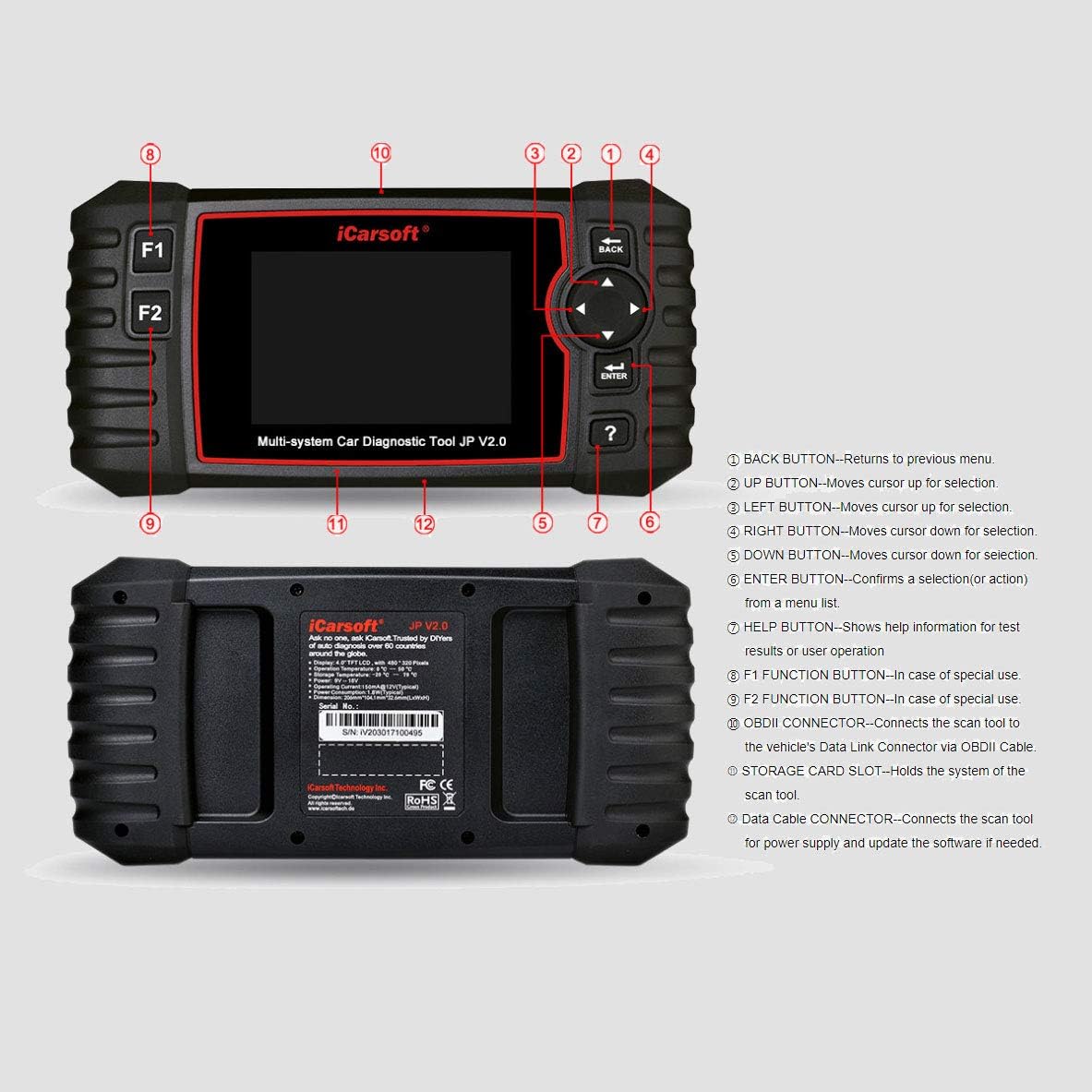
Image: A detailed diagram of the iCarsoft JP V2.0 scanner, highlighting its various buttons and connection ports with corresponding numbers.
- ปุ่มย้อนกลับ: กลับไปยังเมนูก่อนหน้า
- ปุ่มขึ้น: Moves the cursor up for selection.
- LEFT Button: Moves the cursor for selection.
- RIGHT Button: Moves the cursor for selection.
- ปุ่มลง: Moves the cursor down for selection.
- ปุ่ม ENTER: ยืนยันการเลือกหรือการดำเนินการจากรายการเมนู
- ปุ่มช่วยเหลือ: Displays help information for test results or user operation.
- F1 Function Button: Used for special functions.
- F2 Function Button: Used for special functions.
- ขั้วต่อ OBDII: Connects the scan tool to the vehicle’s Data Link Connector via the OBDII Cable.
- STORAGE CARD SLOT: Holds the system’s TF card.
- Data Cable Connector: Connects the scan tool for power supply and software updates via PC.

Image: The iCarsoft JP V2.0 diagnostic tool, showing its screen and main control buttons.
การเริ่มต้น
- เชื่อมต่อกับยานพาหนะ: Locate the vehicle's OBDII port, typically under the dashboard on the driver's side. Plug the main OBDII cable into the vehicle's port and then connect the other end to the iCarsoft JP V2.0 tool's OBDII connector.
- เปิดเครื่อง: The tool will automatically power on once connected to the vehicle's OBDII port. If not, ensure the vehicle's ignition is in the 'ON' position (engine off).
- ตั้งค่าเริ่มต้น: Follow the on-screen prompts to select your language and confirm basic settings.
คำแนะนำการใช้งาน

Image: The iCarsoft JP V2.0 displaying its main menu, showing options like 'Diagnosis', 'Service', 'Voltage', 'OBDII/EOBD', 'Review', 'DTC LibMap', 'Setup', 'Help', and 'About'.
การนำทาง
Use the UP, DOWN, LEFT, and RIGHT arrow buttons to navigate through menus and select options. Press the ENTER button to confirm a selection. The BACK button will return you to the previous screen.
การอ่านและการล้างรหัสข้อผิดพลาดในการวินิจฉัย (DTCs)
- จากเมนูหลัก เลือก 'Diagnosis' or 'OBDII/EOBD'.
- Choose the vehicle make and model if prompted.
- เลือก 'Read Codes' ถึง view current, pending, or historic DTCs.
- After addressing the vehicle issue, select 'Clear Codes' to erase the DTCs from the vehicle's computer. Confirm the action when prompted.
Viewการนำข้อมูลสดมาใช้
Live data allows you to monitor various sensor readings and system parameters in real-time. This can be crucial for diagnosing intermittent issues.
- From the diagnosis menu, select 'Live Data'.
- Choose the parameters you wish to monitor. The tool will display the data in numerical or graphical format.
Advanced Diagnostic Functions
The iCarsoft JP V2.0 supports a range of special functions for specific vehicle maintenance and service tasks:
- การรีเซ็ตบริการน้ำมัน: รีเซ็ตไฟเตือนการบริการน้ำมันหลังการเปลี่ยนถ่ายน้ำมัน
- Electronic Parking Brake (EPB) System Maintenance: Allows for safe replacement of brake pads by disengaging and re-engaging the EPB system.
- ระบบจัดการแบตเตอรี่ (BMS): Registers new batteries to the vehicle's ECU.
- Diesel Particulate Filter (DPF) Regeneration Control System: Initiates DPF regeneration to clear blockages.
- Electronic Throttle Control System (ETC): ดำเนินการขั้นตอนการเรียนรู้ใหม่ของลิ้นปีกผีเสื้อ
- Steering Angle Sensor (SAS) Calibration: Calibrates the steering angle sensor after repairs or replacements.
- การทดสอบแบตเตอรี่: Checks the health and charge status of the vehicle's battery.
- ข้อมูล Review และพิมพ์: อนุญาตให้รีviewing saved diagnostic data and printing reports via PC.
การอัพเดตซอฟต์แวร์
To ensure your iCarsoft JP V2.0 tool has the latest vehicle coverage and diagnostic capabilities, regular software updates are recommended. Updates are performed via a PC connection.
- Visit the official iCarsoft website to download the update client software for your PC.
- ติดตั้งโปรแกรมอัปเดตบนคอมพิวเตอร์ของคุณ
- Connect the iCarsoft JP V2.0 tool to your PC using the provided USB data cable.
- Launch the update client and follow the on-screen instructions to download and install the latest software onto your device.
ข้อมูลจำเพาะทางเทคนิค

Image: A technical diagram illustrating the physical dimensions and key specifications of the iCarsoft JP V2.0 device.
| แสดง | 4.0" TFT LCD, 480*320 Pixels |
| อุณหภูมิการทำงาน | 0°C ~ 50°C (32°F ~ 122°F) |
| อุณหภูมิในการจัดเก็บ | -20°C ~ 70°C (-4°F ~ 158°F) |
| ปฏิบัติการฉบับที่tage | 9 ~ 18 โวลต์ |
| กระแสไฟฟ้าที่ใช้งาน | 150mA@12V (Typical) |
| การใช้พลังงาน | 1.8W (ทั่วไป) |
| ขนาด (กว้าง x ยาว x สูง) | 206มม. x 104.1มม. x 32.6มม. |
| น้ำหนัก | 500 กรัม |
การซ่อมบำรุง
To ensure the longevity and optimal performance of your iCarsoft JP V2.0 diagnostic tool, follow these maintenance guidelines:
- การทำความสะอาด: ใช้แบบนุ่มๆamp cloth to clean the exterior of the tool. Do not use abrasive cleaners or solvents.
- พื้นที่จัดเก็บ: Store the tool in its nylon carry case in a dry, cool environment, away from direct sunlight and extreme temperatures.
- การดูแลสายเคเบิล: Avoid bending or twisting the cables excessively. Always grasp the connector when unplugging, not the cable itself.
- การอัปเดตซอฟต์แวร์: Regularly update the software to maintain compatibility and access to new features.
คู่มือการแก้ไขปัญหา
If you encounter issues while using your iCarsoft JP V2.0 tool, refer to the following common problems and solutions:
- Tool Does Not Power On:
- Ensure the OBDII cable is securely connected to both the vehicle's port and the tool.
- ตรวจสอบให้แน่ใจว่าสวิตช์กุญแจรถอยู่ในตำแหน่ง 'เปิด' (เครื่องยนต์ดับ)
- ตรวจสอบระดับแบตเตอรี่รถยนต์tage; the tool requires a minimum operating voltage.
- เกิดข้อผิดพลาดในการสื่อสารกับยานพาหนะ:
- ยืนยันว่ากุญแจรถเปิดอยู่
- Check for any damage to the OBDII cable.
- Ensure the correct vehicle make and model are selected in the tool's menu.
- ลองเชื่อมต่อกับรถคันอื่นเพื่อตรวจสอบว่าปัญหาไม่ได้เกิดจากตัวรถเพียงอย่างเดียว
- Special Function Not Working:
- Verify that the specific function is supported for your vehicle's year, make, and model.
- Ensure the tool's software is up to date.
- Follow all on-screen instructions carefully for the specific function.
- หน้าจอค้างหรือตอบสนองช้า:
- Restart the tool by disconnecting and reconnecting it from the vehicle.
- ตรวจสอบให้แน่ใจว่าเสียบการ์ด TF อย่างถูกต้องแล้ว
การรับประกันและการสนับสนุนลูกค้า
iCarsoft is committed to providing high-quality products and excellent customer service.
- การรับประกัน: The iCarsoft JP V2.0 comes with a รับประกัน 1 ปี ครอบคลุมถึงข้อบกพร่องในการผลิต
- อัปเดตฟรีตลอดอายุการใช้งาน: Enjoy lifetime free software updates to keep your tool current with the latest vehicle models and diagnostic protocols.
- Lifetime Free Hardware Repair: iCarsoft offers lifetime free hardware repair services.
- การสนับสนุนลูกค้า: For technical assistance, troubleshooting, or warranty claims, please contact iCarsoft customer support. Professional engineers are available for prompt replies. Refer to the official iCarsoft webเว็บไซต์สำหรับรายละเอียดการติดต่อ