
1. สินค้าหมดview
The EZoneTronics Android Car Radio is a double DIN multimedia system designed for in-car entertainment and navigation. It features a touch screen display, Android operating system, built-in Bluetooth, Wi-Fi connectivity, and GPS capabilities. This unit supports various applications and media playback, enhancing your driving experience.
คุณสมบัติหลัก:
- ระบบควบคุมพวงมาลัย: Compatible with factory steering wheel controls (resistive analog signal input only). Digital CANBUS signals may require an external converter.
- การนำทาง GPS: Integrated GPS module. Download preferred map applications from the Play Store after connecting to Wi-Fi.
- Wi-Fi ในตัว: Allows downloading applications from the Play Store.
- บลูทูธและวิทยุ FM: Bluetooth for hands-free calls and music streaming. FM radio with preset stations for real-time traffic, news, and weather.
ส่วนประกอบที่รวมอยู่:
The package includes the Android Player unit, GPS Antenna, Power Harness, 2 USB adapters, User Manual, RCA output wire, Camera Input wire, and 2 Installation brackets.

Figure 1: EZoneTronics Android Car Radio unit and included accessories.
2. การติดตั้ง
การติดตั้งอย่างถูกต้องเป็นสิ่งสำคัญอย่างยิ่งต่อประสิทธิภาพการทำงานสูงสุด ขอแนะนำให้ติดตั้งโดยผู้เชี่ยวชาญหากคุณไม่คุ้นเคยกับระบบสายไฟเครื่องเสียงรถยนต์
2.1 การเชื่อมต่อสายไฟ:
- สายรัดไฟฟ้า: Connect the main power harness to your vehicle's power supply, ensuring correct positive, negative, and accessory connections.
- เสาอากาศ GPS: เชื่อมต่อเสาอากาศ GPS และวางไว้ในตำแหน่งที่ชัดเจน view มองท้องฟ้าเพื่อรับสัญญาณได้ดีที่สุด
- อะแดปเตอร์ USB: Utilize the provided USB adapters for connecting external devices or media.
- อาร์ซีเอเอาท์พุต: เชื่อมต่อกับภายนอก amplifiers or subwoofers using the RCA output wires.
- อินพุตกล้อง: เชื่อมต่อด้านหลังview camera to the dedicated camera input wire for parking assistance.
2.2 การควบคุมพวงมาลัย (SWC):
If your vehicle has factory steering wheel controls based on a resistive analog signal, the SWC feature can be retained by connecting the appropriate wires. For vehicles using a digital CANBUS data signal, an additional digital-to-resistive converter may be required. If your car does not have factory SWC, an external steering wheel controller (wired connection) can be added.

Figure 2: Steering Wheel Control in operation.
3. การดำเนินการ
3.1 การควบคุมพื้นฐาน:
The unit features a fully capacitive touch screen for control. Side buttons typically include Power, Volume Up/Down, Home, and Back functions.
3.2 ระบบนำทางด้วย GPS:
After connecting to a Wi-Fi network, access the Play Store to download your preferred navigation application. Ensure the GPS antenna is properly installed for accurate positioning.

Figure 3: GPS Navigation Function.
3.3 การเชื่อมต่อบลูทูธ:
Enable Bluetooth on your mobile phone and search for the car radio. Pair the devices to enable hands-free calling, access your phone book, and stream audio via A2DP.

Figure 4: Bluetooth features including hands-free calls and EQ regulation.
3.4 Wi-Fi and App Installation:
Connect the unit to a Wi-Fi hotspot (e.g., from your mobile phone) to access the Play Store. You can download and install various applications, including streaming services like Netflix.
3.5 ฟังก์ชั่นการเชื่อมโยงกระจก:
The Mirror Link function allows you to display your smartphone screen on the car radio. Android phones can be controlled via USB, while iPhones can mirror video and audio wirelessly.
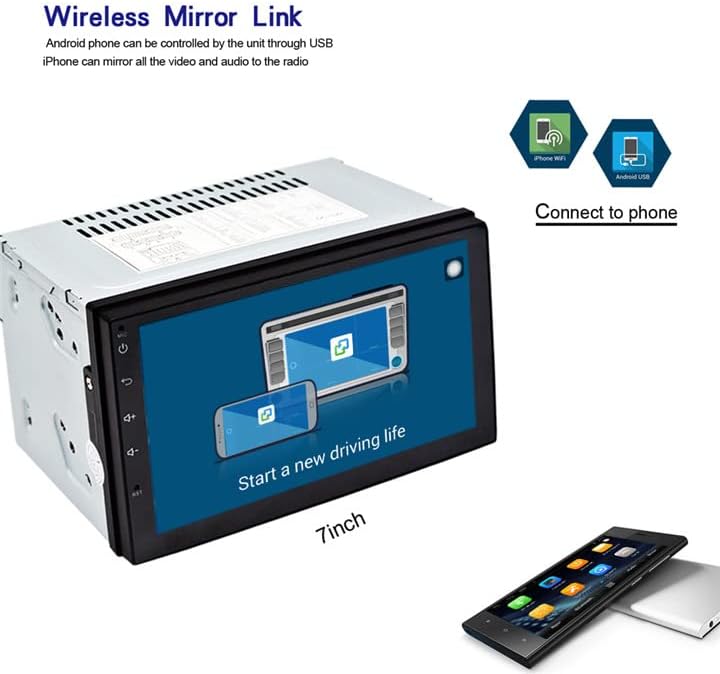
Figure 5: Wireless Mirror Link setup.
วิทยุ FM 3.6:
Access the FM radio function to tune into local stations. You can save your favorite stations as presets for quick access.

รูปที่ 6: อินเทอร์เฟซวิทยุ FM
4. ข้อมูลจำเพาะ
| คุณสมบัติ | คำอธิบาย |
|---|---|
| ยี่ห้อ | EZoneTronics |
| หมายเลขรุ่น | 10 |
| เทคโนโลยีการเชื่อมต่อ | บลูทู ธ Wi-Fi |
| ประเภทตัวควบคุม | แอนดรอยด์ |
| คุณสมบัติพิเศษ | บลูทูธในตัว, หน้าจอสัมผัส |
| อุปกรณ์ที่รองรับ | สมาร์ทโฟน |
| ประเภทขั้วต่อ | ยูเอสบี |
| โหมดเอาต์พุตเสียง | สเตอริโอ |
| การกำหนดค่าช่องเสียงรอบทิศทาง | 4.0 |
| การเข้ารหัสวิดีโอ | เอช.264 |
| กำลังขับ | 45 วัตต์ |
| จำนวนช่องสัญญาณ | 4 |
| บริการอินเทอร์เน็ตที่รองรับ | เน็ตฟลิกซ์ |
| วิธีการควบคุม | แอปสัมผัส |
| ประเภทเอาต์พุตเสียง | บลูทูธ |
| รูปแบบ | ว.ม. |
| ผู้ผลิต | Rhythm Electronics Limited |

รูปที่ 7: ขนาดผลิตภัณฑ์
5 การแก้ไขปัญหา
If you encounter issues with your EZoneTronics Android Car Radio, please refer to the following general troubleshooting steps:
- ไม่มีไฟฟ้า: Check all power connections, including the main power harness and vehicle's fuse box. Ensure the accessory wire is correctly connected.
- ไม่มีเสียง: Verify speaker connections and ensure the volume is not muted or set to minimum. Check RCA connections if using external ampลิตเตอร์
- ปัญหาสัญญาณ GPS: ตรวจสอบให้แน่ใจว่าได้ติดตั้งเสาอากาศ GPS ในตำแหน่งที่ไม่มีสิ่งกีดขวาง view ของท้องฟ้า ตรวจสอบการเชื่อมต่อเสาอากาศกับตัวเครื่อง
- ปัญหาการเชื่อมต่อบลูทูธ: ตรวจสอบให้แน่ใจว่าได้เปิดใช้งานบลูทูธทั้งในวิทยุรถยนต์และอุปกรณ์มือถือของคุณแล้ว ลองยกเลิกการจับคู่และจับคู่ใหม่อีกครั้ง
- หน้าจอสัมผัสไม่ตอบสนอง: ลองรีสตาร์ทเครื่องดู หากปัญหายังคงอยู่ อาจจำเป็นต้องรีเซ็ตเป็นค่าเริ่มต้นจากโรงงาน (ดูตัวเลือกนี้ได้จากการตั้งค่าบนหน้าจอ)
- ความผิดพลาดของแอป: Ensure the unit is connected to Wi-Fi and the app is updated to the latest version. Clear the app's cache or reinstall it if necessary.
For persistent issues, contact EZoneTronics customer support for further assistance.
6. ข้อมูลด้านความปลอดภัย
Always prioritize safety while operating your vehicle. Do not operate the car radio in a way that distracts you from driving. Adjust settings or interact with applications only when the vehicle is safely parked. Adhere to all local traffic laws and regulations.