
1. บทนำ
The T'nB FM Bluetooth Transmitter (Model FMCT05B) allows you to stream audio from your smartphone or other compatible devices to your car's FM radio. This device features Bluetooth connectivity, a USB port, an SD card slot, and an LCD screen for displaying essential information. Enjoy hands-free calling and versatile music playback directly through your vehicle's sound system.
2. ข้อมูลด้านความปลอดภัย
คำเตือน: Use only the power adapter provided with this device. To prevent interference, avoid operating the transmitter in close proximity to other electronic devices.
3. สินค้าหมดview
Familiarize yourself with the components of your T'nB FM Bluetooth Transmitter.
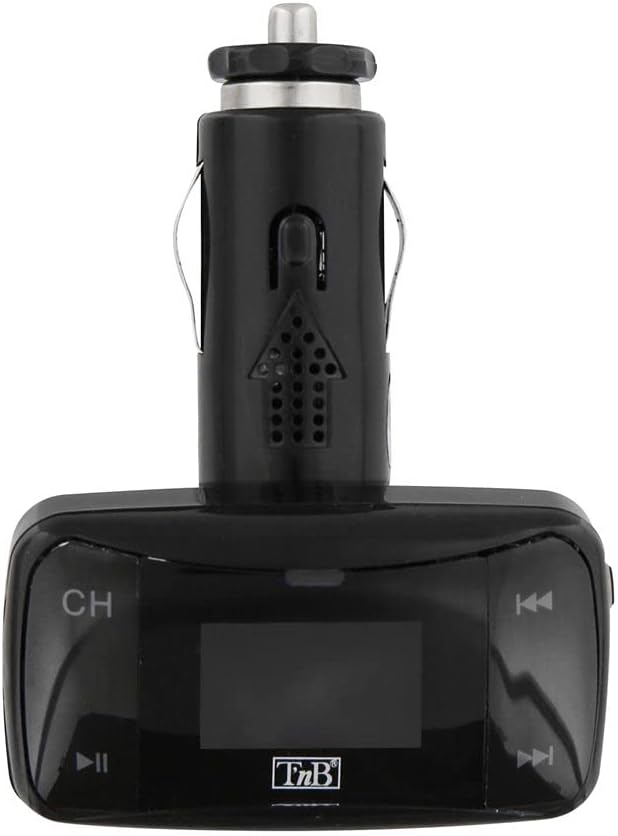
รูปที่ 1: ด้านหน้า view of the T'nB FM Bluetooth Transmitter. This image displays the device's LCD screen, 'CH' button for frequency adjustment, and track navigation buttons.

รูปที่ 2: มุม view of the T'nB FM Bluetooth Transmitter. This perspective shows the device's overall shape, the 12V car socket connector, and the side profile ของปุ่มควบคุม

รูปที่ 3: 3.5mm AUX Audio Cable. This cable can be used to connect external audio sources to the transmitter's AUX input.
4. คำแนะนำในการตั้งค่า
- ใส่ตัวส่งสัญญาณ: Plug the T'nB FM Bluetooth Transmitter firmly into your vehicle's 12V power socket (cigarette lighter port). The device's LCD screen should illuminate.
- Tune Your Car Radio: Turn on your car's FM radio and tune it to an unused FM frequency. Choose a frequency that has no strong broadcast signal to minimize interference.
- จับคู่ความถี่ของเครื่องส่งสัญญาณ: On the T'nB transmitter, use the 'CH' button or frequency adjustment controls to set the transmitter's FM frequency to match the frequency selected on your car radio. Ensure both frequencies are identical for optimal audio transmission.
- จับคู่ผ่านบลูทู ธ :
- เปิดใช้งานบลูทูธบนสมาร์ทโฟนหรืออุปกรณ์เสียงของคุณ
- ค้นหา available Bluetooth devices. The transmitter should appear as "FMCT05B" or a similar name.
- Select the transmitter to pair. Once paired, the device will confirm the connection, and you can begin streaming audio.
5. คู่มือการใช้งาน
5.1 การเล่นเพลง
- บลูทูธสตรีมมิ่ง: Once paired, play music on your smartphone. The audio will be transmitted to your car's FM radio. Use the transmitter's track navigation buttons (◀◀ / ▶▶) to skip tracks and the play/pause button (▶▌▌) to control playback.
- การเล่นการ์ด USB/SD: Insert a USB flash drive or an SD card containing MP3/MP4 audio files into the respective slot on the transmitter. The device will automatically detect and begin playing the audio files. Use the track navigation and play/pause buttons to control playback.
- อินพุต AUX: Connect an external audio device (e.g., MP3 player) to the transmitter's 3.5mm AUX input using the provided cable. Select the AUX input mode on the transmitter if available, or ensure no other media is playing.
5.2 การโทรแบบแฮนด์ฟรี
- การรับ / วางสาย: When a call comes in, the music will pause. Press the play/pause button (▶▌▌) to answer the call. Press it again to end the call.
- โทรซ้ำ: Double-press the play/pause button (▶▌▌) to redial the last number called.
- การปรับระดับเสียง: Adjust the call volume using the volume controls on the transmitter or your car's radio.
5.3 จอแสดงผล LCD
The LCD screen displays the current FM frequency, volume level, track number, and song titles (when available from the source).
6. การบำรุงรักษา
- รักษาอุปกรณ์ให้สะอาดและแห้ง ใช้ผ้าแห้งนุ่มเช็ดทำความสะอาดพื้นผิว
- Avoid exposing the transmitter to extreme temperatures, direct sunlight, or high humidity.
- ห้ามถอดประกอบหรือดัดแปลงอุปกรณ์ เนื่องจากจะทำให้การรับประกันเป็นโมฆะและอาจทำให้เกิดความเสียหายได้
7 การแก้ไขปัญหา
- ไม่มีไฟฟ้า: Ensure the transmitter is securely plugged into the 12V power socket and that the car's ignition is on. Check the car's fuse for the 12V socket if necessary.
- คุณภาพเสียงไม่ดี/สัญญาณรบกวน:
- Adjust the FM frequency on both the transmitter and your car radio to a different, clear frequency with no strong broadcast signals.
- Ensure the volume on your audio source (smartphone, USB, SD card) is set to an appropriate level.
- เคลื่อนย้ายออกไปจากบริเวณที่มีสัญญาณรบกวนคลื่นวิทยุแรง
- บลูทูธไม่เชื่อมต่อ:
- Ensure Bluetooth is enabled on your smartphone and the transmitter is powered on.
- Delete the transmitter from your phone's Bluetooth device list and attempt to pair again.
- Restart both your phone and the transmitter.
- USB/SD Card Not Playing: ตรวจสอบให้แน่ใจว่าได้ใส่สื่ออย่างถูกต้องและมีไฟล์เสียงที่เข้ากันได้ files (MP3/MP4 format). Try a different USB drive or SD card.
8. ข้อมูลจำเพาะ
| คุณสมบัติ | ข้อมูลจำเพาะ |
|---|---|
| ชื่อรุ่น | FMCT05B |
| ยี่ห้อ | ทีแอนด์บี |
| เทคโนโลยีการเชื่อมต่อ | บลูทูธ, ยูเอสบี |
| แหล่งพลังงาน | USB (12V DC Car Socket) |
| มาตรฐานการสื่อสารไร้สาย | บลูทูธ |
| อุปกรณ์ที่รองรับ | Speaker, MP3 Player, Car Stereo System, Smartphone, Headset |
| ประเภทสื่อ | การ์ด SD, แฟลชไดรฟ์ USB |
| ฮาร์ดแวร์อินเตอร์เฟซ | USB ประเภทเอ |
| วิธีการควบคุม | Tactile (Buttons) |
| ประเภทเอาต์พุตเสียง | FM Radio, Speaker |
| อินพุตเสียง | อ๊อกซ์ 3.5มม. |
| เล่มที่tage | 12 โวลต์ (กระแสตรง) |
9. การรับประกันและการสนับสนุน
For warranty information or technical support, please refer to the documentation included with your purchase or contact T'nB customer service directly. Contact details can typically be found on the manufacturer's official webเว็บไซต์.