
การแนะนำ
This manual provides instructions for the Sharper Image Motion Activated Candy Dispenser. This device is designed to dispense small, hard-shelled candies, nuts, and snacks using a touchless motion sensor, promoting hygiene and convenience. It is suitable for use in various settings, including homes and offices.
ข้อมูลด้านความปลอดภัยที่สำคัญ
- ผลิตภัณฑ์นี้ไม่ได้มีไว้สำหรับเด็กอายุต่ำกว่า 12 ปี
- The dispenser is designed for small, dry food items only. Do not use with liquids or sticky substances.
- Store the dispenser in a cool, dry area to maintain optimal performance and food quality.
- ตรวจสอบให้แน่ใจว่าใส่แบตเตอรี่ถูกต้องตามเครื่องหมายขั้ว ห้ามใช้แบตเตอรี่เก่าและใหม่ปะปนกัน หรือใช้แบตเตอรี่ต่างชนิดกัน
- Remove batteries if the dispenser will not be used for an extended period to prevent leakage.
เนื้อหาแพ็คเกจ
- 1x Sharper Image Motion Activated Candy Dispenser Unit
- คู่มือการใช้งาน
Note: 4 "AA" batteries are required and not included. An optional 6V DC 0.5A (300mA) AC power adapter is also not included.
การตั้งค่า
1. การติดตั้งแบตเตอรี่
- Locate the battery compartment on the underside of the dispenser base.
- เปิดฝาช่องใส่แบตเตอรี่
- Insert 4 "AA" batteries (not included), ensuring correct polarity (+/-) as indicated inside the compartment.
- ปิดฝาช่องใส่แบตเตอรี่ให้แน่น
Alternatively, an optional 6V DC 0.5A (300mA) AC power adapter can be used (not included).
2. การเติมเครื่องจ่าย
- Before first use, clean the transparent container thoroughly.
- Remove the lid from the top of the dispenser.
- Carefully pour your desired treats into the container. Ensure the items are suitable for dispensing (see "Operating Instructions" for details).
- เปลี่ยนฝาให้แน่น

Figure 1: Filling the dispenser with treats.
คำแนะนำการใช้งาน
การใช้เซ็นเซอร์ตรวจจับการเคลื่อนไหว
- Place your hand directly under the dispensing chute.
- The built-in motion sensor will detect your hand and activate the dispensing mechanism.
- Hold your hand under the chute for a moment to allow the treats to dispense. The amount dispensed may vary. If no treats dispense on the first attempt, briefly remove your hand and place it back under the sensor.
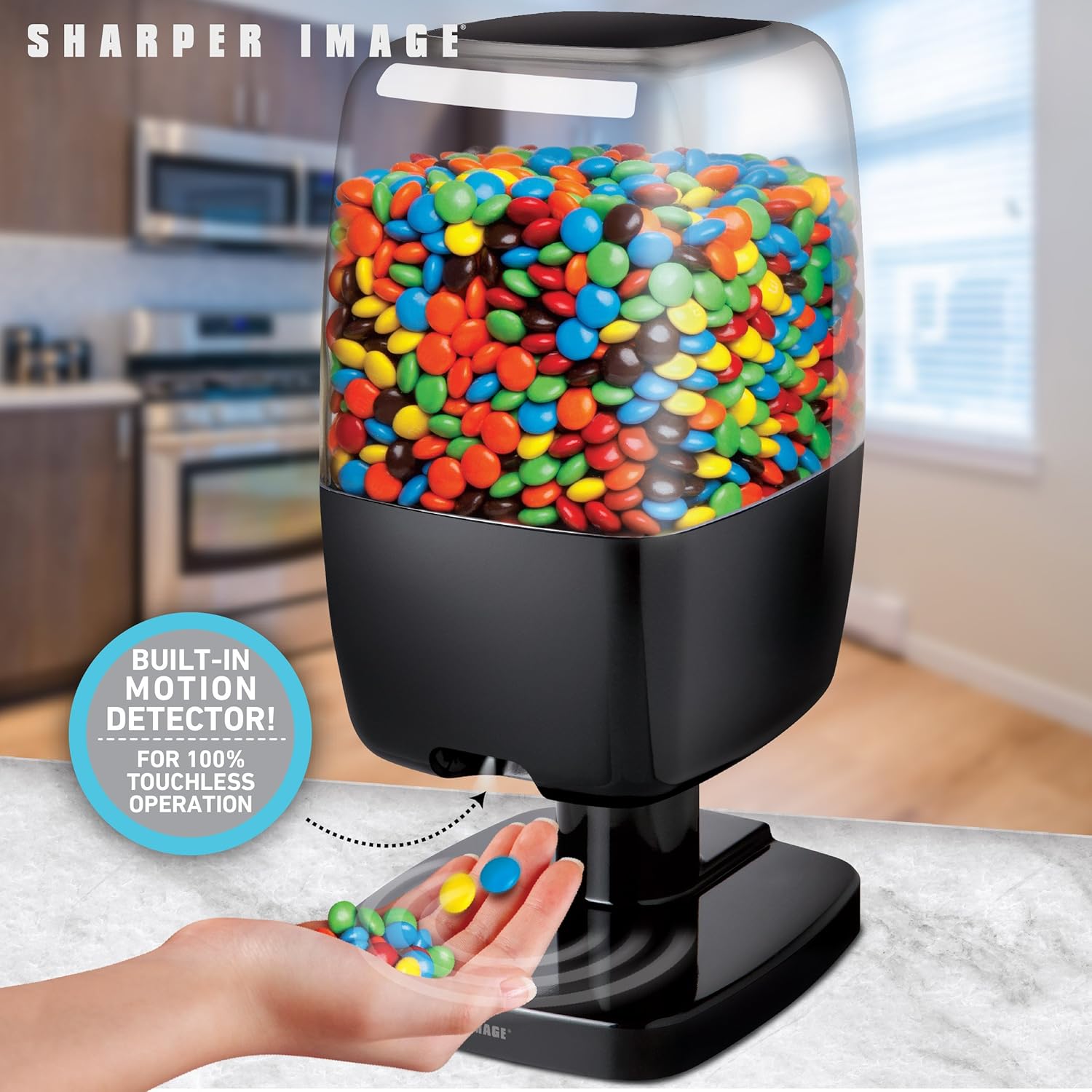
Figure 2: Hands-free dispensing in action.
Disabling Dispensing (Hidden Button)
A hidden button is located on the back of the dispenser. Pressing this button will temporarily disable the dispensing function, preventing treats from being dispensed even when the motion sensor is activated. Press it again to re-enable dispensing.
Recommended Items for Dispensing
For optimal performance, use items that are hard-shelled, dry, and approximately 0.75 inches (1.9 cm) or smaller in size. Exampรวมถึง:
- Small Gumballs
- Hard shell, chocolate coated candy (e.g., M&M's)
- Hard shell, fruit flavored candy
- เฮเซลนัท
- เจลลี่บีน
- Small Jawbreakers
- ถั่วแมคคาเดเมีย
- ถั่วสน
- Shelled, unsalted peanuts
- พิสตาชิโอปอกเปลือก
- Small Jordan almonds
- ถั่วเหลือง
- เมล็ดทานตะวัน
- อัลมอนด์ล้วน
- ถั่วลิสงเค็ม
Items NOT Recommended for Dispensing
Avoid using the following items to prevent blockages or damage to the dispenser:
- Candy that is wrapped
- Candy that has a soft chocolate coating
- Candy that is cylindrically or barrel-shaped
- Candy that is gummy
- Raisins or similar dried fruit
- Candy that is sticky
- Items larger than 0.75 inches (1.9 cm)
- วัตถุโลหะ

Figure 3: Guide for suitable and unsuitable items.
การซ่อมบำรุง
การทำความสะอาด
- To clean the dispenser, first ensure it is empty of all treats and batteries are removed.
- เช็ดพื้นผิวภายนอกด้วยผ้านุ่ม damp ผ้า.
- The transparent container can be detached and washed with mild soap and water. Ensure it is completely dry before reassembling and refilling.
- Do not immerse the base unit in water or place it in a dishwasher.
พื้นที่จัดเก็บ
When not in use, store the dispenser in a cool, dry place away from direct sunlight and moisture. Remove batteries if storing for an extended period.
การแก้ไขปัญหา
Dispenser Not Activating or Dispensing
- ตรวจสอบแบตเตอรี่: Ensure batteries are correctly installed and have sufficient charge. Replace with fresh "AA" batteries if necessary.
- สิ่งกีดขวางเซ็นเซอร์: Verify that the motion sensor area is clean and free from obstructions.
- การวางมือ: Ensure your hand is placed directly under the sensor and held steady for a moment.
- Hidden Button: Check if the hidden button on the back of the dispenser has been pressed, disabling the dispensing function. Press it again to re-enable.
Treats Not Dispensing Properly or Getting Stuck
- Item Suitability: Confirm that the items being dispensed are suitable for the dispenser (refer to "Recommended Items" section). Avoid sticky, wrapped, or oversized items.
- การเติมเกิน: Do not overfill the dispenser, as this can impede the dispensing mechanism.
- การอุดตัน: Gently shake the dispenser or use a soft, non-abrasive tool to clear any blockages in the chute.
อายุการใช้งานแบตเตอรี่สั้น
- คุณภาพแบตเตอรี่: Use high-quality alkaline batteries for best performance and longevity.
- ความถี่ในการใช้งาน: Frequent use will naturally deplete batteries faster. Consider using an optional AC adapter for continuous power if available.
ข้อมูลจำเพาะ
| ยี่ห้อ: | ภาพคมชัดยิ่งขึ้น |
| แบบอย่าง: | B07KGMDK96 |
| วัสดุ: | พลาสติก |
| สี: | สีดำ |
| ขนาด (สูง x กว้าง x ลึก): | ขนาดโดยประมาณ 13.125 นิ้ว x 6.00 นิ้ว x 6.75 นิ้ว (33.3 ซม. x 15.2 ซม. x 17.1 ซม.) |
| แหล่งพลังงาน: | 4 "AA" batteries (not included) or optional 6V DC 0.5A (300mA) AC adapter (not included) |
| Max Item Size: | Up to 0.5 inches (1.27 cm) in size (for optimal dispensing) |

รูปที่ 4: ขนาดผลิตภัณฑ์
การรับประกันและการสนับสนุน
For warranty information or technical support, please refer to the contact details provided with your product packaging or visit the official Sharper Image webไซต์ โปรดเก็บใบเสร็จรับเงินไว้เป็นหลักฐานการซื้อ