
1. บทนำ
The Segway Ninebot Gokart Pro 2 is a high-performance electric go-kart designed for ages 14 and up, offering an exhilarating driving experience with speeds up to 23 mph and a range of 15.5 miles. It features a robust design, advanced control options, and a versatile setup that allows for both racing and drifting.

Figure 1: Segway Ninebot Gokart Pro 2
2. ข้อมูลด้านความปลอดภัย
Your safety is paramount. Always wear a helmet and appropriate protective gear when operating the Gokart Pro 2. This product is UL-2272 certified by TUV Rheinland for safety standards. Key safety features include:
- โครงเหล็กกล้าความแข็งแรงสูง: รองรับน้ำหนักได้ถึง 220 ปอนด์
- Triple Anti-Collision Protection: Integrated design for enhanced safety.
- Manual Handbrake: For emergency stops and controlled drifting.
- ปรับพอดี: Accommodates riders from 4'5" to 6'3".
Always operate the go-kart in a safe, open environment, away from traffic and pedestrians. Ensure all components are securely fastened before each use.

Figure 2: Triple front protection system
3. เนื้อหาบรรจุภัณฑ์
Before assembly, verify that all items listed below are present in your package:

Figure 3: Packing List for Gokart Pro Kit + Ninebot S MAX
- คู่มือการใช้งาน
- (AA) battery x 6
- สกรู x 6
- Hex wrenches (4mm, 5mm, 2.5mm)
- เครื่องมือถอดขายึดพวงมาลัย
- ส่วนประกอบปลดเร็วพวงมาลัย
- เครื่องชาร์จแบตเตอรี่
- ลำโพงเครื่องยนต์ Ninebot
- สปอยเลอร์หลัง
- พวงมาลัยพาวเวอร์
4. การตั้งค่า
The Gokart Pro 2 comes mostly pre-assembled. Follow these steps for final setup:
- Adjust Frame Length: Extend the frame to fit the rider's height (4'5" to 6'3"). Secure with the provided screws and hex wrenches.
- Adjust Steering Wheel: Use the quick-release mechanism to adjust the steering wheel column height for comfortable reach.
- Install Rear Spoiler: Attach the rear spoiler to the designated slots at the back of the seat.
- Install Ninebot Engine Speaker: Secure the Bluetooth speaker to the frame using the provided straps.
- ติดตั้งธงความปลอดภัย: Mount the optional safety flag at the rear for increased visibility.
- ชาร์จแบตเตอรี่: Fully charge the battery before first use. Refer to the 'Maintenance' section for charging details.
Video 1: Detailed setup and feature overview of the Segway Ninebot Gokart Pro.
5. คู่มือการใช้งาน
Familiarize yourself with the controls and driving modes before operating the Gokart Pro 2.
- เปิด/ปิดเครื่อง: Use the power button located on the Ninebot S MAX unit at the rear of the go-kart.
- โหมดการขับขี่: The Gokart Pro 2 offers four driving modes:
- โหมดความปลอดภัย: Up to 4.97 mph (for beginners).
- โหมดปกติ: สูงสุดถึง 11.2 ไมล์ต่อชั่วโมง
- โหมดกีฬา: สูงสุดถึง 17.4 ไมล์ต่อชั่วโมง
- โหมดการแข่งขัน: สูงสุดถึง 23 ไมล์ต่อชั่วโมง
- Acceleration & Braking: Use the foot pedals for acceleration and braking. The manual handbrake can be used for drifting and emergency stops.
- การดริฟท์: The special TPE rear tires and powerful rear-wheel drive allow for controlled drifting. Adjust drifting assistance levels via the Segway app.
- Smart Control (Segway App): Connect your smartphone via Bluetooth to the Segway app to:
- Switch driving modes.
- Adjust drifting assistance levels.
- Control ambient lights.
- ตรวจสอบสถานะแบตเตอรี่และระยะทางที่วิ่งไปแล้ว
- ดำเนินการอัพเดตเฟิร์มแวร์
- Immersive Engine Sounds: The Ninebot Engine Speaker simulates various engine sounds (single-cylinder, V8, double cylinder, V12) that synchronize with acceleration. It can also function as a Bluetooth speaker for music.

Figure 4: Four available driving modes

Figure 5: Ninebot Engine Sounds Simulator

Figure 6: Segway App Integration
Video 2: A closer look at the Segway Ninebot Gokart Pro, demonstrating features and operation.
6. การบำรุงรักษา
Regular maintenance ensures optimal performance and longevity of your Gokart Pro 2.
- การชาร์จแบตเตอรี่: Connect the provided charger to the charging port on the Ninebot S MAX unit. The battery level indicator will show charging progress.
- การตรวจสอบยาง: Regularly inspect tires for wear and tear. Replace worn tires promptly to maintain performance and safety. Rear TPE tires are designed for drifting and may wear faster.
- การทำความสะอาด: Clean the go-kart with a damp ผ้า. หลีกเลี่ยงการใช้น้ำแรงดันสูงหรือสารเคมีรุนแรง
- พื้นที่จัดเก็บ: Store the go-kart in a dry, cool place. The Gokart Pro 2 is collapsible for easy transport and storage.
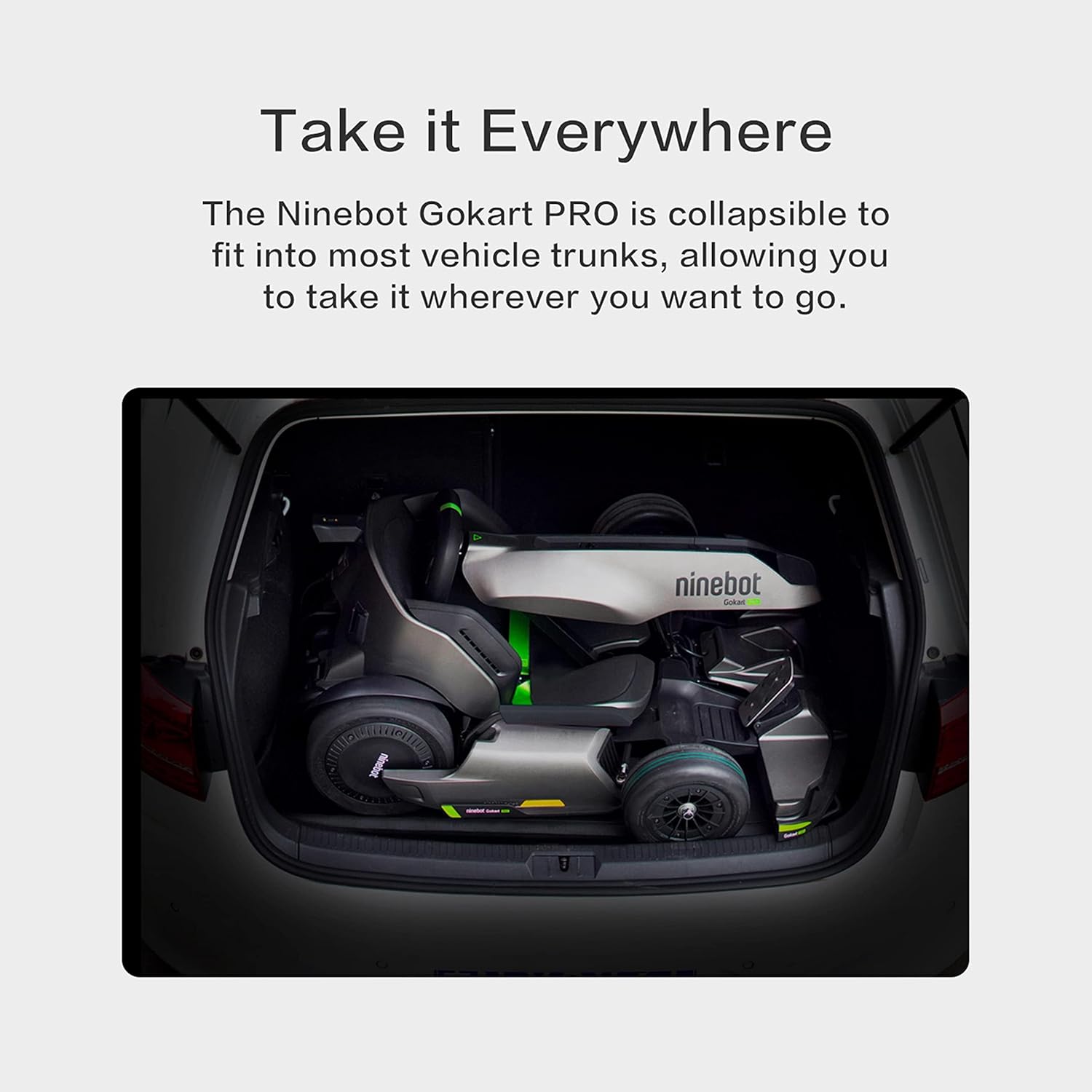
Figure 7: Gokart Pro 2 in collapsed state for transport
7 การแก้ไขปัญหา
If you encounter any issues with your Gokart Pro 2, refer to the following common troubleshooting tips:
- รถโกคาร์ทไม่เปิดเครื่อง: Ensure the battery is charged and properly connected. Check the power button on the Ninebot S MAX unit.
- Reduced speed or range: This may indicate a low battery charge. Fully charge the battery. Performance can also be affected by rider weight, terrain, and driving mode.
- ปัญหาการเชื่อมต่อแอป: Ensure Bluetooth is enabled on your smartphone and the go-kart. Try restarting both the app and the go-kart.
- เสียงผิดปกติ: Inspect for any loose parts or obstructions around the wheels and frame. If the noise persists, contact customer support.
8. ข้อมูลจำเพาะ
| คุณสมบัติ | ข้อมูลจำเพาะ |
|---|---|
| ชื่อรุ่น | Transformers Electric GoKart Pro |
| ขนาดบรรจุภัณฑ์สินค้า กว้าง x ยาว x สูง | 45 x 36 x 21.05 นิ้ว |
| น้ำหนักแพ็คเกจ | 65.77 กิโลกรัม |
| ขนาดสินค้า กxยxส | 55.9 x 33.5 x 23.6 นิ้ว |
| น้ำหนักสินค้า | 112.9 ปอนด์ |
| ชื่อยี่ห้อ | เซกเวย์ |
| สี | สีดำ |
| วัสดุ | อลูมิเนียม |
| ผู้ใช้ที่แนะนำ | Unisex- ผู้ใหญ่ |
| ผู้ผลิต | Ninebot (Changzhou) Tech Co. , Ltd. |
| หมายเลขชิ้นส่วน | N3M432 |
| รุ่นปี | 2021 |
| สไตล์ | Gokart Pro |
| ส่วนประกอบที่รวมอยู่ | Frame, Accessories |
| ขนาด | พิเศษขนาดใหญ่ |
9. การรับประกันและการสนับสนุน
The Segway Ninebot Gokart Pro 2 comes with a รับประกันจำกัด 1 ปี. For any product inquiries, technical assistance, or warranty claims, please contact Segway Customer Support. You can find contact information on the official Segway website or through the Segway app.