
Homend Automatic Water Pump Pressure Controller
Homend Automatic Water Pump Pressure Controller User Manual
Model: Automatic Water Pump Pressure Controller
แบรนด์: โฮเมนด์
การแนะนำ
This manual provides essential information for the safe and effective use of your Homend Automatic Water Pump Pressure Controller. Please read this manual thoroughly before installation and operation, and keep it for future reference.
The Homend Automatic Water Pump Pressure Controller is designed to automate the operation of water pumps. It automatically stops the pump if no water is detected, eliminating the need for a pressure tank. It controls the pump's on and off cycles based on water pressure changes, contributing to water conservation. This controller is suitable for various pump types including self-priming pumps, jet pumps, garden pumps, clarified water pumps, and centrifugal pumps.

Figure 1: Homend Automatic Water Pump Pressure Controller
ภาพนี้แสดงให้เห็นส่วนหลัก view of the Homend Automatic Water Pump Pressure Controller, featuring its distinctive yellow and blue casing with a pressure gauge visible on the side.
ข้อมูลด้านความปลอดภัย
ปฏิบัติตามข้อควรระวังด้านความปลอดภัยขั้นพื้นฐานอยู่เสมอ เพื่อลดความเสี่ยงจากการเกิดไฟไหม้ ไฟฟ้าช็อต และการบาดเจ็บส่วนบุคคล
- Ensure the power supply matches the controller's voltagอี (110V)
- โปรดถอดปลั๊กไฟก่อนทำการติดตั้ง บำรุงรักษา หรือแก้ไขปัญหาใดๆ
- การติดตั้งควรดำเนินการโดยผู้เชี่ยวชาญที่มีคุณสมบัติหากคุณไม่แน่ใจ
- Do not operate the controller if it is damaged.
- Keep the controller away from excessive moisture or direct water spray unless properly sealed for such conditions.
สินค้าเกินview
Familiarize yourself with the components of the pressure controller.
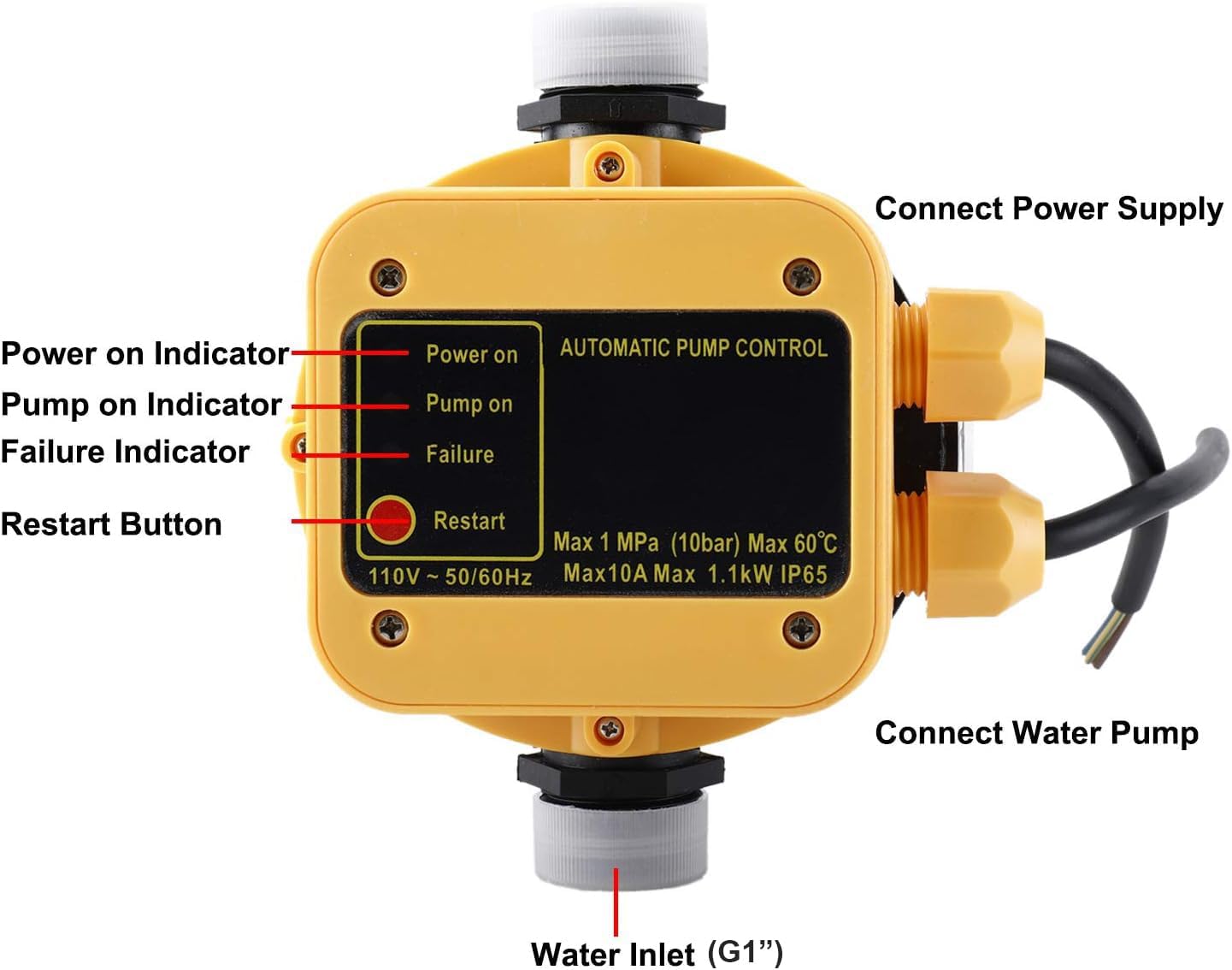
Figure 2: Controller Components and Indicators
ภาพนี้แสดงด้านบน view of the controller with key components labeled: Power on Indicator, Pump on Indicator, Failure Indicator, Restart Button, Connect Power Supply, Connect Water Pump, and Water Inlet (G1").
- Power on Indicator: จะสว่างขึ้นเมื่อเครื่องกำลังได้รับไฟ
- Pump on Indicator: Illuminates when the water pump is actively running.
- ตัวบ่งชี้ความล้มเหลว: Illuminates to indicate an error or fault condition, such as dry running.
- ปุ่มรีสตาร์ท: Used to manually restart the pump after a failure or power interruption.
- เชื่อมต่อพาวเวอร์ซัพพลาย: Terminal for connecting the main power input.
- Connect Water Pump: Terminal for connecting the water pump's power cable.
- Water Inlet (G1"): The primary water connection point for the controller.
การติดตั้งและการตั้งค่า
Follow these steps for proper installation of the water pump pressure controller.
- การติดตั้ง: Securely mount the controller in a suitable location, ensuring it is protected from direct weather exposure if not rated for outdoor use.
- การต่อน้ำ: Connect the water inlet (G1") of the controller to your water supply line. Ensure all connections are watertight.
- การเชื่อมต่อปั๊ม: Connect the water pump's outlet to the controller's water outlet.
- Electrical Connection (Power Supply): Connect the main 110V power supply to the 'Connect Power Supply' terminals on the controller. Ensure correct wiring for live, neutral, and ground (if applicable).
- Electrical Connection (Water Pump): Connect the water pump's power cable to the 'Connect Water Pump' terminals on the controller.
- การเติมครั้งแรก: Before powering on, ensure the pump and suction line are primed with water to prevent dry running.

Figure 3: Typical Installation Scenarios
This image illustrates various application examples, showing the controller integrated into different water pump systems, demonstrating its versatility in home and garden setups.
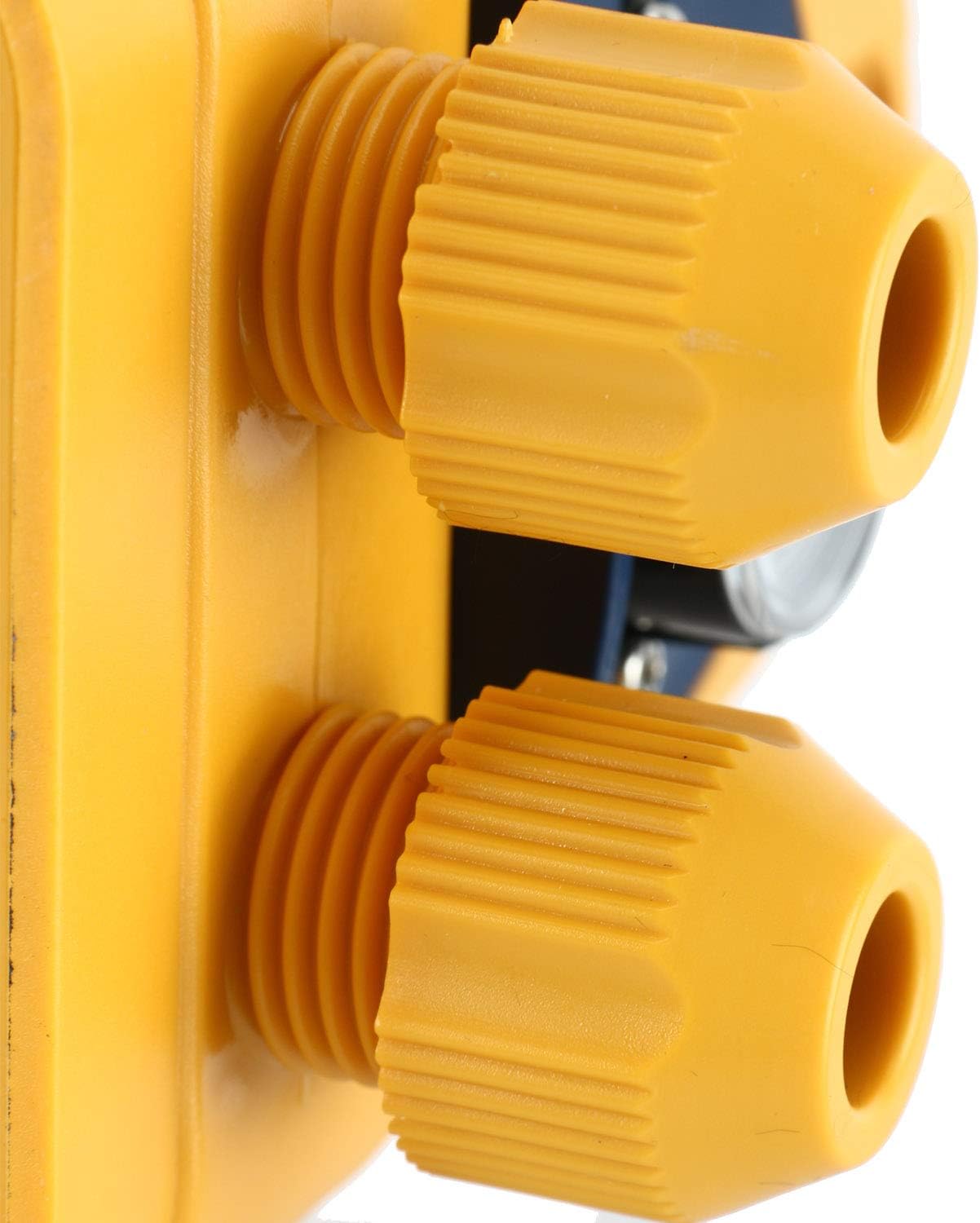
Figure 4: Electrical Connection Points
รายละเอียด view of the electrical connection points on the controller, showing the secure cable glands for power input and pump output.
คำแนะนำการใช้งาน
The controller is designed for fully automatic operation.
- เปิดเครื่อง: Once installed and connected, apply power to the controller. The 'Power on Indicator' LED will illuminate.
- การทำงานอัตโนมัติ: The controller will automatically detect water pressure changes. When water is demanded (e.g., a tap is opened), the pressure drops, and the controller will activate the pump. The 'Pump on Indicator' LED will illuminate.
- Pump Off: When water demand ceases and pressure is restored, the controller will automatically turn off the pump. The 'Pump on Indicator' LED will turn off.
- การป้องกันการทำงานขณะแห้ง: If the water supply to the pump runs out, the controller will automatically stop the pump to prevent damage. The 'Failure Indicator' LED will illuminate.
- Restarting After Failure: If the 'Failure Indicator' is lit due to dry running, ensure the water supply is restored. Then, press the 'Restart Button' to reset the controller and resume pump operation.
การซ่อมบำรุง
การบำรุงรักษาอย่างสม่ำเสมอจะช่วยให้คอนโทรลเลอร์ของคุณทำงานได้อย่างมีประสิทธิภาพสูงสุดและมีอายุการใช้งานยาวนานขึ้น
- การตรวจสอบปกติ: Periodically check all electrical and water connections for leaks, corrosion, or loose wiring.
- การทำความสะอาด: Keep the exterior of the controller clean and free from dust and debris. Use a soft, dry cloth. Do not use abrasive cleaners or solvents.
- ฤดูหนาว: In cold climates, ensure the controller and associated plumbing are protected from freezing temperatures to prevent damage.
- Pressure Gauge Check: Monitor the pressure gauge for consistent readings during operation.
การแก้ไขปัญหา
โปรดดูหัวข้อนี้เพื่อดูปัญหาทั่วไปและวิธีแก้ไข
| ปัญหา | สาเหตุที่เป็นไปได้ | สารละลาย |
|---|---|---|
| ปั๊มไม่เริ่มทำงาน | ไม่มีแหล่งจ่ายไฟ 'Failure Indicator' is on (dry running). ขั้วต่อไฟฟ้าหลวม | ตรวจสอบแหล่งจ่ายไฟและเบรกเกอร์วงจร Restore water supply and press 'Restart Button'. Check and tighten all wiring connections (ensure power is off first). |
| ปั๊มทำงานต่อเนื่อง | Water leak in the system. ตัวควบคุมทำงานผิดปกติ | Inspect plumbing for leaks and repair. Contact customer support if no leaks are found. |
| Pump cycles on/off frequently. | มีรอยรั่วเล็กน้อยในระบบ น้ำประปาไม่เพียงพอ | Check for minor leaks. Ensure adequate water flow to the pump. |
| 'Failure Indicator' is on. | No water in the pump/supply line (dry running). | Ensure water supply is available and pump is primed. Press 'Restart Button'. |
ข้อมูลจำเพาะ
Key technical specifications for the Homend Automatic Water Pump Pressure Controller.
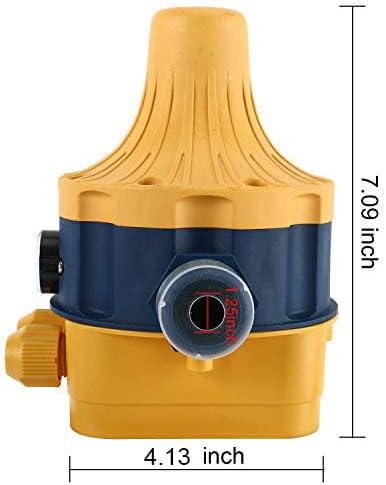
รูปที่ 5: ขนาดผลิตภัณฑ์
This image provides the key dimensions of the controller, showing a height of 7.09 inches and a width of 4.13 inches.
| คุณสมบัติ | ข้อมูลจำเพาะ |
|---|---|
| ยี่ห้อ | โฮมเอ็นด์ |
| แบบอย่าง | Automatic Water Pump Pressure Controller |
| เล่มที่tage | 110โวลต์ |
| ความถี่ | 50-60เฮิรตซ์ |
| กระแสไฟสูงสุด | 10เอ |
| พลังสูงสุด | 1.1 กิโลวัตต์ |
| แรงดันการทำงานสูงสุด | 10 Bar (1 MPa) |
| การเชื่อมต่อ | 1" Male |
| วัสดุ | พลาสติก |
| สี | สีเหลือง |
| ขนาดสินค้า (กว้าง x ยาว x สูง) | 0.79" x 0.79" x 0.79" (Note: This appears to be a generic placeholder, actual dimensions from image are approx. 4.13" W x 7.09" H) |
| น้ำหนักสินค้า | 2.46 ปอนด์ |
| ยูพีซี | 711221778127 |
การรับประกันและการสนับสนุน
For warranty information, please refer to the documentation included with your purchase or contact the seller directly. This product includes a manual instruction in the package.
For technical support or inquiries, please contact Homend customer service through the retailer where the product was purchased.
Ask a question about this manual
Ask about setup, troubleshooting, compatibility, parts, safety, or missing instructions. Manuals+ will review the question and use this page’s manual context to help answer it.