
1. บทนำและเรื่องอื่นๆview
Thank you for choosing the Magicforce 21-Key Mechanical Numeric Keypad. This wired numeric keypad is designed to enhance your productivity, especially for tasks involving extensive data entry, such as spreadsheets, accounting, and financial applications. Featuring durable mechanical switches and a convenient LED backlight, it offers a comfortable and efficient typing experience.

The Magicforce 21-Key Mechanical Numeric Keypad, shown connected to a laptop, features a compact design and LED backlighting.
2. เนื้อหาบรรจุภัณฑ์
โปรดตรวจสอบว่าสินค้าทั้งหมดมีอยู่ในแพ็คเกจของคุณ:
- 1 x Magicforce 21-Key Mechanical Numeric Keypad
- สาย USB 1 เส้น
3. คู่มือการติดตั้ง
The Magicforce Numeric Keypad is designed for simple plug-and-play operation, requiring no additional drivers for most operating systems.
- Locate an available USB port on your computer (laptop or desktop PC).
- Connect the provided USB cable to the mini-USB port on the keypad.
- เสียบปลายอีกด้านของสาย USB เข้ากับพอร์ต USB ของคอมพิวเตอร์ของคุณ
- The keypad will be automatically recognized by your system and ready for use.
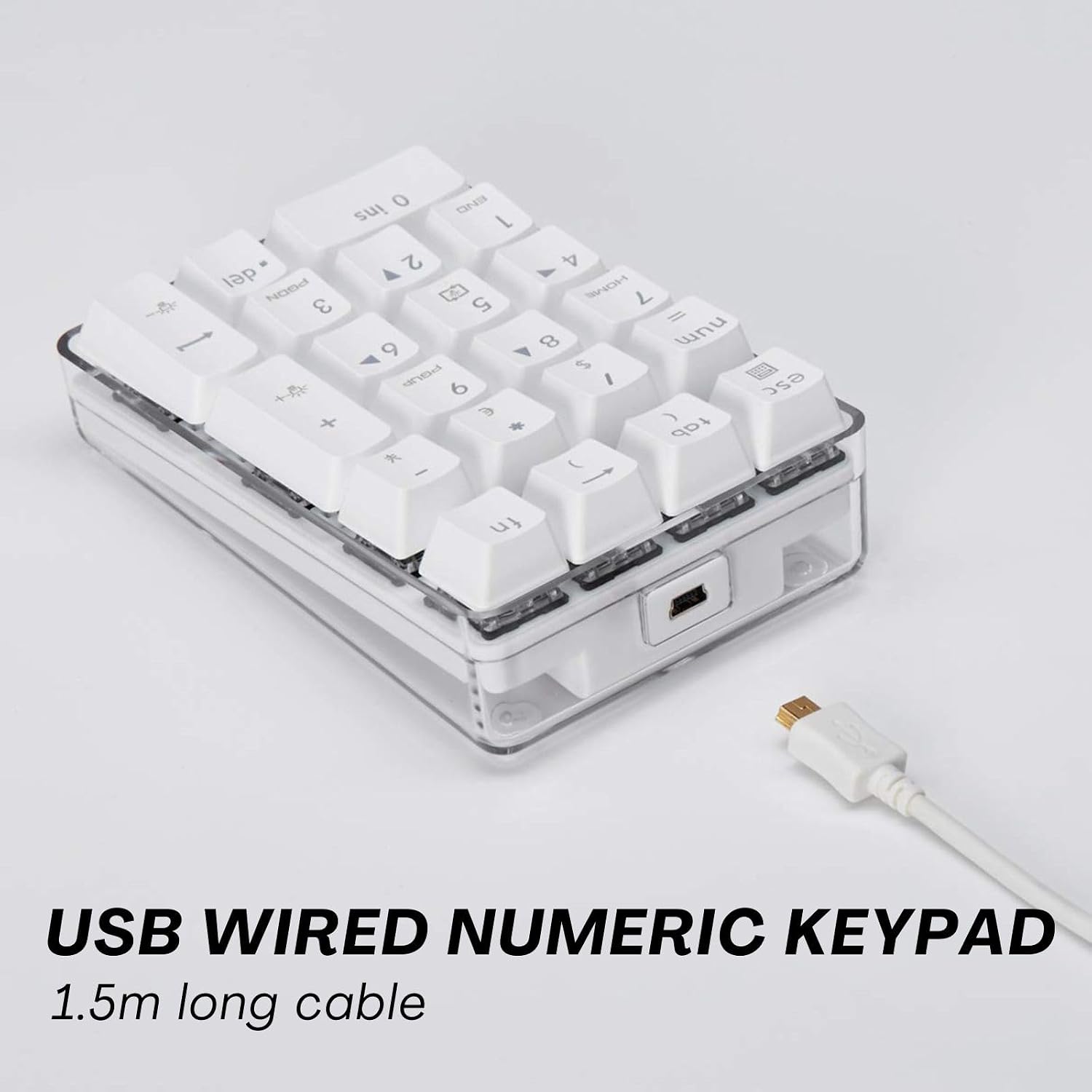
Connect the keypad to your computer using the included USB cable for immediate use.
4. คู่มือการใช้งาน
4.1 Basic Numeric Input
Once connected, the keypad functions like a standard numeric pad. Ensure the 'Num Lock' indicator light is on for numeric input. Press the 'Num' key to toggle Num Lock on or off.
4.2 ฟังก์ชันปุ่มลัด
The keypad includes several convenient hotkey functions accessible by pressing the 'Fn' key in combination with other keys. These functions are independent of your main keyboard's settings.

Hotkey combinations for enhanced functionality, including calculator access and special symbols.
| หมวดหมู่ | การผสมผสาน | การทำงาน |
|---|---|---|
| เครื่องคิดเลข | เอฟเอ็น + เอสซี | เปิดเครื่องคิดเลข |
| สัญลักษณ์ทางคณิตศาสตร์ | เอฟเอ็น + แท็บ | ( |
| เอฟเอ็น + ← | ) | |
| FN + NUM | = | |
| สัญลักษณ์สกุลเงิน | เอฟเอ็น + / | $ |
| FN + * | € | |
| FN + - | ¥ |
Note: Function keys may not work on macOS.

The keypad operates as a standalone device, ensuring no interference with your main keyboard.
การควบคุมแบ็คไลท์ 4.3
The keypad features an LED backlight for improved visibility in low-light conditions. You can adjust the lighting mode and brightness:
- เปลี่ยนโหมดแสงสว่าง: กด fn+5 to cycle through modes: Steady lighting, Reactive, Breathing, and Light off.
- เพิ่มความสว่าง: กด เอฟเอ็น + +
- ลดความสว่าง: กด Fn + ป้อน

The keypad's backlight can be adjusted for intensity and mode, providing convenience in various lighting environments.
This video demonstrates the various lighting modes and key functions of the Magicforce 21-Key Mechanical Numeric Keypad, including reactive and breathing backlight effects.
5. สวิตช์เชิงกล
This keypad features Blue Switches, known for their distinct tactile bump and audible click sound. This provides satisfying feedback with each keystroke, making it ideal for typing and data entry where precision and confirmation are desired.

The Blue Switch provides a light typing feel and an enjoyable "click" sound.
6. การออกแบบตามหลักสรีรศาสตร์และความสะดวกในการพกพา
The keypad is designed to reduce input pressure and features anti-slip pads on the back for firm and stable placement on your desk. Its compact size makes it highly portable, suitable for users on the go or those with limited desk space.

Compact dimensions (4.92 x 3.35 x 1.5 inches) ensure portability and ergonomic comfort.
7. ผู้ใช้ที่เหมาะสม
This numeric keypad is an ideal accessory for a variety of users, including:
- Laptop users who lack a dedicated numeric section.
- Professionals in banking, financial securities, and business.
- Users of compact keyboards (e.g., 87-key, 82-key, 68-key, 61-key) who require a separate numeric input.

The keypad is suitable for various users, enhancing productivity for data entry tasks.
8. การบำรุงรักษา
To ensure the longevity and optimal performance of your keypad, follow these maintenance guidelines:
- การทำความสะอาด: Use a soft, dry cloth to wipe the surface of the keypad. For deeper cleaning, a slightly damp cloth can be used, ensuring no liquid enters the key switches or internal components.
- หลีกเลี่ยงของเหลว: Do not spill liquids on the keypad. In case of accidental spills, immediately disconnect the keypad from your computer and allow it to dry completely before reconnecting.
- พื้นที่จัดเก็บ: เมื่อไม่ใช้งาน ควรเก็บแป้นพิมพ์ไว้ในที่สะอาดและแห้ง หลีกเลี่ยงอุณหภูมิที่สูงหรือต่ำเกินไป และแสงแดดโดยตรง
9 การแก้ไขปัญหา
If you encounter any issues with your Magicforce Numeric Keypad, please refer to the following common solutions:
- ปุ่มกดไม่ตอบสนอง:
- Ensure the USB cable is securely connected to both the keypad and your computer.
- ลองเสียบแป้นพิมพ์เข้ากับพอร์ต USB อื่นบนคอมพิวเตอร์ของคุณดู
- รีสตาร์ทเครื่องคอมพิวเตอร์ของคุณ
- Verify that the 'Num Lock' is activated (the indicator light should be on).
- Backlight Not Working/Adjusting:
- Ensure the keypad is properly connected and receiving power.
- Cycle through the lighting modes using fn+5.
- ปรับความสว่างโดยใช้ เอฟเอ็น + + และ Fn + ป้อน.
- Function Keys (Fn combinations) Not Working:
- Ensure you are pressing the 'Fn' key simultaneously with the desired function key.
- Note that some function keys may not be fully compatible with macOS.
If the issue persists after trying these steps, please contact Magicforce customer support for further assistance.
10. ข้อมูลจำเพาะ
| คุณสมบัติ | รายละเอียด |
|---|---|
| ขนาดสินค้า | 4.92 x 3.35 x 1.5 นิ้ว |
| น้ำหนักสินค้า | 11.5 ออนซ์ |
| ผู้ผลิต | เมจิกฟอร์ซ |
| หมายเลขรุ่น | มอร์ซา/va266 |
| เทคโนโลยีการเชื่อมต่อ | USB (แบบมีสาย) |
| คำอธิบายแป้นพิมพ์ | เครื่องจักรกล |
| ประเภทสวิตซ์ | สวิทช์สีฟ้า |
| จำนวนคีย์ | 21 |
| การแบ็คไลท์ | Single Color LED (White) |
| คุณสมบัติพิเศษ | Portable, Ergonomic, Backlit |
| การใช้ที่แนะนำ | Business, Data Entry, Laptop Extension |
11. การรับประกันและการสนับสนุน
Magicforce products are manufactured to the highest quality standards. For information regarding warranty coverage, technical support, or service inquiries, please refer to the warranty card included with your product or visit the official Magicforce webไซต์ โปรดเก็บหลักฐานการซื้อไว้เพื่อใช้ในการเรียกร้องการรับประกัน