
SUNITEC BC920
คู่มือการใช้งานลำโพงบลูทูธติดรถยนต์ SUNITEC BC920
Hands-Free Bluetooth Car Speaker for Cell Phone
1. สินค้าหมดview
The SUNITEC BC920 is a versatile Bluetooth car speaker designed to provide clear, hands-free communication and audio streaming in your vehicle. It features advanced DSP noise-cancellation technology for crystal-clear calls and supports voice assistants like Siri and Google Assistant for safe driving.

ภาพ: ด้านหน้า view of the SUNITEC BC920 Bluetooth Car Speaker, showing its compact design and control buttons.
2. เนื้อหาบรรจุภัณฑ์
กรุณาทำเครื่องหมายในช่องสำหรับรายการต่อไปนี้:
- SUNITEC BC920SA Bluetooth Car Kit
- ที่ชาร์จแบตในรถยนต์
- สายชาร์จ USB
- Quick user guide / User Manual

Image: Back of the SUNITEC BC920 product box, detailing key features and package contents.
3. เค้าโครงอุปกรณ์
Familiarize yourself with the buttons and ports on your SUNITEC BC920 speakerphone.
- ปุ่มโทรออก: Answer/End calls, Redial.
- เพิ่มระดับเสียง (+): เพิ่มปริมาณ
- ลดเสียงลง (-): ลดระดับเสียง.
- ปุ่มปิดเสียง: ปิด/เปิดเสียงไมโครโฟน
- สวิตช์ไฟ: เปิด/ปิด.
- พอร์ตไมโครยูเอสบี: สำหรับการชาร์จ
- คลิปกระบังหน้า: For attaching to car visor.

ภาพ: ระยะใกล้ view of the SUNITEC BC920, highlighting the call button, volume controls, and mute button.
4. การตั้งค่าและการชาร์จ
4.1 การชาร์จเริ่มต้น
Before first use, fully charge the SUNITEC BC920. Connect the provided USB charging cable to the Micro USB port on the device and the other end to the car charger or a standard USB power adapter (not included). The LED indicator will show charging status.
The device features a long-lasting battery, providing up to 22 hours of talk time and 1000 hours of standby time on a full charge.

Image: Illustration showing the SUNITEC BC920 and its impressive battery life, with icons for 22 hours talk time and 1000 hours standby time.
4.2 การเปิด/ปิดเครื่อง
- การเปิดเครื่อง: Slide the power switch to the "ON" position. You will hear a voice prompt "Power On".
- วิธีปิดเครื่อง: Slide the power switch to the "OFF" position. You will hear a voice prompt "Power Off".
The device also features an auto power on/off function. A built-in vibration sensor automatically turns on the car kit when it detects car door opening, allowing it to reconnect with your phone. When the device is not in use for a period, it will turn off automatically to save battery.

Image: Visual representation of the SUNITEC BC920's auto power-on feature, showing the device activating when a car door is opened.
4.3 การจับคู่บลูทูธ
To connect the SUNITEC BC920 to your mobile phone:
- โปรดตรวจสอบให้แน่ใจว่าได้เปิดใช้งานลำโพงแล้ว
- On your phone, go to Bluetooth settings and enable Bluetooth.
- ค้นหา available devices. The speakerphone will appear as "BC920".
- Select "BC920" to pair. You will hear a voice prompt "Pairing" and then "Connected" upon successful connection.
The SUNITEC BC920 supports connecting two Bluetooth cell phones simultaneously, allowing for easy switching between music and calls from different devices.

Image: Diagram illustrating the dual connection capability of the SUNITEC BC920, showing two smartphones connected simultaneously.
5. คู่มือการใช้งาน
5.1 การโทรออกและรับสาย
- รับสาย: กดปุ่ม ปุ่มโทรออก ครั้งหนึ่ง.
- การวางสาย: กดปุ่ม ปุ่มโทรออก ครั้งหนึ่งระหว่างการโทร
- การปฏิเสธสาย: กดปุ่มค้างไว้ ปุ่มโทรออก เป็นเวลา 2 วินาที
- กำลังโทรซ้ำหมายเลขล่าสุด: กดสองครั้ง ปุ่มโทรออก.
- การปรับระดับเสียง: ใช้ เพิ่มระดับเสียง (+) และ ลดเสียงลง (-) ปุ่ม
- ไมโครโฟนปิดเสียง: กดปุ่ม ปุ่มปิดเสียง ระหว่างการสนทนา กดอีกครั้งเพื่อเปิดเสียง
The built-in 2W powerful speaker and DSP noise-cancellation technology ensure clear calls and high-quality audio even in noisy environments.

Image: Graphic highlighting the clear speech and high-quality audio features of the SUNITEC BC920, with sound waves emanating from the speaker.
5.2 Voice Assistant (Siri/Google Assistant)
The SUNITEC BC920 supports voice assistants, allowing you to make calls, send texts, or get driving directions hands-free, enhancing driving safety.
- การเปิดใช้งานผู้ช่วยเสียง: กดปุ่มค้างไว้ ปุ่มโทรออก for 2 seconds to activate Siri (iOS) or Google Assistant (Android).
- Once activated, you can issue commands such as:
- "โทรหา [ชื่อผู้ติดต่อ]"
- "Text [Contact Name] [Message]"
- "Show me directions to [Destination]"
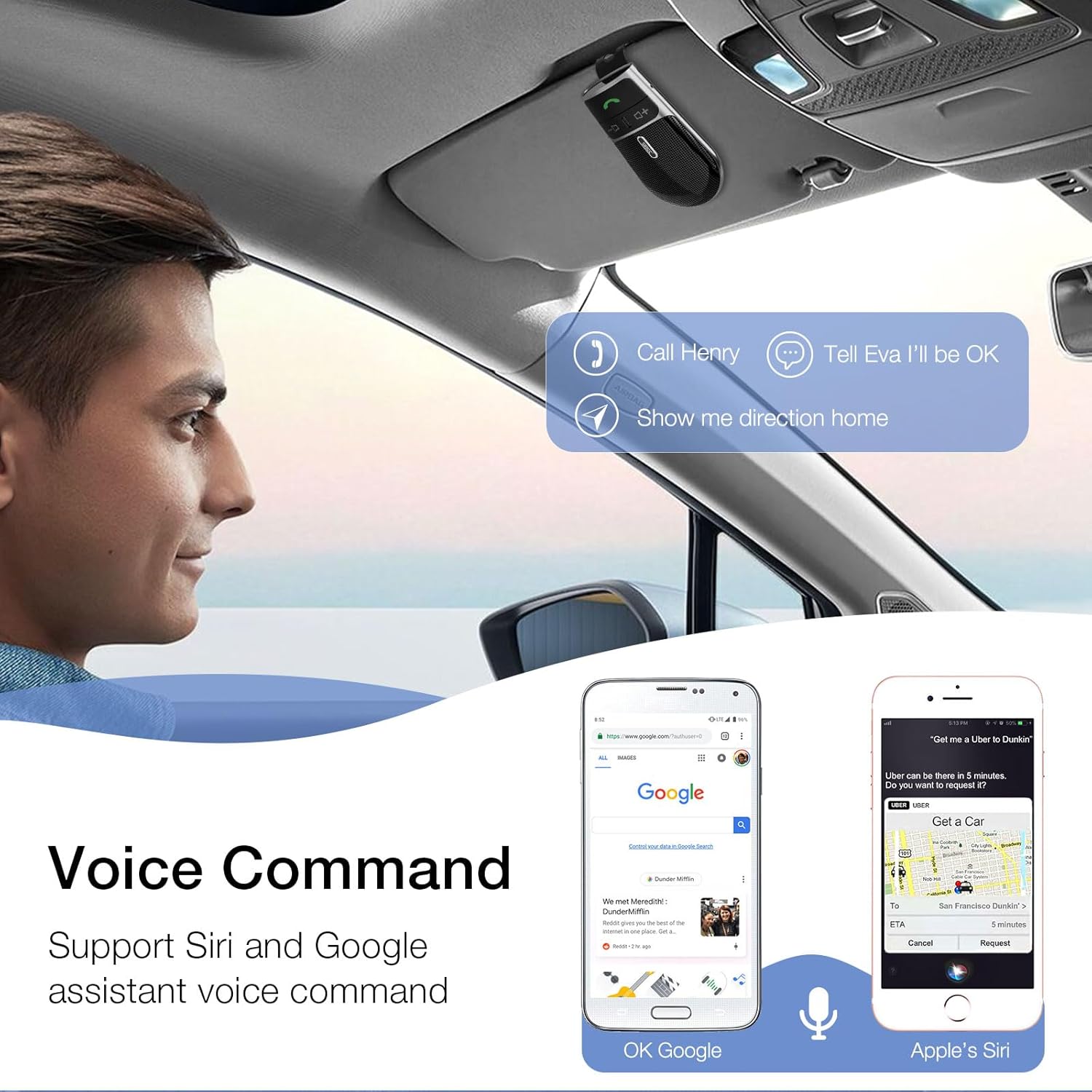
Image: A user in a car interacting with the SUNITEC BC920 to use voice commands for calling, texting, and navigation via Siri or Google Assistant.
5.3 การนำทางด้วยเสียง
The device provides clear voice prompts for various operational statuses, making it easy to use without visual confirmation.
- "Power On"
- "Power Off"
- "Pairing"
- "Connected"
- "Disconnected"
- "Battery Low"
Image: Depiction of the SUNITEC BC920 providing voice guidance, with a list of common voice prompts.
6. การบำรุงรักษา
- ทำความสะอาดอุปกรณ์ด้วยผ้านุ่มและแห้ง ห้ามใช้น้ำยาทำความสะอาดหรือสารละลายที่มีฤทธิ์กัดกร่อน
- เก็บอุปกรณ์ให้ห่างจากอุณหภูมิ ความชื้น และแสงแดดโดยตรง
- ห้ามถอดชิ้นส่วนอุปกรณ์ การทำเช่นนั้นจะทำให้การรับประกันเป็นโมฆะและอาจทำให้เกิดความเสียหายได้
- เก็บไว้ในที่แห้งและเย็นเมื่อไม่ได้ใช้งานเป็นเวลานาน
7 การแก้ไขปัญหา
| ปัญหา | สาเหตุที่เป็นไปได้ | สารละลาย |
|---|---|---|
| อุปกรณ์ไม่เปิดเครื่อง | แบตเตอรี่หมด | ชาร์จอุปกรณ์ให้เต็ม |
| ไม่สามารถเชื่อมต่อกับโทรศัพท์ได้ | Bluetooth is off on phone; device not in pairing mode; too many paired devices. | Ensure phone Bluetooth is on. Restart both devices. Clear previous Bluetooth connections on your phone. |
| คุณภาพเสียงไม่ดีระหว่างการโทร | Low battery; interference; device too far from phone. | Charge the device. Move closer to your phone. Avoid sources of strong electromagnetic interference. |
| ผู้ช่วยเสียงไม่ตอบสนอง | Not activated correctly; phone settings. | Ensure you press and hold the Call Button for 2 seconds. Check voice assistant settings on your phone. |
8. ข้อมูลจำเพาะ
| คุณสมบัติ | รายละเอียด |
|---|---|
| หมายเลขรุ่น | พ.ศ.920 |
| ขนาดสินค้า | 4.5 x 2.6 x 1 นิ้ว |
| น้ำหนักสินค้า | 2.2 ออนซ์ |
| แบตเตอรี่ | แบตเตอรี่ลิเธียมโพลิเมอร์ 1 ก้อน (รวมอยู่ด้วย) |
| เทคโนโลยีการเชื่อมต่อ | บลูทูธ |
| แหล่งพลังงาน | ใช้พลังงานจากแบตเตอรี่ |
| วัสดุ | พลาสติก |
| คุณสมบัติพิเศษ | DSP Noise Cancellation, Microphone |
| เวลาสนทนา | นานถึง 22 ชั่วโมง |
| เวลาสแตนด์บาย | นานถึง 1000 ชั่วโมง |
9. ข้อมูลด้านความปลอดภัย
Proper usage while driving and battery handling precautions are essential. Always refer to the full user manual for comprehensive safety warnings.
- อย่าใช้งานอุปกรณ์ในลักษณะที่รบกวนสมาธิในการขับขี่ ให้ความสำคัญกับความปลอดภัยบนท้องถนนเสมอ
- อย่าให้เครื่องโดนน้ำหรือความชื้นมากเกินไป
- หลีกเลี่ยงอุณหภูมิที่สูงหรือต่ำเกินไป
- กำจัดแบตเตอรี่ตามระเบียบข้อบังคับท้องถิ่น ห้ามเผา
10. การรับประกันและการสนับสนุน
SUNITEC offers a customer-friendly policy for its products:
- การรับประกัน: 365 Days free return for any problems.
- บริการลูกค้า: Expect a quick response within 24 hours for inquiries.
For further assistance, please contact SUNITEC support:
- โทรศัพท์: 0755-36863386 / 26863387 / 36863389
- อีเมล: support@sunitec.net
- Webเว็บไซต์: www.sunitec.net/en/

Image: Information regarding SUNITEC's customer service, including contact details and warranty period.
Ask a question about this manual
Ask about setup, troubleshooting, compatibility, parts, safety, or missing instructions. Manuals+ will review the question and use this page’s manual context to help answer it.