
PowMr SL03-30A
PowMr SL03-30A Solar Charge Controller User Manual
Model: SL03-30A
1. บทนำ
The PowMr SL03-30A Solar Charge Controller is designed to manage the power flow from your solar panels to your battery bank, ensuring efficient charging and protecting your batteries from overcharge and over-discharge. This controller is suitable for 12V/24V systems and supports various battery types including Lithium and Lead-Acid batteries. It features an LCD display for monitoring system parameters and offers multiple protection functions to enhance system safety and longevity.
2. คุณสมบัติหลัก

ภาพ: เหนือview of the PowMr SL03-30A Solar Charge Controller's main features, including 12V/24V auto-detection, energy recording, temperature compensation, aluminum heat sink, eight electronic protections, compatibility with Lithium/Lead-acid batteries, and light & timer control.
- 12V/24V Auto-detection: Automatically identifies system voltage.
- Energy Recording/Current Display: Provides real-time monitoring of energy and current.
- การชดเชยอุณหภูมิ: Adjusts charging parameters based on ambient temperature.
- แผ่นระบายความร้อนอลูมิเนียม: Ensures efficient heat dissipation for stable operation.
- Eight Electronic Protections: Comprehensive safety features including overcharge, over-discharge, short-circuit, and reverse current protection.
- ความเข้ากันได้ของแบตเตอรี่: Supports Lithium and Lead-Acid battery types (Flooded, GEL, AGM, LiFePO4).
- Light & Timer Control: Programmable load control functions.
- จอแสดงผล LCD: Clear interface for parameter viewการปรับแต่งและแก้ไข

ภาพ: ภายใน view of the controller highlighting key components such as the copper coil for stable charge/discharge, a fuse for double protection, and MOSFETs made from good raw materials for current sensing.
3. คำแนะนำด้านความปลอดภัย
Please read all instructions carefully before installation and operation. Failure to follow these instructions may result in damage to the controller, battery, or solar panels, and may void the warranty.
- Ensure the battery is connected first to allow the controller to recognize the system voltage.
- Always connect the solar panels and load after the battery.
- Disconnect the solar panels and load before disconnecting the battery.
- Install the controller in a well-ventilated, dry, and cool environment, away from flammable materials.
- Avoid touching or short-circuiting wires or terminals.
- ควรใช้ขนาดสายไฟที่เหมาะสมสำหรับการเชื่อมต่อทั้งหมดเพื่อป้องกันความร้อนสูงเกินไป
- This device is for indoor use only. Avoid exposure to water or excessive humidity.
- เก็บให้พ้นจากมือเด็ก
4. การติดตั้ง
4.1 ลำดับการเดินสายไฟ
- Connect the battery to the charge controller. Ensure correct polarity (+ to + and - to -). The controller will display the battery voltage.
- Connect the solar panel to the charge controller. Ensure correct polarity. The controller will begin charging the battery.
- เชื่อมต่ออุปกรณ์ที่จะชาร์จเข้ากับตัวควบคุมการชาร์จ ตรวจสอบให้แน่ใจว่าขั้วถูกต้อง
สำคัญ: Always connect the battery first and disconnect it last. This sequence prevents damage to the controller from voltagอีกระชาก
4.2 การติดตั้ง
Mount the controller vertically on a wall or flat surface in a well-ventilated area, away from direct sunlight, high temperatures, and water. Ensure there is sufficient air circulation around the heat sink.

Image: The PowMr SL03-30A Solar Charge Controller showing its mounting holes on the sides, indicating how it can be affixed to a surface.
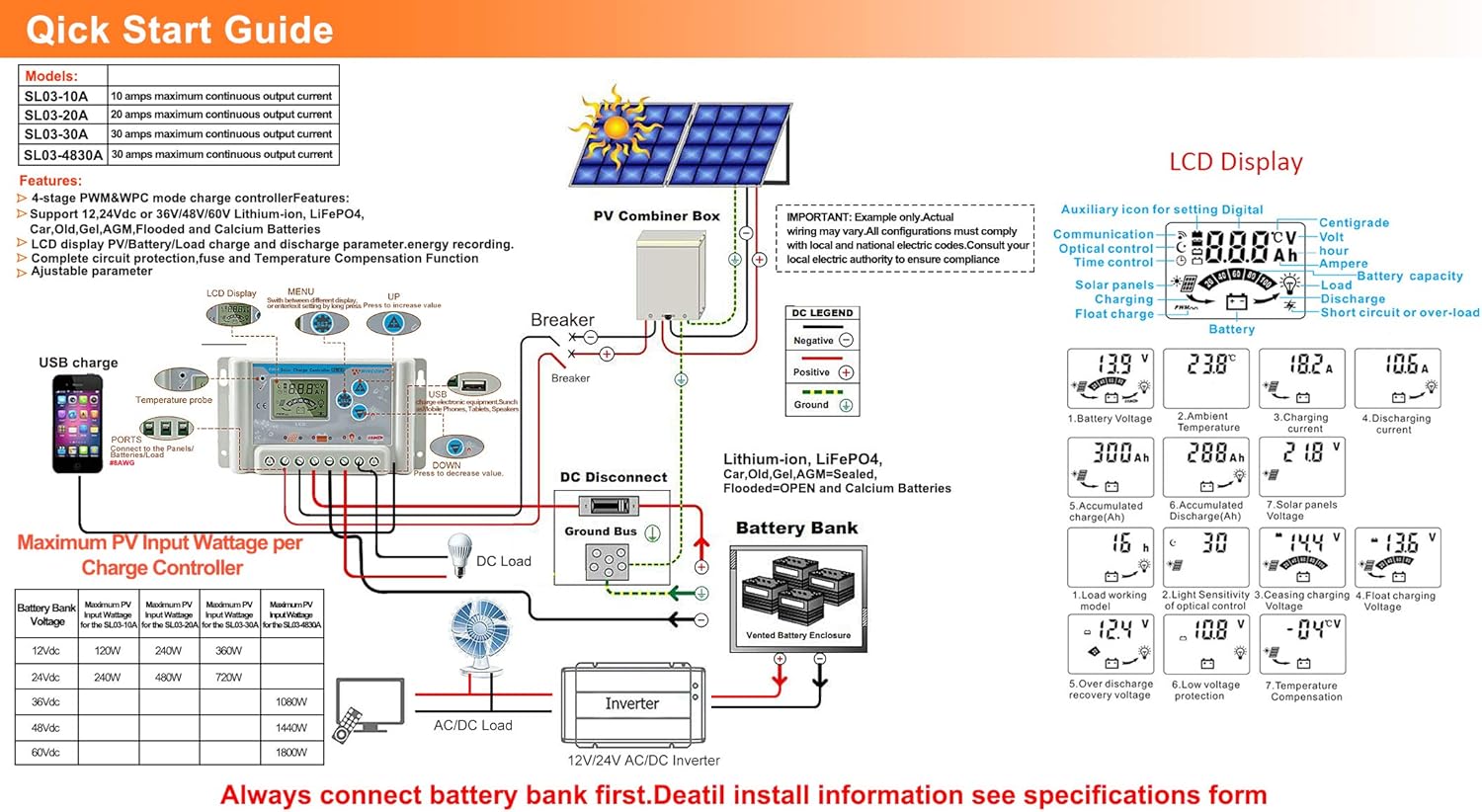
Image: A detailed wiring diagram for the solar charge controller, showing connections for PV combiner box, battery bank, DC load, and inverter. It also illustrates the LCD display and various parameters.
4.3 Video Guide: How to Connect the Controller
Video: This video demonstrates the correct wiring procedure for the PowMr SL03-30A Solar Charge Controller, showing how to connect the battery and solar panels. It also shows how to browse the interface and adjust settings.
5. การดำเนินการ
จอแสดงผล LCD 5.1 และปุ่มต่างๆ
The controller features an LCD display and three buttons for operation: UP, DOWN, and SET.
- ปุ่มขึ้น: Navigates through display interfaces, increases parameter values.
- ปุ่มลง: Navigates through display interfaces, decreases parameter values.
- ปุ่ม ตลท.: Enters/exits setting mode, confirms parameter changes.
5.2 Browsing Display Interfaces
Press the UP or DOWN button to cycle through various display interfaces, including battery voltage, charging current, accumulated discharge, and load status.
5.3 การตั้งค่าพารามิเตอร์
To enter the setting interface, long-press the SET button for 5 seconds. Use the UP and DOWN buttons to adjust values and the SET button to confirm and move to the next parameter. Long-press SET again to save changes and exit.
พารามิเตอร์ที่สามารถปรับได้แก่:
- ประเภทแบตเตอรี่: Select the correct battery type (e.g., Lead-Acid, Lithium).
- โหมดควบคุมโหลด: Set timer for load operation (e.g., 24H for continuous, 16H for dusk-to-dawn).
- ชาร์จ Voltage: Adjust maximum charge voltage.
- การตัดจำหน่ายฉบับที่tage: กำหนดปริมาตรขั้นต่ำtage before load disconnection.
- ปล่อยประจุ เชื่อมต่อใหม่ Voltage: ตั้งค่าระดับเสียงtage at which the load reconnects.
Refer to the "Specifications" section for default and adjustable ranges for each parameter.
6. ฟังก์ชั่นการป้องกัน

Image: A circular diagram illustrating the eight electronic protection features of the PowMr SL03-30A Solar Charge Controller, including power off memory, short-circuit, over-charging, open-circuit, over-load, under-voltage discharge, over-heat, and dual MOSFET reverse current protection.
The PowMr SL03-30A controller incorporates multiple protection mechanisms to ensure the safety and longevity of your solar system:
- การป้องกันการชาร์จเกิน: ป้องกันแบตเตอรี่เสียหายจากการชาร์จมากเกินไป
- การป้องกันการคายประจุเกิน: ตัดการเชื่อมต่อโหลดเมื่อแรงดันแบตเตอรี่ลดลงtagค่า e ลดลงต่ำกว่าระดับที่ปลอดภัย
- การป้องกันการลัดวงจร: ปิดเครื่องอัตโนมัติเมื่อเกิดไฟฟ้าลัดวงจร
- Open-circuit Protection: Protects the system if the solar panel circuit is open.
- การป้องกันขั้วย้อนกลับ: Prevents damage from incorrect battery or solar panel connections.
- การป้องกันไฟเกิน: Disconnects the load if current exceeds the rated limit.
- การป้องกันความร้อนเกิน: ลดกำลังไฟหรือปิดเครื่องหากอุณหภูมิภายในของตัวควบคุมสูงเกินไป
- ปิดหน่วยความจำ: ยังคงการตั้งค่าไว้แม้หลังจากไฟดับ
7. ข้อมูลจำเพาะ

Image: A comprehensive table detailing the specifications for PowMr SL03-10A, SL03-20A, SL03-30A, and SL03-40A models, including normal battery voltage, charge/discharge current, battery type, system recognize range, charging regulation, maximum PV open circuit voltage, and various protection parameters.
| พารามิเตอร์ | Value (SL03-30A) |
|---|---|
| ปริมาณแบตเตอรี่ปกติtage | อัตโนมัติ 12V / 24V |
| กระแสไฟชาร์จ | 30เอ |
| กระแสไฟปล่อย | 30เอ |
| ประเภทแบตเตอรี่ | Lead-Acid Battery (Flooded, AGM, Gel, Calcium), LiFePO4 (Lithium) |
| System Recognize Range | Lead-Acid Battery: 8V-15V(12V System), 18V-30V(24V System) LiFePO4: 8V-15V(12V), 18V-30V(24V) |
| Charging Regulation | Bulk, Absorption, Float, Equalization |
| แม็กซ์ PV Open Circuit Voltagอี (Voc) | <= 50V |
| Max. PV Input Wattagอี (12V/24V) | 360วัตต์/720วัตต์ |
| Stop-charge Voltage | Default 14.4V (12V), 28.8V (24V) (adjustable) |
| Float-charge Voltage | Default 13.6V (12V), 27.2V (24V) (adjustable) |
| ปริมาณต่ำtage Reconnected | Default 12.4V (12V), 24.8V (24V) (adjustable) |
| ปริมาณต่ำtage การตัดการเชื่อมต่อ | Default 10.8V (12V), 21.6V (24V) (adjustable) |
| No Load Losses | <10มิลลิแอมป์ |
| การชดเชยอุณหภูมิแบตเตอรี่ | Automatic with optional NTC thermal probe (adjustable) |
| อุณหภูมิในการทำงาน | -20°C ถึง +60°C |
| Outline Size (L*W*H) | 143*77*40มม. |
| ระยะห่างของรูยึด | 134*55มม. |
| น้ำหนัก | 260กรัม |
8 การแก้ไขปัญหา
This section provides solutions to common issues you might encounter with your PowMr SL03-30A Solar Charge Controller.
| ปัญหา | สาเหตุที่เป็นไปได้ | สารละลาย |
|---|---|---|
| จอแสดงผลคอนโทรลเลอร์ปิดอยู่ | ไม่มีแบตเตอรี่เชื่อมต่อหรือไม่มีแรงดันไฟฟ้าของแบตเตอรี่tagอีต่ำเกินไป | Connect the battery correctly. Ensure battery voltage สูงกว่า 8V |
| "LLL" or "HHH" displayed on screen. | No PV input or PV voltage ต่ำ/สูงเกินไป | Ensure solar panels are connected and receiving sunlight. Check PV voltage. |
| แบตเตอรี่ไม่ชาร์จ | Solar panel not connected, insufficient sunlight, or incorrect wiring. | Check solar panel connections and ensure adequate sunlight. Verify wiring polarity. |
| การโหลดไม่ทำงาน | โหลดถูกตัดการเชื่อมต่อ แรงดันแบตเตอรี่tage too low (over-discharge protection), or load control settings. | Check load connections. Charge battery. Adjust load control timer (e.g., set to 24H for continuous). |
| ตัวควบคุมมีความร้อนสูงเกินไป | Poor ventilation or excessive load/charging current. | Ensure proper ventilation around the controller. Reduce load or charging current if consistently overheating. |
9. การบำรุงรักษา
การบำรุงรักษาอย่างสม่ำเสมอจะช่วยให้ตัวควบคุมการชาร์จพลังงานแสงอาทิตย์ทำงานได้อย่างมีประสิทธิภาพสูงสุดและยืดอายุการใช้งาน
- ความสะอาด : รักษาตัวควบคุมให้สะอาด ปราศจากฝุ่นและเศษขยะ ใช้ผ้าแห้งเช็ดทำความสะอาด
- การเชื่อมต่อ: Periodically check all wiring connections for tightness and corrosion. Loose connections can cause overheating and poor performance.
- การระบายอากาศ : ตรวจสอบให้แน่ใจว่าช่องระบายอากาศไม่ถูกปิดกั้น เพื่อให้ความร้อนระบายออกได้อย่างเหมาะสม
- สุขภาพแบตเตอรี่: ตรวจสอบปริมาณแบตเตอรี่tage and health regularly. Replace batteries as needed.
- สภาพแวดล้อม : Ensure the controller is operating within its specified temperature and humidity ranges.
10. การรับประกันและการสนับสนุน
For warranty information, technical support, or service inquiries, please contact PowMr customer service through the retailer where the product was purchased or visit the official PowMr website. Please have your model number (SL03-30A) and purchase date available when contacting support.
หากต้องการข้อมูลเพิ่มเติม โปรดเยี่ยมชม PowMr Store.
Ask a question about this manual
Ask about setup, troubleshooting, compatibility, parts, safety, or missing instructions. Manuals+ will review the question and use this page’s manual context to help answer it.