
การแนะนำ
The Clarity AltoPlus Amplified Phone is designed to provide clear and accessible communication for individuals with hearing loss or low vision. This manual provides detailed instructions for setting up, operating, and maintaining your phone, ensuring optimal performance and user experience.
ข้อมูลด้านความปลอดภัยที่สำคัญ
- อย่าให้โทรศัพท์โดนน้ำหรือความชื้น
- ใช้เฉพาะอะแดปเตอร์ไฟฟ้าที่มาพร้อมกับเครื่องเท่านั้น
- ควรวางโทรศัพท์ให้ห่างจากแหล่งความร้อนและแสงแดดโดยตรง
- อย่าพยายามเปิดหรือซ่อมแซมโทรศัพท์ด้วยตนเอง แนะนำให้ส่งช่างผู้ชำนาญเข้ารับบริการทั้งหมด
- เก็บให้พ้นจากมือเด็ก
เนื้อหาแพ็คเกจ
- Clarity AltoPlus Phone Base
- โทรศัพท์มือถือ
- สายโทรศัพท์แบบขด
- สายโทรศัพท์
- อะแดปเตอร์ AC
- คู่มือการใช้งาน (เอกสารนี้)
คู่มือการติดตั้ง
1. การเชื่อมต่อโทรศัพท์
- Connect one end of the coiled handset cord to the handset and the other end to the handset jack on the side of the phone base.
- Connect one end of the telephone line cord to the LINE jack on the back of the phone base and the other end to a telephone wall jack.
- Connect the AC power adapter to the DC IN jack on the back of the phone base and plug the other end into a standard electrical outlet.

รูปที่ 1: ด้านข้าง view of the Clarity AltoPlus phone, illustrating the connection points for the handset, telephone line, and power adapter.
2. การติดตั้งแบตเตอรี่ (สำรอง)
The AltoPlus phone requires 4 AA batteries (not included) for backup power during outages. Locate the battery compartment on the underside of the phone base, insert the batteries according to the polarity markings, and close the compartment cover.
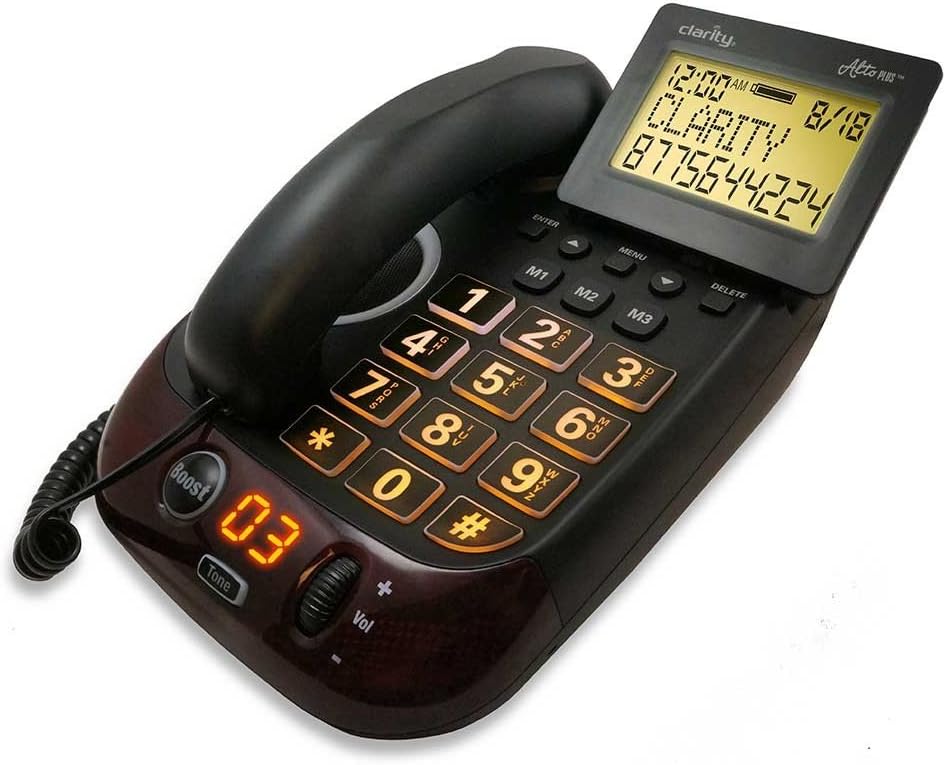
Figure 2: The Clarity AltoPlus Amplified Phone, displaying its large buttons, backlit screen, and the 'Boost' feature.
คำแนะนำการใช้งาน
การโทรออกและรับสาย
- ในการโทรออก: Lift the handset or press the SPEAKERPHONE button, then dial the desired number using the large keypad.
- วิธีรับสาย: When the phone rings, lift the handset or press the SPEAKERPHONE button.
- วิธีวางสาย: Place the handset back in the cradle or press the SPEAKERPHONE button again if using speakerphone.
Ampคุณสมบัติการขยาย
The AltoPlus offers significant amplification to enhance call clarity:
- สูงถึง 53dB Ampการทำให้บริสุทธิ์: Adjust the volume control dial on the side of the phone to increase the incoming sound level.
- Boost Override: กดปุ่ม บูสต์ button to activate maximum amplification for all calls. The indicator light will illuminate when Boost is active.
- การควบคุมเสียง: Use the Tone button and associated dial to adjust the frequency range of the incoming audio, customizing it to your specific hearing needs.
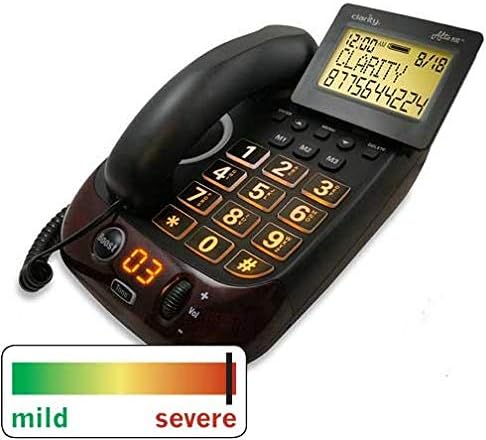
Figure 3: The Clarity AltoPlus phone, highlighting its capability to assist users across a spectrum of hearing loss, from mild to severe.
Talking Caller ID and Keypad
- พูดคุย ID ผู้โทร: The phone announces the caller's name or number (if available) before you answer, providing an audible alert in addition to the visual display.
- Talking Keypad: Each number pressed on the keypad is audibly announced, assisting users with low vision or those who prefer auditory confirmation.
ปุ่มหน่วยความจำ
The phone features three one-touch memory buttons (M1, M2, M3) for frequently called numbers. Refer to the full manual for programming instructions.
ลำโพงโทรศัพท์
Press the SPEAKERPHONE button to engage hands-free communication. The built-in microphone and speaker allow for clear conversations without holding the handset.
Headset and Neckloop Jacks
The AltoPlus includes a 2.5mm headset jack for connecting a compatible headset and a 3.5mm neckloop jack for use with hearing aids equipped with a T-coil.
Outgoing Speech Amplification (OSA)
The Outgoing Speech Amplification feature increases your voice by up to 15dB, making it easier for the person you are speaking with to hear you clearly.
การซ่อมบำรุง
- การทำความสะอาด: เช็ดโทรศัพท์ด้วยผ้าเนื้อนุ่มและแห้งamp ผ้า. อย่าใช้สารเคมีที่รุนแรงหรือน้ำยาทำความสะอาดที่มีฤทธิ์กัดกร่อน
- การเปลี่ยนแบตเตอรี่: Replace the 4 AA backup batteries annually or as needed to ensure continuous operation during power outagใช่
การแก้ไขปัญหา
- ไม่มีเสียงสัญญาณโทรศัพท์: Ensure all cords (handset, line, power) are securely connected. Check if the telephone line is active.
- เลขที่ Ampการทำให้บริสุทธิ์: Verify the Boost button is pressed and the volume control is adjusted.
- จอแสดงผลไม่ทำงาน: Check the power connection. If using battery backup, ensure batteries are fresh and correctly installed.
- ID ผู้โทรไม่แสดง: Ensure Caller ID service is subscribed through your telephone service provider.
ข้อมูลจำเพาะทางเทคนิค
- Ampการทำให้บริสุทธิ์: สูงถึง 53dB
- ระดับเสียงกริ่ง: Up to 100dB with visual indicator
- หน้าจอ: 4-inch backlit display with large font
- Outgoing Speech Amplification (OSA): 15เดซิเบล
- แบตเตอรี่สำรอง: ต้องใช้แบตเตอรี่ 4 AA (ไม่รวม)
- ขนาด : 10.4" x 8" x 4.4"
- ใบรับรอง: TIA-4953 certified for mild, moderate, and severe hearing loss; TIA1083 hearing aid compatible
- แหล่งพลังงาน: AC Adapter, AA Battery Powered (for backup)
- ประเภทผู้โทรออก: ปุ่มกดเดียว
- ประเภทระบบตอบรับ: Digital (if applicable, check model variant)
- การระบุผู้โทร: ใช่
- ยูพีซี: 826725767765
- ASIN: B07H41NB3V
การรับประกันและการสนับสนุน
The Clarity AltoPlus Amplified Phone comes with a manufacturer's warranty. Please refer to the warranty card included with your purchase for specific terms and conditions. For technical support, troubleshooting assistance, or warranty claims, please contact Clarity customer service.