
Bluesound PULSE 2i WHT
Bluesound Pulse 2i Wireless Multi-Room Smart Speaker User Manual
Model: PULSE 2i WHT
การแนะนำ
The Bluesound Pulse 2i is a premium, high-resolution streaming music speaker designed to fill large spaces with rich, clear audio. As part of the Bluesound ecosystem, it offers unparalleled sound quality and versatile connectivity options for a seamless multi-room audio experience. This manual provides detailed instructions for setting up, operating, maintaining, and troubleshooting your Pulse 2i speaker.

รูปที่ 1 : ด้านหน้า view of the Bluesound Pulse 2i Wireless Smart Speaker.
คู่มือการติดตั้ง
1. แกะกล่อง
นำส่วนประกอบทั้งหมดออกจากบรรจุภัณฑ์อย่างระมัดระวัง กล่องควรบรรจุ:
- ลำโพง
2. การจัดวางเริ่มต้น
Place your Pulse 2i speaker on a stable, flat surface. For optimal sound performance, ensure it is not obstructed and has clear space around it. The speaker is designed to deliver powerful audio in large rooms.

Figure 2: The Pulse 2i speaker positioned on a surface, ready for use.
3. การเชื่อมต่อไฟฟ้า
Connect the provided power cable to the AC input on the back of the Pulse 2i speaker, then plug the other end into a wall outlet. The speaker will power on automatically.
4. การเชื่อมต่อเครือข่าย
The Pulse 2i supports both Wi-Fi and Gigabit Ethernet for network connectivity. For the most stable connection, especially when streaming high-resolution audio, a wired Ethernet connection is recommended.
- ไวไฟ : The speaker features leading-class dual-band Wi-Fi to ensure zero dropouts or delays. Follow the instructions in the BluOS Controller App to connect to your wireless network.
- อีเธอร์เน็ต: Connect an Ethernet cable from your router or network switch to the LAN/USB port on the back of the speaker.
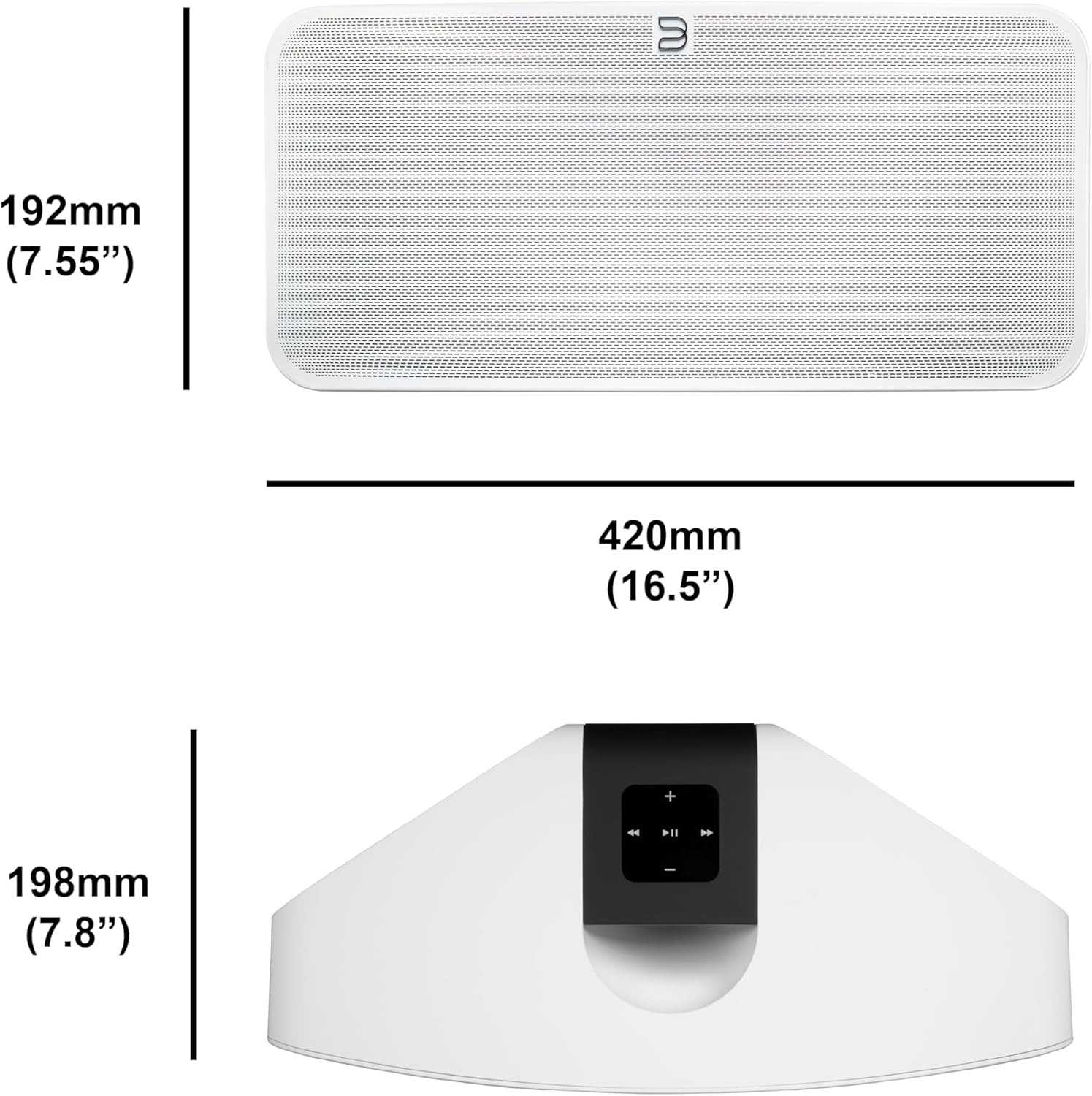
Figure 3: Rear panel of the Pulse 2i, highlighting the power input, LAN/USB, and optical/analog input ports.
สินค้าเกินview วีดีโอ
Official product video demonstrating the features and capabilities of the Bluesound Pulse 2i speaker, including its design and connectivity options.
คำแนะนำการใช้งาน
1. BluOS Controller App
The primary method for controlling your Pulse 2i is through the BluOS Controller App, available for smartphones, tablets, and desktop computers. This app allows you to:
- Browse and play music from various streaming services (Spotify, Tidal, Amazon Music HD, Qobuz, etc.)
- Access your local music library and internet radio stations.
- Group multiple Bluesound players for a synchronized multi-room audio experience.
- Adjust volume, playback, and sound settings.

Figure 4: Top panel of the Pulse 2i with touch controls for playback, volume, and track navigation.
2. การสตรีมเพลง
The Pulse 2i supports high-resolution audio playback up to 24-bit/192 kHz. You can stream directly from Apple devices using AirPlay 2 or connect via two-way Bluetooth with Qualcomm aptX HD for high-quality wireless audio.
3. การควบคุมด้วยเสียง
The speaker is compatible with Amazon Alexa and Apple Siri, allowing for hands-free voice control of your music playback. Simply enable the Bluesound skill/action in your voice assistant app and link your account.
4. ระบบเสียงหลายห้อง
Expand your audio system by adding more Bluesound players throughout your home. Use the BluOS app to group speakers and play the same music in multiple rooms, or different music in each room.

Figure 5: The Pulse 2i seamlessly integrates into a kitchen environment, providing background music.

Figure 6: The Pulse 2i enhances the audio experience in a social setting.
การบำรุงรักษาและการดูแล
To ensure the longevity and optimal performance of your Pulse 2i speaker, follow these care guidelines:
- การทำความสะอาด: Use a soft, dry cloth to wipe the exterior surfaces. Do not use liquid cleaners, aerosols, or abrasive chemicals, as they may damage the finish.
- การจัดวาง: หลีกเลี่ยงการวางลำโพงไว้กลางแสงแดดโดยตรง ใกล้แหล่งความร้อน หรือในบริเวณที่มีความชื้นสูง
- การระบายอากาศ : ตรวจสอบให้แน่ใจว่ามีการระบายอากาศที่เหมาะสมรอบๆ ลำโพงเพื่อป้องกันความร้อนสูงเกินไป อย่าปิดกั้นช่องระบายอากาศใดๆ
- พลัง: ถอดสายไฟออกขณะเกิดพายุฝนฟ้าคะนองหรือเมื่อไม่ได้ใช้งานเป็นเวลานาน
การแก้ไขปัญหา
If you encounter issues with your Pulse 2i speaker, refer to the table below for common problems and their solutions.
| ปัญหา | สาเหตุที่เป็นไปได้ | สารละลาย |
|---|---|---|
| No power/No lights | สายไฟหลุดหรือเต้ารับชำรุด | ตรวจสอบการเชื่อมต่อสายไฟ ลองเสียบปลั๊กเข้ากับเต้ารับอื่นดู |
| ไม่มีเสียง | Volume too low, incorrect input selected, or network issue. | Increase volume. Verify correct input in BluOS app. Check network connection. |
| ไม่สามารถเชื่อมต่อ Wi-Fi ได้ | Incorrect Wi-Fi password, router too far, or network interference. | Re-enter Wi-Fi password. Move speaker closer to router. Reduce interference from other devices. |
| การขัดจังหวะการเล่นเพลง | Weak Wi-Fi signal or network congestion. | Ensure strong Wi-Fi signal. Consider using a wired Ethernet connection. |
หากปัญหายังคงมีอยู่หลังจากลองวิธีแก้ไขเหล่านี้แล้ว โปรดติดต่อฝ่ายสนับสนุนลูกค้า
ข้อมูลจำเพาะทางเทคนิค
| คุณสมบัติ | รายละเอียด |
|---|---|
| ชื่อรุ่น | PULSE 2i WHT |
| ประเภทลำโพง | มัลติรูม |
| เทคโนโลยีการเชื่อมต่อ | บลูทู ธ Wi-Fi |
| โหมดเอาต์พุตเสียง | สเตอริโอ |
| กำลังขับสูงสุดของลำโพง | 25 วัตต์ |
| น้ำหนักสินค้า | 11.11 ปอนด์ |
| ขนาดสินค้า | ลึก 16 นิ้ว x กว้าง 8 นิ้ว x สูง 7 นิ้ว |
| อุปกรณ์ที่รองรับ | สมาร์ทโฟน |
| วิธีการควบคุม | เสียง |
| ผู้ผลิต | Lenbrook Group |
ข้อมูลการรับประกัน
The Bluesound Pulse 2i comes with a limited warranty. Please refer to the warranty card included with your product or visit the official Bluesound webเว็บไซต์สำหรับข้อกำหนดและเงื่อนไขโดยละเอียดเกี่ยวกับการรับประกันและการบริการ
การสนับสนุนลูกค้า
For further assistance, technical support, or service inquiries, please contact Bluesound customer support through their official website or the contact information provided in your product packaging. Ensure you have your model number (PULSE 2i WHT) and serial number ready when contacting support.
Ask a question about this manual
Ask about setup, troubleshooting, compatibility, parts, safety, or missing instructions. Manuals+ will review the question and use this page’s manual context to help answer it.