
1. บทนำ
ขอบคุณสำหรับการซื้อasing the GooDee Mini Projector GD-DE-9. This manual provides essential information for setting up, operating, and maintaining your projector. Please read it thoroughly before use to ensure optimal performance and safety.
The GooDee GD-DE-9 is a portable LED projector designed for home entertainment, gaming, and presentations. It features a native resolution of 800x480p, supports up to 1080p input, and offers multiple connectivity options including HDMI, VGA, USB, AV, and SD card. Its advanced cooling system ensures quiet operation, and the integrated 2W speaker provides clear audio.

รูปที่ 1.1 : ด้านหน้า view of the GooDee Mini Projector GD-DE-9.
2. ข้อมูลด้านความปลอดภัย
เพื่อป้องกันไฟไหม้ ไฟฟ้าช็อต หรือการบาดเจ็บ โปรดปฏิบัติตามข้อควรระวังด้านความปลอดภัยต่อไปนี้:
- ห้ามเปิดโปรเจคเตอร์asinก. ส่งต่อการบริการทั้งหมดไปยังเจ้าหน้าที่บริการที่มีคุณสมบัติเหมาะสม
- อย่าให้โปรเจ็กเตอร์โดนฝนหรือความชื้นเพื่อป้องกันไฟไหม้หรือไฟฟ้าช็อต
- ตรวจสอบให้แน่ใจว่ามีการระบายอากาศที่เหมาะสม อย่าปิดกั้นช่องระบายอากาศ
- ใช้เฉพาะอะแดปเตอร์ไฟฟ้าที่มาพร้อมกับโปรเจ็กเตอร์เท่านั้น
- หลีกเลี่ยงการมองเข้าไปในเลนส์โปรเจ็กเตอร์โดยตรงเมื่อเลนส์amp อยู่บนแล้ว
- วางโปรเจ็กเตอร์บนพื้นผิวที่ได้ระดับและมั่นคง
- ถอดปลั๊กโปรเจคเตอร์ออกจากเต้าเสียบไฟขณะเกิดพายุฝนฟ้าคะนองหรือเมื่อไม่ได้ใช้งานเป็นเวลานาน
3. เนื้อหาบรรจุภัณฑ์
กรุณาตรวจสอบว่าสินค้าทั้งหมดรวมอยู่ในแพ็คเกจของคุณ:
- GooDee Mini Projector GD-DE-9
- อะแดปเตอร์แปลงไฟ
- รีโมทคอนโทรล
- สาย HDMI
- เคเบิ้ล AV
- คู่มือการใช้งาน
4. สินค้าหมดview
4.1 ส่วนประกอบของโปรเจ็กเตอร์

รูปที่ 4.1: ด้านข้าง view พร้อมพอร์ตอินพุต/เอาต์พุต
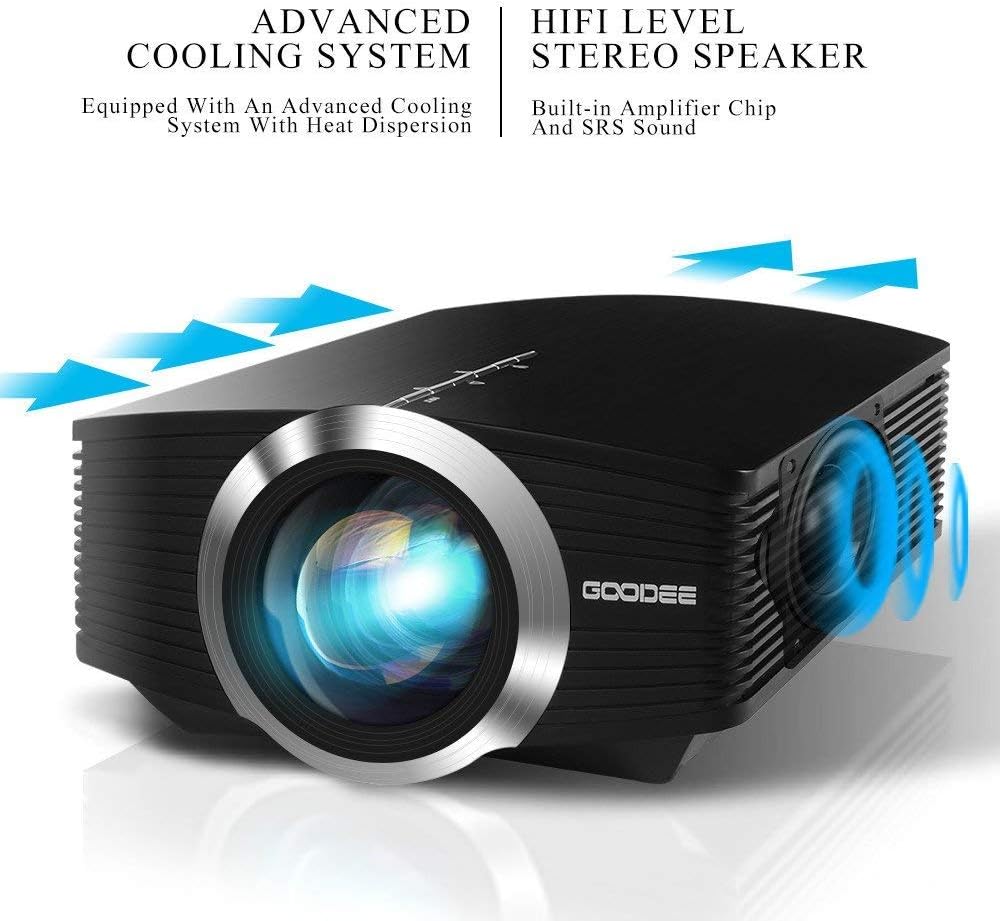
The projector features a direct light path optical technology for enhanced brightness and an advanced cooling system for quiet operation.

Figure 4.2: Advanced Cooling System and HIFI Stereo Speaker.
4.2 การควบคุมระยะไกล
The remote control allows you to operate the projector from a distance. Insert two AAA batteries (not included) into the remote control before use.

รูปที่ 4.3: การควบคุมระยะไกล
5. การตั้งค่า
5.1 ตำแหน่งและการฉายภาพ
The image size is adjusted by changing the projection distance. For optimal viewing, a projection distance between 1.5 to 4 meters is recommended, yielding screen sizes from 50 to 130 inches. The best projection size is typically 80-100 inches at a distance of 6.6-8 feet.

Figure 5.1: Projection Distance and Screen Size Chart.
รูปที่ 5.2: อดีตample Projector Placement.
5.2 การเชื่อมต่อสายไฟ
ต่ออะแดปเตอร์แปลงไฟเข้ากับพอร์ตอินพุตไฟของโปรเจ็กเตอร์ จากนั้นเสียบอะแดปเตอร์เข้ากับเต้ารับไฟฟ้า
5.3 การเชื่อมต่ออุปกรณ์ป้อนข้อมูล
The projector supports various input sources including HDMI, VGA, USB, AV, and SD card. It can connect to PCs, laptops, DVD players, PS3/4, Xbox ONE, and smartphones/tablets (via MHL cable and adapter, not included).

Figure 5.3: Multimedia Connection Diagram.
To connect a smartphone or tablet, ensure your device supports MHL functionality. You will need an MHL cable and a suitable adapter (not included).

Figure 5.4: Connecting Smartphones/Tablets.
5.4 Focus Adjustment and Keystone Correction
Adjust the focus ring on the projector lens until the image is clear. Use the keystone correction feature to adjust the image if it appears trapezoidal. The projector supports a ±15° keystone correction.
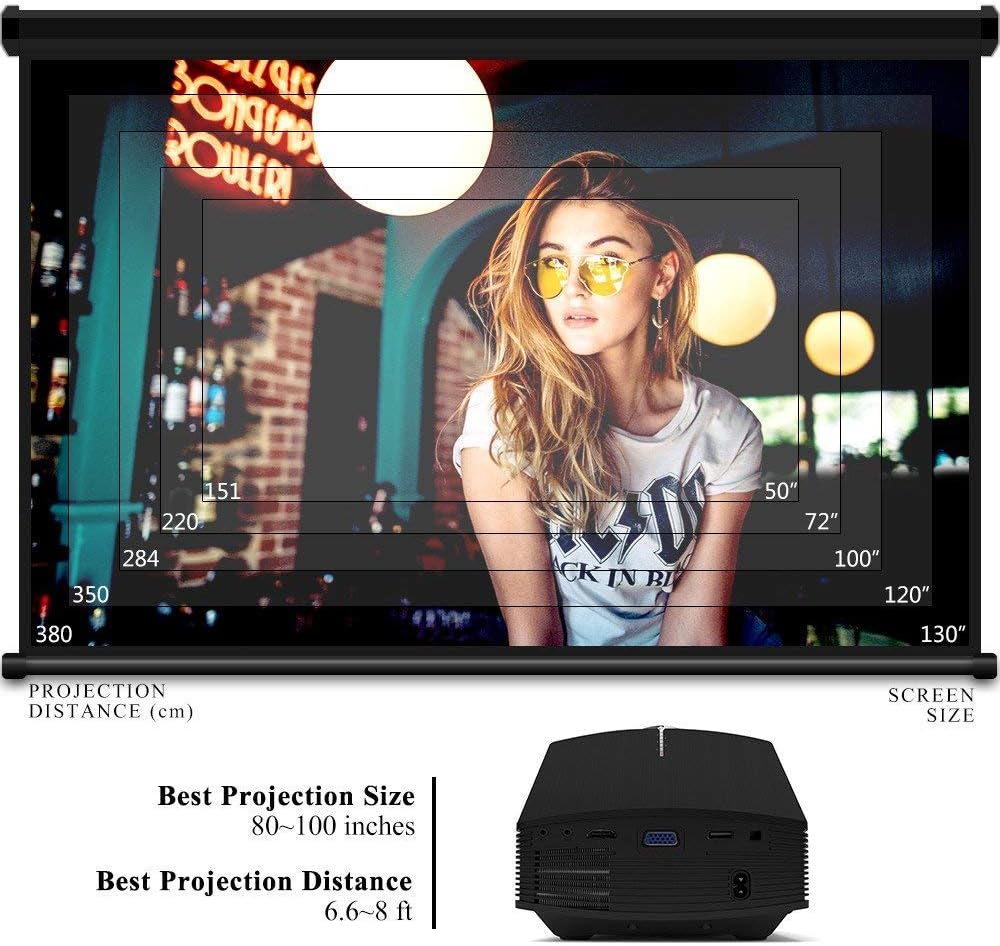
Figure 5.5: Focus and Keystone Adjustment.
6. คู่มือการใช้งาน
6.1 เปิด/ปิดเครื่อง
กดปุ่มเปิด/ปิดบนตัวโปรเจ็กเตอร์หรือรีโมทคอนโทรลเพื่อเปิดหรือปิดโปรเจ็กเตอร์
6.2 การเลือกแหล่งที่มา
Press the 'Source' button on the projector or remote control to cycle through available input sources (HDMI, VGA, USB, AV, SD). Select the desired input source corresponding to your connected device.
6.3 การนำทางเมนู
Use the arrow buttons on the projector or remote control to navigate through the on-screen menu. Press 'OK' or 'Enter' to confirm selections. Use the 'Menu' button to access settings and 'Exit' or 'Return' to go back.
6.4 เอาต์พุตเสียง
The projector has a built-in 2W speaker. For external audio, connect speakers or headphones to the 3.5mm audio output jack on the projector.
7. การบำรุงรักษา
7.1 การทำความสะอาดเลนส์
Use a soft, lint-free cloth or lens cleaning paper to gently wipe the projector lens. Do not use abrasive cleaners or solvents.
7.2 การทำความสะอาดช่องระบายอากาศ
Regularly clean the air vents to ensure proper airflow and prevent overheating. Use a soft brush or compressed air to remove dust accumulation.
7.3 พื้นที่จัดเก็บ
When not in use, store the projector in a cool, dry place, away from direct sunlight and extreme temperatures. Use the original packaging or a protective case to prevent dust and damage.
8 การแก้ไขปัญหา
| ปัญหา | สาเหตุที่เป็นไปได้ | สารละลาย |
|---|---|---|
| ไม่มีภาพแสดง | Incorrect input source selected; Cable not connected properly; Device not powered on. | Select the correct input source; Check all cable connections; Ensure the source device is powered on. |
| ภาพเบลอ | ไม่ได้ปรับโฟกัส โปรเจ็กเตอร์อยู่ใกล้/ไกลจากหน้าจอมากเกินไป | ปรับวงแหวนโฟกัส ปรับระยะการฉายภาพ |
| รูปภาพเป็นรูปสี่เหลี่ยมคางหมู | โปรเจ็กเตอร์ไม่ตั้งฉากกับจอ | ปรับการแก้ไขคีย์สโตน |
| ไม่มีเสียง | ระดับเสียงเบาเกินไป; ปิดเสียง; ไม่ได้เชื่อมต่อ/ตั้งค่าอุปกรณ์เสียงภายนอก | เพิ่มระดับเสียง; เปิดเสียง; ตรวจสอบการเชื่อมต่อและการตั้งค่าเสียงภายนอก |
| รีโมตคอนโทรลไม่ทำงาน | แบตเตอรี่อ่อน/หมด; มีสิ่งกีดขวางระหว่างรีโมทและโปรเจ็กเตอร์; เซ็นเซอร์รีโมทถูกปิดกั้น | เปลี่ยนแบตเตอรี่; กำจัดสิ่งกีดขวาง; ตรวจสอบให้แน่ใจว่าเซ็นเซอร์ระยะไกลไม่มีสิ่งกีดขวาง |
9. ข้อมูลจำเพาะ
| คุณสมบัติ | รายละเอียด |
|---|---|
| ยี่ห้อ | กูดี |
| หมายเลขรุ่น | GD-DE-9 |
| ประเภทจอภาพ | จอแอลซีดี |
| ความละเอียดดั้งเดิม | 800 x 480 พิกเซล |
| ความละเอียดที่รองรับ | สูงถึง 1080p |
| ความสว่าง | 3000 ลูเมน (LED) |
| Lamp ชีวิต | 30,000 ชั่วโมง |
| เทคโนโลยีการเชื่อมต่อ | HDMI, USB, VGA, AV, การ์ด SD |
| ฮาร์ดแวร์อินเตอร์เฟซ | HDMI, USB, VGA |
| ลำโพงในตัว | 2W Stereo Speaker |
| ระยะฉายภาพ | 1.5 - 4 meters (6.6 - 8 feet recommended) |
| ขนาดหน้าจอ | 50 - 130 inches (80 - 100 inches recommended) |
| Keystone Correction | ±15° แบบแมนนวล |
| ฟอร์มแฟกเตอร์ | พกพาได้ |
| ประเภทการติดตั้ง | ที่วางบนโต๊ะ |
| สี | สีดำ |
| ขนาดแพ็คเกจ | 33 x 21.6 x 11.8 ซม. |
| น้ำหนักสินค้า | 1.48 กก. |
| ข้อแนะนำการใช้ | เกมมิ่ง, โฮมเธียเตอร์ |
| อุปกรณ์ที่รองรับ | Smartphone, PC, Laptop, DVD Player, PS3/4, Xbox ONE, Fire TV Stick |
10. การรับประกันและการสนับสนุน
GooDee offers a 3-year warranty for this projector. If you encounter any issues or are not completely satisfied with your purchase, please contact GooDee customer support. A refund or replacement is available within the first 2 months of purchase. Customer satisfaction is our top priority.
For support, please refer to the contact information provided on the GooDee official webไซต์หรือแพลตฟอร์มการซื้อของคุณ