
การแนะนำ
เดอะ เฟนเดอร์ ชampกีต้าร์ไอออน II 50 Amplifier is a versatile and user-friendly amplifier designed for various guitar playing styles. Whether you are a beginner seeking your first practice amp or a seasoned player needing powerful stage gear, this 50-watt amplifier offers a wide range of tones and effects.
คุณสมบัติที่สำคัญ ได้แก่:
- 50 watts of power with a 12-inch Fender special design guitar speaker.
- World-renowned Fender clean and overdrive tones, plus British and modern distortion flavors.
- Multi-effects with two channels, including reverb, delay/echo, chorus, tremolo, and Vibratone.
- TAP button for easy synchronization of delay times and tremolo speeds.
- Auxiliary input for external devices, headphone output for private practice, and a rear-panel USB port.
การตั้งค่า
Follow these steps to set up your Fender Champion II 50 ampเครื่องฟอก:
- การแกะกล่อง: นำไฟล์ ampแกะเครื่องขยายเสียงออกจากบรรจุภัณฑ์ เก็บวัสดุบรรจุภัณฑ์ทั้งหมดไว้สำหรับการขนส่งหรือจัดเก็บในอนาคต
- การจัดวาง: วาง amplifier on a stable, flat surface. Ensure adequate ventilation around the unit.
- การเชื่อมต่อไฟฟ้า: เชื่อมต่อสายไฟที่ให้มาเข้ากับ ampต่อสายไฟเข้าของเครื่องขยายเสียง แล้วเสียบเข้ากับเต้ารับไฟฟ้ากระแสสลับที่เหมาะสม
- การเชื่อมต่อเครื่องมือ: เสียบกีตาร์ของคุณเข้า ป้อนข้อมูล เสียบแจ็คที่แผงด้านหน้าโดยใช้สายเคเบิลเครื่องดนตรีขนาดมาตรฐาน 1/4 นิ้ว
- เปิดเครื่อง: หมุน amplifier's power switch to the ON position. The PWR LED will illuminate.
คำแนะนำการใช้งาน
แผงควบคุมโอเวอร์view
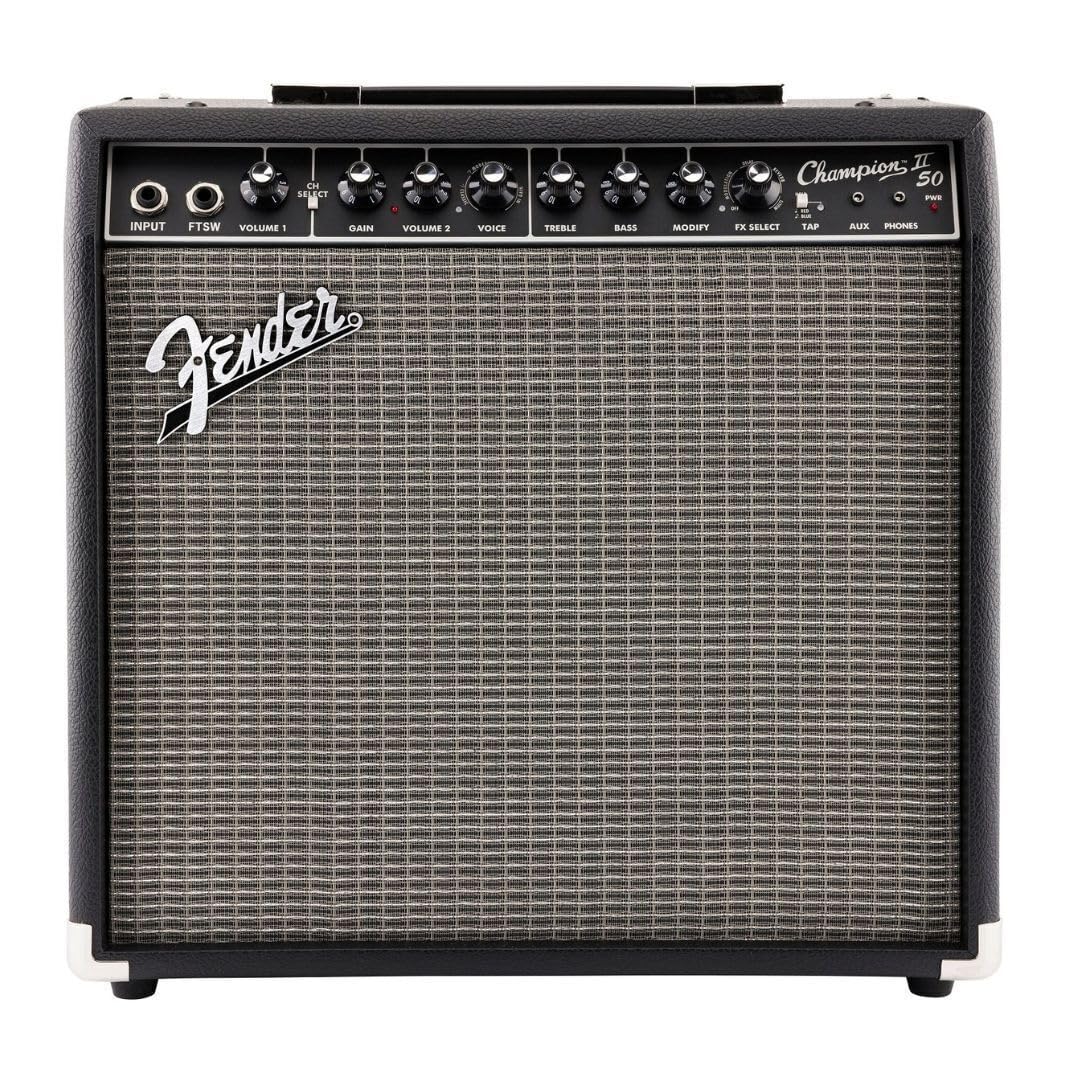
ชampion II 50 features an intuitive control panel for easy tone shaping:

- อินพุต: แจ็คขนาด 1/4 นิ้ว สำหรับเชื่อมต่อเครื่องดนตรีของคุณ
- FTSW (Footswitch): 1/4-inch jack for connecting an optional footswitch to toggle channels or effects.
- เล่มที่ 1: Controls the output level of Channel 1.
- เลือกช่อง: Toggles between Channel 1 (clean) and Channel 2 (voice/effects).
- ได้รับ: Controls the amount of overdrive/distortion in Channel 2.
- เล่มที่ 2: Controls the output level of Channel 2.
- เสียง: เลือกที่แตกต่างกัน amplifier voicings (e.g., Classic Fender, British, Modern Distortion).
- เสียงแหลม: ปรับการตอบสนองความถี่สูง
- เบส: ปรับการตอบสนองความถี่ต่ำ
- แก้ไข: Adjusts a secondary parameter for the selected effect.
- เลือกเอฟเฟ็กต์: Selects from 12 built-in effects (e.g., Reverb, Delay/Echo, Chorus, Tremolo, Vibratone).
- แตะ: Used to set the tempo for time-based effects like delay and tremolo. Hold to activate dotted eighth note delay.
- ช่องเสริม: 1/8-inch stereo input for connecting external audio devices (e.g., MP3 player).
- โทรศัพท์: 1/8-inch stereo output for headphones, automatically mutes the speaker.
- PWR: ไฟ LED แสดงสถานะ
โดยใช้ Amp โมเดลและเอฟเฟกต์
ชampion II 50 offers a variety of amp models and effects to customize your sound:
- Amp Voicings: ใช้ เสียง knob to select different amp types, ranging from classic Fender clean tones to various overdrive and high-gain options.
- เอฟเฟกต์ในตัว: หมุน FX เลือก knob to choose from 12 different effects. The แก้ไข knob allows for fine-tuning of the selected effect's parameters.
- การควบคุมจังหวะ: For effects like delay and tremolo, press the แตะ button repeatedly to set the desired tempo. Holding the แตะ button will activate a dotted eighth note delay function.
การเชื่อมต่อ
การ amplifier provides convenient connectivity options:
- อินพุตเสริม: Connect your music player to the อ๊อกซ์ input to play along with your favorite tracks.
- เอาท์พุตหูฟัง: ใช้ โทรศัพท์ jack for silent practice. The speaker output is automatically muted when headphones are connected.
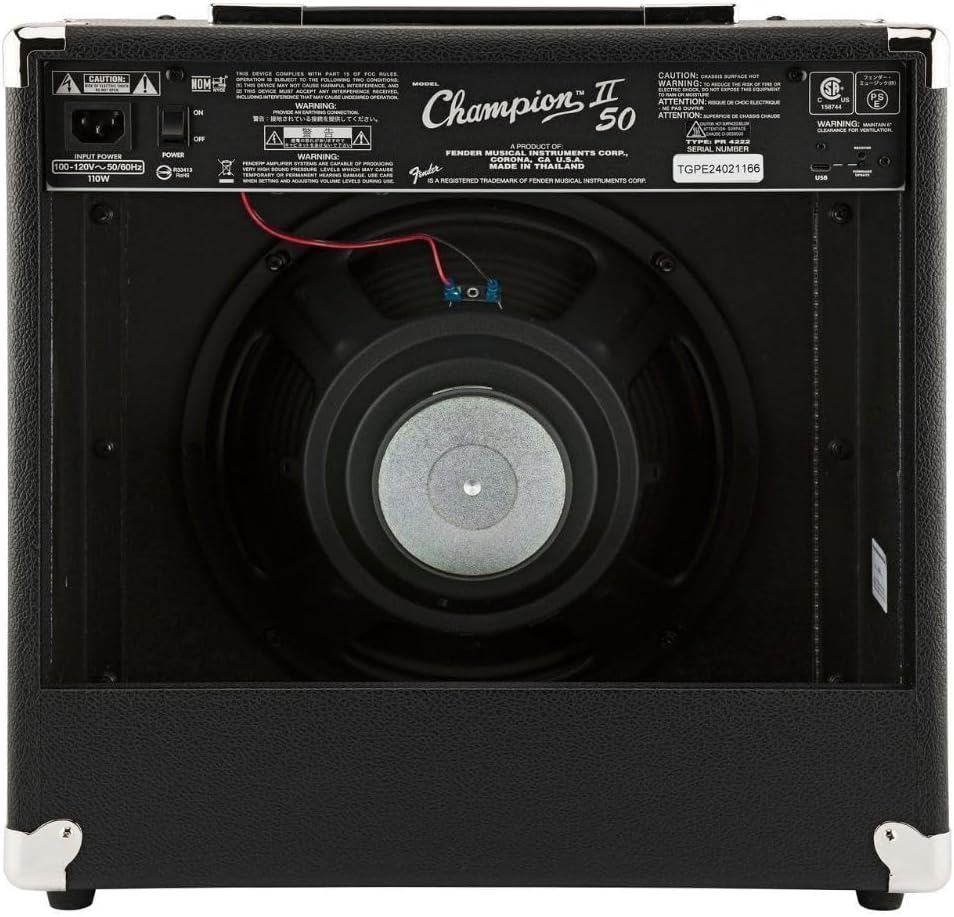
- พอร์ต USB: A rear-panel USB port is available for recording directly to a computer.
วิดีโอผลิตภัณฑ์อย่างเป็นทางการ
1 วิดีโอ: Champไอออน II Amps Demo Video. This video provides a comprehensive demonstration of the features and sound capabilities of the Fender Champไอออน II amplifier series, including the 50-watt model.
2 วิดีโอ: Champไอออน II Amps Demo Video 2. A shorter demonstration showcasing additional tones and effects available on the Fender Champไอออน II ampชุดไลไฟเออร์
การซ่อมบำรุง
การบำรุงรักษาที่เหมาะสมช่วยให้มีอายุการใช้งานยาวนานและประสิทธิภาพการทำงานที่เหมาะสมที่สุด ampเครื่องฟอก:
- การทำความสะอาด: ใช้ผ้าแห้งเนื้อนุ่มทำความสะอาดด้านนอกของตัวเครื่อง ampใช้สารเพิ่มความคมชัด หลีกเลี่ยงน้ำยาทำความสะอาดที่มีฤทธิ์กัดกร่อนหรือตัวทำละลาย
- พื้นที่จัดเก็บ: เมื่อไม่ใช้งาน ให้เก็บ amplifier in a dry, temperature-controlled environment, away from direct sunlight or extreme temperatures.
- การระบายอากาศ : ให้แน่ใจว่า amplifier's vents are not obstructed to prevent overheating.
- การดูแลสายเคเบิล: Always handle power and instrument cables carefully. Avoid bending or crimping them excessively.
การแก้ไขปัญหา
หากคุณพบปัญหาเกี่ยวกับ amplifier, try these basic troubleshooting steps:
- ไม่มีไฟฟ้า: Check if the power cable is securely connected to both the amplifier and the power outlet. Ensure the power switch is ON and the PWR LED is lit. Try a different power outlet.
- ไม่มีเสียง: Verify that your instrument cable is properly connected to both the guitar and the amplifier's INPUT jack. Check the VOLUME knobs for both channels and ensure they are not set to zero. If using headphones, ensure they are fully plugged into the PHONES jack.
- เสียงผิดเพี้ยน (โดยไม่ตั้งใจ): Check the GAIN and VOLUME settings. High GAIN settings are intended for distortion, but excessive levels can cause unwanted clipping. Ensure your instrument's volume is not too high.
- เอฟเฟกต์ไม่ทำงาน: Ensure the FX SELECT knob is not set to OFF. Adjust the MODIFY knob to see if the effect parameter needs adjustment.
ข้อมูลจำเพาะ
| คุณสมบัติ | คำอธิบาย |
|---|---|
| ยี่ห้อ | บังโคลน |
| ชื่อรุ่น | Champion II 50 |
| หมายเลขรุ่น | 2330800000 |
| เอาท์พุต วัดtage | 50 วัตต์ |
| ขนาดลำโพง | 12 นิ้ว |
| ปริมาณช่องสัญญาณเอาต์พุต | 1 (with two selectable input channels) |
| ขนาดสินค้า (ลึก x กว้าง x สูง) | ลึก 19.8 นิ้ว x กว้าง 19.8 นิ้ว x สูง 11.5 นิ้ว |
| น้ำหนักสินค้า | 23 ปอนด์ |
| วัสดุ | Stainless Steel (Enclosure) |
| เอฟเฟกต์ในตัว | 12 (Reverb, Delay/Echo, Chorus, Tremolo, Vibratone, etc.) |
การรับประกันและการสนับสนุน
Your Fender Champกีต้าร์ไอออน II 50 Ampเครื่องขยายเสียงมาพร้อมกับ รับประกันจำกัด 2 ปี. Fender amplifiers are built with unmatched quality, and this warranty covers defects in materials and workmanship for two (2) years from the original purchase date.
For warranty claims, technical support, or service inquiries, please refer to the official Fender website or contact Fender customer service directly. Keep your proof of purchase for warranty validation.


