
การแนะนำ
This manual provides essential instructions for setting up, operating, and maintaining your Optoma W335 WXGA DLP Professional Projector. Designed for business presentations, classrooms, and home use, this projector delivers bright, clear images with a long lamp life. Please read this manual thoroughly before use to ensure optimal performance and safety.
การตั้งค่า
การเปิดออกและการตรวจสอบเบื้องต้น
Carefully remove the projector and all accessories from the packaging. Verify that all components listed in the 'What's in the Box' section are present and undamaged.
- W335 projector
- สายไฟ
- ระยะไกล
- แบตเตอรี่
การจัดวาง
The Optoma W335 is portable, weighing less than 7 pounds, making it easy to move between rooms. For optimal viewing, place the projector on a stable, flat surface. Ensure adequate ventilation around the unit to prevent overheating.

Image: The Optoma W335 projector showing its compact size and dimensions (12.44" width, 9.2" depth, 4.27" height).
The projector features adjustable legs for easy height and angle adjustments, allowing you to find the perfect screen area for projection. This helps in achieving a level and properly aligned image.
การเชื่อมต่อ
The W335 offers a variety of input options for connecting to different devices:
- ช่องต่อ HDMI: สำหรับวิดีโอและเสียงดิจิทัลความละเอียดสูง
- VGA: For analog video connections, commonly used with computers.
- วิดีโอคอมโพสิต: สำหรับวิดีโอความละเอียดมาตรฐาน
- เสียงเข้า/ออก: สำหรับเชื่อมต่อแหล่งสัญญาณเสียงภายนอกหรือลำโพง
- USB Power Out (5V/1.0A): สำหรับจ่ายไฟให้กับอุปกรณ์ภายนอก เช่น สตรีมมิ่งสติ๊ก
- อาร์เอส232: เพื่อการบูรณาการระบบควบคุม
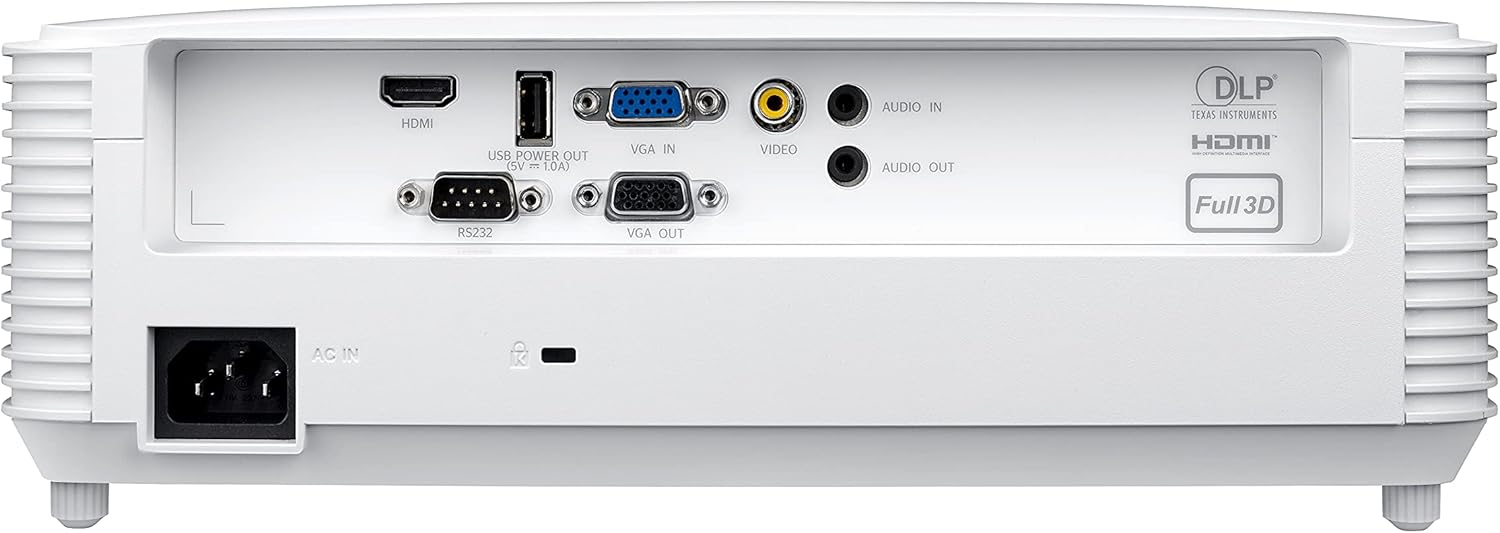
Image: Rear panel of the Optoma W335 projector, clearly showing the HDMI, VGA In, VGA Out, Video, Audio In, Audio Out, RS232, and USB Service Only ports.
Connect your source device (e.g., laptop, Blu-ray player) to the appropriate input port on the projector. Ensure the power cord is securely connected to the projector and a power outlet.
คำแนะนำการใช้งาน
การเปิด/ปิดเครื่อง
Press the power button on the projector's control panel or the remote control to turn the unit on or off. Allow a few moments for the projector to warm up or cool down.

ภาพ: ด้านบน view of the Optoma W335 projector, highlighting the control panel with power, menu, and navigation buttons, along with focus and zoom rings.
การปรับภาพ
- จุดสนใจ: หมุนวงแหวนปรับโฟกัสบนเลนส์เพื่อเพิ่มความคมชัดของภาพ
- ซูม: Use the zoom ring to adjust the image size without moving the projector.
- การแก้ไขคีย์สโตน: The W335 supports vertical keystone correction to square the image if the projector is not perfectly perpendicular to the screen. This can be adjusted via the on-screen menu.
The projector delivers vibrant and sharp WXGA resolution (1280 x 800) images with a 22,000:1 contrast ratio, suitable for various environments including well-lit rooms due to its 3,800 lumens brightness.
เสียง
An integrated 10-watt speaker provides room-filling audio. For enhanced sound, connect external speakers to the Audio Out port.
การซ่อมบำรุง
Lamp ชีวิต
โปรเจ็กเตอร์ lamp has a life of up to 15,000 hours, providing many years of use with minimal maintenance. When the lamp reaches the end of its life, a warning indicator will appear, and the lamp will need to be replaced. Refer to the full user manual for detailed lamp คำแนะนำในการเปลี่ยน
การทำความสะอาด
- เลนส์: Use a soft, lint-free cloth and lens cleaning solution to gently clean the projector lens.
- ภายนอก: เช็ดทำความสะอาดภายนอกasinเช็ดทำความสะอาดด้วยผ้าแห้งเนื้อนุ่ม หลีกเลี่ยงน้ำยาทำความสะอาดที่มีฤทธิ์กัดกร่อนหรือตัวทำละลาย
- ช่องระบายอากาศ: Regularly check and clean the air vents to ensure proper airflow and prevent overheating. Use a soft brush or compressed air to remove dust.
การแก้ไขปัญหา
- ไม่มีรูป:
- Ensure the projector is powered on and the source device is connected and active.
- Check the input source selection on the projector.
- ตรวจสอบว่าสายเคเบิลทั้งหมดเชื่อมต่ออย่างแน่นหนา
- ภาพเบลอ:
- ปรับวงแหวนโฟกัสบนเลนส์
- ตรวจสอบให้แน่ใจว่าโปรเจคเตอร์อยู่ห่างจากจอภาพในระยะที่เหมาะสม
- Use keystone correction if the image is distorted.
- ไม่มีเสียง:
- ตรวจสอบการตั้งค่าระดับเสียงทั้งบนโปรเจ็กเตอร์และอุปกรณ์แหล่งที่มา
- Ensure external speakers (if used) are properly connected and powered.
- Verify the audio cable connection.
- โปรเจ็กเตอร์ร้อนเกินไป:
- ตรวจสอบให้แน่ใจว่าช่องระบายอากาศสะอาดและไม่มีสิ่งกีดขวาง
- ใช้งานโปรเจ็กเตอร์ในบริเวณที่มีอากาศถ่ายเทได้ดี
- If the issue persists, power off the projector and allow it to cool down before restarting.
ข้อมูลจำเพาะ
| คุณสมบัติ | รายละเอียด |
|---|---|
| ขนาดสินค้า | 9.6 x 12.4 x 3.9 นิ้ว |
| น้ำหนักสินค้า | 6.61 ปอนด์ |
| หมายเลขรุ่นสินค้า | W335 |
| ยี่ห้อ | ออปโตม่า |
| การใช้ที่แนะนำ | ธุรกิจ การศึกษา |
| คุณสมบัติพิเศษ | โยนสั้น |
| เทคโนโลยีการเชื่อมต่อ | hdmi, vga |
| ความละเอียดการแสดงผล | 1280 x 800 (WXGA) |
| ความสว่าง | 3800 ลูเมน |
| อัตราส่วนคอนทราสต์ | 22,000:1 น. |
| Lamp ชีวิต | นานถึง 15,000 ชั่วโมง |
| ลำโพงในตัว | 10 วัตต์ |
| อัตราการโยน | 1.55 – 1.73:1 |
การรับประกันและการสนับสนุน
สำหรับข้อมูลการรับประกันโดยละเอียดและการสนับสนุนทางเทคนิค โปรดดูที่เว็บไซต์อย่างเป็นทางการของ Optoma website or the documentation included with your product. You can also contact Optoma customer service directly for assistance.
เยี่ยมชม ร้าน Optoma บน Amazon สำหรับข้อมูลผลิตภัณฑ์เพิ่มเติม