
การแนะนำ
The Aputure 120D Mark II is a high-performance 180W daylight-balanced LED video light designed for professional film and photography applications. It features enhanced brightness, improved color accuracy (CRI 96+, TLCI 97+), and a redesigned integrated controller-power unit for a streamlined setup. This manual provides essential information for the safe and effective use of your Aputure 120D Mark II.
ข้อมูลด้านความปลอดภัย
- Do not look directly into the light source when operating.
- Ensure proper ventilation to prevent overheating. The unit features an ultra-silent fan for cooling.
- ใช้เฉพาะอะแดปเตอร์แปลงไฟและสายเคเบิลที่ระบุไว้เท่านั้น
- เก็บอุปกรณ์ให้ห่างจากน้ำและของเหลวอื่นๆ
- อย่าพยายามถอดประกอบหรือดัดแปลงตัวเครื่อง แนะนำให้ช่างผู้ชำนาญเข้ารับบริการทั้งหมด
- Always secure the light head properly on a stand or mounting point.
เนื้อหาแพ็คเกจ
ตรวจสอบว่ามีรายการทั้งหมดอยู่ในแพ็คเกจของคุณ:
- Aputure 120D Mark II LED Light Head
- Integrated Controller-Power Unit
- แผ่นสะท้อนแสงมาตรฐาน
- รีโมทคอนโทรล
- สายไฟ
- การเชื่อมต่อสายเคเบิล
- กระเป๋าใส่ของ
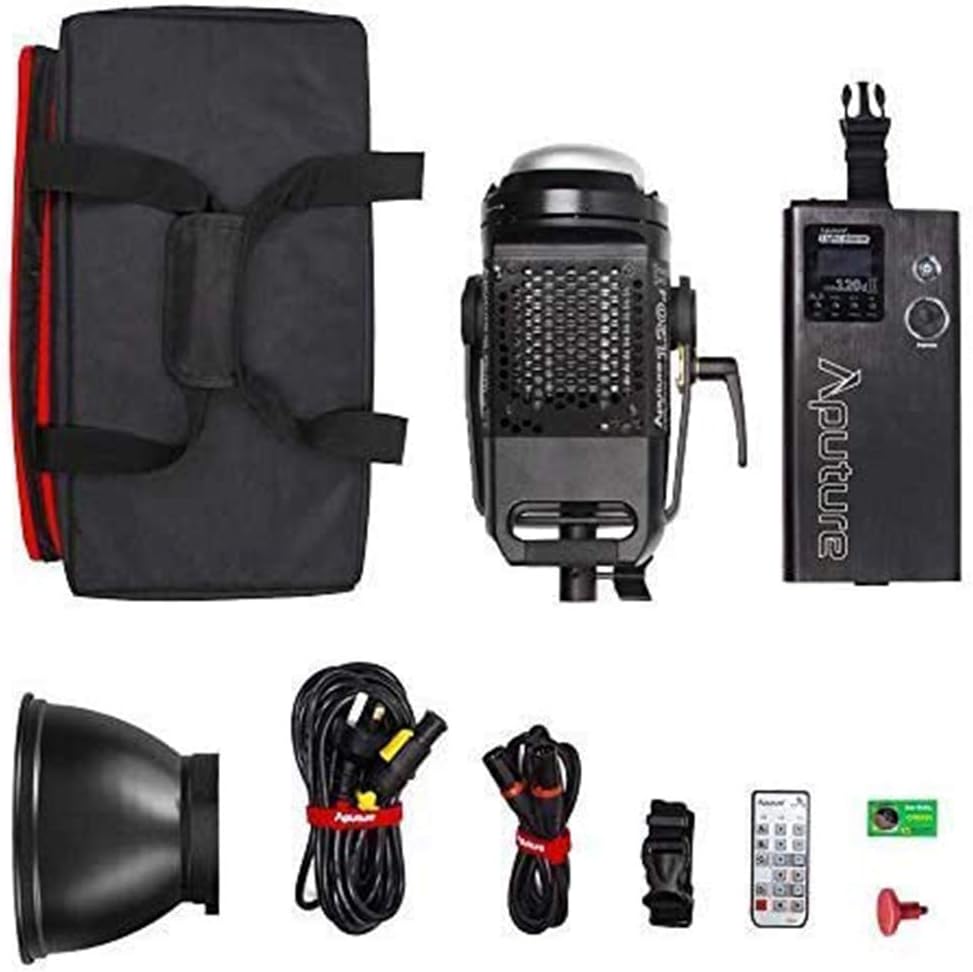
Image: All components included in the Aputure 120D Mark II package, neatly arranged.
การตั้งค่า
- การติดตั้งหัวไฟ: Attach the Aputure 120D Mark II light head to a compatible light stand using its handbrake locking yoke. Ensure it is securely fastened.
- Connecting the Controller-Power Unit: Connect the light head to the integrated controller-power unit using the provided Neutrik locking cables. The unified design simplifies cabling.
- ติดอุปกรณ์เสริม: The light features a universal Bowens mount. To attach the standard reflector or other Bowens-mount modifiers (like a softbox or Fresnel lens), align the accessory with the mount on the light head and twist until it locks into place. Press the release switch to detach.
- การเชื่อมต่อไฟฟ้า: Connect the power cable from the controller-power unit to a suitable power outlet.

Image: The Aputure 120D Mark II light head, showcasing its compact design and handle, alongside its dedicated carrying bag.

Image: Close-up of the Aputure 120D Mark II light head with a standard reflector, emphasizing its robust aircraft-grade aluminum construction and the versatile Bowens mount.
วิดีโอ: บทนำview of the Aputure 120D Mark II LED Video Light, demonstrating its features and basic setup.
การดำเนินงาน
- เปิด/ปิดเครื่อง: Press the power button on the controller-power unit to turn the light on or off.
- การปรับความสว่าง: Use the control knob on the unit to adjust the brightness from 0% to 100%. The C120D II allows for fine adjustments even below 10%.
- การควบคุม DMX: The C120D II supports DMX lighting functions, allowing integration into professional lighting setups for precise control.
- Pre-Programmed Lighting Effects: Access and select from 5 pre-programmed lighting effects (e.g., thunder, fireworks) via the controller.
- การควบคุมแบบไร้สาย: The light can be controlled wirelessly using the included remote control or a compatible mobile application.

Image: The integrated controller-power unit of the Aputure 120D Mark II, showing its display and intuitive control knobs for brightness and settings.

Image: The Aputure 120D Mark II in an outdoor environment, illustrating its powerful and adjustable brightness output.

Image: A visual representation of the Aputure 120D Mark II's accurate color rendition, featuring a color chart and the light illuminating a scene.
การซ่อมบำรุง
- การทำความสะอาด: Use a soft, dry cloth to clean the exterior of the light head and controller. Avoid using harsh chemicals or abrasive materials.
- การบำรุงรักษาพัดลม: The ultra-silent fan is designed for longevity. Ensure the fan vents are clear of dust and obstructions to maintain optimal cooling performance.
- พื้นที่จัดเก็บ: When not in use, store the Aputure 120D Mark II in its dedicated carrying bag in a cool, dry place, away from direct sunlight and extreme temperatures.

ภาพ: รายละเอียด view of the Aputure 120D Mark II light head, highlighting its ultra-silent fan system designed for efficient temperature control.
การแก้ไขปัญหา
- ไฟไม่เปิด: Check all cable connections, especially the Neutrik locking cables between the light head and controller. Ensure the power cable is securely plugged into a working outlet.
- เสียงพัดลม: The 120D Mark II features an ultra-silent fan. If unusual noise occurs, check for obstructions in the fan vents. If the issue persists, contact customer support.
- ปัญหาการควบคุมระยะไกล: Ensure the remote control has fresh batteries and is within range. Verify that the light and remote are set to the same channel and group.
- ความสว่างไม่สม่ำเสมอ: Check for loose cable connections. If using DMX, verify DMX settings.
ข้อมูลจำเพาะ
| คุณสมบัติ | ข้อมูลจำเพาะ |
|---|---|
| ยี่ห้อ | อพูเจอร์ |
| หมายเลขรุ่น | LS C120d II |
| การใช้พลังงาน | สูงสุด 180W |
| อุณหภูมิสี | 5500K (สมดุลแสงกลางวัน) |
| ซีอาร์ไอ | ≥96 |
| ทีแอลซีไอ | ≥97 |
| ความสว่าง | 30,000 lux@0.5m (with Reflector) |
| เทคโนโลยีการเชื่อมต่อ | DMX, 2.4GHz Wireless |
| น้ำหนักสินค้า | 16.53 ปอนด์ |
การรับประกันและการสนับสนุน
The Aputure 120D Mark II LED Video Light comes with a manufacturer's warranty. Please refer to the warranty card included in your product packaging for specific terms and conditions. For technical support, troubleshooting assistance, or warranty claims, please contact Aputure customer service through their official webเว็บไซต์หรือตัวแทนจำหน่ายที่ได้รับอนุญาต
สำหรับทรัพยากรเพิ่มเติมและข้อมูลผลิตภัณฑ์ โปรดไปที่ ร้าน Aputure บน Amazon.