
1. สินค้าหมดview
The LeeKooLuu Wireless Backup Camera System provides a clear, stable digital signal for enhanced visibility when reversing or monitoring your vehicle's rear. This system includes a 5-inch touch button monitor and a wireless camera, suitable for various vehicles including cars, trucks, SUVs, sedans, RVs, and trailers.

Image 1.1: LeeKooLuu Wireless Backup Camera System components, including the 5-inch monitor and the license plate mount camera.
คุณสมบัติหลัก:
- Wireless Digital Signal: Stable point-to-point transmission, reducing interference.
- 5-Inch Touch Button Monitor: High-definition 1080P display with intuitive touch controls.
- การสนับสนุนสองช่องทาง: Ability to add a second wireless camera for front view, hitch view, or additional rear coverage (second camera sold separately).
- เส้นตารางจอดรถแบบทำเอง: Adjustable parking guidelines for width, position (Left/Right/Up/Down), and option to turn off.
- ความเข้ากันได้กับยานพาหนะที่กว้าง: Designed for cars, sedans, SUVs, pickups, trucks, vans, RVs, and trailers.
- ติดตั้งง่าย: Simplified wiring for both monitor and camera.
2. การตั้งค่าและการติดตั้ง
การติดตั้งอย่างถูกต้องเป็นสิ่งสำคัญอย่างยิ่งต่อประสิทธิภาพสูงสุด โปรดปฏิบัติตามขั้นตอนเหล่านี้อย่างระมัดระวัง
2.1 เนื้อหาในบรรจุภัณฑ์:
- 5-inch Wireless Monitor
- Wireless Backup Camera (with integrated transmitter)
- Car Charger (with ON/OFF switch)
- สายไฟสำหรับกล้อง
- Monitor Mounting Bracket (Dashboard/Windshield options)
- ฮาร์ดแวร์สำหรับการติดตั้ง (สกรู, ขั้วต่อสายไฟ)
2.2 Camera Installation:
- การติดตั้ง: Attach the wireless backup camera to your vehicle's license plate frame. Ensure the camera lens has a clear, unobstructed view.
- การเชื่อมต่อไฟฟ้า: Connect the camera's power cable to a 11V-24V DC power supply. This can be the vehicle's reverse lights (for reverse-only activation), running lights, or license plate lights (for continuous use).
- Identify the positive (+) and negative (-) wires of your chosen power source using a multimeter.
- Connect the red wire of the camera's power cable to the positive (+) wire and the black wire to the negative (-) or ground. Use the provided wire connectors for a secure connection.
- การเดินสายไฟที่ปลอดภัย: Route and secure all wiring to prevent damage from vehicle movement, weather, or road debris.
2.3 Monitor Installation:
- การติดตั้ง: Choose between dashboard mount or windshield suction mount. Secure the monitor in a position that does not obstruct your view ของถนน
- การเชื่อมต่อไฟฟ้า: Plug the monitor's car charger into your vehicle's cigarette lighter socket. The charger includes an ON/OFF adapter for convenience.
- เปิดเครื่อง: Turn on the monitor using the power button on the car charger or the touch button on the monitor itself.
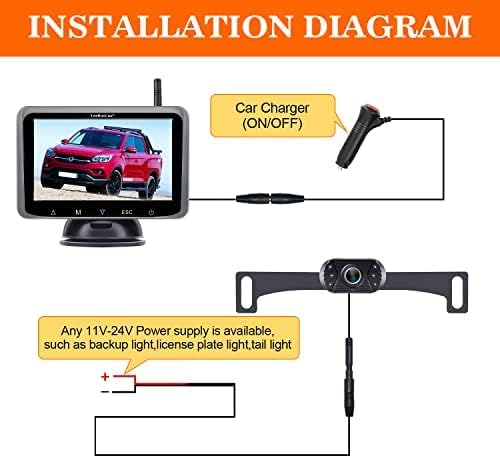
Image 2.1: Wiring diagram for the camera and monitor power connections.

Image 2.2: Monitor installation options: dashboard and windshield mounting.
2.4 Initial Pairing (if necessary):
The camera and monitor are typically pre-paired at the factory. If no image appears after installation, manual pairing may be required. Refer to the monitor's on-screen menu for pairing instructions (usually accessed via the 'M' button).
3. คู่มือการใช้งาน
Familiarize yourself with the monitor's functions for safe and effective use.
3.1 Monitor Controls:
The 5-inch monitor features touch buttons for easy navigation and settings adjustment.
- ปุ่มเปิด/ปิด: Turns the monitor ON/OFF.
- 'M' Button (Menu): Accesses the main menu for settings like pairing, image adjustments, and grid line customization.
- ปุ่มลูกศร (ขึ้น/ลง): Navigate menu options or adjust values.
- 'ESC' Button: ออกจากเมนูหรือการตั้งค่าปัจจุบัน
3.2 Parking Grid Lines:
The system allows for customization of parking guidelines to match your vehicle and preferences.
- Access the menu via the 'M' button.
- Navigate to the 'Parking Line' or 'Guideline' settings.
- Adjust the width, and move the lines Left/Right/Up/Down to accurately reflect your vehicle's dimensions and the desired parking path.
- You can also choose to disable the parking guidelines if preferred.
3.3 Dual Camera Functionality:
The monitor supports two camera inputs (CAM1 and CAM2) and a split-screen view.

Image 3.1: Monitor display modes: CAM1, CAM2, and Split Screen, demonstrating the option to add a second camera for RVs or trailers.
- If a second camera is installed, you can switch between CAM1, CAM2, or a split-screen view using the monitor's controls.
- This feature is useful for monitoring both the rear of your primary vehicle and a towed RV or trailer.
3.4 Image Quality and Vision:
The camera features an upgraded 6-glass lens for clear images and includes night vision capabilities.

Image 3.2: Comparison of camera's day and night vision capabilities.
4. การบำรุงรักษา
Regular maintenance ensures the longevity and optimal performance of your backup camera system.
- การทำความสะอาดเลนส์กล้อง: ทำความสะอาดเลนส์กล้องเป็นระยะด้วยผ้านุ่มๆamp cloth to remove dirt, dust, or water spots that may obscure the viewหลีกเลี่ยงการใช้น้ำยาทำความสะอาดที่มีฤทธิ์กัดกร่อน
- Monitor Care: Wipe the monitor screen with a soft, dry, or slightly damp ใช้ผ้าเช็ดทำความสะอาด ห้ามฉีดน้ำยาทำความสะอาดลงบนหน้าจอโดยตรง
- การตรวจสอบสายไฟ: Periodically check all wiring connections for tightness and signs of wear or damage. Ensure wires are securely fastened and not exposed to excessive heat or sharp edges.
- การป้องกันสภาพอากาศ: While the camera is designed for outdoor use, extreme weather conditions (heavy rain, snow, extreme temperatures) can affect performance. Ensure the camera is free of ice or snow before use in cold climates.
5 การแก้ไขปัญหา
If you encounter issues with your LeeKooLuu Wireless Backup Camera System, refer to the following troubleshooting guide.
5.1 No Image on Monitor:
- ตรวจสอบพลังงาน: Ensure both the monitor and camera are receiving power. Verify the car charger is firmly plugged into the cigarette lighter and the camera's power wires are correctly connected to a functional power source.
- ตรวจสอบการเชื่อมต่อ: Confirm all cable connections are secure.
- ซ่อมแซมอุปกรณ์อีกครั้ง: If the devices were previously working, try re-pairing the camera and monitor through the monitor's menu settings.
- การรบกวน: Wireless signals can be affected by other electronic devices. Try moving the monitor slightly or ensuring no large metal objects are blocking the signal path.
5.2 Image Flickering or Unstable Signal:
- ช่วงสัญญาณ: Ensure the distance between the camera and monitor is within the effective wireless range (up to 40ft, or 450ft in open areas).
- การรบกวน: Other wireless devices (e.g., Wi-Fi, Bluetooth) can cause interference. Try to minimize their use or reposition the monitor.
- ความผันผวนของกำลังไฟฟ้า: Ensure the camera is receiving a stable power supply. Fluctuations in voltage can affect signal stability.
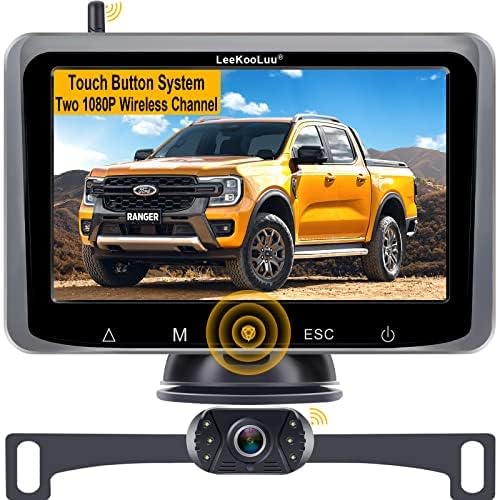
Image 5.1: Wireless signal transmission range and vehicle compatibility.
5.3 Image Delay:
- A slight delay (e.g., 1-2 seconds) is normal for wireless systems. Significant delays (e.g., 4 seconds or more) may indicate signal interference or a weak power supply. Review the steps for 'Image Flickering or Unstable Signal'.
5.4 Parking Lines Incorrect:
- Adjust the parking grid lines through the monitor's menu settings to accurately align with your vehicle's perspective.
6. ข้อมูลจำเพาะ
| คุณสมบัติ | ข้อมูลจำเพาะ |
|---|---|
| หมายเลขรุ่น | 8523722953 |
| ขนาดหน้าจอ | 5 นิ้ว |
| เทคโนโลยีการแสดงผล | จอแอลซีดี |
| การเชื่อมต่อ | ไร้สาย |
| เล่มที่tage | 12 Volts (Monitor), 11V-24V (Camera) |
| เทคโนโลยีเซ็นเซอร์ออปติคัล | ซีมอส |
| ประเภทเลนส์ | Fixed Wide Angle (6-glass lens) |
| มุมจริงของ View | 150 องศา |
| ประเภทการติดตั้ง | ติดตั้งบนพื้นผิว, ติดตั้งบนแผงหน้าปัด |
| น้ำหนักสินค้า | 1.87 ปอนด์ |
| ขนาดแพ็คเกจ | 9.33 x 6.02 x 4.29 นิ้ว |
7. การรับประกันและการสนับสนุน
LeeKooLuu stands behind the quality of its products.
7.1 การรับประกันสินค้า:
ผลิตภัณฑ์นี้มาพร้อมกับ รับประกัน 2 ปี นับจากวันที่ซื้อ การรับประกันนี้ครอบคลุมถึงข้อบกพร่องจากการผลิตและการทำงานผิดปกติภายใต้การใช้งานปกติ
7.2 การสนับสนุนด้านเทคนิค:
For any technical assistance, installation questions, or troubleshooting, LeeKooLuu offers การสนับสนุนทางเทคนิคตลอด 24 ชั่วโมง. Please contact our customer service team for prompt assistance.

Image 7.1: LeeKooLuu provides 24-hour customer support.
7.3 Replacement Service:
In case of a confirmed product defect covered under warranty, a replacement service is available. Contact customer support to initiate a replacement.