
1. บทนำ
The Sangean WR-22WL is a versatile table-top digital tuning receiver designed for high-quality audio playback. It features AM/FM-RDS radio, Bluetooth wireless audio streaming, and USB playback for MP3/WMA files. This manual provides detailed instructions for the proper setup, operation, and maintenance of your device.
2. คำแนะนำด้านความปลอดภัย
- แหล่งพลังงาน: ใช้เฉพาะอะแดปเตอร์แปลงไฟหรือแบตเตอรี่ที่ระบุไว้เท่านั้น ตรวจสอบให้แน่ใจว่าได้ปรับแรงดันไฟฟ้าให้เหมาะสมแล้วtagตรงตามข้อกำหนดของหน่วยงาน
- น้ำและความชื้น: อย่าให้ตัวเครื่องโดนฝน ความชื้น หรือของเหลวที่หยด/กระเด็นใส่ อย่าวางสิ่งของที่บรรจุของเหลว เช่น แจกัน ไว้บนตัวเครื่อง
- การระบายอากาศ : Ensure adequate ventilation. Do not block ventilation openings. Maintain a minimum distance around the unit for sufficient ventilation.
- ความร้อน: ห้ามวางเครื่องไว้ใกล้แหล่งความร้อน เช่น หม้อน้ำ เครื่องทำความร้อน เตา หรืออุปกรณ์อื่นๆ (รวมถึง ampเครื่องให้ความร้อน) ที่ผลิตความร้อน
- การทำความสะอาด: ถอดปลั๊กเครื่องออกจากเต้าเสียบก่อนทำความสะอาด ใช้ผ้านุ่มและแห้ง ห้ามใช้น้ำยาทำความสะอาดชนิดน้ำหรือสเปรย์ทำความสะอาด
- การบริการ: อย่าพยายามให้บริการผลิตภัณฑ์นี้ด้วยตนเอง ส่งต่อการบริการทั้งหมดไปยังช่างบริการที่ผ่านการรับรอง
3. เนื้อหาบรรจุภัณฑ์
ตรวจสอบว่ารายการทั้งหมดที่ระบุไว้ด้านล่างนี้รวมอยู่ในแพ็คเกจของคุณ:
- Sangean WR-22WL Digital Tuning Receiver
- สายไฟ AC
- เสาอากาศลวด FM
- รีโมทคอนโทรลแบบอินฟราเรด
- คู่มือเจ้าของ (เอกสารนี้)
4. คุณสมบัติของผลิตภัณฑ์
- AM/FM-RDS Digital Tuning with 10 Station Presets (5 AM, 5 FM)
- การสตรีมเสียงไร้สาย Bluetooth ในตัว
- USB MP3/WMA Playback
- Easy-to-Read High Contrast LCD Display with Automatic and Adjustable Backlight
- Clock Function with FM RDS-CT Synchronization
- Dual Alarm Timers (Radio, Buzzer, or USB)
- Humane Wake System (HWS) for Adjustable Alarm Volume
- Nap, Sleep, and Snooze Timers
- Rotary Bass and Treble Controls
- Dynamic Bass Compensation for Enhanced Low Frequencies
- Loudness On/Off Function
- Single 3-inch 7W Full Range Speaker with Enlarged Magnet
- รีโมทคอนโทรลอินฟราเรดแบบเต็มรูปแบบ
- แจ็คหูฟังสำหรับการฟังแบบส่วนตัว
- 12V DC Input Socket for Optional External Power Supply
5. การควบคุมและการแสดงผล
Familiarize yourself with the controls and display on your Sangean WR-22WL receiver.
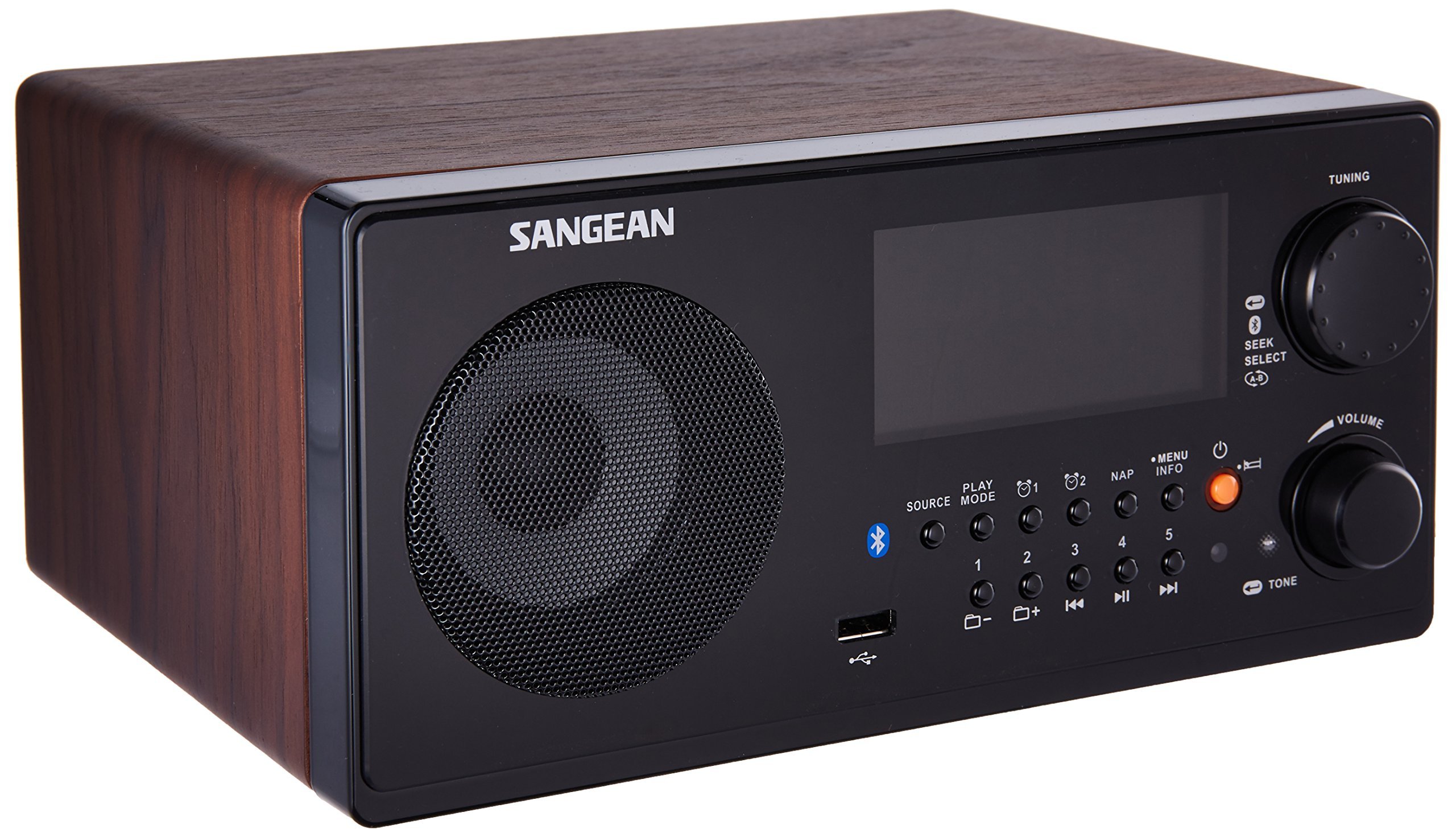
รูปที่ 5.1: แผงด้านหน้าเกินview of the Sangean WR-22WL.
- ผู้บรรยาย: เอาท์พุตเสียง
- จอแสดงผล LCD: Shows time, station information, source, and settings.
- ปุ่มปรับ: Rotates to adjust frequency or navigate menus.
- SEEK/SELECT Button: Press to auto-seek stations or confirm menu selections.
- ปุ่มปรับระดับเสียง: Rotates to adjust audio output level.
- ปุ่มแหล่งที่มา: Cycles through available audio sources (AM, FM, Bluetooth, USB).
- ปุ่มโหมด: Changes playback mode (e.g., repeat for USB).
- ปุ่มเล่น/หยุดชั่วคราว: ควบคุมการเล่นจากแหล่งสัญญาณ Bluetooth และ USB
- ปุ่มงีบหลับ: Activates the nap timer.
- ปุ่มข้อมูล: Displays additional information (e.g., RDS data).
- ปุ่มเมนู: เข้าถึงการตั้งค่าและตัวเลือกของระบบ
- ปุ่มเพาเวอร์: เปิดหรือปิดเครื่อง
- ปุ่มตั้งค่าล่วงหน้า (1-5): จัดเก็บและเรียกคืนสถานีวิทยุโปรด
- พอร์ต USB: Connects USB drives for MP3/WMA playback.
- ปุ่มปรับเสียง: Adjusts bass and treble settings.
- Headphone Jack (Rear Panel): For connecting headphones for private listening.
6. การตั้งค่า
6.1 การเชื่อมต่อสายไฟ
Connect the supplied AC power cord to the AC IN jack on the rear of the unit and then to a standard wall outlet. The unit can also be powered by a 12V DC input source (not supplied) via the DC IN jack for portable use.
6.2 การเชื่อมต่อเสาอากาศ
For optimal FM reception, fully extend the supplied FM wire antenna and position it for the best signal. For AM reception, the unit has a built-in AM antenna; rotate the unit for best reception.
6.3 การติดตั้งแบตเตอรี่รีโมทคอนโทรล
Insert two AAA batteries (not supplied) into the remote control, observing the correct polarity (+/-) as indicated inside the battery compartment.
7. คู่มือการใช้งาน
7.1 การทำงานพื้นฐาน
- เปิด/ปิดเครื่อง: กดปุ่ม พลัง ปุ่มเพื่อเปิดหรือปิดเครื่อง
- การปรับระดับเสียง: หมุน ปริมาณ หมุนปุ่มตามเข็มนาฬิกาเพื่อเพิ่มระดับเสียง หมุนทวนเข็มนาฬิกาเพื่อลดระดับเสียง
- การเลือกแหล่งที่มา: กดปุ่ม แหล่งที่มา button repeatedly to cycle through AM, FM, Bluetooth, and USB modes.
การใช้งานวิทยุ AM/FM 7.2
- จูน: In AM or FM mode, rotate the การปรับแต่ง knob to manually adjust the frequency. Press the SEEK/SELECT ปุ่มสำหรับสแกนหาสถานีที่ว่างอยู่ถัดไปโดยอัตโนมัติ
- การจัดเก็บค่าที่ตั้งไว้ล่วงหน้า: Tune to your desired station. Press and hold one of the ค่าที่ตั้งไว้ล่วงหน้า (1-5) buttons until the display confirms the station is saved.
- การเรียกคืนค่าที่ตั้งไว้ล่วงหน้า: กดปุ่มใดปุ่มหนึ่งสั้นๆ ค่าที่ตั้งไว้ล่วงหน้า (1-5) buttons to recall a saved station.
- RDS (ระบบข้อมูลวิทยุ): When tuned to an FM station broadcasting RDS, information such as station name, song title, and artist may be displayed. Press the ข้อมูล button to cycle through available RDS data.
7.3 การทำงานของบลูทูธ
- การจับคู่: Select Bluetooth as the source. The display will show "PAIRING". On your Bluetooth-enabled device, search for "Sangean WR-22WL" and select it to connect. Once paired, the display will show "CONNECTED".
- การสตรีมเสียง: Play audio from your paired device. Use the เล่น/หยุดชั่วคราว and track skip buttons on the unit or your device to control playback.
7.4 การเล่น USB
- Connecting USB: Insert a USB flash drive containing MP3/WMA audio fileลงในพอร์ต USB
- การเล่นซ้ำ: Select USB as the source. The unit will automatically begin playing fileNS. ใช้ เล่น/หยุดชั่วคราว and track skip buttons to control playback.
7.5 ฟังก์ชันนาฬิกาและตัวจับเวลา
- ตั้งนาฬิกา: Access the clock settings via the เมนู button. You can set the time manually or allow it to synchronize with FM RDS-CT (Clock Time) signals.
- การตั้งค่าการเตือน: The unit features two independent alarms. Access alarm settings via the เมนู. Set the alarm time, source (radio, buzzer, or USB), and desired volume. The Humane Wake System (HWS) gradually increases the alarm volume.
- ปิดเสียงเตือนชั่วคราว: When an alarm sounds, press any button (except Power) to activate snooze for a short period.
- เวลานอน: Set the sleep timer via the เมนู to automatically turn off the unit after a set duration.
- ตั้งเวลางีบหลับ: กดปุ่ม นอน button to set a short nap timer.
7.6 การตั้งค่าเสียง
- เบสและเสียงแหลม: กดปุ่ม โทนเสียง button to access bass and treble adjustments. Rotate the การปรับแต่ง knob to modify levels.
- Dynamic Bass Compensation: This feature enhances bass response at lower volumes. It can be toggled on/off in the menu.
- ดัง: The loudness function can be enabled or disabled via the menu to further enhance audio at low volumes.
8. การบำรุงรักษา
- การทำความสะอาดหน่วย: เช็ดทำความสะอาดภายนอกตัวเครื่องด้วยผ้าแห้งเนื้อนุ่มที่ไม่เป็นขุย ห้ามใช้สารทำความสะอาดที่มีฤทธิ์กัดกร่อน แว็กซ์ หรือตัวทำละลาย
- การดูแลจอแสดงผล: Avoid touching the LCD display with sharp objects.
- พื้นที่จัดเก็บ: If storing the unit for an extended period, disconnect it from the power source and remove batteries from the remote control. Store in a cool, dry place.
9 การแก้ไขปัญหา
| ปัญหา | สาเหตุที่เป็นไปได้ | สารละลาย |
|---|---|---|
| ไม่มีไฟฟ้า | ไม่ได้เสียบสายไฟ; ปลั๊กไฟไม่ทำงาน | ตรวจสอบให้แน่ใจว่าสายไฟเสียบแน่นดีแล้ว ทดสอบปลั๊กไฟกับอุปกรณ์อื่นดูก่อน |
| ไม่มีเสียง | ระดับเสียงต่ำเกินไป; เปิดใช้งานโหมดปิดเสียง; เลือกแหล่งสัญญาณไม่ถูกต้อง | Increase volume. Check if headphones are connected. Select correct audio source. |
| การรับสัญญาณวิทยุไม่ดี | เสาอากาศไม่ได้ยืด/อยู่ในตำแหน่งที่ถูกต้อง; สัญญาณรบกวน | Fully extend and adjust FM wire antenna. Rotate the unit for AM reception. Move away from electronic devices causing interference. |
| การจับคู่บลูทูธล้มเหลว | Device not in pairing mode; Device too far; Already paired with another device. | Ensure the WR-22WL is in Bluetooth pairing mode. Move devices closer. Disconnect from other Bluetooth devices. |
| การเล่น USB ไม่ทำงาน | ไดรฟ์ USB ไม่ได้รับการฟอร์แมตอย่างถูกต้อง; ไม่รองรับ file ประเภท; ไดรฟ์ USB มีปัญหา | Ensure USB drive is FAT32 formatted. Verify files are MP3/WMA. Try a different USB drive. |
10. ข้อมูลจำเพาะ
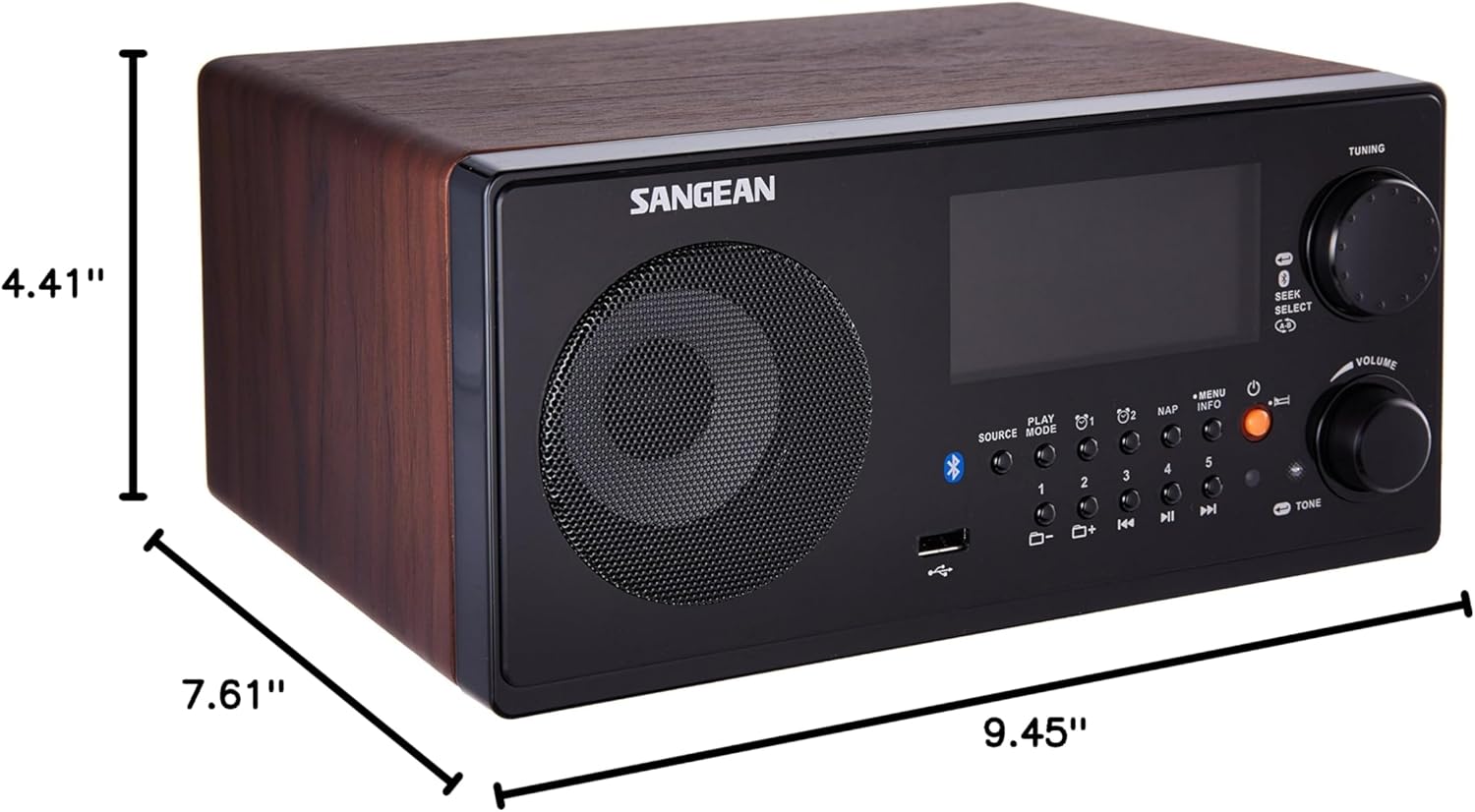
รูปที่ 10.1: Sangean WR-22WL Product Dimensions.
- ยี่ห้อ: ซานเกียน
- แบบอย่าง: WR-22WL
- ขนาดสินค้า (กว้าง x ยาว x สูง) : 9.45" x 7.61" x 4.41" (240 มม. x 193 มม. x 112 มม.)
- น้ำหนักสินค้า: 6 ปอนด์ (2.72 กก.)
- เทคโนโลยีการเชื่อมต่อ: บลูทูธ, ยูเอสบี
- เทคโนโลยีจูนเนอร์: AM, FM (RDS)
- แหล่งพลังงาน: AC Power Cord, 12V DC Input (optional), 2 x AAA batteries (for remote control)
- ผู้บรรยาย: 3-inch 7W Full Range Speaker
- ประเภทจอภาพ: จอ LCD ระบบดิจิตอล
- อินเทอร์เฟซฮาร์ดแวร์: ยูเอสบี
- สี: Brown (Dark Walnut finish)
11. การรับประกันและการสนับสนุน
This Sangean WR-22WL unit comes with a รับประกันจำกัด 90 วัน. For warranty claims or technical support, please refer to the contact information provided with your purchase documentation or visit the official Sangean website. Please have your model number (WR-22WL) and proof of purchase ready when contacting support.