
การแนะนำ
This manual provides detailed instructions for the setup, operation, and maintenance of your TOZO T8 True Wireless Earbuds. Please read this manual thoroughly before using the product to ensure proper function and longevity.
มีอะไรอยู่ในกล่อง
เมื่อแกะกล่องแล้ว โปรดตรวจสอบให้แน่ใจว่ามีสิ่งของทั้งหมดที่ระบุไว้ด้านล่างนี้ครบถ้วน:
- TOZO T8 True Wireless Earbuds (ซ้ายและขวา)
- เคสชาร์จไฟ
- สายชาร์จ USB
- คู่มือการใช้งาน
- Ear Cushions (3 sets: Small, Medium, Large)

Image: Contents of the TOZO T8 package, including earbuds, charging case, and accessories.
การตั้งค่า
1. การชาร์จครั้งแรก
ก่อนใช้งานครั้งแรก โปรดชาร์จหูฟังและเคสชาร์จให้เต็มก่อน เชื่อมต่อสาย USB ที่ให้มากับพอร์ตชาร์จบนเคสและแหล่งจ่ายไฟ ไฟแสดงสถานะบนเคสจะแสดงสถานะการชาร์จ

Image: The TOZO T8 charging case with earbuds, illustrating the charging process.
2. การจับคู่กับอุปกรณ์ของคุณ
- Remove both earbuds from the charging case. They will automatically power on and connect to each other. You will hear an audio cue "Connected", followed by "Left Channel" and "Right Channel".
- เปิดใช้งานบลูทูธบนโทรศัพท์มือถือหรืออุปกรณ์อื่นๆ ของคุณ
- ค้นหา อุปกรณ์บลูทูธที่มีอยู่และเลือก "TOZO-T8-R". Do not select "TOZO-T8-L".
- Once connected, you will hear "Second Device Connected", and you can begin playing audio.

Image: Visual guide demonstrating the steps to pair TOZO T8 earbuds with a mobile device.
3. การสวมหูฟัง
Select the ear tip size that provides the best fit and seal for optimal sound quality and comfort. Gently insert the earbud into your ear canal and slightly rotate it to ensure a secure and comfortable fit.
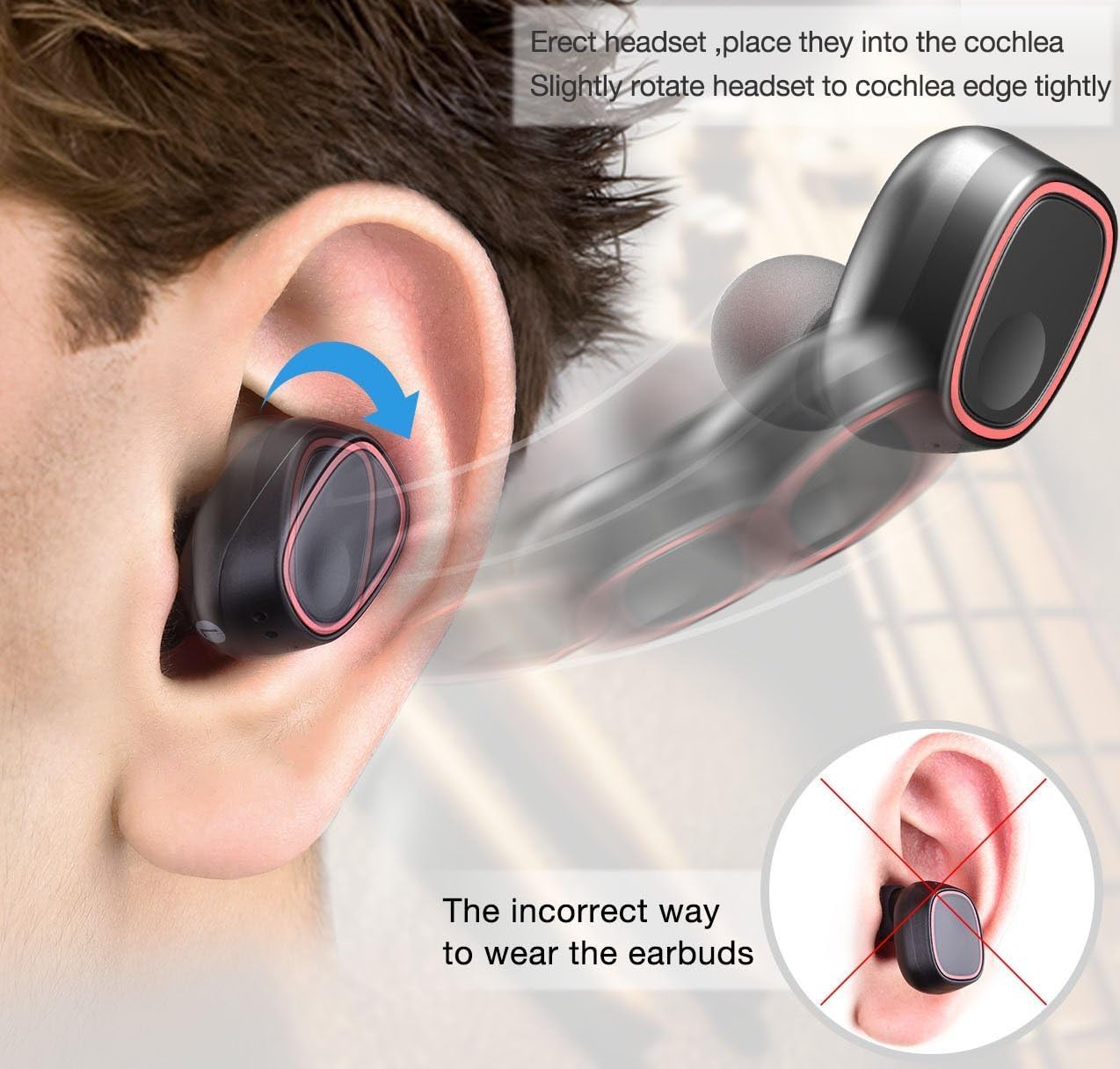
Image: Illustration detailing the proper method for wearing the earbuds and an example of an incorrect fit.
คำแนะนำการใช้งาน
The TOZO T8 earbuds feature touch controls for various functions:
- เล่น/หยุดชั่วคราว: Tap the button on either earbud once.
- รับ/วางสาย: Tap the button on either earbud once.
- ปฏิเสธสาย: กดปุ่มบนหูฟังข้างใดข้างหนึ่งค้างไว้ 2 วินาที
- เพลงถัดไป: Double-tap the button on the right earbud.
- แทร็กก่อนหน้า: Double-tap the button on the left earbud.
- ผู้ช่วยเสียง: Triple-tap the button on either earbud.
The earbuds can be used individually. To use a single earbud, simply remove one from the charging case. It will automatically enter single-earbud mode. To switch back to stereo, remove the other earbud from the case.
การซ่อมบำรุง
- รักษาหูฟังและกล่องชาร์จให้สะอาดและแห้ง ใช้ผ้านุ่มและแห้งเช็ด
- ควรหลีกเลี่ยงการวางผลิตภัณฑ์ไว้ในที่ที่มีอุณหภูมิสูงหรือต่ำเกินไป ความชื้นสูง หรือสารกัดกร่อน
- เก็บหูฟังเอียร์บัดไว้ในกล่องชาร์จเมื่อไม่ได้ใช้งานเพื่อปกป้องและชาร์จอยู่เสมอ
- ควรทำความสะอาดขั้วชาร์จทั้งบนหูฟังและเคสเป็นประจำ เพื่อให้มั่นใจได้ว่าการชาร์จเป็นไปอย่างถูกต้อง
การแก้ไขปัญหา
| ปัญหา | สารละลาย |
|---|---|
| หูฟังไม่จับคู่กัน | Place both earbuds back into the charging case, then remove them again. Ensure they are fully charged. |
| หูฟังไม่เชื่อมต่อกับอุปกรณ์ | Ensure Bluetooth is enabled on your device. Forget "TOZO-T8-R" from your device's Bluetooth list and re-pair following the setup instructions. |
| มีหูฟังใช้งานได้แค่ข้างเดียว | Place both earbuds back into the charging case. Ensure both are charging. Remove them simultaneously to re-establish stereo connection. |
| คุณภาพเสียงไม่ดีหรือระดับเสียงต่ำ | Ensure earbuds are properly seated in your ears and try different sized ear tips for a better seal. Clean any debris from the earbud grilles. |
| เคสชาร์จไม่ชาร์จ | Check the USB cable and power adapter. Ensure the cable is securely connected to both the case and the power source. |
ข้อมูลจำเพาะ
| คุณสมบัติ | รายละเอียด |
|---|---|
| ยี่ห้อ | โตโซ |
| หมายเลขรุ่น | T8 |
| เทคโนโลยีการเชื่อมต่อ | ไร้สาย (Bluetooth) |
| เวอร์ชันบลูทูธ | 4.1 |
| ช่วงบลูทูธ | 10 เมตร |
| การวางตำแหน่งหู | ในหู |
| การควบคุมเสียงรบกวน | การแยกเสียง |
| อายุการใช้งานแบตเตอรี่โดยเฉลี่ย (หูฟัง) | 2.5 ชั่วโมง |
| Battery Charge Time (Earbuds) | 1 ชั่วโมง |
| อายุการใช้งานแบตเตอรี่โดยเฉลี่ยของเคสพกพา | 6 Hours (provides 2-3 full charges for earbuds) |
| ระดับความต้านทานต่อน้ำ | กันน้ำ |
| น้ำหนักสินค้า | 0.1 กิโลกรัม |
| วัสดุ | Silicone (Ear tips) |
การรับประกันและการสนับสนุน
For warranty information or technical support, please refer to the official TOZO website or contact their customer service directly. Details can typically be found on the product packaging or the TOZO official support page.


