
1. สินค้าหมดview
The Integra DTM-7 is a Network A/V Stereo Receiver designed to integrate modern digital audio and video technologies with traditional stereo sound. It supports advanced HDMI switching for 4K and HDR10 content, offers robust network connectivity for streaming services, and includes wireless audio capabilities. The receiver is built with a focus on sound quality and versatile control options.
รูปที่ 1.1: ด้านหน้า view of the Integra DTM-7 Network A/V Stereo Receiver. This image displays the front panel controls, display, and input jacks.
คุณสมบัติหลัก:
- กำลังขับสูง: Delivers 100 Watts per channel (8 Ohms, 20 Hz-20 kHz, 0.08% THD, 2 Channels Driven, FTC) with 4-ohm stability, housed in an anti-resonant steel chassis and audiophile-grade aluminum front panel.
- การเชื่อมต่อ HDMI ขั้นสูง: Features 4 HDMI inputs and 1 HDMI output, supporting 4K/60 Hz, HDR10, HLG (Hybrid Log-Gamma), Dolby Vision, and BT.2020 Pass-thru with HDCP 2.2, 4:4:4 Color Space, and WCG (Wide Color Gamut).
- การเชื่อมต่อกับระบบ Sonos: Compatible with existing Sonos Home Sound Systems or as a starting point for a new one, allowing for music streaming capability with Sonos Connect and a firmware update.
- Extensive Network and Wireless Audio: Includes Wi-Fi and Bluetooth compatibility, providing access to internet radio sources such as Tidal, Pandora, Spotify, Deezer, and TuneIn. Supports Chromecast Built-In, DTS Play-Fi technology, and AirPlay for wireless audio streaming.
- การเชื่อมต่อแบบอะนาล็อก: Features a built-in phono preamp for turntable connection.
- ตัวเลือกการควบคุมที่ยืดหยุ่น: Controllable via the included IR remote, the Integra Control Pro app (for iOS and Android devices), or through 3rd party control systems utilizing IP or RS232C.
2. อะไรอยู่ในกล่อง
ตรวจสอบว่ารายการทั้งหมดที่ระบุไว้ด้านล่างรวมอยู่ในแพ็คเกจ:
- Integra DTM-7 Network A/V Stereo Receiver
- สายไฟ
- เสาอากาศ FM ในร่ม
- เสาอากาศ AM แบบห่วง
- ไมโครโฟนตั้งค่าลำโพง
- Basic manual (this document provides detailed instructions)
- รีโมทคอนโทรล
- แบตเตอรี่ AAA 2 ก้อน (สำหรับรีโมทคอนโทรล)
3. การตั้งค่า
3.1 การเชื่อมต่อส่วนประกอบของคุณ
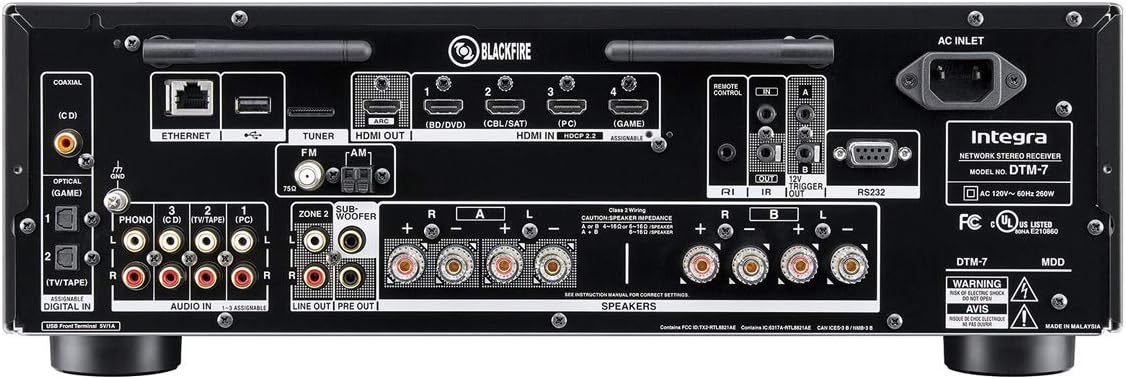
Before making any connections, ensure the receiver and all components are powered off and unplugged from the wall outlet. Refer to the rear panel diagram for connection points.

รูปที่ 3.1: Rear panel connections of the Integra DTM-7. This image illustrates the various input and output ports for audio, video, and network connections.
- การเชื่อมต่อลำโพง: Connect your passive speakers to the SPEAKER terminals on the rear panel. Ensure correct polarity (+ to + and - to -) for each speaker. The DTM-7 supports 4-ohm compatible speakers. For optimal performance, use high-quality speaker cables.
- การเชื่อมต่อ HDMI: Connect your video sources (e.g., Blu-ray player, game console, streaming device) to the HDMI IN ports. Connect your TV or projector to the HDMI OUT port. The HDMI ports support 4K/60 Hz, HDR10, Dolby Vision, and HDCP 2.2.
- การเชื่อมต่อเครือข่าย: For wired network access, connect an Ethernet cable from your router to the ETHERNET port. For wireless network access, ensure the Wi-Fi antennas are properly attached and positioned.
- การเชื่อมต่อเสียงอะนาล็อก: Connect analog audio sources (e.g., CD player, cassette deck) to the AUDIO IN ports. For turntables, connect to the PHONO input, which includes a built-in preampชีวิต.
- การเชื่อมต่อเสาอากาศ: เชื่อมต่อเสาอากาศ FM และ AM ที่ให้มาเข้ากับขั้วต่อของแต่ละเสาอากาศเพื่อรับสัญญาณวิทยุ
- การเชื่อมต่อไฟฟ้า: After all other connections are made, connect the power cord to the AC INLET on the receiver and then to a wall outlet.
3.2 การตั้งค่าและการสอบเทียบเบื้องต้น
After connecting your components, perform the initial setup:
- เปิดเครื่อง: กดปุ่ม เปิด/สแตนด์บาย ปุ่มบนแผงด้านหน้าหรือรีโมทคอนโทรลเพื่อเปิดเครื่องรับ
- On-Screen Setup Guide: Follow the on-screen instructions displayed on your TV for initial configuration, including language selection and network settings.
- การปรับเทียบลำโพง: Use the supplied speaker setup microphone. Connect it to the dedicated port on the front panel. Place the microphone at your primary listening position and follow the on-screen prompts to automatically calibrate your speakers for optimal sound.
4. คู่มือการใช้งาน
4.1 การทำงานพื้นฐาน
- เปิด/ปิดเครื่อง: กดปุ่ม เปิด/สแตนด์บาย ปุ่มบนแผงด้านหน้าหรือรีโมทคอนโทรล
- การเลือกอินพุต: ใช้ ป้อนข้อมูล selector buttons on the front panel or the remote control to choose your desired audio/video source (e.g., HDMI 1, CD, NET).
- การควบคุมระดับเสียง: ปรับแต่ง ปริมาณหลัก ปุ่มหมุนที่แผงด้านหน้าหรือ ปริมาณ +/- ปุ่มบนรีโมทคอนโทรล
- การควบคุมเสียง: ใช้ BASS และ เสียงแหลม knobs on the front panel to adjust the sound characteristics to your preference.
4.2 Network and Wireless Features
The DTM-7 offers a range of network and wireless audio capabilities:
- บริการสตรีมมิ่ง: Access integrated streaming services such as Tidal, Pandora, Spotify, Deezer, and TuneIn directly from the receiver's menu. A stable internet connection is required.
- Chromecast ในตัว: Cast audio from compatible apps on your smartphone, tablet, or computer directly to the receiver.
- DTS Play-Fi: Enjoy high-quality wireless audio from your mobile device or PC to the receiver and other DTS Play-Fi enabled products.
- แอร์เพลย์: Stream audio from your Apple devices (iPhone, iPad, Mac) to the receiver over your home network.
- บลูทูธ: Pair your Bluetooth-enabled devices to stream audio wirelessly to the receiver.
4.3 ตัวเลือกการควบคุม
- รีโมทคอนโทรล IR: Use the included remote for direct control of all receiver functions. Ensure line of sight to the receiver's IR sensor.
- Integra Control Pro App: Download the free Integra Control Pro app for iOS and Android devices. This app provides comprehensive control over the receiver's functions, including input selection, volume, network features, and settings.
- 3rd Party Control: The DTM-7 supports integration with custom installation systems via IP control or RS232C for advanced home automation.
5. การบำรุงรักษา
To ensure the longevity and optimal performance of your Integra DTM-7 receiver, follow these maintenance guidelines:
- การทำความสะอาด: Gently wipe the exterior surfaces with a soft, dry cloth. Do not use abrasive cleaners, waxes, or solvents, as they can damage the finish.
- การระบายอากาศ : ตรวจสอบให้แน่ใจว่ามีการระบายอากาศที่เพียงพอรอบๆ เครื่องรับสัญญาณ อย่าปิดกั้นช่องระบายอากาศด้านบนหรือด้านข้าง หลีกเลี่ยงการวางเครื่องไว้ในตู้ปิดที่ไม่มีการระบายอากาศที่เหมาะสม
- การกำจัดฝุ่น: ควรใช้แปรงขนนุ่มหรือเครื่องดูดฝุ่นที่มีหัวแปรงปัดฝุ่นออกจากช่องระบายอากาศเป็นระยะๆ
- สายไฟ: Regularly check the power cord for any signs of damage. If damaged, discontinue use and contact customer support for a replacement.
6 การแก้ไขปัญหา
If you encounter issues with your DTM-7 receiver, refer to the following common troubleshooting steps:
- ไม่มีไฟฟ้า:
- ตรวจสอบให้แน่ใจว่าสายไฟเสียบเข้ากับตัวรับสัญญาณและเต้ารับที่ผนังที่ใช้งานได้แน่นหนา
- ตรวจสอบว่าปลั๊กไฟใช้งานได้หรือไม่โดยลองเสียบอุปกรณ์อื่นเข้าไป
- ไม่มีเสียง:
- ตรวจสอบให้แน่ใจว่าได้เลือกแหล่งข้อมูลขาเข้าที่ถูกต้องแล้ว
- ตรวจสอบการเชื่อมต่อลำโพงทั้งหมดว่าถูกต้องตามขั้วและแน่นสนิทหรือไม่
- ตรวจสอบให้แน่ใจว่าระดับเสียงไม่ได้ถูกตั้งไว้ที่ต่ำสุดหรือปิดเสียงไว้
- Confirm that your speakers are functional.
- ไม่มีวิดีโอ:
- Ensure the HDMI cables are securely connected to both the source device, the receiver's HDMI IN, and the TV's HDMI OUT.
- Verify that the correct HDMI input is selected on the receiver and the correct HDMI input is selected on your TV.
- ลองใช้สายหรือพอร์ต HDMI อื่น
- ปัญหาการเชื่อมต่อเครือข่าย:
- For wired connections, ensure the Ethernet cable is properly connected to the receiver and your router.
- For Wi-Fi, check your router's status and ensure the receiver is within range. Re-enter Wi-Fi credentials if necessary.
- รีสตาร์ทเราเตอร์และตัวรับสัญญาณของคุณ
- รีโมทคอนโทรลไม่ทำงาน:
- เปลี่ยนแบตเตอรี่ในรีโมทคอนโทรล
- ตรวจสอบให้แน่ใจว่าไม่มีสิ่งกีดขวางระหว่างรีโมทและเซ็นเซอร์ IR ของเครื่องรับ
If the problem persists after trying these steps, please refer to the Integra support webเว็บไซต์หรือติดต่อฝ่ายบริการลูกค้า
7. ข้อมูลจำเพาะ
| คุณสมบัติ | ข้อมูลจำเพาะ |
|---|---|
| กำลังขับ | 100 W/Ch. (8 Ohms, 20 Hz-20 kHz, 0.08% THD, 2 Channels Driven, FTC) |
| อินพุต/เอาต์พุต HDMI | 4 เข้า / 1 ออก |
| คุณสมบัติ HDMI | 4K/60 Hz, HDR10, HLG, Dolby Vision, BT.2020 Pass-thru, HDCP 2.2, 4:4:4 Color Space, WCG |
| เทคโนโลยีการเชื่อมต่อ | AirPlay, Bluetooth, HDMI, Wi-Fi, Ethernet |
| Wireless Audio Features | Chromecast Built-In, DTS Play-Fi, AirPlay, Spotify, Pandora, Tidal, Deezer, TuneIn |
| โหมดเอาต์พุตเสียง | สเตอริโอ |
| การกำหนดค่าช่องเสียงรอบทิศทาง | 2.1 |
| อินพุตเสียงทุ้ม | Yes (Built-in phono preamp) |
| ประเภทการควบคุม | IR Remote, Android/iOS App (Integra Control Pro), IP, RS232C |
| ขนาดผลิตภัณฑ์ (กว้าง x สูง x ลึก) | 17.1 x 5.9 x 12.9 นิ้ว (โดยประมาณ) |
| น้ำหนักสินค้า | 18.7 ปอนด์ |
| ผู้ผลิต | ออนเกียว |
8. การรับประกันและการสนับสนุน
For detailed warranty information, please refer to the warranty card included with your product or visit the official Integra website. For technical support, product registration, or service inquiries, please contact Integra customer support or visit their official webเว็บไซต์สำหรับข้อมูลที่ทันสมัยที่สุด
Manufacturer: Onkyo