
1. บทนำ
This manual provides essential instructions for the safe and effective operation of the Mustool MT866 Digital True RMS Clamp Meter. The MT866 is a versatile instrument designed for measuring AC/DC voltage, AC/DC current, frequency, temperature, capacitance, resistance, and continuity. It also features a live wire check function and non-contact voltage detection for enhanced safety. Please read this manual thoroughly before using the device.
2. ข้อมูลด้านความปลอดภัย
โปรดปฏิบัติตามข้อควรระวังด้านความปลอดภัยต่อไปนี้เสมอ เพื่อป้องกันการบาดเจ็บส่วนบุคคลหรือความเสียหายต่อมิเตอร์:
- Do not exceed the maximum input limits for any measurement function.
- ควรระมัดระวังเป็นพิเศษ when working with live circuits. High voltagมันอาจเป็นอันตรายได้
- Ensure the test leads are in good condition, without any damage to the insulation.
- Do not operate the meter if it appears damaged or if the battery cover is not properly closed.
- Always disconnect the test leads from the circuit before changing the function dial.
- Use the correct function and range สำหรับการวัดแต่ละครั้ง
- Keep fingers behind the finger guards on the test probes during measurements.
- Avoid using the meter in wet environments or in the presence of explosive gases or dust.
- The meter is rated for CAT III 600V and CAT II 600V. Do not use it for measurements exceeding these categories.
3. สินค้าหมดview
The Mustool MT866 is a compact and feature-rich clamp meter. Familiarize yourself with its components:
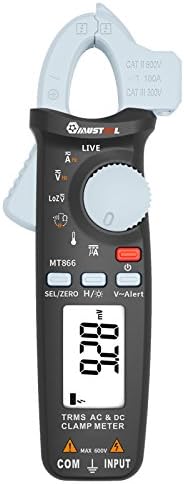
รูปที่ 1 : ด้านหน้า View of the Mustool MT866 Clamp เมตร. This image displays the main components including the clamp jaw, LCD display, function dial, and control buttons.
3.1 ส่วนประกอบ
- Clamp ขากรรไกร: ใช้สำหรับวัดกระแสไฟฟ้า AC/DC แบบไม่สัมผัส
- Clamp คันโยกปลดล็อค: เปิด clamp กราม.
- แบบไม่สัมผัส Voltage (NCV) Sensor: ตรวจจับปริมาณ ACtagอีโดยไม่ต้องมีการสัมผัสโดยตรง
- จอแสดงผล LCD: แสดงค่าการวัด หน่วย และตัวบ่งชี้ฟังก์ชัน
- แป้นหมุนเลือกฟังก์ชัน: Selects the desired measurement mode.
- SEL/ZERO Button: Selects sub-functions or zeros the DC current reading.
- H/💡 Button: Activates Data Hold or backlight.
- V~Alert Button: Activates the V~ alert function for live wire detection.
- Input Terminals (COM, INPUT): สำหรับเชื่อมต่อสายทดสอบสำหรับวัดระดับเสียงtage. การวัดความต้านทาน ความจุ ความถี่ และอุณหภูมิ
- Back Hook: For convenient hanging of the meter.
3.2. ตัวบ่งชี้การแสดงผล
- ไฟฟ้ากระแสสลับ/กระแสตรง: Indicates Alternating Current or Direct Current.
- V: โวลต์ (Voltagจ).
- A: Ampกระแสไฟฟ้า (ปัจจุบัน)
- โอห์ม: โอห์ม (ความต้านทาน)
- F: ฟารัด (ความจุ)
- เฮิร์ตซ์: เฮิรตซ์ (ความถี่)
- °C/°F: Degrees Celsius/Fahrenheit (Temperature).
- สด: Live wire detection indicator.
- LOZ: โวลต์อิมพีแดนซ์ต่ำtagโหมดการวัดอี
- H: Data Hold activated.
- สัญลักษณ์แบตเตอรี่: ไฟแสดงสถานะแบตเตอรี่ต่ำ
4. การตั้งค่า
4.1. การติดตั้งแบตเตอรี่
The Mustool MT866 requires batteries for operation (not included in the package). To install or replace batteries:
- Ensure the meter is turned off and all test leads are disconnected.
- ค้นหาฝาครอบช่องใส่แบตเตอรี่ที่ด้านหลังของมิเตอร์
- คลายสกรูยึดออก แล้วถอดฝาครอบออก
- ใส่แบตเตอรี่ใหม่ โดยสังเกตขั้วให้ถูกต้อง (+ และ -)
- ปิดฝาครอบแบตเตอรี่และขันสกรูให้แน่น
4.2. การเชื่อมต่อสายทดสอบ
สำหรับการวัดส่วนใหญ่ (ปริมาตร)tage, resistance, capacitance, etc.), test leads are required.

Figure 2: Mustool MT866 with Test Leads. The black test lead is connected to the COM terminal, and the red test lead is connected to the INPUT terminal.
- เชื่อมต่อ สายทดสอบสีดำ ไปที่ คอม ขั้วต่ออินพุต (ทั่วไป)
- เชื่อมต่อ ตะกั่วทดสอบสีแดง ไปที่ ป้อนข้อมูล เทอร์มินัล.
- Ensure connections are firm before taking any measurements.
5. คู่มือการใช้งาน
Turn the function dial to the desired measurement mode. Use the SEL/ZERO button to switch between sub-functions (e.g., AC/DC, Resistance/Continuity/Diode).
5.1. AC/DC เล่มที่tagอี การวัด (V)
- หมุนแป้นหมุนเลือกฟังก์ชันไปที่ V ตำแหน่ง.
- ใช้ SEL/ZERO button to select AC (V~) or DC (V=) voltage.
- ต่อสายทดสอบแบบขนานเข้ากับวงจรหรือชิ้นส่วนที่ต้องการทดสอบ
- อ่านเล่มที่tagค่า e บนจอแสดงผล
5.2. Low Impedance Voltage (LOZ) Measurement
- หมุนแป้นหมุนเลือกฟังก์ชันไปที่ ลอซ ตำแหน่ง.
- This mode automatically detects AC or DC voltage with a low input impedance, which can help drain ghost voltages and provide more accurate readings in certain applications.
- Connect the test leads in parallel to the circuit.
5.3. AC/DC Current Measurement (A) - Clamp
- หมุนแป้นหมุนเลือกฟังก์ชันไปที่ A ตำแหน่ง.
- ใช้ SEL/ZERO button to select AC (A~) or DC (A=) current.
- กดปุ่ม clamp ก้านปลดเพื่อเปิด clamp กราม.
- ให้หุ้มตัวนำเพียงตัวเดียวของวงจรไว้ภายในตัวหุ้มamp กราม.
- For DC current, press SEL/ZERO to zero the reading before measurement if necessary.
- อ่านค่าปัจจุบันบนจอแสดงผล
5.4. Resistance (Ω), Continuity, Diode Test
- หมุนแป้นหมุนเลือกฟังก์ชันไปที่ Ω ตำแหน่ง.
- ใช้ SEL/ZERO button to cycle between Resistance, Continuity, and Diode Test modes.
- ความต้านทาน: Connect test leads across the component. Ensure the circuit is de-energized.
- ความต่อเนื่อง: If resistance is below approximately 30Ω, the buzzer will sound.
- การทดสอบไดโอด: Connect the red lead to the anode and black lead to the cathode. The display shows the forward voltage drop. สลับสายไฟเพื่อตรวจสอบวงจรเปิด
5.5. Capacitance (µF) Measurement
- หมุนแป้นหมุนเลือกฟังก์ชันไปที่ µฟาเรนไฮต์ ตำแหน่ง.
- Discharge the capacitor completely before connecting the test leads.
- ต่อสายวัดทดสอบเข้ากับขั้วของตัวเก็บประจุ
- อ่านค่าความจุบนจอแสดงผล
5.6. การวัดความถี่ (Hz)
- Frequency can be measured from the jaw (when in AC current mode) or from the input terminals (when in AC voltagโหมดอี)
- When in ACV or ACA mode, press the SEL/ZERO button to cycle to the frequency measurement.
- เชื่อมต่อสายทดสอบหรือ clamp the conductor as appropriate for the primary measurement.
5.7. Temperature (°C/°F) Measurement

Figure 3: Mustool MT866 with Temperature Probe. The temperature probe is connected to the input terminals for temperature measurements.
- หมุนแป้นหมุนเลือกฟังก์ชันไปที่ อุณหภูมิ ตำแหน่ง.
- Connect the temperature test probe to the input terminals (red to INPUT, black to COM).
- วางปลายหัววัดอุณหภูมิไว้บนหรือใกล้กับวัตถุที่ต้องการวัดอุณหภูมิ
- Read the temperature on the display. Use SEL/ZERO เพื่อสลับระหว่างเซลเซียสและฟาเรนไฮต์
5.8. Live Wire Check (LIVE)
- หมุนแป้นหมุนเลือกฟังก์ชันไปที่ สด ตำแหน่ง.
- Insert the red test lead into the live wire socket. The display will show "LIVE" and an alarm will sound if a live wire is detected.
5.9. ไม่สัมผัส Voltage (V~Alert) Detection
- กดปุ่ม วี~แจ้งเตือน ปุ่มสำหรับเปิดใช้งานโหมด NCV
- Move the top of the meter (where the NCV sensor is located) close to a conductor or outlet.
- ถ้า AC voltage is detected, the meter will beep and the LED indicator will flash, with the intensity increasing เป็นปริมาตรtagความแข็งแกร่งเพิ่มขึ้น
5.10. µA HVAC Flame Rod Test
- หมุนแป้นหมุนเลือกฟังก์ชันไปที่ มคเอ ตำแหน่ง.
- This function is specifically designed for measuring microamperes in HVAC flame rod applications (0-200.0µA).
- Connect the test leads in series with the flame rod circuit.
5.11. Data Hold (H) and Backlight (💡)
- กดปุ่ม H/💡 button briefly to activate Data Hold, freezing the current reading on the display. Press again to release.
- กดปุ่มค้างไว้ H/💡 ปุ่มเพื่อเปิดหรือปิดไฟแบ็คไลท์
6. การบำรุงรักษา
6.1. การทำความสะอาด
- เช็ดมิเตอร์ด้วยโฆษณาamp ผ้าและผงซักฟอกอ่อน ห้ามใช้สารกัดกร่อนหรือตัวทำละลาย
- ตรวจสอบให้แน่ใจว่ามิเตอร์แห้งสนิทก่อนใช้งาน
6.2. การเปลี่ยนแบตเตอรี่
When the battery symbol appears on the display, replace the batteries as described in Section 4.1. Prompt battery replacement ensures accurate readings and proper device function.
6.3. การจัดเก็บ
- หากไม่ได้ใช้งานมิเตอร์เป็นเวลานาน ควรถอดแบตเตอรี่ออกเพื่อป้องกันการรั่วไหล
- เก็บเครื่องวัดไว้ในที่แห้งและเย็น หลีกเลี่ยงแสงแดดโดยตรงและอุณหภูมิที่สูงหรือต่ำเกินไป
7 การแก้ไขปัญหา
| ปัญหา | สาเหตุที่เป็นไปได้ | สารละลาย |
|---|---|---|
| ไม่มีจอแสดงผลหรือจอแสดงผลมืด | แบตเตอรี่เหลือน้อยหรือหมด การติดตั้งแบตเตอรี่ไม่ถูกต้อง | เปลี่ยนแบตเตอรี่ ตรวจสอบขั้วแบตเตอรี่ด้วย |
| แสดง "OL" หรือ "OVER" | ค่าที่วัดได้เกินช่วงที่เลือกไว้ | Select a higher range or check if the input is too high for the meter. |
| การอ่านที่ไม่ถูกต้อง | Poor test lead connection; incorrect function/range selected; external interference. | Ensure firm connections; select appropriate function/range; move away from strong electromagnetic fields. |
| ไม่มีเสียงบี๊บแสดงความต่อเนื่อง | Circuit resistance too high; continuity mode not selected. | Ensure resistance is below 30Ω; press SEL/ZERO to select continuity mode. |
8. ข้อมูลจำเพาะ
The following are the general specifications for the Mustool MT866 Digital True RMS Clamp เมตร:
- Max. Display: 6000 นับ
- กระแสไฟฟ้าสลับ (ACA): 6A/60A/100A (±2.5%+5)
- กระแสไฟตรง (DCA): 6A/60A/100A (±2.5%+5)
- ฉบับ ACtagอี (ACV): 6V/60V/600V (±1%+3)
- DC ฉบับที่tagอี (ดีซีวี): 6V/60V/600V (±1%+3)
- อิมพีแดนซ์ต่ำtage (LoZ ACV-DCV Auto Scan): 600.0V / 300kΩ input impedance
- ความต้านทาน (โอห์ม): 600Ω/6KΩ/60KΩ/600KΩ/6MΩ/60MΩ (±1%+3)
- ความจุ: 600.0µF/6000µF (±4%+3)
- ความถี่ (Hz): 60Hz/1000Hz (from jaw or input terminals)
- อุณหภูมิ: -20~500°ซ / -4~932°F
- µA HVAC Flame Rod Test: 0~200.0µA
- สัญญาณเตือนภัยความต่อเนื่อง: น้อยกว่า 30Ω
- สไตล์: ดิจิตอล
- ประเภทการวัด: มัลติมิเตอร์
- ระดับความปลอดภัย: CAT600 600V, CATXNUMX XNUMXV แรงดันไฟฟ้า
9. เนื้อหาบรรจุภัณฑ์
The Mustool MT866 package typically includes the following items:
- 1 x Mustool MT866 Digital True RMS Clamp Meter (Batteries are not included)
- 1 x Pair Test Probe (Red and Black)
- 1 x 1M (Length) Temperature Test Probe
- 1 x English User Manual (This document)
10. การรับประกันและการสนับสนุน
สำหรับข้อมูลการรับประกัน การสนับสนุนทางเทคนิค หรือสอบถามเกี่ยวกับบริการ โปรดดูเอกสารที่ให้ไว้ตอนซื้อสินค้า หรือติดต่อผู้ค้าปลีกของคุณ เก็บใบเสร็จรับเงินไว้เป็นหลักฐานการซื้อ