
1. บทนำ
The Canon PowerShot G5 X is a compact digital camera featuring a 1.0-inch, 20.2 Megapixel High-Sensitivity CMOS sensor and a built-in 2.36 million dot electronic viewfinder. This camera is designed for advanced photographers seeking high-quality stills and video with comprehensive control. It includes Wi-Fi and NFC capabilities for easy sharing and remote operation.
คุณสมบัติที่สำคัญ ได้แก่:
- 1.0-inch, 20.2 Megapixel High-Sensitivity CMOS sensor.
- Canon DIGIC 6 Image Processor for enhanced image quality and fast operation.
- Built-in 2.36 million dot electronic viewตัวค้นหา
- Multi-angle capacitive 3.0-inch touch panel LCD with 1.04 million dots.
- Full HD 1080p video recording at 60p/30p/24p.
- Integrated Wi-Fi and NFC for wireless connectivity.
2. อะไรอยู่ในกล่อง
Verify that all items are present before initial use:
- Canon PowerShot G5 X Camera Body
- แบตเตอรี่แพ็ค
- เครื่องชาร์จแบตเตอรี่
- สายคล้องคอ

Figure 2.1: Included items with the Canon PowerShot G5 X camera.
3. การตั้งค่าเริ่มต้น
3.1 การชาร์จแบตเตอรี่
- ใส่แบตเตอรี่ลงในเครื่องชาร์จแบตเตอรี่
- เสียบที่ชาร์จเข้ากับเต้ารับไฟฟ้า ไฟแสดงสถานะการชาร์จจะสว่างขึ้น
- Once charging is complete, the indicator light will change or turn off. Remove the battery.
3.2 การใส่แบตเตอรี่และการ์ดหน่วยความจำ
- เปิดฝาช่องใส่แบตเตอรี่/การ์ดที่ด้านล่างของกล้อง
- Insert the charged battery into the compartment, ensuring correct orientation.
- Insert a compatible SD, SDHC, or SDXC memory card into the card slot until it clicks into place.
- ปิดฝาปิดช่องใส่ให้แน่น
3.3 การเปิดกล้อง
กดปุ่ม เปิด/ปิด button located on the top of the camera to power it on. The lens will extend, and the LCD screen will activate.

รูปที่ 3.1 : ด้านหน้า view of the Canon PowerShot G5 X.
4. การใช้งานกล้อง
4.1 โหมดการถ่ายภาพพื้นฐาน
แป้นหมุนเลือกโหมดที่ด้านบนของกล้องช่วยให้สามารถเลือกโหมดการถ่ายภาพต่างๆ ได้:
- โหมดอัตโนมัติ: For automatic settings.
- P (โปรแกรม AE): Camera sets aperture and shutter speed, but allows other adjustments.
- Av (Aperture Priority AE): คุณตั้งค่ารูรับแสง กล้องจะตั้งค่าความเร็วชัตเตอร์เอง
- Tv (Shutter Priority AE): คุณตั้งค่าความเร็วชัตเตอร์ กล้องจะตั้งค่ารูรับแสงเอง
- M (คู่มือ): คุณสามารถควบคุมทั้งค่ารูรับแสงและความเร็วชัตเตอร์ได้
- Custom Modes (C1/C2): Save and recall your preferred settings.
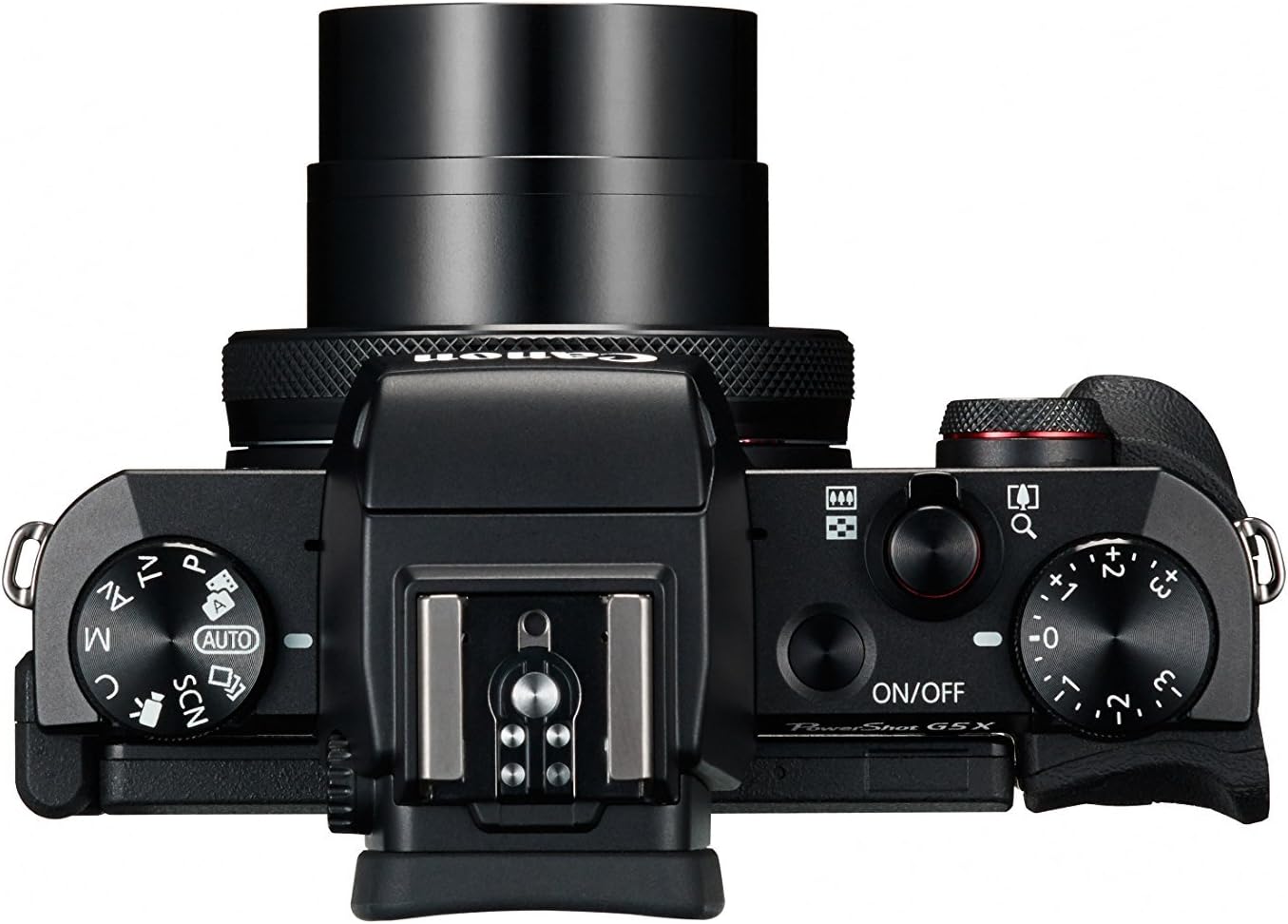
Figure 4.1: Top controls of the Canon PowerShot G5 X.
4.2 การใช้ Viewช่องมองภาพและหน้าจอ LCD
The camera features both an electronic viewfinder (EVF) and a multi-angle touch panel LCD. You can switch between them or use the EVF for composing shots in bright conditions. The LCD screen can be articulated for various shooting angles and touch operations.

Figure 4.2: Canon PowerShot G5 X with articulated LCD screen.

รูปที่ 4.3: ด้านหลัง view of the Canon PowerShot G5 X.
4.3 การบันทึกวิดีโอ
To record video, set the mode dial to the movie mode icon. Press the dedicated movie button to start and stop recording. The camera supports 1080p Full HD video at various frame rates (60p/30p/24p).
4.4 การเชื่อมต่อ Wi-Fi และ NFC
The camera's built-in Wi-Fi and NFC functions allow for wireless transfer of images and videos to compatible smart devices or computers. Refer to the camera's menu for detailed instructions on setting up these connections.
5. การบำรุงรักษาและการดูแล
5.1 การทำความสะอาดกล้อง
- เลนส์: Use a lens brush or blower to remove dust, then gently wipe with a microfiber lens cloth. Avoid touching the lens surface directly.
- หน้าจอ LCD: Wipe gently with a soft, dry cloth. For stubborn smudges, use a screen cleaner specifically designed for electronics.
- ตัวกล้อง: Wipe with a soft, dry cloth. Do not use organic solvents or strong cleaning agents.
5.2 พื้นที่จัดเก็บ
เมื่อไม่ใช้งาน ควรเก็บกล้องไว้ในที่แห้งและเย็น หลีกเลี่ยงแสงแดดโดยตรงและอุณหภูมิที่สูงหรือต่ำเกินไป ถอดแบตเตอรี่ออกหากไม่ได้ใช้งานกล้องเป็นเวลานาน
6 การแก้ไขปัญหา
This section addresses common issues you might encounter with your Canon PowerShot G5 X camera.
| ปัญหา | สาเหตุที่เป็นไปได้ / วิธีแก้ไข |
|---|---|
| กล้องไม่สามารถเปิดได้ | Battery is depleted. Charge the battery. Ensure battery is inserted correctly. |
| ภาพมีความเบลอ | Lens is dirty. Clean the lens. Shutter speed is too slow. Increase shutter speed or use image stabilization. Camera shake. Hold the camera steady or use a tripod. |
| Cannot connect to Wi-Fi/NFC. | Ensure Wi-Fi/NFC is enabled in camera settings. Check device compatibility and network settings. Refer to the camera's connectivity guide in the menu. |
| ข้อผิดพลาดการ์ดหน่วยความจำ | การ์ดหน่วยความจำเต็มแล้ว ลบข้อมูลที่ไม่จำเป็นออก files or replace card. Card is corrupted. Format the card (this will erase all data). Card is incompatible. Use a supported SD, SDHC, or SDXC card. |
| แฟลชไม่ทำงาน | Flash is set to OFF. Change flash mode to Auto or On. Subject is too far. Check flash range. |
7. ข้อมูลจำเพาะ
| คุณสมบัติ | รายละเอียด |
|---|---|
| ประเภทเซนเซอร์ | 1.0-inch High-Sensitivity CMOS |
| ความละเอียดของภาพนิ่งที่มีประสิทธิภาพ | 20.2 MP |
| หน่วยประมวลผลภาพ | ดิจิค 6 |
| ซูมออปติคอล | 4.2 เท่า |
| รูรับแสงเลนส์ | เอฟ/1.8-2.8 |
| ระยะโฟกัส (เทียบเท่า 35 มม.) | 24-100มม. |
| ระบบป้องกันภาพสั่นไหว | ดิจิตอล |
| Viewตัวค้นหา | Built-in Electronic Viewfinder (2.36 million dots) |
| หน้าจอ LCD | 3.0-inch Multi-angle Capacitive Touch Panel (1.04 million dots) |
| ความละเอียดวิดีโอ | 1080p Full HD (60p/30p/24p) |
| การเชื่อมต่อ | Wi-Fi, NFC, HDMI, USB |
| สื่อบันทึกข้อมูล | SD, SDHC, SDXC Memory Cards |
| น้ำหนักสินค้า | 1.8 ปอนด์ |
| หมายเลขรุ่น | 0510C001 |
| ยูพีซี | 748926548632 |
8. การรับประกันและการสนับสนุน
8.1 ข้อมูลการรับประกัน
This Canon PowerShot G5 X camera comes with a 90-day limited warranty from the date of purchase. This warranty covers manufacturing defects under normal use. Please retain your proof of purchase for warranty claims.
8.2 การสนับสนุนลูกค้า
For technical assistance, service, or further inquiries, please refer to the official Canon support webหรือติดต่อฝ่ายบริการลูกค้า โดยทั่วไปข้อมูลการติดต่อจะอยู่ในเว็บไซต์ของผู้ผลิต webเว็บไซต์.