
1. บทนำ
The DinoFire X16-DF-US is a rechargeable wireless presentation clicker designed to enhance your presentations. It offers a reliable 2.4GHz wireless connection, a bright red laser pointer, and intuitive controls for seamless navigation through slides. This manual provides detailed instructions for setup, operation, maintenance, and troubleshooting to ensure optimal performance of your device.

Image 1: DinoFire X16-DF-US Rechargeable Wireless Presentation Clicker. This image displays the sleek, black design of the presentation remote with its control buttons and red laser light emitting from the front.
2. เนื้อหาบรรจุภัณฑ์
โปรดตรวจสอบว่าสินค้าทั้งหมดมีอยู่ในแพ็คเกจ:
- 1 x Wireless Presenter Remote Control
- 1 x ตัวรับสัญญาณ USB ไร้สาย
- สายชาร์จ USB 1 เส้น
- 1 x คู่มือผู้ใช้ (เอกสารนี้)
3. สินค้าหมดview
Familiarize yourself with the components and controls of your DinoFire presentation clicker.

Image 2: Detailed diagram of the DinoFire X16-DF-US presentation clicker. This image shows multiple views of the device, highlighting the 'Light Hole', 'Manage Volume' buttons, 'Page UP' and 'Page Down' buttons, 'Play/Full Screen' and 'Black Screen' functions, 'Charing Port', 'USB Receiver', 'Pointer Button', 'Switch on/off' slider, 'Switch Windows' button, 'Open the Hyperlink' button, and 'Select Hyperlink' button.
- Light Hole: Emits the red laser pointer.
- Manage Volume: Adjusts system volume (buttons labeled '+' and '-').
- เลื่อนขึ้น: Navigates to the previous slide.
- เลื่อนหน้าลง: Navigates to the next slide.
- Play/Full Screen: Single press for Play, Press and Hold for Full Screen.
- Black Screen: Single press for Black Screen, Press and Hold for Black Screen.
- พอร์ตชาร์จ: Micro USB port for recharging the device.
- ตัวรับสัญญาณ USB: Stores securely within the presenter via magnetism.
- Pointer Button: เปิดใช้งานเลเซอร์พอยเตอร์สีแดง
- เปิด/ปิด: Power slider to turn the device on or off.
- สลับหน้าต่าง: Long press the TAB key button to switch between open windows.
- Open the Hyperlink: Double press the dedicated hyperlink button to open a selected hyperlink.
- Select Hyperlink: Single press the dedicated hyperlink button to select a hyperlink.
4. การตั้งค่า
4.1 Charging the Presenter
The DinoFire X16-DF-US features a built-in rechargeable battery. Before first use, or when the low power indicator flashes, charge the device using the provided USB cable.
- Connect the micro USB end of the charging cable to the charging port on the side of the presenter.
- เชื่อมต่อปลาย USB มาตรฐานของสายเคเบิลเข้ากับแหล่งจ่ายไฟ USB (เช่น พอร์ต USB ของคอมพิวเตอร์ อะแดปเตอร์ติดผนัง USB)
- A full charge typically takes about one hour. The device can operate for more than one week on a single charge, depending on usage.

Image 3: The DinoFire X16-DF-US presentation clicker connected to a laptop via a USB charging cable. This image illustrates the charging process, highlighting the micro USB port on the device and the USB-A connector plugged into a laptop.
4.2 การเชื่อมต่อตัวรับสัญญาณ USB
The wireless receiver is stored magnetically within the presenter for convenience and to prevent loss.
- Gently pull out the USB receiver from the bottom end of the presenter.
- เสียบตัวรับสัญญาณ USB เข้ากับพอร์ต USB ที่ว่างอยู่บนคอมพิวเตอร์หรือแล็ปท็อปของคุณ
- ระบบจะตรวจจับและติดตั้งไดรเวอร์ที่จำเป็นโดยอัตโนมัติ ไม่จำเป็นต้องติดตั้งไดรเวอร์ด้วยตนเอง

ภาพที่ 4: ภาพระยะใกล้ view of the DinoFire X16-DF-US presentation clicker showing the magnetic storage for the USB receiver. The image demonstrates how the mini USB receiver is securely stored within the presenter's body, preventing it from being easily lost.
4.3 การเปิด/ปิดเครื่อง
Locate the ON/OFF switch on the side of the presenter. Slide it to the 'ON' position to power on the device before use, and to 'OFF' when not in use to conserve battery.
5. คู่มือการใช้งาน
The DinoFire X16-DF-US offers a range of functions to control your presentation effectively.
5.1 Basic Presentation Controls
- Page Up (▲ button): Press to move to the previous slide.
- Page Down (▼ button): Press to move to the next slide.
- Play/Full Screen (□ button): Single press to start/resume presentation. Press and hold to enter full screen mode.
- Black Screen (□ button): Single press to black out the screen. Press and hold to black out the screen.
5.2 ฟังก์ชั่นขั้นสูง
- Hyperlink Control:
- Single press the dedicated hyperlink button to select a hyperlink.
- Double press the dedicated hyperlink button to open the selected hyperlink.
- การควบคุมระดับเสียง: Use the '+' and '-' buttons on the side of the presenter to adjust the system volume.
- สลับหน้าต่าง: Long press the 'TAB' button (often integrated with another function button) to switch between open application windows on your computer.

Image 5: The DinoFire X16-DF-US presentation clicker demonstrating the 'Switch Windows' function. The image shows the presenter in front of a computer screen displaying multiple open application windows, illustrating the ability to switch between them.
5.3 Laser Pointer Operation
Press and hold the dedicated pointer button (often marked with a sun or star icon) to activate the red laser pointer. Release the button to turn it off.

Image 6: Close-up of the DinoFire X16-DF-US presentation clicker emitting a bright red laser beam. The image also includes a warning symbol against pointing the laser at eyes, emphasizing laser safety.
Safety Warning: Do not point the laser beam directly at people's eyes or at highly reflective surfaces. The laser is bright and can cause temporary vision impairment or eye damage.
The red laser light is effective against most backgrounds but is not recommended for use on LED, LCD, or TV screens.
5.4 ความเข้ากันได้
The DinoFire X16-DF-US is widely compatible with various operating systems and presentation software:
- ระบบปฏิบัติการ: Windows 2003, XP, Windows Vista, Windows 7, 8, 10, Linux, Android, Mac OS.
- ซอฟต์แวร์: Microsoft PowerPoint, Keynote, Google Slides, Prezi, MS Word, Excel, ACD See, and web เบราว์เซอร์
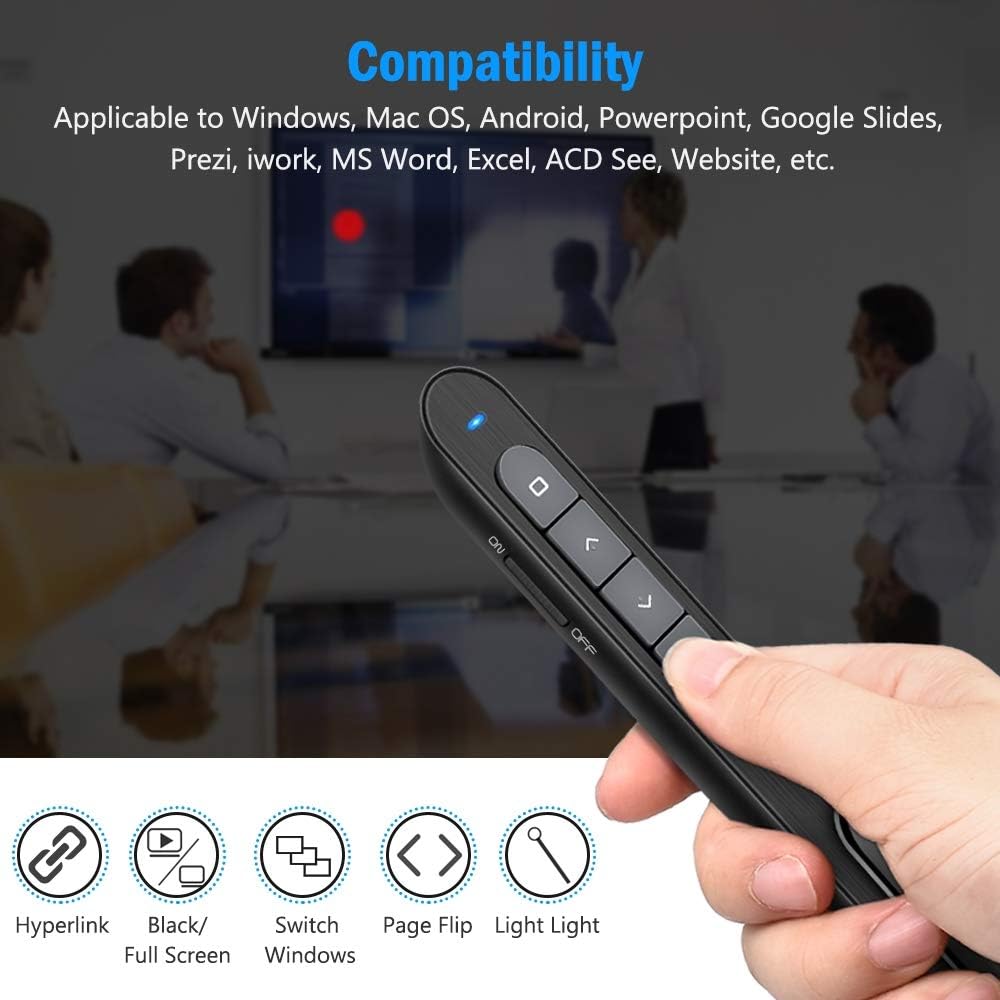
Image 7: The DinoFire X16-DF-US presentation clicker shown with various compatibility icons. This image highlights the device's compatibility with Windows, Mac OS, Android, PowerPoint, Google Slides, Prezi, iWork, MS Word, Excel, ACD See, and general website navigation.
5.5 Wireless Control Range
The presenter operates on a 2.4GHz RF frequency, providing a wireless control range of up to 100 feet (30 meters). The red laser light has a range of over 300 feet (90 meters).

Image 8: A person using the DinoFire X16-DF-US presentation clicker in a large room, pointing at a projected screen. The image emphasizes the long control range of the device, indicating a presenter control range of over 328ft and a red light range of over 656ft.
6. การบำรุงรักษา
6.1 การดูแลแบตเตอรี่
- ชาร์จอุปกรณ์ให้เต็มก่อนใช้งานครั้งแรก
- หลีกเลี่ยงการระบายแบตเตอรี่จนหมดบ่อยครั้งเพื่อยืดอายุการใช้งาน
- เก็บอุปกรณ์ไว้ในที่แห้งและเย็นเมื่อไม่ได้ใช้งานเป็นเวลานาน
6.2 การทำความสะอาด
เช็ดอุปกรณ์ด้วยผ้านุ่มและแห้ง ห้ามใช้สารเคมีรุนแรงหรือน้ำยาทำความสะอาดที่มีฤทธิ์กัดกร่อน
6.3 หน่วยเก็บข้อมูลตัวรับสัญญาณ USB
Always store the USB receiver inside the magnetic compartment of the presenter when not in use to prevent loss.
7 การแก้ไขปัญหา
- Presenter not responding:
- Ensure the presenter is powered on (ON/OFF switch).
- ตรวจสอบว่าตัวรับสัญญาณ USB เสียบเข้ากับพอร์ต USB ของคอมพิวเตอร์แน่นดีแล้ว
- Verify the presenter's battery level. Recharge if the low power indicator is flashing.
- ลองเสียบตัวรับสัญญาณ USB เข้ากับพอร์ต USB อื่น
- รีสตาร์ทเครื่องคอมพิวเตอร์ของคุณ
- Laser pointer not working:
- โปรดตรวจสอบให้แน่ใจว่าได้เปิดใช้งานอุปกรณ์นำเสนอแล้ว
- Press and hold the laser pointer button firmly.
- ตรวจสอบระดับแบตเตอรี่
- ไฟแสดงสถานะพลังงานต่ำ:
- When the indicator light flashes continuously, it signifies low battery. Please charge the device immediately.
- The device will enter auto-sleep mode if unused for approximately 5 minutes to save energy.
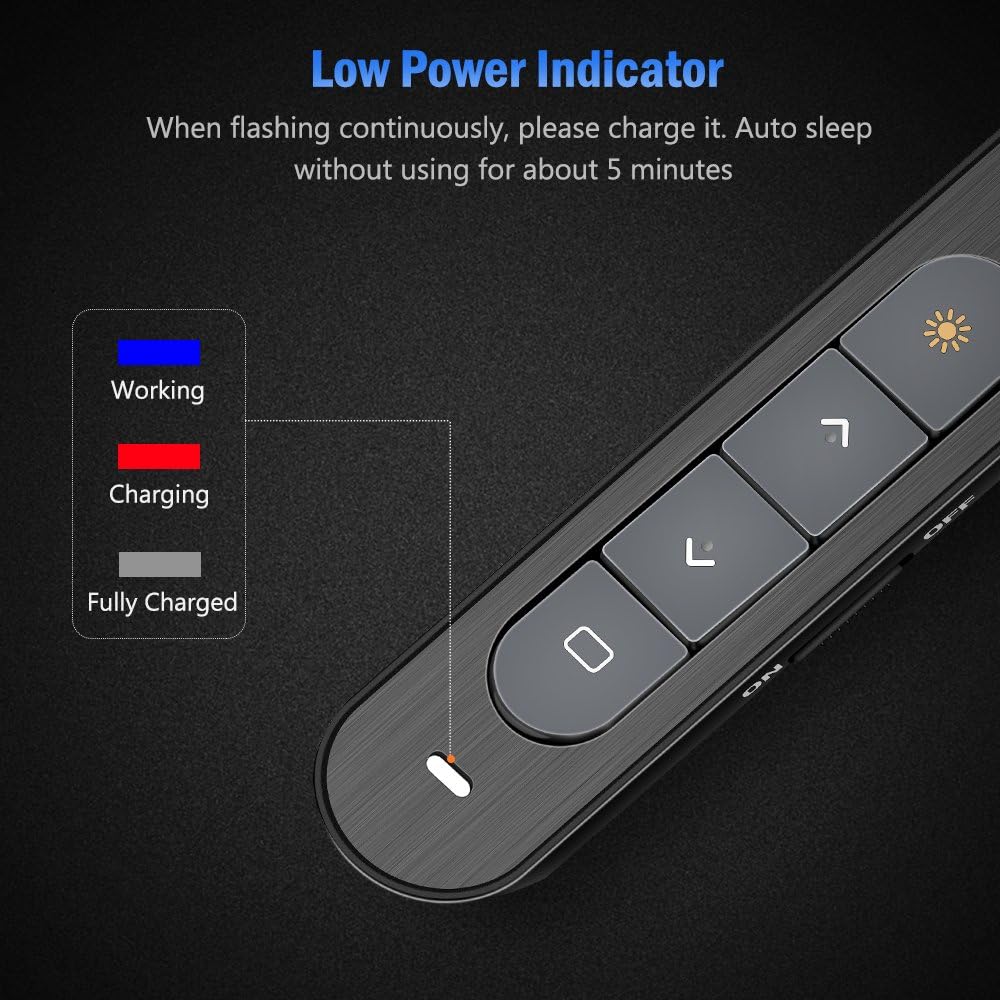
Image 9: Close-up of the DinoFire X16-DF-US presentation clicker showing the low power indicator light. The image displays a legend for the indicator light colors: blue for 'Working', red for 'Charging', and gray for 'Fully Charged', along with a visual representation of the indicator flashing when low on power.
8. ข้อมูลจำเพาะ
| คุณสมบัติ | ข้อมูลจำเพาะ |
|---|---|
| หมายเลขรุ่น | X16-DF-US |
| เทคโนโลยี | ความถี่วิทยุ (RF) |
| ความถี่ | 2.4กิกะเฮิรตซ์ |
| ระยะควบคุม | สูงถึง 100 ฟุต (30 เมตร) |
| แสงเลเซอร์สี | สีแดง |
| Laser Light Distance | Over 300ft (90m) |
| เอาท์พุทเลเซอร์สูงสุด | <5มิลลิวัตต์ |
| ประเภทแบตเตอรี่ | ลิเธียมโพลีเมอร์ 160 mAh |
| เวลาในการชาร์จ | ประมาณ 1 ชั่วโมง |
| ฉบับทำงานtage | 1.5โวลต์ |
| Sleep Current | น้อยกว่า 10uA |
| ขนาด | 5.5 x 0.8 x 0.8 นิ้ว (โดยประมาณ) |
| น้ำหนักสินค้า | 1.76 ออนซ์ |
| เวอร์ชั่น USB | USB 1.1, รองรับ USB 2.0, USB 3.0 |
| ระบบปฏิบัติการที่รองรับ | Windows 2003/XP/Vista/7/8/10, Mac OS, Linux, Android |
9. การรับประกันและการสนับสนุน
DinoFire offers a commitment to product quality. If the USB receiver is lost within one year of purchase, a free replacement may be provided. For further support or inquiries, please refer to the DinoFire official webเว็บไซต์หรือติดต่อฝ่ายบริการลูกค้าของพวกเขา