
1. บทนำและเรื่องอื่นๆview
The Dio DiOCAMRI01 is an advanced 360° HD WiFi camera designed for indoor surveillance, offering comprehensive monitoring while prioritizing user privacy. This camera features a motorized lens, 1080p resolution, and infrared night vision, ensuring clear visuals day and night. Its unique geo-fencing capability automatically activates a privacy mode when you are home, retracting the lens to ensure your personal space remains private. The camera also includes motion and noise detection, two-way audio communication, and local recording options via a Micro SD card.
This manual provides essential information for the proper installation, operation, and maintenance of your DiOCAMRI01 camera.
2. ข้อมูลด้านความปลอดภัย
- อ่านคำแนะนำทั้งหมดอย่างละเอียดก่อนใช้งาน
- ใช้เฉพาะอะแดปเตอร์แปลงไฟที่ให้มากับเครื่องเท่านั้น
- อย่าให้กล้องโดนน้ำ ความชื้น หรืออุณหภูมิที่สูงหรือต่ำเกินไป
- ควรหลีกเลี่ยงการวางกล้องไว้ใกล้แหล่งความร้อนหรือในที่ที่มีแสงแดดส่องโดยตรง
- อย่าพยายามถอดประกอบหรือซ่อมแซมกล้องด้วยตนเอง โปรดติดต่อช่างผู้ชำนาญเพื่อขอรับบริการ
- Ensure the camera is securely mounted if using wall or ceiling installation.
3. เนื้อหาบรรจุภัณฑ์
ตรวจสอบว่ามีส่วนประกอบทั้งหมดอยู่ในแพ็คเกจของคุณ:
- DiOCAMRI01 HD WiFi Camera
- อะแดปเตอร์แปลงไฟ
- Mounting Kit (screws, wall plugs, mounting bracket)
- คู่มือการใช้งาน (เอกสารนี้)
4. คุณสมบัติของผลิตภัณฑ์
- การตรวจสอบระยะไกล: Day and night vision (infrared night vision up to 10m).
- Wide-Angle Motorized Lens: Offers 360° horizontal and 150° vertical rotation for comprehensive coverage.
- การปกป้องความเป็นส่วนตัว: Geo-fencing feature automatically puts the camera in standby mode and closes the lens when the owner is present. Manual standby mode is also available via the app.
- Motion and Noise Detection: Adjustable sensitivity with 3 levels. Sends direct notifications to your smartphone.
- เสียงสองทาง: Built-in microphone and intercom function allow you to hear and speak through the camera.
- การบันทึกในเครื่อง: Supports Micro SD card (up to 128GB, not included) for manual or automatic recording upon detection. Remote viewing of recordings is available via the smartphone app.
- ตั้งค่าได้ง่าย: Quick and intuitive installation via the DiO Cam+ mobile application.
- การติดตั้งที่ยืดหยุ่น: Designed for discreet integration, can be mounted on a wall, ceiling, or placed on a shelf.
5. การตั้งค่า
5.1 การตั้งค่าเริ่มต้น
- การเชื่อมต่อไฟฟ้า: Connect the camera to a power outlet using the provided power adapter. The camera will power on.
- Download DiO Cam+ App: ค้นหา "DiO Cam+" in your smartphone's app store (iOS or Android) and download the application.
- ลงทะเบียน/เข้าสู่ระบบ: เปิดแอปพลิเคชันและทำตามคำแนะนำบนหน้าจอเพื่อสร้างบัญชี หรือเข้าสู่ระบบหากคุณมีบัญชีอยู่แล้ว
- เพิ่มกล้อง: Within the DiO Cam+ app, select the option to add a new device. Follow the in-app wizard to connect your camera to your Wi-Fi network. This typically involves scanning a QR code on the camera or entering Wi-Fi credentials.
- การจัดวาง: Position the camera in your desired location. It can be placed on a flat surface, or mounted on a wall or ceiling using the included mounting kit. Ensure the camera has a clear line of sight to the area you wish to monitor.
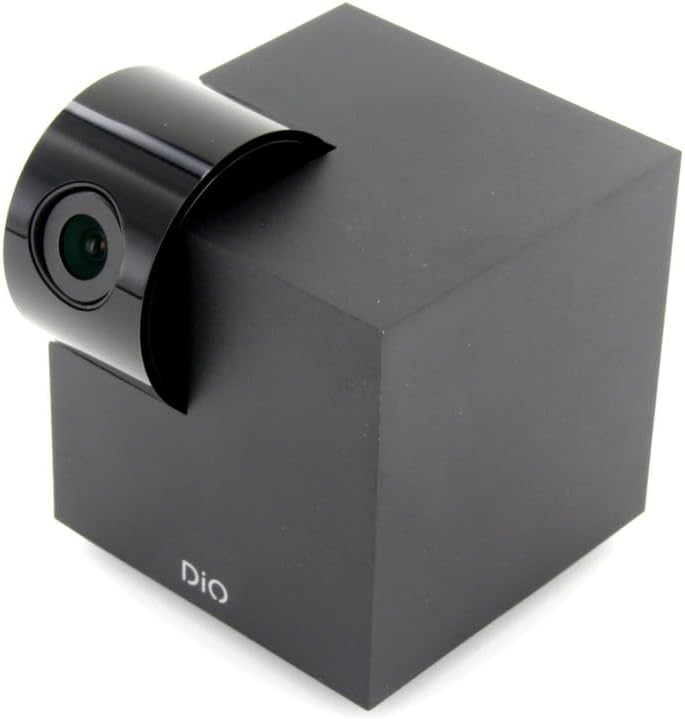
Figure 5.1: The DiOCAMRI01 camera in its standard upright position.

Figure 5.2: Camera placed on a shelf, demonstrating discreet integration.

Figure 5.3: Camera mounted on a ceiling for overhead surveillance.
5.2 การติดตั้งการ์ด Micro SD (ไม่บังคับ)
To enable local video recording, insert a Micro SD card (up to 128GB, not included) into the designated slot on the camera. Ensure the camera is powered off before inserting or removing the card.
5.3 การแชร์การเข้าถึงกล้อง
The DiO Cam+ app allows you to easily share access to your camera with family members or trusted friends. Navigate to the camera settings within the app and select the sharing option to invite others to view the live feed and recordings.
6. คู่มือการใช้งาน
6.1 สด View และการควบคุมระยะไกล
Once connected, open the DiO Cam+ app to access the live video feed from your camera. From the live view บนหน้าจอ คุณสามารถ:
- ปรับ View มุม: Use the on-screen controls to remotely rotate the camera lens up to 350° horizontally and 150° vertically to cover all corners of your room.
- เสียงสองทาง: แตะไอคอนไมโครโฟนเพื่อพูดผ่านลำโพงของกล้อง และฟังเสียงจากไมโครโฟนของกล้อง
- Take Snapshots/Record Video: Capture still images or start manual video recordings directly from the live view.

Figure 6.1: Camera interacting with the DiO Cam+ smartphone application.

รูปที่ 6.2: ด้านข้าง view of the camera, highlighting the rotating lens mechanism.
6.2 Privacy Features (Geo-Fencing and Manual Standby)
The DiOCAMRI01 camera offers advanced privacy protection:
- การกำหนดขอบเขตทางภูมิศาสตร์: Configure geo-fencing in the app to automatically switch the camera to privacy mode when your smartphone enters a predefined home zone. In privacy mode, the camera lens will retract, ensuring no recording or live viewไอเอ็นจีเกิดขึ้น
- โหมดสแตนด์บายแบบแมนนวล: You can manually activate or deactivate the camera's standby mode (privacy mode) at any time through the DiO Cam+ app.
- Scheduled Standby: Set a schedule within the app for the camera to automatically enter or exit standby mode at specific times.

Figure 6.3: Camera with lens retracted, indicating privacy mode.
6.3 Motion and Noise Detection
The camera can detect motion and noise within its field of view. When triggered, it will send a notification to your smartphone and can automatically begin recording to the Micro SD card.
- การปรับความไว: Adjust the detection sensitivity (3 levels) in the app settings to minimize false alarms.
- ตัวเลือกการบันทึก: Configure recording duration (1, 3, or 5 minutes per clip) or continuous recording if a Micro SD card is installed.
7. การบำรุงรักษา
- การทำความสะอาด: Use a soft, dry cloth to clean the camera body and lens. Do not use liquid cleaners or abrasive materials.
- การอัปเดตซอฟต์แวร์: Regularly check the DiO Cam+ app for firmware updates to ensure optimal performance and security. Follow the in-app instructions for any available updates.
- การจัดการการ์ด Micro SD: รีเป็นระยะๆview and manage recordings on your Micro SD card. Format the card through the app if necessary to maintain performance.
8 การแก้ไขปัญหา
- กล้องออฟไลน์: Ensure the camera is powered on and connected to your Wi-Fi network. Check your Wi-Fi router and internet connection. Try restarting the camera and your router.
- ไม่สามารถเชื่อมต่อกับแอปได้: Verify your Wi-Fi password. Ensure your smartphone is connected to a 2.4GHz Wi-Fi network during initial setup, as the camera may not support 5GHz networks.
- คุณภาพวิดีโอไม่ดี: Check your internet connection speed. Ensure the camera lens is clean and free from obstructions. Adjust camera placement for optimal lighting.
- Motion/Noise Detection Not Working: Check the sensitivity settings in the app. Ensure the detection zones are correctly configured.
- No Recording to SD Card: Ensure the Micro SD card is correctly inserted and formatted. Check if the card is full. The camera supports up to 128GB.
- Privacy Mode Not Activating: Verify that geo-fencing is enabled and configured correctly in the app, and that your smartphone's location services are active.
9. ข้อมูลจำเพาะ
| คุณสมบัติ | ข้อมูลจำเพาะ |
|---|---|
| หมายเลขรุ่น | DIOCAM-RI01 |
| ประเภทการติดตั้ง | ติดผนัง |
| ความละเอียดในการจับภาพวิดีโอ | 1080p |
| สี | สีขาว |
| จำนวนรายการ | 1 |
| ส่วนประกอบที่รวมอยู่ | DiOCAMRI01 WiFi HD 360° Rotating 1080P 2MP Camera with Geo-Fencing |
| เทคโนโลยีการสื่อสารไร้สาย | ไวไฟ |
| ฟอร์มแฟกเตอร์ | Dome (Cube with rotating lens) |
| ความละเอียดวิดีโอที่มีประสิทธิภาพ | 1080 |
| Viewอิงแองเกิล | 360 องศา (แนวนอน) |
| ช่วงการมองเห็นตอนกลางคืน | 10 เมตร |
| วัสดุ | โลหะ |
| เล่มที่tage | 5 โวลต์ |
| วัดtage | 5 วัตต์ |
| ขนาดรายการ (ยาว x กว้าง x สูง) | 9.4 x 4.9 x 31.9 เซนติเมตร |
| ผู้ผลิต | ชาคอน |
| คุณสมบัติพิเศษ | Local Recording, Night Vision |
| รวมแบตเตอรี่ | เลขที่ |
| แบตเตอรี่ที่จำเป็น | เลขที่ |
| การใช้ที่แนะนำ | การตรวจจับการเคลื่อนไหว, การมองเห็นในเวลากลางคืน |
| เทคโนโลยีการเชื่อมต่อ | ไร้สาย |
| การใช้งานในร่ม/กลางแจ้ง | ในร่ม |
| อุปกรณ์ที่รองรับ | สมาร์ทโฟน |
| แหล่งพลังงาน | Battery Powered (Note: Product specs indicate 'No batteries required', implying external power) |
| โปรโตคอลการเชื่อมต่อ | ไวไฟ |
| ประเภทตัวควบคุม | แอนดรอยด์ |
10. การรับประกันและการสนับสนุน
For information regarding warranty coverage, technical support, or service, please refer to the official Dio webตรวจสอบข้อมูลบนเว็บไซต์หรือติดต่อร้านค้าที่คุณซื้อสินค้า เก็บหลักฐานการซื้อไว้เพื่อใช้ในการเคลมประกัน
ผู้ผลิต: ชาคอน