
1. บทนำ
Thank you for choosing the EDM 00780 Remote Control. This manual provides essential information for the proper setup, operation, and maintenance of your remote control, specifically designed for use with EDM Model 07214. Please read these instructions carefully before using the product to ensure optimal performance and longevity.
ข้อมูลด้านความปลอดภัยที่สำคัญ: Always handle batteries with care. Do not mix old and new batteries, or different types of batteries. Remove batteries if the remote will not be used for an extended period.
2. สินค้าหมดview
2.1 ส่วนประกอบ
The EDM 00780 remote control features an ergonomic design for comfortable handling and intuitive push-button operation. Key components include:
- ปุ่มควบคุม: Various buttons for specific functions of the EDM Model 07214.
- ตัวส่งสัญญาณอินฟราเรด: Located at the front, transmits signals to the device.
- ช่องใส่แบตเตอรี่: อยู่ด้านหลัง สำหรับติดตั้งแบตเตอรี่
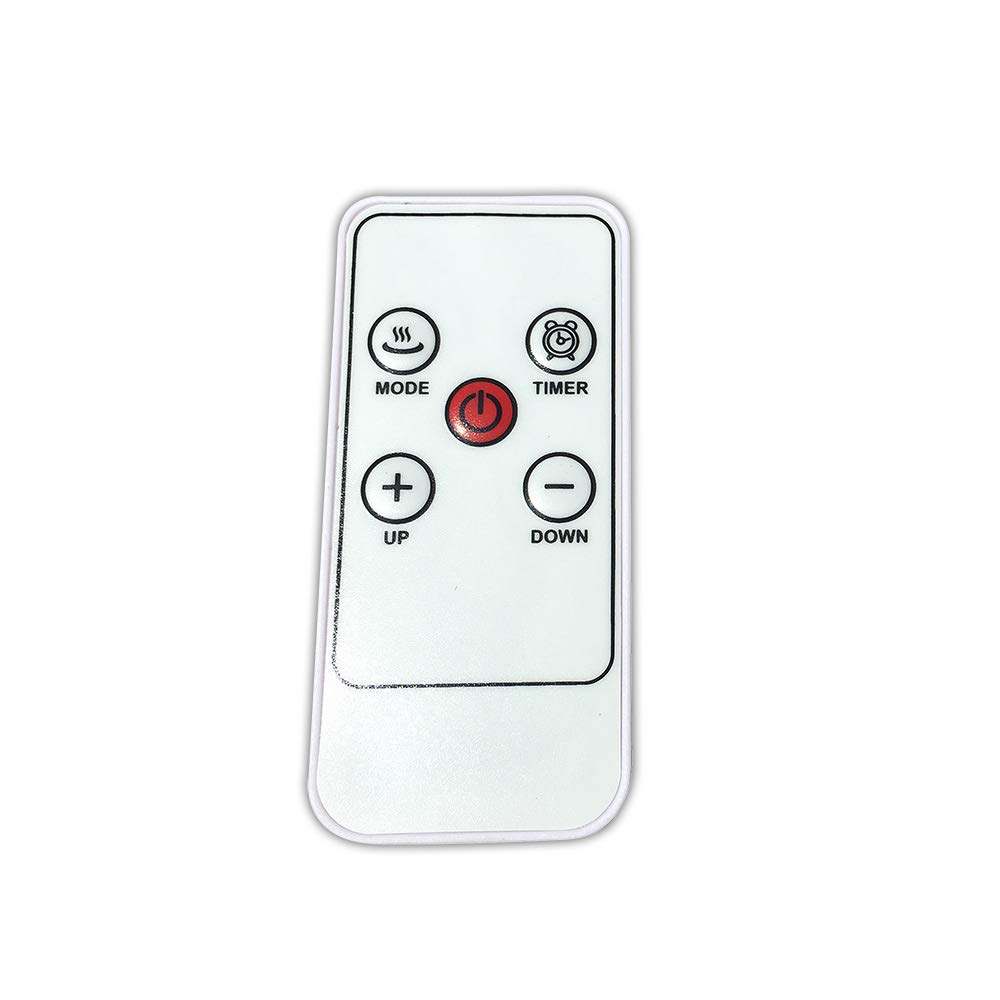
ภาพที่ 1: ด้านหน้า view of the EDM 00780 Remote Control, showing its ergonomic shape and button layout.
3. การตั้งค่า
3.1 การติดตั้งแบตเตอรี่
- ค้นหาฝาปิดช่องใส่แบตเตอรี่ที่ด้านหลังของรีโมทคอนโทรล
- เลื่อนหรือกดเบาๆ แล้วยกฝาขึ้นเพื่อเปิดช่องเก็บของ
- Insert the required batteries (typically AAA, refer to the compartment for specific type and polarity) ensuring the positive (+) and negative (-) terminals align correctly with the markings inside the compartment.
- ใส่ฝาครอบช่องใส่แบตเตอรี่กลับเข้าไป โดยให้แน่ใจว่าล็อคเข้าที่อย่างแน่นหนา
3.2 การใช้งานครั้งแรก
After installing the batteries, the remote control is ready for use. Point the infrared emitter directly towards the EDM Model 07214 device you wish to control. Ensure there are no obstructions between the remote and the device.
4. การดำเนินการ
4.1 ฟังก์ชั่นพื้นฐาน
The EDM 00780 remote control operates via infrared technology, providing a maximum range of 10 meters under optimal conditions. To operate, simply press the desired button while pointing the remote at the EDM Model 07214.
4.2 ฟังก์ชันปุ่ม
Specific button functions will correspond to the features of your EDM Model 07214. Common button types include:
- ปุ่มเปิด/ปิด: เพื่อเปิดหรือปิดอุปกรณ์
- ปุ่มฟังก์ชั่น: For specific operations (e.g., mode selection, timer, light control).
- ปุ่มนำทาง: If applicable, for menu navigation.
Refer to the user manual of your EDM Model 07214 for detailed descriptions of each button's function.
5. การบำรุงรักษา
5.1 การทำความสะอาด
ในการทำความสะอาดรีโมทคอนโทรล ให้ใช้ผ้าแห้งนุ่มๆ เช็ด สำหรับคราบสกปรกที่ติดแน่น ให้ใช้ผ้าชุบน้ำหมาดๆ เช็ดเบาๆampen the cloth with water or a mild cleaning solution. Do not use abrasive cleaners, alcohol, or solvents, as these can damage the surface or internal components.
5.2 การเปลี่ยนแบตเตอรี่
Replace batteries when the remote control's response becomes sluggish or stops working. Follow the battery installation steps outlined in Section 3.1. Always replace all batteries at the same time with new ones of the same type.
5.3 พื้นที่จัดเก็บ
Store the remote control in a cool, dry place away from direct sunlight and extreme temperatures. If storing for an extended period, remove the batteries to prevent leakage and potential damage.
6 การแก้ไขปัญหา
6.1 ปัญหาทั่วไป
| ปัญหา | สาเหตุที่เป็นไปได้ | สารละลาย |
|---|---|---|
| รีโมทไม่ตอบสนอง | แบตเตอรี่เสียหรือติดตั้งไม่ถูกต้อง | เปลี่ยนแบตเตอรี่โดยตรวจสอบให้แน่ใจว่าใส่ขั้วถูกต้อง |
| ระยะจำกัดหรือการตอบสนองไม่ต่อเนื่อง | Weak batteries, obstruction, or remote not pointed correctly. | Replace batteries. Ensure a clear line of sight to the device. Point directly at the device. |
| ปุ่มบางปุ่มใช้งานไม่ได้ | Button malfunction or device not recognizing command. | Clean the remote. Test other buttons. If only one button fails, contact support. |
7. ข้อมูลจำเพาะ
| คุณสมบัติ | ข้อมูลจำเพาะ |
|---|---|
| หมายเลขรุ่น | 00780 |
| ยี่ห้อ | อีดีเอ็ม |
| เทคโนโลยีการเชื่อมต่อ | อินฟราเรด |
| ประเภทตัวควบคุม | Push-button Control |
| ระยะสูงสุด | 10 เมตร |
| คุณสมบัติพิเศษ | การออกแบบตามหลักสรีรศาสตร์ |
| ขนาด (กว้าง x ยาว x สูง) | 10 x 10 x 10 ซม. |
| น้ำหนัก | 20 กรัม |
| สี | หลากสี |
| ประเทศต้นกำเนิด | สเปน |
8. การรับประกันและการสนับสนุน
This product is covered by a standard manufacturer's warranty. For specific warranty terms and conditions, please refer to the documentation provided with your EDM Model 07214 device or contact EDM customer support directly. For technical assistance or further inquiries, please visit the official EDM webเว็บไซต์หรือติดต่อฝ่ายบริการลูกค้าของพวกเขา