
การแนะนำ
This manual provides essential instructions for the safe operation, maintenance, and troubleshooting of your Best Choice Products 3-in-1 Robot Vacuum Cleaner, Model SKY4719. This device is designed to vacuum, sweep, and mop various floor types, offering automated cleaning with smart features.
โปรดอ่านคู่มือนี้อย่างละเอียดก่อนใช้ผลิตภัณฑ์และเก็บคู่มือนี้ไว้เพื่อใช้อ้างอิงในอนาคต
เนื้อหาแพ็คเกจ
โปรดแกะกล่องอย่างระมัดระวัง และตรวจสอบให้แน่ใจว่าสินค้าทุกรายการที่ระบุไว้ด้านล่างครบถ้วนและอยู่ในสภาพดี หากมีสินค้าใดขาดหายหรือเสียหาย โปรดติดต่อฝ่ายบริการลูกค้า

This image displays the complete package contents, including the robot vacuum, remote control, mop pads, HEPA filters, water tank, dust bin, power adapter, cleaning brush, and charging dock station.
- 1 x BCP Cleaning Robot
- 1 x รีโมทคอนโทรล
- แผ่นม็อบ 2 แผ่น
- 1 x ถังเก็บน้ำ
- ตัวกรอง HEPA 3 ชิ้น
- 1 x ถังเก็บฝุ่น
- 6 x แปรงด้านข้าง
- อะแดปเตอร์ไฟฟ้า 1 ตัว
- 1 x คู่มือการใช้งาน
- 1 x Charging Dock Station
- แปรงทำความสะอาด 1 ชิ้น
สินค้าเกินview
The Best Choice Products SKY4719 robot vacuum is a versatile cleaning device designed for efficiency and convenience. It integrates vacuuming, sweeping, and mopping functionalities into one compact unit.
The robot vacuum cleaner features a sleek black design with a central control panel and a lift-up cover for the dustbin.
คุณสมบัติหลัก:
- การทำความสะอาด 3-in-1: Sweeps, vacuums, and mops for comprehensive floor care.
- การชาร์จตัวเอง: Automatically returns to its charging base when battery is low.
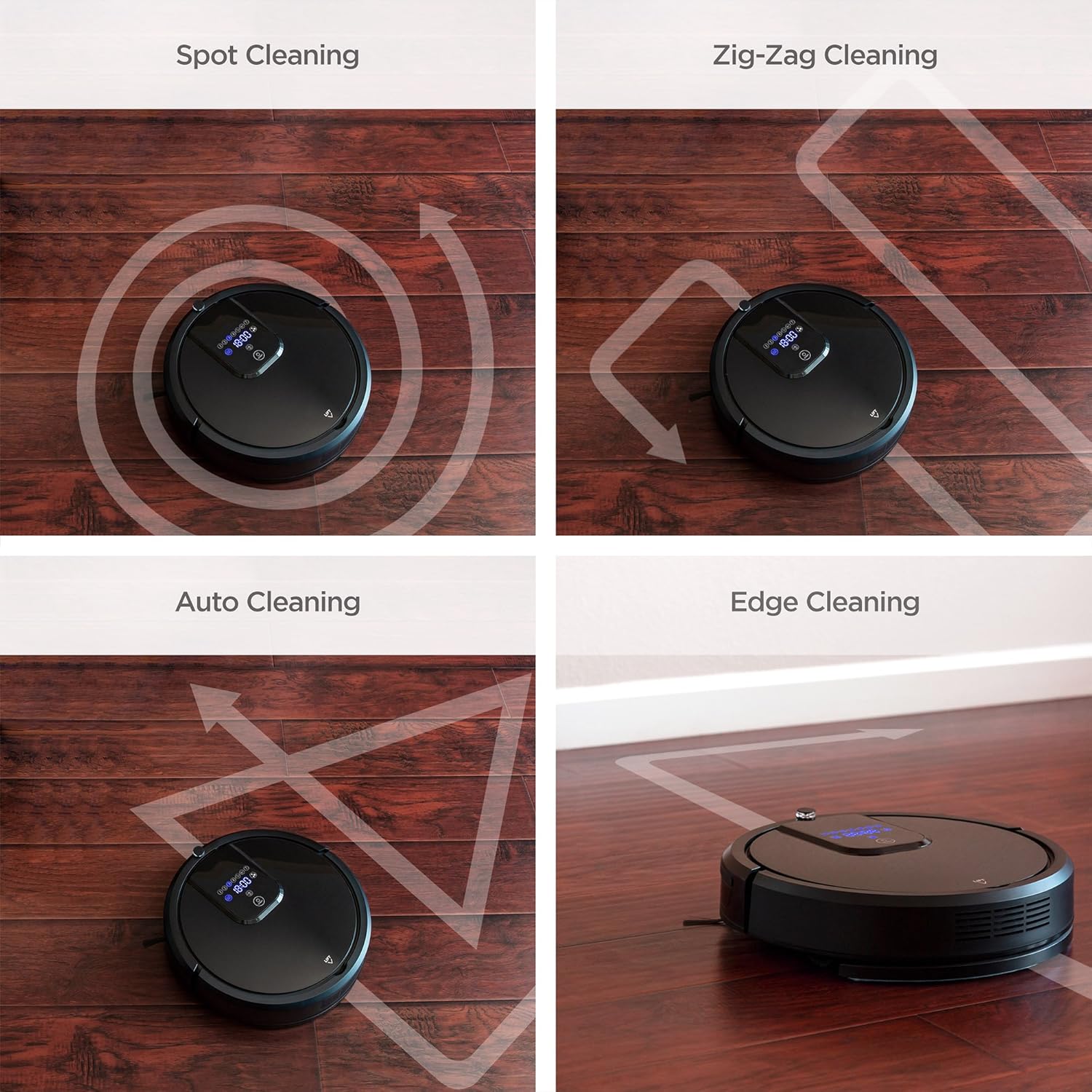
- โหมดการทำความสะอาดหลายแบบ: Includes Spot, Zig-Zag, Auto, and Edge cleaning.
- เซ็นเซอร์อัจฉริยะ: Equipped with anti-collision and fall prevention technology.
- การทำงานที่มีเสียงรบกวนต่ำ: Designed for quiet cleaning.
- การควบคุมระยะไกลและการสั่งงานด้วยเสียง: Convenient control options for ease of use.

A view of the robot's underside reveals the main brush, side brushes for sweeping, and the removable mop pad, designed for effective cleaning on various surfaces.
การตั้งค่า
1. การจัดวางฐานชาร์จ
Place the charging base against a wall in an open, uncluttered area. Ensure there is at least 1 meter (3 feet) of clear space in front of the base and 0.5 meters (1.5 feet) on either side. Plug the power adapter into the charging base and then into a wall outlet.
2. การชาร์จครั้งแรก
Before first use, fully charge the robot vacuum. Place the robot onto the charging base, ensuring the charging contacts align. The indicator lights on the robot will show charging status. A full charge typically takes 4-5 hours.
3. Attaching Side Brushes
Snap the two side brushes onto the posts on the bottom of the robot. Ensure they are securely attached.
4. Filling Water Tank (for Mopping)
If using the mopping function, remove the water tank from the robot. Open the water tank cap, fill it with clean water (do not use cleaning solutions that may clog the nozzle), and securely close the cap. Reinsert the water tank into the robot until it clicks into place. Attach a clean mop pad to the bottom of the water tank.
คำแนะนำการใช้งาน
การเปิด/ปิดเครื่อง
Press and hold the power button on the robot or the remote control to turn the device on or off.
โหมดการทำความสะอาด
The robot vacuum offers several cleaning modes to suit different needs. These can be selected via the remote control or the control panel on the robot.

Four distinct cleaning patterns are illustrated: Spot cleaning for concentrated areas, Zig-Zag for systematic coverage, Auto cleaning for general use, and Edge cleaning for walls and corners.
- ทำความสะอาดอัตโนมัติ: The robot automatically navigates and cleans the entire floor area.
- การทำความสะอาดเฉพาะจุด: Concentrates cleaning on a specific dirty area. The robot will clean in a spiral pattern.
- การทำความสะอาดขอบ: หุ่นยนต์ทำความสะอาดตามผนังและขอบเฟอร์นิเจอร์
- Zig-Zag Cleaning: The robot cleans in a systematic back-and-forth pattern, ideal for large, open spaces.

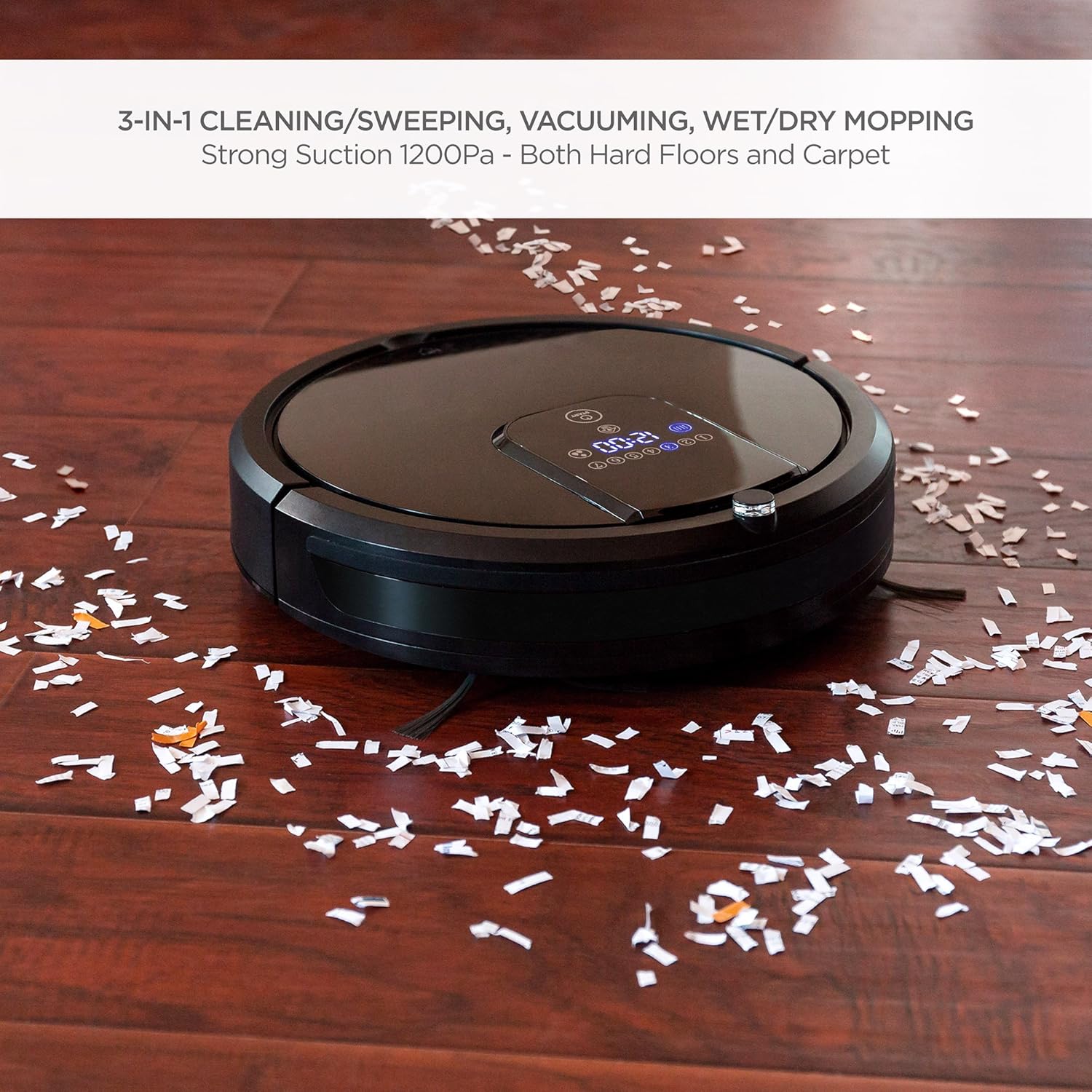
The robot vacuum is shown effectively collecting small debris from a hardwood floor, demonstrating its powerful vacuuming capability.
The robot vacuum is shown actively mopping a hardwood floor, highlighting its wet/dry mopping capability.
รีโมทคอนโทรล
Use the included remote control to start/stop cleaning, select cleaning modes, direct the robot manually, set cleaning schedules, and send the robot back to its charging base.
การควบคุมด้วยเสียง
The robot vacuum is compatible with Amazon Echo devices. Follow the instructions in your Amazon Echo app to connect and enable voice commands for your robot vacuum.
การชาร์จตัวเอง
When the battery level is low, the robot will automatically return to its charging base to recharge. Ensure the charging base is accessible and unobstructed.
คุณสมบัติด้านความปลอดภัย

This image illustrates the robot vacuum's intelligent features: automatic return to charging base, obstacle avoidance, ability to climb over small thresholds, and sensors to prevent falls down stairs.
- Anti-Collision: Built-in sensors detect obstacles and allow the robot to navigate around them, preventing damage to furniture and the robot itself.
- การปีนป่าย: The robot can climb over small thresholds and carpets up to a certain height.
- การป้องกันการล้ม: Cliff sensors prevent the robot from falling down stairs or off elevated surfaces.
This video provides a visual guide to the robot vacuum's capabilities, including its 3-in-1 cleaning functions, self-charging, remote control, and voice control integration.
การซ่อมบำรุง
การบำรุงรักษาตามปกติจะช่วยให้หุ่นยนต์ดูดฝุ่นของคุณทำงานได้อย่างเหมาะสมที่สุดและยืดอายุการใช้งาน
1. การล้างถังขยะ
After each cleaning cycle, or when the dust bin is full, remove it from the robot and empty its contents into a trash receptacle. Clean the dust bin with a dry cloth.
2. การทำความสะอาดตัวกรอง
The HEPA filters should be cleaned regularly. Tap them gently to remove dust. Replace filters every 1-3 months depending on usage. Do not wash HEPA filters with water.
3. ทำความสะอาดแปรงข้าง
Periodically check the side brushes for tangled hair or debris. Use the included cleaning brush or scissors to remove any obstructions. Replace worn brushes as needed.
4. Cleaning Mop Cloths
After each mopping session, remove the mop cloth and wash it with water. Allow it to air dry completely before reattaching or storing.
5. การทำความสะอาดเซ็นเซอร์และหน้าสัมผัสการชาร์จ
Wipe the cliff sensors, anti-collision sensors, and charging contacts on both the robot and the charging base with a clean, dry cloth to ensure proper function.
การแก้ไขปัญหา
หากคุณพบปัญหาเกี่ยวกับหุ่นยนต์ดูดฝุ่น โปรดดูปัญหาทั่วไปและวิธีแก้ไขต่อไปนี้:
| ปัญหา | สาเหตุที่เป็นไปได้ | สารละลาย |
|---|---|---|
| หุ่นยนต์ไม่เปิด | แบตเตอรี่เหลือน้อย; ปิดสวิตช์ไฟ | Charge the robot; ensure the main power switch is in the 'ON' position. |
| หุ่นยนต์ติดขัดบ่อยครั้ง | สิ่งกีดขวาง (สายเคเบิล พรม); พื้นที่แคบ | Clear the cleaning area of small obstacles; use boundary strips if available. |
| ประสิทธิภาพการทำความสะอาดไม่ดี | Full dust bin; dirty filters/brushes. | Empty dust bin; clean or replace filters and brushes. |
| Robot does not return to charging base. | Charging base obstructed; base not powered. | Ensure clear path to base; check power connection to base. |
| รีโมทคอนโทรลไม่ทำงาน | Dead batteries; out of range. | Replace remote batteries; operate within range of the robot. |
If the problem persists after trying these solutions, please contact Best Choice Products customer support.
ข้อมูลจำเพาะ
| คุณสมบัติ | รายละเอียด |
|---|---|
| ยี่ห้อ | ผลิตภัณฑ์ทางเลือกที่ดีที่สุด |
| หมายเลขรุ่น | สกาย4719 |
| คำแนะนำด้านพื้นผิว | Hardwood, Tile, Laminate, Carpet |
| คุณสมบัติพิเศษ | Programmable, Self-Charging, Anti-Collision, Fall Prevention |
| สี | สีดำ |
| ประเภทตัวควบคุม | รีโมทคอนโทรล, การควบคุมด้วยเสียง |
| ประเภทตัวกรอง | Cartridge (HEPA Type) |
| อายุการใช้งานแบตเตอรี่ | นานถึง 1.5 ชั่วโมง |
| ประเภทแบตเตอรี่ | ลิเธียมไอออน |
| ความจุถังเก็บฝุ่น | 0.9 ลิตร |
| แหล่งพลังงาน | Corded Electric (Charging Base) |
| น้ำหนักสินค้า | 10.8 ปอนด์ |
| ระดับเสียง | 60 เดซิเบล |
| อุปกรณ์ที่รองรับ | อเมซอน เอคโค่ |
| ฟอร์มแฟกเตอร์ | หุ่นยนต์ |
การรับประกันและการสนับสนุน
For warranty information or technical support, please refer to the warranty card included in your package or visit the official Best Choice Products website. Please have your model number (SKY4719) and purchase details ready when contacting support.