
1. สินค้าหมดview
The iBall Sound Clock is a multi-functional device designed to serve as a portable Bluetooth speaker, a digital clock, and an alarm. It offers various playback options and a built-in microphone for hands-free calling.
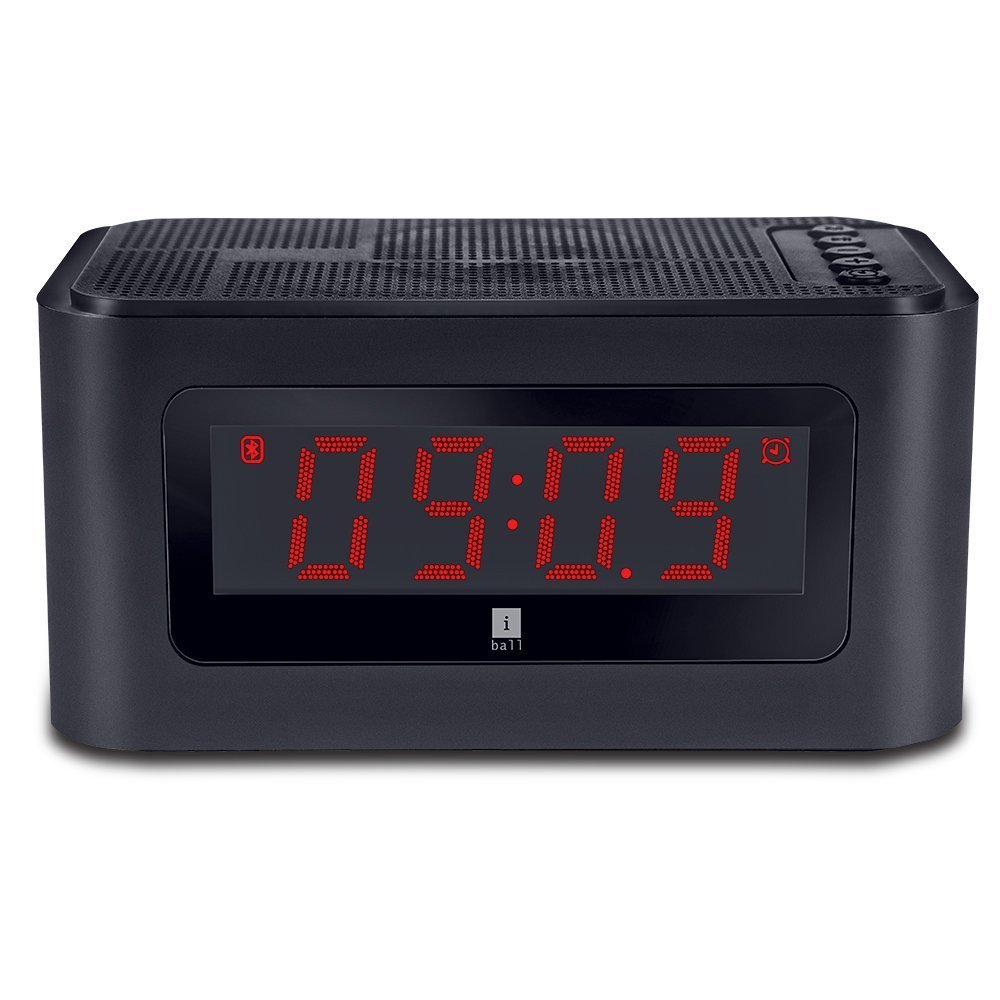
รูปที่ 1 : ด้านหน้า view of the iBall Sound Clock, displaying the digital clock and accessible control buttons on top.
คุณสมบัติหลัก:
- ลำโพงบลูทูธแบบพกพา
- Digital Clock with Alarm Function
- Multiple Playback Options: Bluetooth (BT), USB, Micro SD, FM Radio, AUX
- Built-in Microphone for hands-free calling
- Large LED Screen for time, track, and volume display
2. เนื้อหาบรรจุภัณฑ์
กรุณาทำเครื่องหมายในช่องสำหรับรายการต่อไปนี้:
- iBall Sound Clock Speaker
- Audio / Charging Cable
- คู่มือการใช้งาน
3. การจัดวางอุปกรณ์และการควบคุม
Familiarize yourself with the various parts and controls of your iBall Sound Clock.

Figure 2: Side panel of the iBall Sound Clock, detailing the connectivity ports and power switch.
แผงควบคุมด้านบน:
- ปุ่มโหมด: กดเพื่อสลับระหว่างโหมด Bluetooth, วิทยุ FM, USB, Micro SD และ AUX
- ปุ่มเล่น/หยุดชั่วคราว: Press to play or pause audio. In Bluetooth mode, press to answer/end calls.
- ปุ่มลดระดับเสียง / ปุ่มเพลงก่อนหน้า: Press briefly for previous track. Press and hold to decrease volume.
- ปุ่มเพิ่มระดับเสียง / ปุ่มเพลงถัดไป: Press briefly for next track. Press and hold to increase volume.
- ปุ่มตั้งค่านาฬิกาปลุก: Press to enter alarm setting mode.
Side Panel Ports and Switch:
- พอร์ตชาร์จ Micro USB: สำหรับการชาร์จอุปกรณ์
- พอร์ต USB: สำหรับเล่นไฟล์เสียงจากแฟลชไดรฟ์ USB
- ช่องเสียบการ์ด Micro SD: สำหรับเล่นไฟล์เสียงจาก Micro SD การ์ด
- อินพุต AUX: สำหรับเชื่อมต่ออุปกรณ์เสียงภายนอกผ่านสายสัญญาณเสียงขนาด 3.5 มม.
- สวิตช์เปิด/ปิด: เพื่อเปิดหรือปิดอุปกรณ์
จอแสดงผลด้านหน้า:
- จอแสดงผลดิจิตอล LED: Shows current time, selected mode (BT, FM, AUX, TF, USB), track number, and volume level.
4. คู่มือการติดตั้ง
4.1. การชาร์จอุปกรณ์
Before first use, fully charge the iBall Sound Clock. Connect the supplied audio/charging cable to the Micro USB charging port on the device and the other end to a USB power adapter (not included) or a computer's USB port.
- The LED display may indicate charging status.
- โดยทั่วไปการชาร์จเต็มจะใช้เวลาไม่กี่ชั่วโมง
- บันทึก: The device uses a Lithium Polymer battery.
4.2. การเปิด/ปิดเครื่อง
ค้นหาตำแหน่ง เปิด/ปิด switch on the side panel. Slide the switch to the 'ON' position to power on the device. Slide it to the 'OFF' position to power off.
4.3. การตั้งนาฬิกา
- ตรวจสอบให้แน่ใจว่าอุปกรณ์เปิดอยู่
- กดปุ่ม โหมด button repeatedly until the clock display is active (if not already).
- กดปุ่มค้างไว้ ตั้งปลุก กดปุ่มเพื่อเข้าสู่โหมดตั้งเวลา ตัวเลขชั่วโมงจะกะพริบ
- ใช้ เพิ่มระดับเสียง / แทร็กถัดไป และ ลดระดับเสียง / เพลงก่อนหน้า ปุ่มเพื่อปรับชั่วโมง
- กดปุ่ม ตั้งปลุก กดปุ่มอีกครั้งเพื่อยืนยันชั่วโมง แล้วจึงเปลี่ยนไปตั้งค่านาที ตัวเลขนาทีจะกะพริบ
- ใช้ เพิ่มระดับเสียง / แทร็กถัดไป และ ลดระดับเสียง / เพลงก่อนหน้า ปุ่มปรับนาที
- กดปุ่ม ตั้งปลุก button once more to save the time and exit setting mode.
5. คู่มือการใช้งาน
5.1. โหมดบลูทู ธ
- Power on the iBall Sound Clock. It will automatically enter Bluetooth pairing mode, indicated by a flashing 'BT' icon on the display.
- บนอุปกรณ์มือถือของคุณ เปิดใช้งาน Bluetooth และค้นหาอุปกรณ์ที่มีอยู่
- Select "iBall Sound Clock" from the list of devices.
- Once paired, the 'BT' icon will stop flashing, and you will hear a confirmation tone.
- You can now play audio from your mobile device through the speaker.
- ในการรับสายเรียกเข้าให้กดปุ่ม เล่น/หยุดชั่วคราว button. Press again to end the call.
5.2. โหมดวิทยุ FM
- กดปุ่ม โหมด กดปุ่มซ้ำๆ จนกระทั่งคำว่า 'FM' ปรากฏบนจอแสดงผล
- กดปุ่มค้างไว้ เล่น/หยุดชั่วคราว button to automatically scan and save available FM radio stations. The speaker will cycle through frequencies and store stations with strong signals.
- เมื่อการสแกนเสร็จสิ้น ให้ใช้ เพิ่มระดับเสียง / แทร็กถัดไป และ ลดระดับเสียง / เพลงก่อนหน้า ปุ่มสำหรับนำทางระหว่างสถานีที่บันทึกไว้
5.3. USB / Micro SD Card Mode
- เสียบแฟลชไดรฟ์ USB เข้ากับพอร์ต USB หรือเสียบการ์ด Micro SD เข้ากับช่องเสียบการ์ด Micro SD
- The device will automatically detect the storage and switch to USB or Micro SD mode, indicated by 'USB' or 'TF' (for Micro SD) on the display.
- Audio playback will begin automatically. Use the เล่น/หยุดชั่วคราว, เพิ่มระดับเสียง / แทร็กถัดไป, และ ลดระดับเสียง / เพลงก่อนหน้า ปุ่มเพื่อควบคุมการเล่น

Figure 3: The iBall Sound Clock demonstrating its multiple playback options, including USB and Micro SD card inputs.
5.4. โหมด AUX
- Connect one end of the supplied audio cable to the AUX input port on the iBall Sound Clock and the other end to the audio output jack of your external device (e.g., smartphone, MP3 player).
- กดปุ่ม โหมด กดปุ่มซ้ำๆ จนกระทั่งคำว่า 'AUX' ปรากฏบนจอแสดงผล
- Control audio playback from your external device. The speaker's volume controls will still function.
5.5. การตั้งปลุก
- ตรวจสอบให้แน่ใจว่าอุปกรณ์เปิดอยู่
- กดปุ่ม ตั้งปลุก กดปุ่มเพื่อเข้าสู่โหมดตั้งค่านาฬิกาปลุก ตัวเลขชั่วโมงของนาฬิกาปลุกจะกะพริบ
- ใช้ เพิ่มระดับเสียง / แทร็กถัดไป และ ลดระดับเสียง / เพลงก่อนหน้า ปุ่มเพื่อปรับชั่วโมงการปลุก
- กดปุ่ม ตั้งปลุก กดปุ่มอีกครั้งเพื่อยืนยันชั่วโมง แล้วจึงเปลี่ยนไปตั้งค่านาที ตัวเลขนาทีของนาฬิกาปลุกจะกะพริบ
- ใช้ เพิ่มระดับเสียง / แทร็กถัดไป และ ลดระดับเสียง / เพลงก่อนหน้า ปุ่มสำหรับปรับนาทีปลุก
- กดปุ่ม ตั้งปลุก button once more to save the alarm time. An alarm icon will appear on the display, indicating the alarm is active.
- หากต้องการปิดเสียงเตือน ให้กดปุ่ม ตั้งปลุก button again until the alarm icon disappears.
- When the alarm sounds, press any button to snooze or turn off the alarm.
6. การบำรุงรักษา
- การทำความสะอาด: ใช้ผ้านุ่มและแห้งเช็ดทำความสะอาดพื้นผิวของอุปกรณ์ ห้ามใช้น้ำยาทำความสะอาดหรือวัสดุขัดถู
- พื้นที่จัดเก็บ: เมื่อไม่ได้ใช้งานเป็นเวลานาน ควรเก็บอุปกรณ์ไว้ในที่แห้งและเย็น หลีกเลี่ยงแสงแดดโดยตรงและอุณหภูมิที่สูงหรือต่ำเกินไป
- การดูแลแบตเตอรี่ เพื่อยืดอายุการใช้งานแบตเตอรี่ ควรหลีกเลี่ยงการคายประจุแบตเตอรี่จนหมดบ่อยๆ ควรชาร์จอุปกรณ์เป็นประจำ แม้ว่าจะไม่ได้ใช้งานอยู่ก็ตาม
- การสัมผัสน้ำ: อุปกรณ์นี้ไม่กันน้ำ โปรดหลีกเลี่ยงการสัมผัสน้ำหรือความชื้นสูง
7 การแก้ไขปัญหา
| ปัญหา | สาเหตุที่เป็นไปได้ | สารละลาย |
|---|---|---|
| อุปกรณ์ไม่เปิดเครื่อง | แบตเตอรี่หมดประจุ | เชื่อมต่ออุปกรณ์เข้ากับแหล่งจ่ายไฟโดยใช้สายชาร์จและปล่อยให้ชาร์จจนเต็ม |
| ไม่มีเสียงจากลำโพง | ระดับเสียงเบาเกินไปหรือปิดเสียงไว้ เลือกโหมดไม่ถูกต้อง | Increase the volume. Ensure the correct playback mode (BT, FM, USB, SD, AUX) is selected. Check source device volume. |
| การจับคู่บลูทูธล้มเหลว | Device is not in pairing mode. Source device Bluetooth is off. Too far from source device. | Ensure the speaker is in Bluetooth mode and flashing 'BT'. Turn Bluetooth off and on again on your source device. Move the devices closer. |
| การรับสัญญาณวิทยุ FM ไม่ดี | สัญญาณอ่อน. | Move the speaker to a location with better reception. Re-scan for stations. |
| สัญญาณเตือนภัยไม่ดัง | Alarm is not set or is disabled. Volume is too low. | Verify the alarm time is set and the alarm icon is visible on the display. Increase the volume. |
8. ข้อมูลจำเพาะ
| ยี่ห้อ | iBall |
| แบบอย่าง | sound clock |
| เทคโนโลยีการเชื่อมต่อ | AUX, Bluetooth, USB, wireless |
| คุณสมบัติพิเศษ | Built-in Microphone, Radio, SD Card |
| แหล่งพลังงาน | ใช้พลังงานจากแบตเตอรี่ |
| ประเภทแบตเตอรี่ | ลิเธียมโพลีเมอร์ (รวม 1 ชิ้น) |
| ประเภทจอภาพ | ดิจิตอล LED |
| น้ำหนักสินค้า | 34 กรัม |
| วัสดุ | พลาสติก |
| สี | สีดำ |
9. การรับประกันและการสนับสนุน
For warranty information and technical support, please refer to the warranty card included in your package or contact iBall customer service directly. Keep your purchase receipt for warranty claims.
Manufacturer: iBall