
1. บทนำ
This manual provides essential instructions for the proper use and care of your Yamaha RAV536 (Part # ZP601100) OEM remote control. This remote is designed to operate specific Yamaha A/V receiver models, ensuring seamless control over your audio and video system. Please read this manual thoroughly before use to ensure optimal performance and longevity of your remote control.
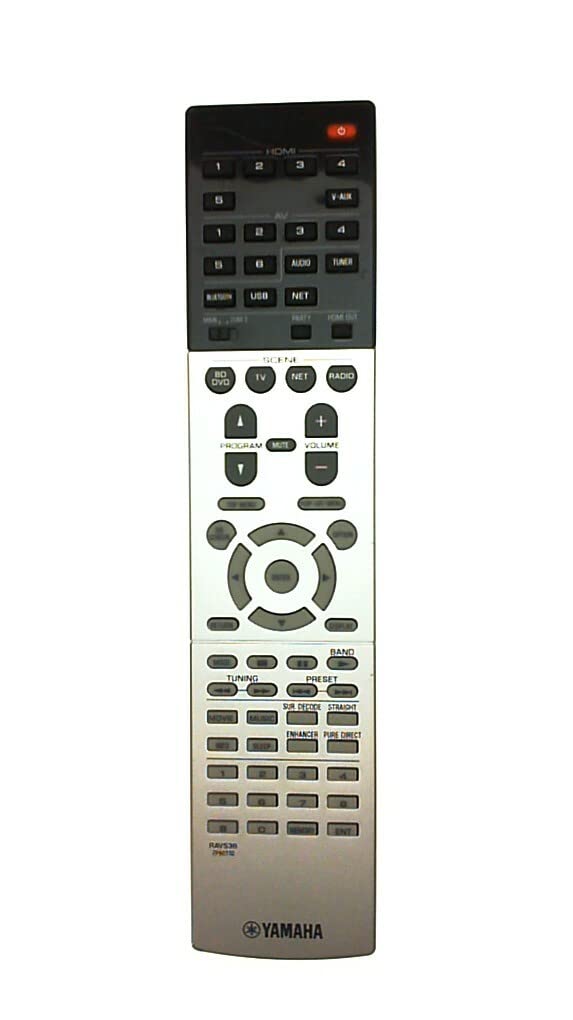
Figure 1: Yamaha RAV536 Remote Control. This image displays the front view of the remote, highlighting its button layout and ergonomic design.
2. รุ่นที่รองรับ
The Yamaha RAV536 (ZP601100) remote control is specifically designed for use with the following Yamaha A/V receiver models:
- ทีเอสอาร์-7790
- RX-V679BL
- เอชทีอาร์-6068
- TSR-7790BL
- RX-A750
- RX-V679
- RX-V779
สำคัญ: This is an OEM remote control and is not universal. It is intended to replace the original remote supplied with the listed models only. Compatibility with other models is not guaranteed.
3. การตั้งค่า: การติดตั้งแบตเตอรี่
To begin using your Yamaha RAV536 remote control, you must install batteries. The remote requires two (2) AAA batteries (not included).
- เปิดช่องใส่แบตเตอรี่: หาฝาปิดช่องใส่แบตเตอรี่ที่ด้านหลังของรีโมทคอนโทรล เลื่อนฝาลงด้านล่าง หรือกดสลักแล้วยกขึ้นเพื่อเปิด
- ใส่แบตเตอรี่: Insert two new AAA batteries into the compartment. Ensure that the positive (+) and negative (-) terminals of the batteries align correctly with the polarity indicators inside the compartment. Incorrect installation can prevent the remote from functioning.
- ปิดช่องใส่แบตเตอรี่: ปิดฝาช่องใส่แบตเตอรี่กลับเข้าที่โดยเลื่อนกลับเข้าที่จนกระทั่งล็อคเข้าที่อย่างแน่นหนา
บันทึก: Always use new batteries for optimal performance. Do not mix old and new batteries, or different types of batteries, as this can lead to leakage or malfunction.
4. การดำเนินการ
Once batteries are installed, the Yamaha RAV536 remote control is ready for use with your compatible Yamaha A/V receiver. No additional programming is typically required for OEM remotes.
- Pointing the Remote: Point the remote control directly towards the infrared (IR) sensor on your Yamaha A/V receiver. Obstructions between the remote and the receiver can block the signal.
- ปุ่มฟังก์ชั่น: Each button on the remote corresponds to a specific function on your A/V receiver (e.g., Power, Volume, Input Selection, Menu Navigation). Refer to the owner's manual of your specific Yamaha A/V receiver model for a detailed explanation of each button's function and how to operate your system.
- พิสัย: The remote operates effectively within a range of approximately 10 meters (33 feet) from the receiver, provided there are no significant obstructions.
For advanced features and specific operational procedures, consult the comprehensive owner's manual that came with your Yamaha A/V receiver.
5. การบำรุงรักษา
การบำรุงรักษาอย่างถูกวิธีจะช่วยให้รีโมทคอนโทรลของคุณใช้งานได้ยาวนานและทำงานได้อย่างน่าเชื่อถือ
- การเปลี่ยนแบตเตอรี่: Replace batteries when the remote's response becomes sluggish or stops working. Always replace both batteries simultaneously with new ones of the same type (AAA).
- การทำความสะอาด: ในการทำความสะอาดรีโมท ให้เช็ดเบาๆ ด้วยผ้าแห้งนุ่มๆ สำหรับคราบสกปรกที่ติดแน่น ให้เช็ดออกเบาๆ ด้วยน้ำสะอาดampชุบผ้าด้วยน้ำหรือน้ำยาทำความสะอาดอ่อนๆ ที่ไม่ทำให้เกิดรอยขีดข่วน หลีกเลี่ยงการใช้สารเคมีรุนแรง ตัวทำละลาย หรือวัสดุที่มีฤทธิ์กัดกร่อน เพราะอาจทำให้พื้นผิวหรือส่วนประกอบภายในของรีโมทเสียหายได้
- พื้นที่จัดเก็บ: If the remote will not be used for an extended period, remove the batteries to prevent potential leakage and damage. Store the remote in a cool, dry place away from direct sunlight and extreme temperatures.
- หลีกเลี่ยงการตกและการกระแทก: Protect the remote from physical shocks, drops, and impacts, which can damage internal circuitry.
6 การแก้ไขปัญหา
If you experience issues with your Yamaha RAV536 remote control, refer to the following common troubleshooting steps:
- รีโมตไม่ตอบสนอง:
- Check if the batteries are inserted correctly, observing polarity (+/-).
- เปลี่ยนแบตเตอรี่เก่าด้วยแบตเตอรี่ AAA ใหม่
- Ensure there are no obstructions between the remote's IR emitter and the receiver's IR sensor.
- Verify that you are pointing the remote directly at the receiver.
- Limited Range or Intermittent Operation:
- เปลี่ยนแบตเตอรี่ใหม่
- Ensure the remote's IR emitter and the receiver's IR sensor are clean and free from dust or smudges.
- Reduce the distance between the remote and the receiver.
- ตรวจสอบแหล่งกำเนิดแสงที่สว่างจ้า (เช่น แสงแดดโดยตรง แสงไฟฟลูออเรสเซนต์) ที่อาจรบกวนสัญญาณอินฟราเรด
- ฟังก์ชั่นเฉพาะไม่ทำงาน:
- Confirm that your A/V receiver is powered on and functioning correctly.
- Refer to your A/V receiver's owner's manual to ensure you are using the correct buttons for the desired functions.
If the problem persists after trying these steps, contact Yamaha customer support or refer to your receiver's manual for further assistance.
7. ข้อมูลจำเพาะ
| ยี่ห้อ | ยามาฮ่า |
| ชื่อรุ่น | RAV536 |
| หมายเลขชิ้นส่วน | ZP601100 |
| สี | สีดำ |
| เทคโนโลยีการเชื่อมต่อ | อินฟาเรด (IR) |
| ระยะสูงสุด | 10 เมตร (ประมาณ 33 ฟุต) |
| ประเภทแบตเตอรี่ | 2 x AAA (ไม่รวม) |
| ประเภทตัวควบคุม | ปุ่มควบคุม |
| คุณสมบัติพิเศษ | การออกแบบตามหลักสรีรศาสตร์ |
| ความเข้ากันได้ของสมาร์ทโฮม | Not Smart Home Compatible |
8. การสนับสนุนและการรับประกัน
For detailed support regarding the functions of your Yamaha A/V receiver, please refer to the owner's manual provided with your original receiver unit. This remote control is an OEM replacement part.
Warranty information for this replacement remote control is typically covered under the terms of purchase from your retailer. Please retain your proof of purchase for any warranty claims. For direct support, you may visit the official Yamaha webเว็บไซต์หรือติดต่อฝ่ายบริการลูกค้าของพวกเขา
คุณสามารถค้นหาข้อมูลเพิ่มเติมและทรัพยากรสนับสนุนได้ที่ ร้านค้า Yamaha บน Amazon.