
การแนะนำ
Thank you for choosing the Bluesound WM200 Universal Wall Mount. This manual provides essential information for the safe and correct installation, operation, and maintenance of your wall mount. Please read these instructions thoroughly before installation and retain them for future reference.
The WM200 wall mount is specifically designed for use with Bluesound PULSE, PULSE 2, PULSE 2i, PULSE MINI, and PULSE MINI 2i speakers, offering a secure and aesthetically pleasing mounting solution.
ข้อมูลด้านความปลอดภัย
- อ่านคำแนะนำทั้งหมด: Before installation, carefully read and understand all instructions.
- Verify wall structure: Ensure the mounting surface can safely support the combined weight of the wall mount and your speaker. Consult a professional if unsure.
- ใช้เครื่องมือที่เหมาะสม: Use only the recommended tools and hardware for installation.
- การติดตั้งที่ปลอดภัย: Improper installation can result in serious injury or damage to equipment. Ensure all fasteners are tightened securely.
- เก็บให้พ้นมือเด็ก: ชิ้นส่วนเล็กๆ อาจเป็นอันตรายจากการสำลักได้
เนื้อหาแพ็คเกจ
โปรดตรวจสอบว่าส่วนประกอบทั้งหมดมีอยู่ก่อนเริ่มการติดตั้ง:
- 1 x Bluesound WM200 Universal Wall Mount
- ฮาร์ดแวร์สำหรับติดตั้ง (สกรู, พุกยึดผนัง)
- คู่มือการใช้งาน (เอกสารนี้)
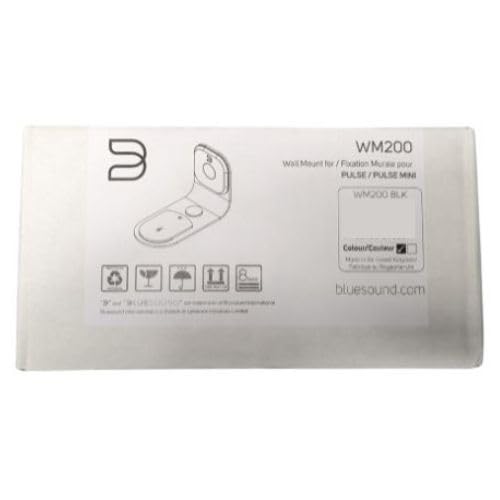
Figure 1: Bluesound WM200 Wall Mount product packaging.
การติดตั้งและการตั้งค่า
Follow these steps to securely install your Bluesound WM200 Universal Wall Mount:
- เลือกสถานที่: Select a suitable wall location, ensuring it is structurally sound and free from electrical wires or plumbing. Consider the optimal listening height and desired swivel range.
- ทำเครื่องหมายจุดเจาะ: Hold the wall mount against the wall at the desired height and use a pencil to mark the drilling points for the mounting screws. Ensure the mount is level.
- เจาะรู: Using an appropriate drill bit for your wall type (e.g., masonry for brick, wood bit for studs), drill pilot holes at the marked locations. If drilling into drywall without a stud, insert the provided wall anchors.
- ติดตั้งอุปกรณ์ยึดติดผนัง: Align the wall mount with the drilled holes. Insert the mounting screws and tighten them securely. Do not overtighten. The mount is constructed from durable steel for reliable support.
- สายเคเบิลเส้นทาง: The WM200 features rubber mouldings designed for flexible wire management. Route your speaker's power and audio cables through these mouldings to keep them tidy and protected.
- เชื่อมต่อลำโพง: Carefully slide your compatible Bluesound speaker onto the wall mount. Ensure it is seated firmly and securely.

Figure 2: Bluesound WM200 Wall Mount with compatible speaker (speaker sold separately).
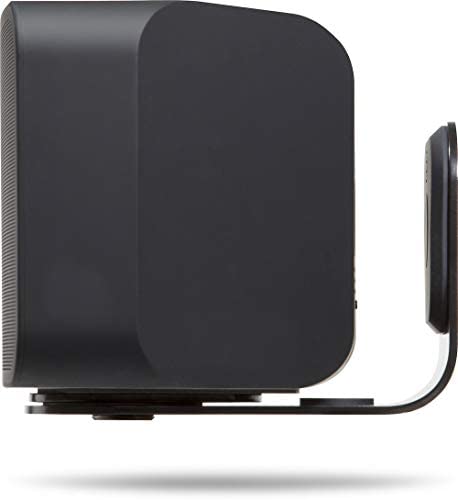
รูปที่ 3: ด้านข้าง view of the WM200 mount securely holding a Bluesound speaker.
การดำเนินการ
The Bluesound WM200 Universal Wall Mount offers a 120° total swivel control. This allows you to adjust the direction of your speaker to optimize sound projection and listening experience. Gently pivot the speaker and mount assembly to achieve the desired angle.
การซ่อมบำรุง
To ensure the longevity and appearance of your Bluesound WM200 Wall Mount, follow these simple maintenance guidelines:
- การทำความสะอาด: เช็ดฐานยึดด้วยผ้าแห้งนุ่มๆ เพื่อกำจัดฝุ่น สำหรับคราบฝังแน่น ให้ใช้ผ้าชุบน้ำหมาดๆ เช็ดเบาๆamp สามารถใช้ผ้าเช็ดทำความสะอาดได้ แล้วเช็ดให้แห้งทันที หลีกเลี่ยงการใช้สารทำความสะอาดที่มีฤทธิ์กัดกร่อนหรือตัวทำละลาย
- การตรวจสอบตามระยะเวลา: Periodically check all mounting screws to ensure they remain tight and secure. Do not overtighten.
การแก้ไขปัญหา
If you encounter any issues with your WM200 Wall Mount, consider the following:
- ฐานยึดดูหลวม: Ensure all mounting screws are securely fastened to the wall and that the speaker is correctly seated on the mount. Re-check the wall structure for stability.
- Speaker not fitting: Verify that your speaker model is compatible with the WM200 mount (PULSE, PULSE 2, PULSE 2i, PULSE MINI, PULSE MINI 2i).
- หมุนยาก: Ensure no cables are obstructing the swivel mechanism. The swivel should operate smoothly with gentle force.
ข้อมูลจำเพาะ
| หมายเลขรุ่น | WM200 |
| ยี่ห้อ | บลูซาวด์ |
| สี | สีดำ |
| วัสดุ | เหล็ก |
| ประเภทการติดตั้ง | ติดผนัง |
| ขนาดรายการ (ยาว x กว้าง x สูง) | 19 x 13 x 9.5 เซนติเมตร |
| น้ำหนักสินค้า | 1.02 กิโลกรัม |
| ระบบควบคุมการหมุน | 120° total |
| การจัดการสายไฟ | Integrated rubber mouldings |

รูปที่ 4: อดีตample installation of the Bluesound WM200 Wall Mount in a living space.
ข้อมูลการรับประกัน
Bluesound products are manufactured to the highest quality standards. This product is covered by a limited warranty against defects in materials and workmanship. The specific terms and duration of the warranty may vary by region. Please refer to the warranty card included with your product or visit the official Bluesound webเว็บไซต์สำหรับข้อมูลการรับประกันโดยละเอียด
สนับสนุน
For technical assistance, troubleshooting, or further inquiries regarding your Bluesound WM200 Universal Wall Mount, please visit the official Bluesound support website or contact their customer service department. You can typically find contact information and FAQs on the Bluesound webเว็บไซต์: