
1. บทนำ
Thank you for choosing the Grundig GCDP 8000 GDR1400 Portable CD Player. This device is designed for convenient playback of audio CDs, MP3, and WMA files. It features an easy-to-read LCD display, a preset 5-band digital equalizer for enhanced audio, and a digital anti-shock system to ensure uninterrupted listening. Please read this manual carefully before use to ensure proper operation and to maximize your listening experience.
2. ข้อมูลด้านความปลอดภัย
- อย่านำอุปกรณ์ไปวางไว้กลางฝน ความชื้น หรือแสงแดดโดยตรง
- ควรหลีกเลี่ยงการวางเครื่องไว้ใกล้แหล่งความร้อน เช่น เครื่องทำความร้อนหรือเตา
- ห้ามถอดชิ้นส่วนเครื่อง ควรส่งเครื่องเข้ารับบริการจากช่างผู้ชำนาญการเท่านั้น
- Use only the specified power adapter (if applicable) and battery type.
- การฟังในระดับเสียงที่สูงเป็นเวลานานอาจทำให้เกิดความเสียหายต่อการได้ยินอย่างถาวร
3. เนื้อหาบรรจุภัณฑ์
- Grundig GCDP 8000 GDR1400 Portable CD Player (1 unit)
- คู่มือการใช้งาน
Note: Additional accessories such as headphones or a power adapter may be sold separately or included depending on your specific package.
4. สินค้าหมดview
Familiarize yourself with the controls and features of your portable CD player.
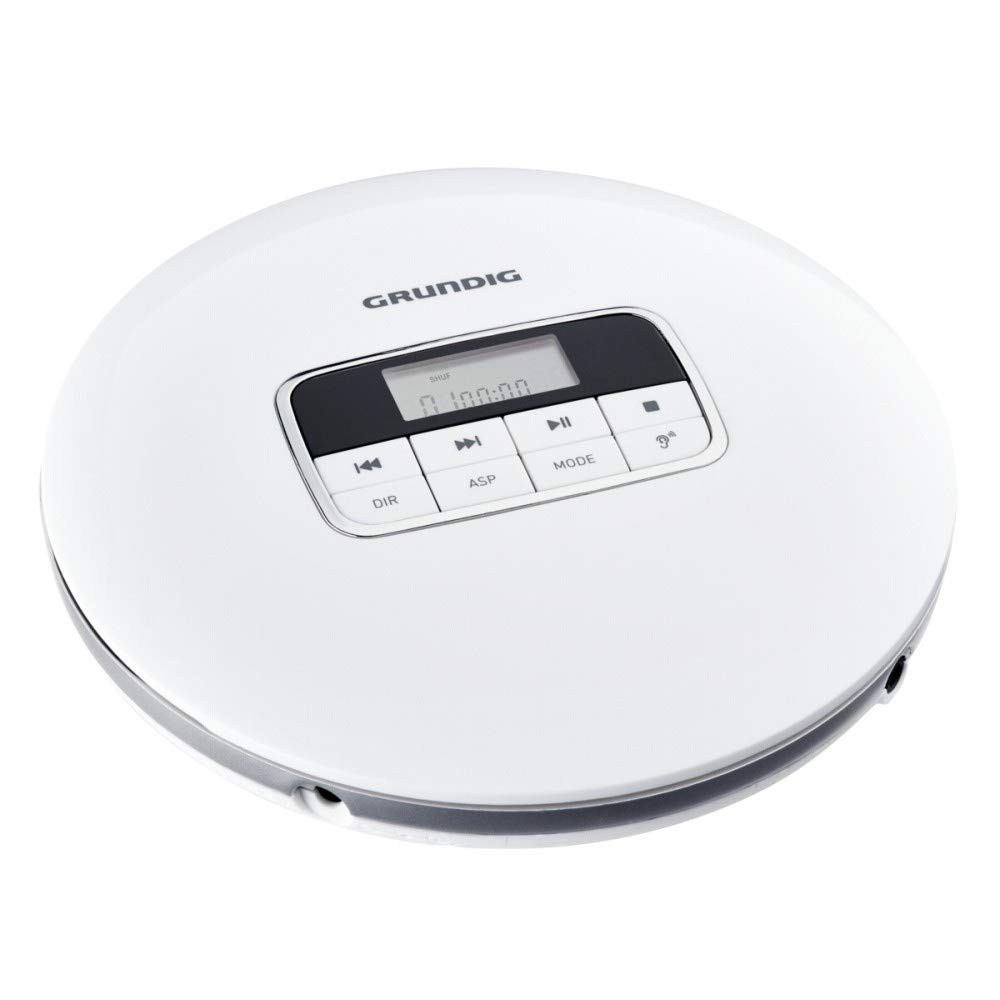
รูปที่ 4.1: ด้านบน View with Controls and Display
This image displays the top surface of the Grundig GCDP 8000 GDR1400 portable CD player, highlighting the central control panel with its LCD screen and various function buttons. The buttons include Play/Pause, Stop, Skip Forward/Backward, DIR (directory), ASP (anti-shock protection), and MODE. The Grundig logo is visible at the top.
การควบคุมและตัวบ่งชี้:
- จอแสดงผล LCD: Shows track number, time, playback mode, and other information.
- เล่น/หยุดชั่วคราว (►/‖): เริ่มหรือหยุดเล่นชั่วคราว
- หยุด (■): หยุดการเล่น
- ข้ามไปข้างหน้า (►►): Skips to the next track or fast forwards during playback.
- ข้ามไปข้างหลัง (◄◄): Skips to the previous track or fast reverses during playback.
- DIR (Directory): Used for navigating folders on MP3/WMA discs.
- ASP (Anti-Shock Protection): Activates or deactivates the anti-shock feature.
- เส้นทาง: เลือกโหมดการเล่น (เช่น เล่นซ้ำหนึ่งเพลง เล่นซ้ำทั้งหมด เล่นแบบสุ่ม)

รูปที่ 4.2: ด้านข้าง View พร้อมพอร์ต
ภาพนี้แสดงด้านข้างของมืออาชีพfile of the Grundig GCDP 8000 GDR1400 portable CD player. Clearly visible are the 3.5 mm headphone jack, labeled 'PHONES', and the DC power input port, indicated by a power symbol.
พอร์ต:
- PHONES (3.5mm Jack): เชื่อมต่อหูฟังของคุณที่นี่
- DC IN: Connect an external power adapter (not included) here.

Figure 4.3: Battery Compartment Area
This image provides another side view of the Grundig GCDP 8000 GDR1400 portable CD player, likely indicating the location of the battery compartment or a similar access panel. The smooth, white casing and silver trim are visible.
5. การตั้งค่า
5.1 การเปิดเครื่องอุปกรณ์
The GCDP 8000 GDR1400 can be powered by batteries or an external DC power adapter.
- การติดตั้งแบตเตอรี่: Open the battery compartment (refer to Figure 4.3 for general location). Insert 1 Lithium-ion battery (not included) according to the polarity markings. Close the compartment securely.
- พลังงานภายนอก: Connect a compatible DC power adapter (not included) to the DC IN port (refer to Figure 4.2). Plug the adapter into a wall outlet.
5.2 การเชื่อมต่อหูฟัง
Plug your 3.5mm stereo headphones into the PHONES jack on the side of the unit (refer to Figure 4.2).
5.3 การใส่แผ่นซีดี
- Gently press the 'OPEN' button or slide the latch to open the CD compartment lid.
- Place the CD with the label side facing up onto the center spindle.
- ค่อยๆ กดแผ่นซีดีลงไปจนกว่าจะมีเสียงคลิกเข้าที่
- ปิดฝาช่องใส่ซีดีให้แน่นจนกระทั่งล็อคเข้าที่
6. ปฏิบัติการ
6.1 การเล่นขั้นพื้นฐาน
- เล่น: Press the Play/Pause (►/‖) button to start playback. The LCD will display the track number and elapsed time.
- หยุดชั่วคราว: Press the Play/Pause (►/‖) button during playback to pause. Press again to resume.
- หยุด: กดปุ่มหยุด (■) เพื่อหยุดการเล่น
- ข้ามแทร็ก: Press Skip Forward (►►) to go to the next track. Press Skip Backward (◄◄) to go to the beginning of the current track, or press twice to go to the previous track.
- กรอเดินหน้า/ย้อนกลับ: Press and hold Skip Forward (►►) or Skip Backward (◄◄) during playback to fast forward or reverse.
6.2 MP3/WMA Playback
When playing a disc with MP3 or WMA files, the player will automatically detect the format. Use the ผกก. button to navigate between folders on the disc.
6.3 Playback Modes (MODE Button)
กดปุ่ม โหมด กดปุ่มซ้ำๆ เพื่อสลับไปมาระหว่างโหมดการเล่นต่างๆ:
- ทำซ้ำหนึ่ง: เล่นซ้ำแทร็กปัจจุบัน
- ทำซ้ำทั้งหมด: เล่นซ้ำทุกแทร็กในแผ่นซีดี
- Random (SHUF): เล่นเพลงในลำดับแบบสุ่ม
- บทนำ: เล่นช่วงไม่กี่วินาทีแรกของแต่ละแทร็ก
6.4 อีควอไลเซอร์ (EQ)
The player features a preset 5-band digital equalizer. Press the EQ button (often integrated with MODE or ASP, refer to your specific unit's button layout) to cycle through different sound presets like Pop, Jazz, Rock, Classic, and Bass Boost, or to turn the equalizer off.
6.5 Digital Anti-Shock System (ASP)
The digital anti-shock system helps prevent audio skipping during movement. This feature is typically enabled by default. Press the งูเห่า button to toggle the anti-shock protection on or off. The LCD will indicate its status.
6.6 การควบคุมระดับเสียง
Adjust the volume using the volume control dial, usually located on the side of the unit. Turn clockwise to increase volume and counter-clockwise to decrease.
7. การบำรุงรักษา
7.1 การทำความสะอาดหน่วย
- เช็ดภายนอกตัวเครื่องด้วยผ้าแห้งและนุ่ม
- ห้ามใช้น้ำยาทำความสะอาดที่มีฤทธิ์กัดกร่อน ขี้ผึ้ง หรือตัวทำละลาย
- To clean the lens inside the CD compartment, use a specialized CD lens cleaner disc. Do not touch the lens directly.
7.2 การดูแลแบตเตอรี่
- ถอดแบตเตอรี่ออกหากจะไม่ใช้งานเครื่องเป็นเวลานาน
- ทิ้งแบตเตอรี่ที่ใช้แล้วอย่างรับผิดชอบตามข้อบังคับท้องถิ่น
8 การแก้ไขปัญหา
| ปัญหา | สาเหตุที่เป็นไปได้ | สารละลาย |
|---|---|---|
| ไม่มีไฟฟ้า | Batteries are depleted or incorrectly inserted; power adapter not connected. | Replace batteries or ensure correct polarity. Connect power adapter securely. |
| ไม่มีเสียง | Headphones not connected; volume too low; disc error. | Ensure headphones are fully plugged in. Increase volume. Try another disc. |
| Disc skipping | Disc is dirty or scratched; unit is moving excessively; ASP is off. | Clean or replace disc. Place unit on a stable surface. Ensure ASP is enabled. |
| แผ่นไม่เล่น | Disc inserted incorrectly; disc is unreadable format; lid not closed. | Reinsert disc correctly. Ensure disc is CD-Audio, MP3, or WMA. Close lid firmly. |
9. ข้อมูลจำเพาะ
| คุณสมบัติ | ข้อมูลจำเพาะ |
|---|---|
| หมายเลขรุ่น | GCDP 8000 GDR1400 |
| ยี่ห้อ | กรุนดิก |
| ขนาดสินค้า | 14.3 x 14.3 x 3.2 ซม. |
| น้ำหนักสินค้า | 203 กรัม |
| รูปแบบเสียงที่รองรับ | MP3, WMA |
| แสดง | จอแสดงผล LCD |
| คุณสมบัติพิเศษ | Preset 5-band Digital Equalizer, Digital Anti-Shock System |
| แจ็คหูฟัง | 1 (3.5มม.) |
| แหล่งพลังงาน | 1 Lithium-ion battery (required), DC power input |
| เทคโนโลยีการเชื่อมต่อ | Wired (no wireless connectivity) |
10. การรับประกันและการสนับสนุน
Grundig products are manufactured to high quality standards. For information regarding warranty terms and conditions, please refer to the warranty card included with your purchase or visit the official Grundig website. For technical support or service inquiries, please contact Grundig customer service through their official channels.
โปรดเก็บหลักฐานการซื้อไว้เพื่อวัตถุประสงค์การรับประกัน