
1. บทนำ
This manual provides essential information for the safe and effective use of the Walfront MC-901 High Voltage Pulse Inverter Module. This module is designed to generate high voltage pulse current based on the coil principle, suitable for electrical experiments and scientific projects. Please read this manual thoroughly before operation.

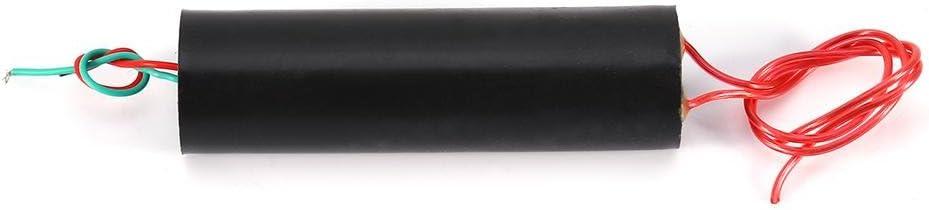
Figure 1: Walfront MC-901 High Voltage Pulse Inverter Module. The module is a black cylindrical component with red and green wires for input, and red wires for high voltagอีเอาท์พุท
2. ข้อมูลด้านความปลอดภัย
WARNING: This product generates extremely high voltage. Improper use can result in serious injury or death. Always exercise extreme caution and follow all safety guidelines.
- เล่มสูงtage No-Load Avoidance: ปริมาณสูงtage module should หลีกเลี่ยง operation without a load. Ensure the high voltage output wires are properly spaced for discharge before applying power.
- Discharge Distance: ปริมาณสูงtage wire discharge distance is proportional to the input battery voltage and capacity. Test the arc distance from short to long. Do not exceed the maximum arc distance, as this can damage the module due to unreleased high-pressure energy.
- การจัดการความร้อน: The module generates internal heat during operation. It is not designed for continuous, long-term use. Allow adequate cooling time between operations.
- ฉนวนกันความร้อน: Ensure all connections, especially high voltage outputs, are properly insulated to prevent accidental contact.
- การกำกับดูแล: This module is intended for educational and experimental purposes. Adult supervision is required for minors.
- ขั้ว: Pay close attention to input polarity. Incorrect polarity can damage the module. (Note: Some users have reported confusion regarding polarity; typically, red is positive and green is negative for DC input, but always verify if possible or test carefully with low voltagอีก่อน)
3. สินค้าหมดview
3.1 ส่วนประกอบ
The Walfront MC-901 module consists of a cylindrical housing with input and output wires.
- สายอินพุต: Typically red and green wires for power input.
- สายไฟขาออก: Two red wires for high voltage pulse output.

Figure 2: The MC-901 module showing the input wires (green and red, twisted) and output wires (two red, coiled).
3.2 คุณสมบัติ
- Generates high voltage pulse current.
- Compact design (88.5 x 26mm).
- Simple circuit design based on the coil principle.
- Suitable for electrical experiments and educational purposes.
4. ข้อมูลจำเพาะ
| พารามิเตอร์ | ค่า |
|---|---|
| ประเภทโมดูล | เอ็มซี-901 |
| อินพุต Voltage | 3.7V - 7.4V กระแสตรง |
| กระแสไฟเข้า | 0.5A - 2.5A |
| ความยาวสายอินพุต | ประมาณ 9 ซม. |
| เล่มสูงtagอี ประเภท | Pulse DC Type |
| ปริมาณการส่งออกtage | 800KV - 1000KV (0.8MV - 1MV) |
| กระแสไฟขาออก | 0.5A - 1A |
| ความยาวสายเอาท์พุต | ประมาณ 15 ซม. |
| Bipolar Discharge Distance | 0.5 ซม. - 1.5 ซม. |
| ขนาด (กxยxส) | 88.5 มม. x 26 มม. (3.48 x 1.02 นิ้ว) |
| น้ำหนัก | ประมาณ 60 กรัม (2.11 ออนซ์) |
5. การตั้งค่า
Before connecting, ensure you have a suitable power source within the specified input voltage range (3.7V-7.4V DC) and capable of supplying the required current (0.5A-2.5A).
- Identify Input Wires: The module has two input wires, typically one red and one green, twisted together. The red wire is generally positive (+), and the green wire is negative (-). Confirm polarity if possible with a multimeter before connecting.
- เชื่อมต่อแหล่งพลังงาน: Connect the positive terminal of your power source to the red input wire and the negative terminal to the green input wire. Ensure connections are secure and insulated.
- Prepare Output Wires: The two red wires are the high voltage output. Before applying power, adjust the distance between these two output wires to the desired discharge gap (0.5 cm to 1.5 cm). Ensure they are not touching and are positioned safely away from any conductive materials or personnel.
- การติดตั้ง: Secure the module in a stable, non-conductive enclosure or mounting to prevent accidental contact and ensure proper heat dissipation.
รูปที่ 3: ก view of the module showing the input wires (green and red) and the output wires (red). Proper connection and spacing are crucial for safe operation.
6. คู่มือการใช้งาน
Once the module is set up and all safety precautions are in place, you can proceed with operation.
- ตรวจสอบการเชื่อมต่อ: Double-check all input and output connections for security and proper insulation.
- ใช้พลัง: Carefully apply power to the input terminals. The module will immediately begin generating high voltage pulses across the output wires.
- Observe Discharge: An arc should form between the high voltage output wires if the distance is appropriate. Adjust the distance as needed, always starting with a shorter gap and gradually increasing.
- เวลาดำเนินการจำกัด: Due to internal heat generation, avoid operating the module for extended periods. Short bursts of operation are recommended, followed by cooling periods.
- หมดแรง: To cease operation, disconnect the input power source.
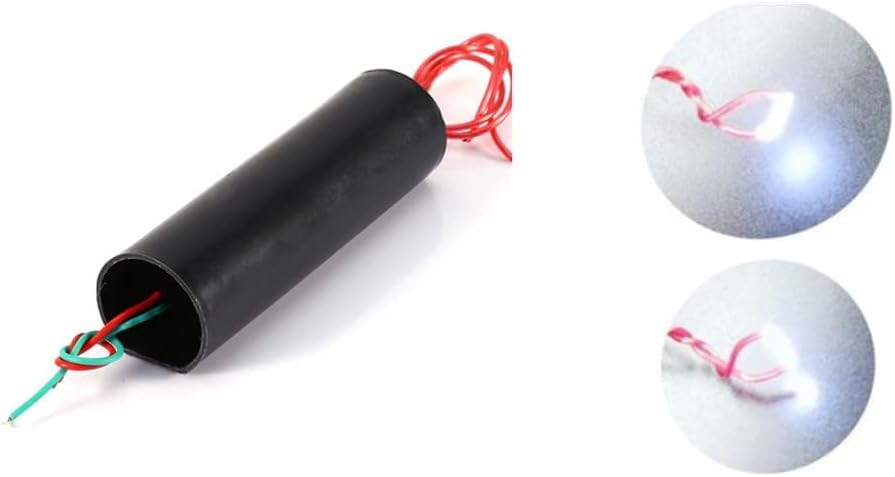
Figure 4: The module in operation, demonstrating the high voltage arc between the output terminals. This image shows the bright discharge created by the module.
7. การบำรุงรักษา
The Walfront MC-901 module is a sealed unit and requires minimal maintenance. However, proper handling and storage are essential for its longevity.
- การทำความสะอาด: Keep the module clean and free from dust and debris. Use a dry, soft cloth for cleaning. Do not use liquids or solvents.
- พื้นที่จัดเก็บ: Store the module in a cool, dry place away from direct sunlight and moisture.
- การตรวจสอบ: Periodically inspect the input and output wires for any signs of damage, fraying, or compromised insulation. Replace or repair damaged wiring immediately.
- หลีกเลี่ยงการกระแทกทางกายภาพ: Protect the module from drops or impacts, which can damage internal components.
8 การแก้ไขปัญหา
If you encounter issues with your Walfront MC-901 module, consider the following troubleshooting steps:
- No Output Arc:
- Check Power Input: ตรวจสอบให้แน่ใจปริมาณอินพุตtage is within the 3.7V-7.4V range and the power source can supply sufficient current (0.5A-2.5A).
- ตรวจสอบขั้ว: Confirm that the input wires are connected with correct polarity (red to positive, green to negative).
- Output Wire Spacing: Adjust the distance between the high voltage output wires. If the gap is too wide, an arc may not form. Start with a smaller gap (e.g., 0.5 cm) and gradually increase.
- สายไฟชำรุด: Inspect input and output wires for breaks or poor connections.
- โมดูลร้อนเกินไป:
- Reduce Operation Time: The module is not designed for continuous operation. Limit usage to short bursts and allow it to cool down.
- ตรวจสอบปริมาณอินพุตtagอี/ปัจจุบัน: Operating outside the specified input range can cause excessive heat.
- Weak or Inconsistent Arc:
- Power Source Capacity: Ensure your power source has enough capacity (mAh) and can deliver the required current consistently.
- การชาร์จแบตเตอรี่: If using batteries, ensure they are fully charged.
If problems persist after following these steps, contact Walfront customer support for further assistance.
9. การรับประกันและการสนับสนุน
9.1 ข้อมูลการรับประกัน
Specific warranty details for the Walfront MC-901 module are not provided in this manual. Please refer to your purchase documentation or contact the retailer/manufacturer directly for warranty terms and conditions.
9.2 การสนับสนุนลูกค้า
For technical support, inquiries, or assistance with your Walfront product, please visit the official Walfront store or contact their customer service department. You can find more information at the Walfront Amazon Store.