
1. บทนำ
The EPEVER VS6048AU is a 60A common positive Pulse Width Modulation (PWM) solar charge controller designed for 12V, 24V, 36V, and 48V solar panel power systems. It incorporates advanced digital techniques to ensure efficient and reliable battery charging and load management. This controller is suitable for various applications, including solar home systems, traffic signals, solar street lights, and solar garden lamps.
คุณสมบัติหลัก:
- 3-สtagการชาร์จแบบอัจฉริยะด้วย PWM: Bulk, Boost/Equalize, Float
- Supports three battery charging options: Sealed, Gel, and Flooded.
- Integrated LCD display for dynamic monitoring of operating data and working conditions.
- Dual USB output ports (Max. 5VDC/2.4A) for charging electronic devices.
- การตั้งค่าปุ่มที่ใช้งานง่าย เพื่อการใช้งานที่สะดวกสบายและง่ายดาย
- Multiple load control modes for versatile application.
- ฟังก์ชันสถิติพลังงาน
- ฟังก์ชั่นชดเชยอุณหภูมิแบตเตอรี่
- Extensive electronic protections for system safety.

Image 1.1: The EPEVER VS6048AU Solar Charge Controller shown in various application settings, including home power supply, street lighting, monitoring, and green energy solutions.
2. ข้อมูลด้านความปลอดภัย
โปรดอ่านคำแนะนำและคำเตือนทั้งหมดอย่างละเอียดก่อนการติดตั้งและการใช้งาน การไม่ปฏิบัติตามคำแนะนำเหล่านี้อาจทำให้เกิดไฟฟ้าช็อต ไฟไหม้ หรือการบาดเจ็บร้ายแรงได้
- ตรวจสอบให้แน่ใจว่าสายไฟทั้งหมดต่อขั้วถูกต้องและแน่นหนา เพื่อป้องกันความเสียหายต่อตัวควบคุมและส่วนประกอบอื่นๆ
- ควรตัดการเชื่อมต่อแผงโซลาร์เซลล์และแบตเตอรี่ทุกครั้งก่อนติดตั้งหรือปรับแต่งตัวควบคุม
- Install the controller in a well-ventilated area, away from flammable gases, moisture, and direct sunlight.
- ควรใช้เบรกเกอร์หรือฟิวส์ที่เหมาะสมสำหรับแผงโซลาร์เซลล์ แบตเตอรี่ และวงจรโหลด
- ห้ามถอดประกอบหรือพยายามซ่อมแซมตัวควบคุมด้วยตนเอง โปรดติดต่อช่างผู้ชำนาญการเพื่อขอรับบริการ
- ควรสวมอุปกรณ์ป้องกันส่วนบุคคลที่เหมาะสม รวมถึงแว่นตาป้องกันดวงตา เมื่อทำงานกับแบตเตอรี่
- Keep children away from the solar power system components.
ระบบป้องกันทางอิเล็กทรอนิกส์: The VS6048AU controller includes comprehensive electronic protections:
- การป้องกันขั้วไฟฟ้าย้อนกลับ
- แบตเตอรี่เกินโวลท์tagการป้องกันอี
- แบตเตอรี่ป้องกันการคายประจุ
- การป้องกันขั้วแบตเตอรี่กลับด้าน
- การป้องกันความร้อนสูงเกินไปของแบตเตอรี่
- การป้องกันโหลดเกิน
- โหลดป้องกันการลัดวงจร
- การป้องกันตัวควบคุมร้อนเกินไป

Image 2.1: Visual representation of the electronic protections integrated into the controller and a basic solar power system connection diagram.
3. สินค้าหมดview
Familiarize yourself with the components and interface of your EPEVER VS6048AU solar charge controller.

ภาพที่ 3.1: ด้านหน้า view of the EPEVER VS6048AU controller with key components labeled.
- จอแสดงผล LCD: Shows system status, parameters, and error codes.
- ปุ่มเมนู: Used to navigate through different display interfaces and enter/exit setting modes.
- ปุ่ม ตลท.: Used to confirm selections, modify parameters, and clear data.
- USB Output Ports (5VDC/2.4A): For charging external electronic devices.
- Temp. Sensor Port (RTS Port): Connects to the optional remote temperature sensor for accurate battery temperature compensation.
- เทอร์มินัล PV: Connect to the solar panel array.
- ขั้วแบตเตอรี่: เชื่อมต่อกับแบตเตอรี่สำรอง
- สถานีชาร์จ: เชื่อมต่อกับโหลด DC
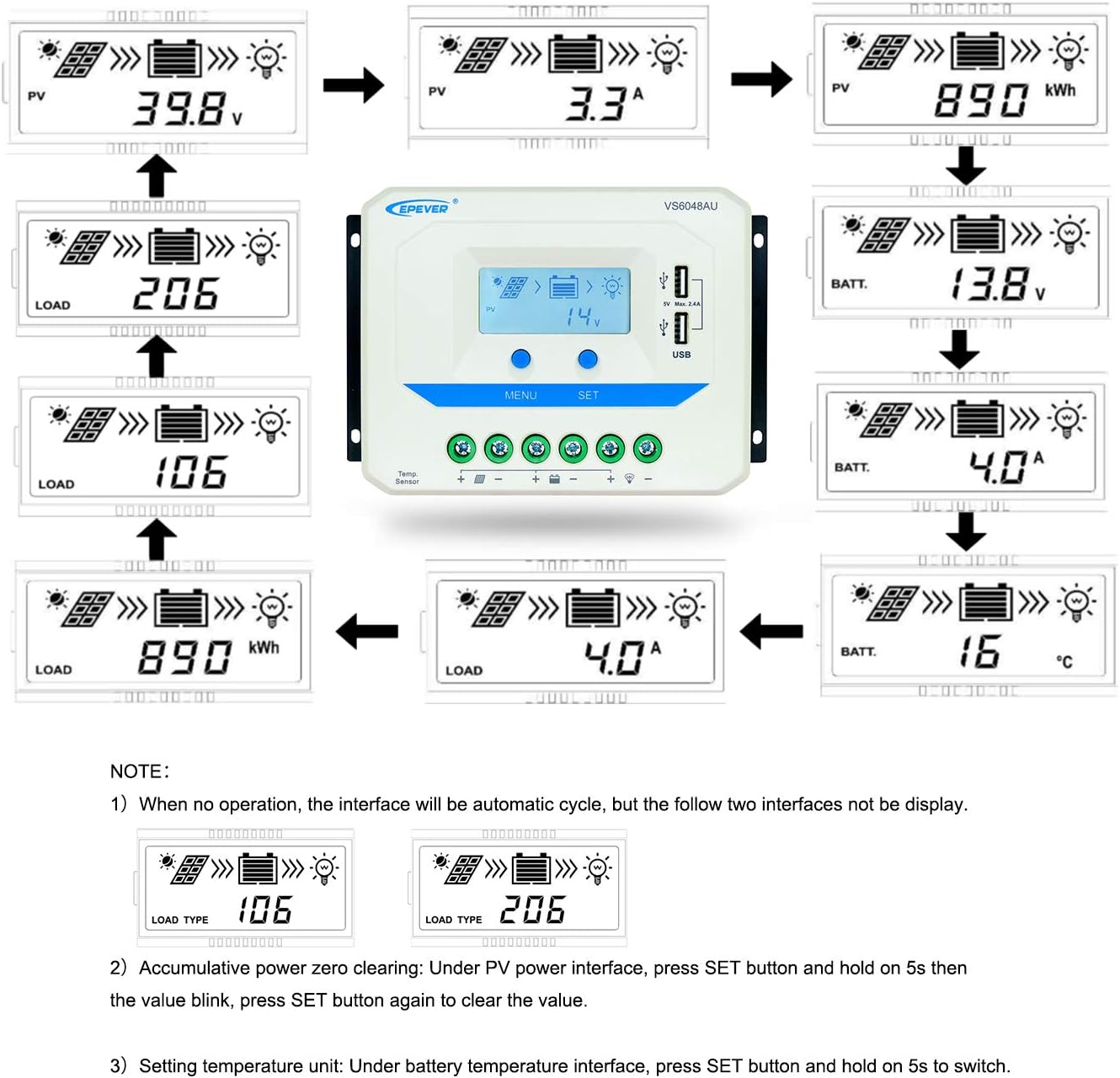
Image 3.2: Dimensions of the EPEVER VS6048AU Solar Charge Controller (approximately 21.4 cm x 12.87 cm x 7.22 cm).
LCD Display Status Description
The LCD display provides visual feedback on the system's operational status. Refer to the table below for icon meanings:

Image 3.3: Detailed description of the icons displayed on the VS6048AU LCD screen.
4. การตั้งค่าและการติดตั้ง
โปรดทำตามขั้นตอนเหล่านี้เพื่อติดตั้งตัวควบคุมการชาร์จพลังงานแสงอาทิตย์อย่างถูกต้อง ตรวจสอบให้แน่ใจว่าได้ตัดการเชื่อมต่อแหล่งจ่ายไฟทั้งหมดก่อนทำการเชื่อมต่อใดๆ
ลำดับการเดินสายไฟ:
- เชื่อมต่อแบตเตอรี่: Connect the battery to the controller's battery terminals. Ensure correct polarity (positive to positive, negative to negative). The controller will detect the battery voltage.
- เชื่อมต่อโหลด: เชื่อมต่อโหลด DC เข้ากับขั้วต่อโหลดของตัวควบคุม ตรวจสอบให้แน่ใจว่าขั้วถูกต้อง
- เชื่อมต่อแผงโซล่าเซลล์: Connect the solar panel array to the controller's PV terminals. Ensure correct polarity.
สำคัญ: Always connect the battery first, then the solar panel, and finally the load. Disconnect in the reverse order: load, then solar panel, then battery.
คู่มือวิดีโอการติดตั้ง:
Video 4.1: An official EPEVER video demonstrating the connection process for the solar charge controller, including battery and load connections. This visual guide can assist with proper installation.
5. คู่มือการใช้งาน
The EPEVER VS6048AU controller features an intuitive LCD display and button interface for monitoring and configuration.
ระบบนำทางด้วยจอ LCD:
When no operation is performed, the LCD interface will automatically cycle through various display screens, showing real-time data such as PV voltage, current, battery voltagและสถานะการโหลด
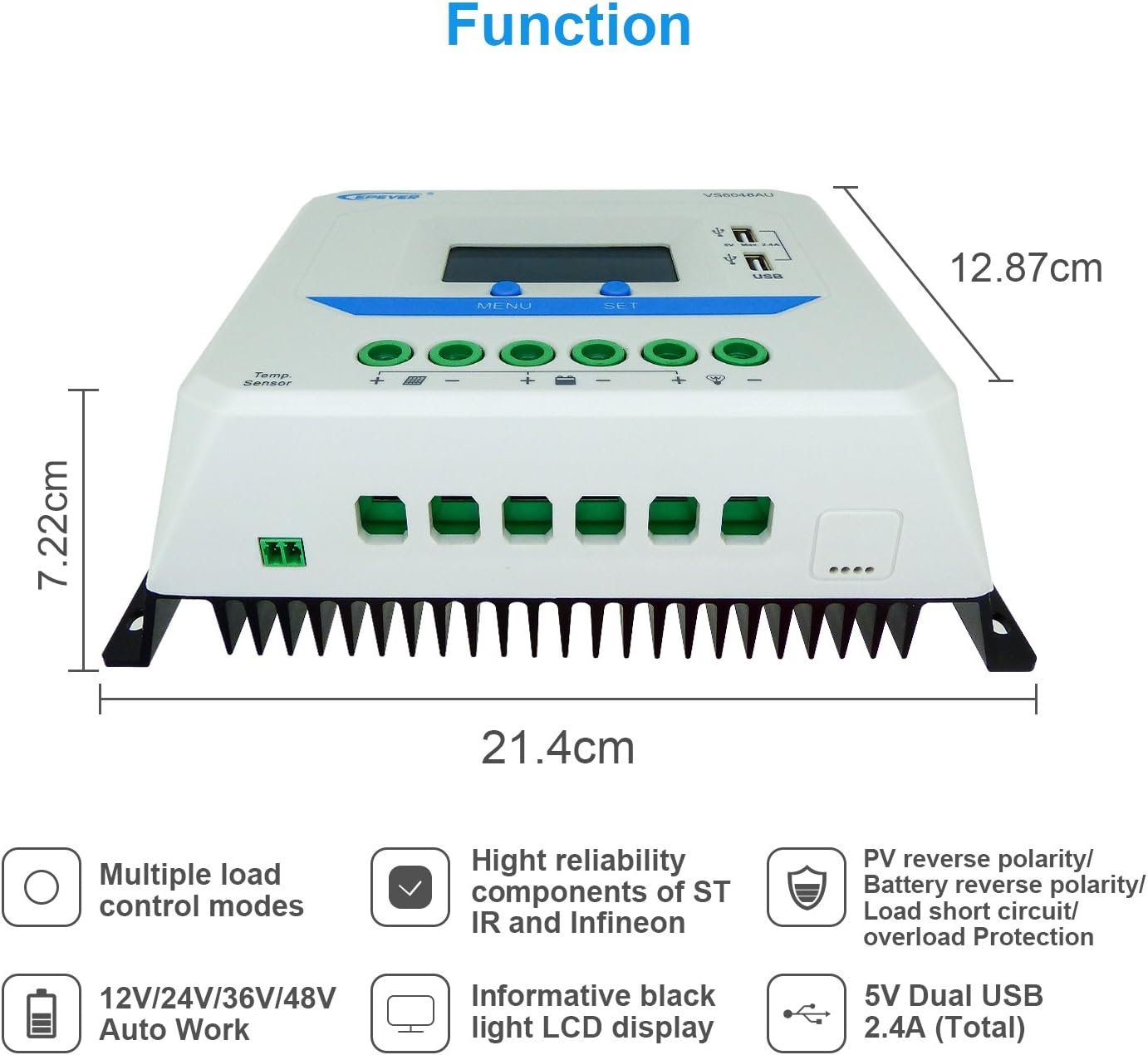
Image 5.1: Illustration of the automatic cycling interfaces on the VS6048AU LCD display.
- กดปุ่ม เมนู button to manually cycle through the display interfaces.
- กดปุ่มค้างไว้ เมนู button to enter or exit the parameter setting mode.
- In parameter setting mode, use the ชุด button to adjust values or confirm selections.
หน่วยปฏิบัติการพิเศษ:
- Accumulative Power Clearing: Under the PV power interface, press and hold the ชุด button for 5 seconds until the value blinks, then press ชุด again to clear the accumulative power value.
- หน่วยการตั้งค่าอุณหภูมิ: Under the battery temperature interface, press and hold the ชุด กดปุ่มค้างไว้ 5 วินาทีเพื่อสลับระหว่างองศาเซลเซียส (°C) และองศาฟาเรนไฮต์ (°F)
โหมดการชาร์จ:
ตัวควบคุมใช้หน่วยความจำ 3 วินาทีtage intelligent PWM charging algorithm:
- การชาร์จจำนวนมาก: แบตเตอรี่จะถูกชาร์จด้วยกระแสไฟสูงสุดจนกระทั่งถึงระดับประจุtage ถึง Boost voltage.
- Boost/Equalize Charging: The battery is charged at a constant voltage. An Equalize charge is typically performed once a month to balance battery cells.
- การชาร์จแบบลอยตัว: แบตเตอรี่ความจุtage is maintained at the Float voltage, and the charging current is reduced to a trickle to keep the battery fully charged.
The controller supports charging for Sealed, Gel, and Flooded battery types. Ensure the correct battery type is selected in the settings for optimal charging performance.
เอาท์พุต USB:
The dual USB ports provide a maximum output of 5VDC/2.4A for charging compatible electronic devices.
6. การบำรุงรักษา
Regular maintenance ensures the longevity and optimal performance of your EPEVER VS6048AU solar charge controller.
- ความสะอาด : รักษาตัวควบคุมให้สะอาด ปราศจากฝุ่นและเศษขยะ ใช้ผ้าแห้งเช็ดทำความสะอาด
- การเชื่อมต่อ: ตรวจสอบการเชื่อมต่อสายไฟทั้งหมดเป็นระยะๆ เพื่อความแน่นหนาและการกัดกร่อน การเชื่อมต่อที่หลวมอาจทำให้เกิดความร้อนสูงเกินไปและเกิดความเสียหายได้
- การระบายอากาศ : Ensure the installation area has adequate ventilation to prevent overheating of the controller.
- การตรวจสอบ: Inspect the controller and wiring for any signs of damage, such as frayed cables or cracked casing. Replace damaged components immediately.
- สุขภาพแบตเตอรี่: ตรวจสอบปริมาณแบตเตอรี่tage and performance regularly. Ensure the battery type setting in the controller matches your battery.
7 การแก้ไขปัญหา
ส่วนนี้จะกล่าวถึงปัญหาทั่วไปที่คุณอาจพบเจอเกี่ยวกับตัวควบคุมการชาร์จพลังงานแสงอาทิตย์ของคุณ
| ปัญหา | สาเหตุที่เป็นไปได้ | สารละลาย |
|---|---|---|
| ไม่มีการแสดงผลบนจอ LCD | แบตเตอรี่ไม่ได้เชื่อมต่อหรือระดับเสียงต่ำtage; ขั้วกลับด้าน | ตรวจสอบการเชื่อมต่อและขั้วของแบตเตอรี่ ตรวจสอบให้แน่ใจว่าแบตเตอรี่มีแรงดันไฟฟ้าเพียงพอtage สูงกว่า 9V |
| แบตเตอรี่ไม่ชาร์จ | PV panels not connected; PV reverse polarity; insufficient sunlight; PV open circuit voltagอีต่ำเกินไป | Check PV connections and polarity. Ensure adequate sunlight. Verify PV open circuit voltage อยู่ในข้อกำหนด |
| โหลดไม่ทำงาน | Load disconnected; load short circuit; load overload; battery low voltagยกเลิกการเชื่อมต่อ | Check load connections. Remove short circuit. Reduce load. Recharge battery. |
| ตัวควบคุมความร้อนสูงเกินไป | Poor ventilation; excessive ambient temperature; prolonged high current operation. | Ensure proper ventilation. Relocate controller to a cooler environment. Reduce load if possible. |
| เอาต์พุต USB ไม่ทำงาน | Device not compatible; controller fault. | Try another USB device. If issue persists, contact support. |
8. ข้อมูลจำเพาะ
Detailed technical specifications for the EPEVER VS6048AU Solar Charge Controller.

Image 8.1: Comprehensive technical specifications table for the EPEVER VS-AU series, including the VS6048AU model.
| พารามิเตอร์ | มูลค่า (VS6048AU) |
|---|---|
| แบบอย่าง | VS6048AU |
| ระบบที่กำหนดฉบับที่tage | 12V/24V/36V/48V Auto Work |
| โวลต์อินพุตแบตเตอรี่tagอี เรนจ์ | 9V ~ 64V |
| กระแสไฟชาร์จ/ปล่อยที่กำหนด | 60เอ |
| แม็กซ์ PV Open Circuit Voltage | 96โวลต์ |
| ประเภทแบตเตอรี่ | ปิดผนึก (ค่าเริ่มต้น) / เจล / น้ำท่วม |
| เพิ่มการชาร์จ Voltage | Sealed: 14.4V, Gel: 14.2V, Flooded: 14.6V |
| ปรับสมดุลการชาร์จ Voltage | Sealed: 14.6V, Gel: No, Flooded: 14.8V |
| การชาร์จแบบลอยตัว Voltage | ซีล/เจล/น้ำท่วม: 13.8V |
| ปริมาณต่ำtage เชื่อมต่อใหม่ Voltage | ซีล/เจล/น้ำท่วม: 12.6V |
| ปริมาณต่ำtage ตัดการเชื่อมต่อฉบับtage | ซีล/เจล/น้ำท่วม: 11.1V |
| การบริโภคเพื่อตนเอง | ≤10mA (12V), ≤18mA (24V) |
| การชดเชยอุณหภูมิ | -3mV/°C/2V (77°F) |
| การต่อลงดิน | บวกทั่วไป |
| เอาท์พุต USB | 5VDC/2.4A (รวม) |
| ขนาดโดยรวม | 214x128.7x72.2 มม. |
| เทอร์มินัล | 3AWG (25 มม.²) |
| น้ำหนักสุทธิ | 1.02 กก. |
| สิ่งที่แนบมา | IP30 |
| อุณหภูมิสภาพแวดล้อมการทำงาน | -25°C ~ +55°C |
| ช่วงความชื้น | ≤95% (NC) |
9. การรับประกันและการสนับสนุน
EPEVER products are designed for reliability and performance. For technical assistance or warranty inquiries, please refer to the following:
- การสนับสนุนด้านเทคนิค: EPEVER provides technical support through its local service centers. For assistance, please contact the authorized dealer or service center in your region.
- ข้อมูลการรับประกัน: Please refer to the warranty card included with your product or visit the official EPEVER webเว็บไซต์สำหรับข้อกำหนดและเงื่อนไขการรับประกันโดยละเอียด
- Free Solar System Design: EPEVER's service centers may offer free solar system design assistance to help you optimize your setup.