
1. บทนำ
The BIOSYNEX BSX-0081N Wrist Electronic Blood Pressure Monitor is designed for reliable and convenient measurement of arterial blood pressure and heart rate. This device is clinically validated and features arrhythmia detection, making it a valuable tool for monitoring cardiovascular health. It includes a large backlit screen for easy reading, a WHO scale indicator for quick classification of blood pressure levels, and memory for tracking measurements over time.
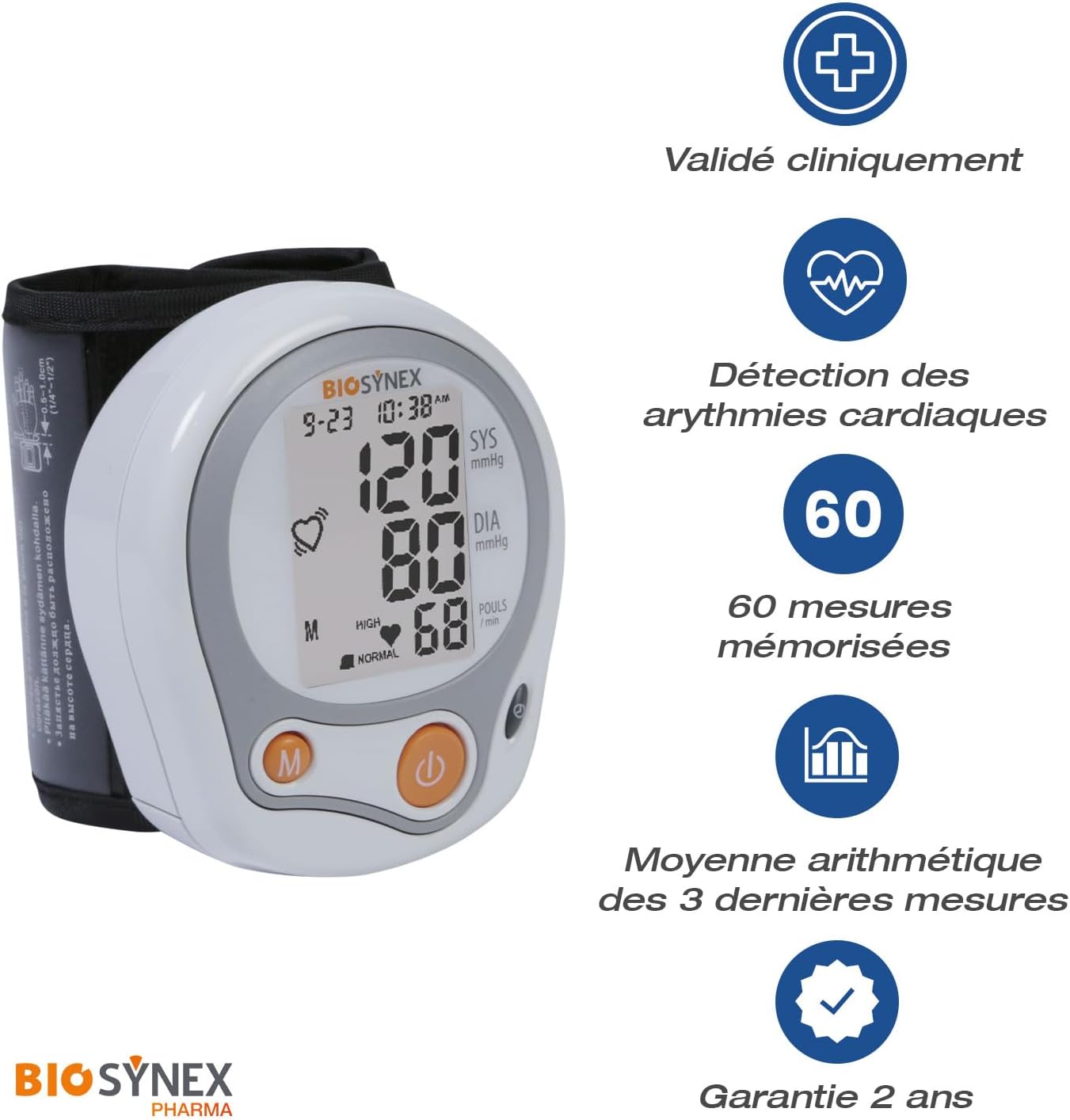
Image: The BIOSYNEX BSX-0081N monitor displaying a blood pressure reading, with icons indicating clinical validation, arrhythmia detection, 60 memory slots, average of last 3 measurements, and a 2-year warranty.
2. การตั้งค่า
2.1 การแกะกล่องและการติดตั้งแบตเตอรี่
Carefully remove the blood pressure monitor from its packaging. The package includes the monitor, a storage case, and two AAA batteries. Locate the battery compartment on the device, insert the two AAA batteries, ensuring correct polarity (+/-), and close the compartment cover.
2.2 การตั้งค่าอุปกรณ์เบื้องต้น
Upon first use or after battery replacement, the device may prompt for date and time settings. Follow the on-screen instructions to set the current date and time for accurate record-keeping.
2.3 Wrist Cuff Placement
- ตรวจสอบให้แน่ใจว่าข้อมือของคุณไม่ได้สวมอะไรอยู่
- Place the monitor on your left wrist with the display facing upwards, approximately 1-2 cm from your hand.
- Tighten the cuff securely but comfortably around your wrist. The wrist circumference should be between 12.5 cm and 21 cm.
- Position your arm so the monitor is at heart level.

Image: A hand demonstrating the correct placement of the BIOSYNEX wrist blood pressure monitor, showing the cuff positioned on the wrist with the display facing up, and an arrow indicating the adjustable wrist circumference range of 12.5-21 cm.
3. คู่มือการใช้งาน
3.1 การวัดผล
- Sit comfortably with your feet flat on the floor, and your arm resting on a table so the monitor is at heart level.
- Press the power button (usually marked with a power symbol) to start the measurement.
- The cuff will automatically inflate and then slowly deflate. Remain still and silent during the measurement.
- Once the measurement is complete, your systolic pressure (SYS), diastolic pressure (DIA), and pulse rate will be displayed on the screen.

ภาพ: รายละเอียด view of the BIOSYNEX monitor's backlit screen, clearly showing a blood pressure reading (120 SYS, 80 DIA) and pulse rate (68), along with the date and time, indicating ease of reading.
3.2 ทำความเข้าใจกับจอแสดงผล
- SYS (ความดันซิสโตลิก): ตัวเลขบน แสดงถึงความดันในหลอดเลือดแดงของคุณขณะที่หัวใจเต้น
- DIA (ความดันไดแอสโตลิก): ตัวเลขด้านล่าง แสดงถึงความดันในหลอดเลือดแดงระหว่างการเต้นของหัวใจ
- ชีพจร: อัตราการเต้นของหัวใจของคุณวัดเป็นครั้งต่อนาที
- การตรวจหาภาวะหัวใจเต้นผิดจังหวะ: An icon (often a heart symbol with irregular waves) will appear if an irregular heartbeat is detected during the measurement. Consult a healthcare professional if this icon frequently appears.
- WHO Scale Indicator: The device features a color-coded scale based on World Health Organization (WHO) guidelines to quickly classify your blood pressure reading (e.g., Normal, High).

Image: The BIOSYNEX monitor on a wrist, displaying a reading and highlighting the WHO scale indicator on the screen, which visually categorizes blood pressure as 'Normal' or 'High' for clear interpretation.
3.3 ฟังก์ชั่นหน่วยความจำ
The monitor automatically stores up to 60 measurements. To view past readings, press the 'M' (Memory) button. The device can also display the average of the last three measurements taken, providing a more stable indicator of your blood pressure trend.
4. การบำรุงรักษา
4.1 การทำความสะอาด
Wipe the device and cuff with a soft, dry cloth. If necessary, use a slightly damp cloth with a mild detergent, then wipe dry. Do not use abrasive cleaners, alcohol, or solvents. Do not immerse the device in water.
4.2 พื้นที่จัดเก็บ
Store the blood pressure monitor in its provided storage case when not in use. Keep it in a cool, dry place, away from direct sunlight, extreme temperatures, and humidity. Avoid dropping the device or subjecting it to strong impacts.
4.3 การเปลี่ยนแบตเตอรี่
When the low battery indicator appears on the display, replace both AAA batteries with new ones. Ensure the device is turned off before replacing batteries and observe correct polarity.
5 การแก้ไขปัญหา
| ปัญหา | สาเหตุที่เป็นไปได้ | สารละลาย |
|---|---|---|
| อุปกรณ์ไม่เปิด | แบตเตอรี่หมดหรือใส่ไม่ถูกต้อง | ตรวจสอบขั้วแบตเตอรี่หรือเปลี่ยนด้วยแบตเตอรี่ AAA ใหม่ |
| การอ่านที่ไม่ถูกต้อง | การวางปลอกแขนไม่ถูกต้อง การเคลื่อนไหวขณะวัด หรือการพูดคุย | Ensure correct cuff placement, remain still and silent during measurement. Repeat measurement after a few minutes. |
| ไอคอนภาวะหัวใจเต้นผิดจังหวะปรากฏขึ้นบ่อยครั้ง | ตรวจพบการเต้นของหัวใจผิดปกติ | Consult a healthcare professional for diagnosis and advice. |
| ปลอกแขนไม่พองหรือยุบเร็วเกินไป | Cuff not properly secured or air leakage. | Re-secure the cuff firmly around the wrist. Check for any damage to the cuff. |
หากคุณพบปัญหาที่ไม่ได้ระบุไว้ในที่นี้ หรือหากวิธีแก้ไขที่กล่าวมาแล้วไม่สามารถแก้ปัญหาได้ โปรดติดต่อฝ่ายบริการลูกค้า
6. ข้อมูลจำเพาะ
- หมายเลขรุ่น: BSX-0081N
- ยี่ห้อ: ไบโอซินเน็กซ์
- แหล่งพลังงาน: แบตเตอรี่ AAA 2 ก้อน (รวมอยู่ด้วย)
- วิธีการวัด: ออสซิลโลเมตริก
- เส้นรอบวงข้อมือ: 12.5 - 21 ซม.
- ความจุหน่วยความจำ: 60 การวัด
- แสดง: Large backlit LCD with date and time
- คุณสมบัติ: Arrhythmia detection, WHO classification indicator, average of last 3 measurements
- ขนาดสินค้า (กว้าง x ยาว x สูง) : 8.4 x 3.2 x 7.1 ซม.
- Target Body Part: ข้อมือ
- คุณสมบัติของวัสดุ: Durable, Reusable
- ส่วนประกอบที่รวมอยู่: Blood Pressure Monitor, Storage Case, Wrist Cuff, User Manual, 2 AAA Batteries
- ประเทศต้นกำเนิด: จีน
7. การรับประกัน
The BIOSYNEX BSX-0081N Wrist Electronic Blood Pressure Monitor comes with a รับประกัน 2 ปี from the date of purchase. This warranty covers manufacturing defects and malfunctions under normal use. It does not cover damage caused by misuse, accidents, unauthorized repairs, or failure to follow the instructions in this manual. Please retain your proof of purchase for warranty claims.
8. การสนับสนุนลูกค้า
For any questions, technical assistance, or warranty claims regarding your BIOSYNEX BSX-0081N Blood Pressure Monitor, please contact BIOSYNEX customer service. Refer to the contact information provided on the product packaging or the official BIOSYNEX webเว็บไซต์สำหรับรายละเอียดการสนับสนุนล่าสุด