
1. สินค้าหมดview
The Maxwest Nitro 5N is an Android 7.0 smartphone designed for reliable communication and multimedia use. It features a 5-inch display, a Quad Core processor, and dual SIM capability, making it suitable for various global GSM networks.

ภาพที่ 1.1: ด้านหน้าและด้านหลัง view of the Maxwest Nitro 5N smartphone, showcasing its sleek black design and display.
2. อะไรอยู่ในกล่อง
Upon opening your Maxwest Nitro 5N package, please ensure all the following items are present:
- Maxwest Nitro 5N Smartphone
- แบตเตอรี่ (2000 mAh)
- อะแดปเตอร์ชาร์จ
- สาย USB
- Protective Case Cover
3. การตั้งค่าเริ่มต้น
3.1. การใส่ซิมการ์ดและแบตเตอรี่
- หมดแรง: Ensure your Maxwest Nitro 5N is powered off before proceeding.
- ถอดฝาหลังออก: ถอดฝาหลังโทรศัพท์ออกอย่างระมัดระวัง
- ใส่ซิมการ์ด: Locate the SIM card slots. This device supports dual SIM cards. Insert your GSM SIM card(s) into the designated slots with the gold contacts facing down. Ensure they are securely seated.
- ใส่แบตเตอรี่: Place the 2000 mAh battery into its compartment, aligning the gold contacts on the battery with those in the phone.
- เปลี่ยนฝาหลัง: Carefully reattach the back cover until it clicks into place.
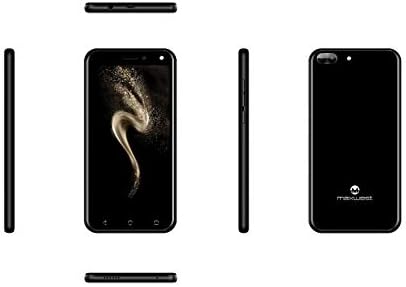
ภาพที่ 3.1: ด้านข้าง views of the Maxwest Nitro 5N, illustrating the location of buttons and ports for SIM/battery access.
3.2. การเปิดเครื่องและการกำหนดค่าเริ่มต้น
- เปิดเครื่อง: Press and hold the Power button (usually on the side) until the Maxwest logo appears.
- เลือกภาษา: ทำตามคำแนะนำบนหน้าจอเพื่อเลือกภาษาที่คุณต้องการ
- การเชื่อมต่อ Wi-Fi: เชื่อมต่อกับเครือข่าย Wi-Fi เพื่อดำเนินการตั้งค่าให้เสร็จสมบูรณ์และดาวน์โหลดการอัปเดตที่จำเป็น
- บัญชี Google: ลงชื่อเข้าใช้ด้วยบัญชี Google ของคุณหรือสร้างบัญชีใหม่ ซึ่งถือเป็นสิ่งสำคัญสำหรับการเข้าถึง Google Play Store และบริการอื่น ๆ ของ Google
- วันที่และเวลา: ตั้งค่าวันที่และเวลาที่ถูกต้องหรืออนุญาตให้เครือข่ายตั้งค่าโดยอัตโนมัติ
- ความปลอดภัย: Configure screen lock options such as PIN, pattern, or password for device security.
หมายเหตุสำคัญ: This device is designed to work with GSM carriers such as AT&T, T-Mobile, and Metro PCS. It will NOT work with CDMA carriers like Verizon, Sprint, or Boost Mobile.
4. Operating Your Maxwest Nitro 5N
4.1. การนำทางพื้นฐาน
- หน้าจอสัมผัส: Interact with the device by tapping, swiping, pinching, and spreading on the 5-inch LCD display.
- หน้าจอหลัก: ศูนย์กลางสำหรับแอปและวิดเจ็ตของคุณ ปัดไปทางซ้ายหรือขวาเพื่อเข้าถึงหน้าจอเพิ่มเติม
- แผงการแจ้งเตือน: ปัดลงจากด้านบนของหน้าจอเพื่อเข้าถึงการแจ้งเตือนและการตั้งค่าด่วน
- ปุ่มนำทาง: Use the on-screen navigation buttons (Back, Home, Recent Apps) at the bottom of the display.
4.2. การโทรและการส่งข้อความ
- แอปโทรศัพท์: แตะไอคอนโทรศัพท์เพื่อเข้าถึงแป้นกดหมายเลข บันทึกการโทร และรายชื่อผู้ติดต่อ
- แอปข้อความ: Tap the Messages icon to send and receive SMS/MMS messages.
4.3. การใช้กล้อง
Your Nitro 5N is equipped with 5MP front and rear cameras.
- เปิดกล้อง: แตะไอคอนกล้องบนหน้าจอหลักหรือลิ้นชักแอปของคุณ
- สวิตช์กล้อง: แตะไอคอนสวิตช์กล้องเพื่อสลับระหว่างกล้องด้านหน้าและด้านหลัง
- ถ่ายภาพ/วิดีโอ: แตะปุ่มชัตเตอร์เพื่อถ่ายภาพหรือเริ่ม/หยุดการบันทึกวิดีโอ
4.4. Screen Pinning Feature
Screen Pinning allows you to lock your phone to a single application, preventing others from accessing other apps or settings. This is useful when sharing your phone temporarily.
- Enable Screen Pinning: ไปที่ Settings > Security > Screen pinning และเปิดมันขึ้นมา
- Pin an App: Open the app you wish to pin. Tap the Recent Apps button (square icon). Swipe up on the app's preview and tap the pin icon.
- Unpin an App: To unpin, simultaneously press and hold the Back and Recent Apps buttons. You may need to enter your PIN/pattern/password if required by your security settings.
5. การบำรุงรักษาและการดูแล
5.1. การดูแลแบตเตอรี่
- การชาร์จ: Use only the provided charger and USB cable. Avoid overcharging by disconnecting the charger once the battery is full.
- อุณหภูมิ: Avoid exposing the phone to extreme temperatures, as this can degrade battery life.
- พื้นที่จัดเก็บ: If storing the phone for an extended period, ensure the battery is partially charged (around 50%).
5.2. การทำความสะอาดอุปกรณ์ของคุณ
- หน้าจอ: ใช้ผ้านุ่มไม่เป็นขุยเช็ดเบาๆampened with water or a screen cleaner, to gently wipe the display.
- ร่างกาย: Use a soft, dry cloth to clean the phone's body. Avoid harsh chemicals or abrasive materials.
5.3. การอัปเดตซอฟต์แวร์
ตรวจสอบการอัปเดตระบบเป็นระยะเพื่อให้มั่นใจได้ถึงประสิทธิภาพและความปลอดภัยสูงสุด ไปที่ การตั้งค่า > เกี่ยวกับโทรศัพท์ > อัปเดตระบบ เพื่อตรวจสอบและติดตั้งการอัพเดทที่มีอยู่
6. การแก้ไขปัญหาทั่วไป
| ปัญหา | วิธีแก้ปัญหาที่เป็นไปได้ |
|---|---|
| โทรศัพท์ไม่สามารถเปิดเครื่องได้ | ตรวจสอบให้แน่ใจว่าใส่แบตเตอรี่และชาร์จอย่างถูกต้อง เสียบที่ชาร์จแล้วลองอีกครั้ง |
| ไม่มีสัญญาณเครือข่าย | Verify SIM card insertion. Check if you are within network coverage. Ensure your carrier is GSM compatible (e.g., AT&T, T-Mobile). Restart the phone. |
| แอปทำงานช้าหรือขัดข้อง | ปิดแอปพื้นหลัง ล้างแคชแอป (การตั้งค่า > แอป > [ชื่อแอป] > ที่เก็บข้อมูล > ล้างแคช). Restart the phone. Ensure sufficient storage space. |
| แบตเตอรี่หมดเร็วมาก | Reduce screen brightness. Disable Wi-Fi, Bluetooth, and GPS when not in use. Close unnecessary background apps. Check battery usage in settings to identify power-hungry apps. |
| ไม่สามารถเชื่อมต่อ Wi-Fi ได้ | ตรวจสอบให้แน่ใจว่าได้เปิดใช้งาน Wi-Fi แล้ว รีสตาร์ทเราเตอร์และโทรศัพท์ของคุณ ลืมเครือข่ายและเชื่อมต่อใหม่ |
7. ข้อมูลจำเพาะผลิตภัณฑ์
| คุณสมบัติ | รายละเอียด |
|---|---|
| ชื่อรุ่น | Nitro 5N |
| ระบบปฏิบัติการ | แอนดรอยด์ 7.0 |
| โปรเซสเซอร์ | Quad Core 1.2 GHz (1.2GHz Cortex A9 Processor) |
| แรม | 1GB |
| การจัดเก็บข้อมูลภายใน | 8 GB (approximately 5.6 GB user available) |
| แสดง | 5.0 inch LCD, 480 x 854 pixels, 2.5D TP |
| กล้องหลัง | 5 MP |
| กล้องหน้า | 5 MP |
| ความจุของแบตเตอรี่ | 2000 mAh ลิเธียมไอออน |
| ความเข้ากันได้ของเครือข่าย | 3G H+ 850/1900/2100 MHz, 2G: 850/900/1800/1900 MHz (GSM Carriers only) |
| การเชื่อมต่อ | USB, Cellular, GPS, Wi-Fi, Bluetooth (Wireless) |
| แจ็คเสียง | 3.5 มม. |
| ขนาด (กว้าง x ยาว x สูง) | 5.73 x 2.83 x 0.38 นิ้ว |
| น้ำหนัก | 5.4 ออนซ์ (153 กรัม) |
| สี | สีดำ |
8. ข้อมูลการรับประกัน
The Maxwest Nitro 5N comes with a รับประกันอะไหล่และแรงงาน 1 ปี from the date of purchase. This warranty covers manufacturing defects and workmanship under normal use. It does not cover damage caused by misuse, accidents, unauthorized repairs, or normal wear and tear.
โปรดเก็บหลักฐานการซื้อของคุณไว้เพื่อเรียกร้องการรับประกัน
9. การสนับสนุนลูกค้า
For technical assistance, troubleshooting beyond this manual, or warranty inquiries, please contact Maxwest customer support. Refer to the contact information provided with your product packaging or visit the official Maxwest webเว็บไซต์สำหรับรายละเอียดการสนับสนุนล่าสุด
When contacting support, please have your product model (Nitro 5N) and proof of purchase readily available.