
การแนะนำ
Thank you for choosing the Butterfly Eco Smart Plus 25-Litre Air Cooler. This manual provides essential information for the safe and efficient operation, maintenance, and troubleshooting of your new appliance. Please read these instructions carefully before use and retain them for future reference.
คำแนะนำด้านความปลอดภัยที่สำคัญ
To reduce the risk of fire, electric shock, or injury, always follow basic safety precautions when using electrical appliances. This includes:
- ตรวจสอบแหล่งจ่ายไฟ voltage matches the cooler's requirements (220-240 volts).
- ห้ามจุ่มเครื่องทำความเย็น สายไฟ หรือปลั๊กลงในน้ำหรือของเหลวอื่นๆ
- Unplug the cooler from the outlet when not in use, before filling with water, or before cleaning.
- ห้ามใช้งานเครื่องใช้ไฟฟ้าที่มีสายไฟหรือปลั๊กชำรุด หรือหลังจากที่เครื่องใช้ไฟฟ้าทำงานผิดปกติหรือได้รับความเสียหายในลักษณะใดๆ
- Keep the cooler on a stable, level surface to prevent tipping.
- Do not block air inlets or outlets. Maintain adequate clearance around the cooler for proper airflow.
- Keep children and pets away from the cooler during operation.
- Do not use the cooler in areas where flammable liquids or gases are stored.
สินค้าเกินview
Familiarize yourself with the components of your Butterfly Eco Smart Plus Air Cooler.

รูปที่ 1: ด้านหน้า view of the Butterfly Eco Smart Plus 25-Litre Air Cooler. This image shows the main body, front louvers, digital display control panel at the top, and castor wheels at the base.
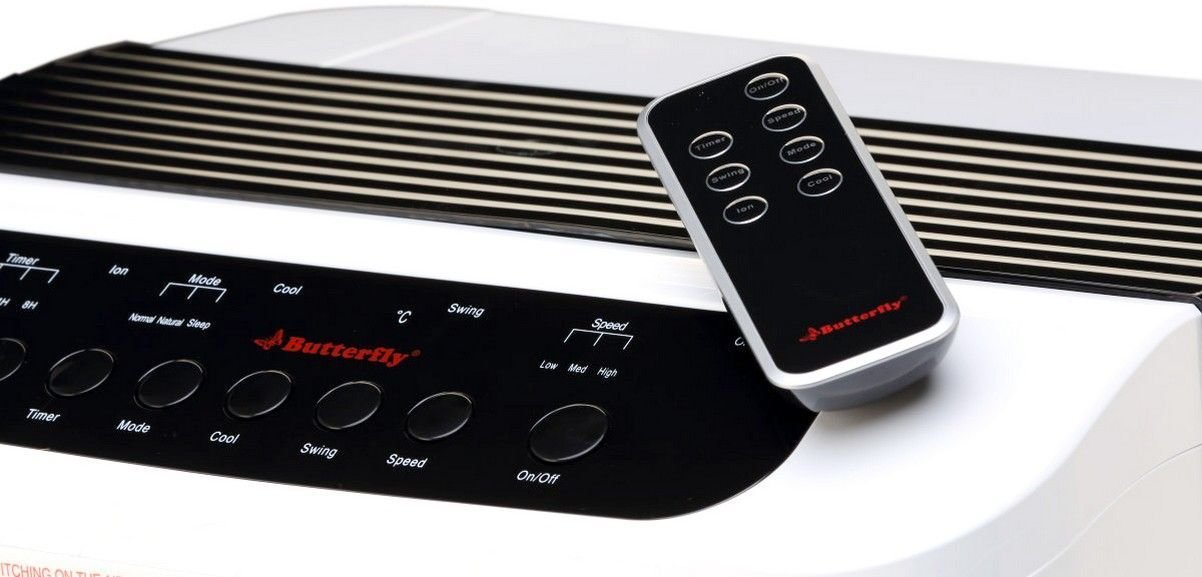
รูปที่ 2: มุม view of the air cooler, highlighting the top control panel and the included remote control placed on top. The side profile with vertical vents is also visible.

รูปที่ 3: Close-up of the remote control for the air cooler, showing buttons for On/Off, Speed, Mode, Timer, Swing, Ion, and Cool functions.

รูปที่ 4: หลัง view of the air cooler with the back panel removed, revealing the honeycomb cooling media. This section is where air is drawn in and cooled by evaporating water.
ส่วนประกอบหลัก:
- แผงควบคุมจอแสดงผลดิจิทัล: Located on the top, for manual operation.
- Front Louvers: Adjustable for directing airflow. Features both horizontal and vertical louvers for wide air distribution.
- ถังเก็บน้ำ: 25-litre capacity, located at the bottom for water storage.
- รังผึ้งระบายความร้อนสื่อ: Located at the rear, responsible for evaporative cooling.
- ล้อเลื่อน: เพื่อความสะดวกในการเคลื่อนย้ายตัวเครื่อง
- รีโมทคอนโทรล: เพื่อการใช้งานที่สะดวกจากระยะไกล
การตั้งค่า
- การแกะกล่อง: Carefully remove the air cooler from its packaging. Retain all packaging materials for future storage or transport.
- การจัดวาง: Place the air cooler on a firm, level surface. For optimal cooling, position the cooler near an open window or door to allow fresh air intake and proper ventilation. Ensure there is at least 20 cm of space around the unit for unobstructed airflow.
- การเติมน้ำ: Open the water inlet cap, typically located at the top or side. Fill the water tank with clean, fresh water up to the 'MAX' level indicator. Do not overfill. The cooler has a 25-litre capacity.
- การเชื่อมต่อไฟฟ้า: Ensure the cooler is switched off before plugging it into a standard 220-240V AC power outlet.
คำแนะนำการใช้งาน
Your air cooler can be operated using the control panel on the unit or the remote control.
ฟังก์ชั่นแผงควบคุม / รีโมทคอนโทรล:
- ปุ่มเปิด/ปิด: กดเพื่อเปิดหรือปิดพัดลมระบายความร้อน
- ปุ่มความเร็ว: หมุนเวียนผ่านความเร็วพัดลม 3 ระดับ: ต่ำ, กลาง, สูง
- ปุ่มเจ๋ง: Activates the water pump to circulate water over the honeycomb pads for evaporative cooling.
- ปุ่มสวิง: Activates or deactivates the automatic oscillation of the vertical louvers to distribute air across a wider area. Horizontal louvers can be adjusted manually.
- ปุ่มโหมด: Selects different operating modes (e.g., Normal, Natural, Sleep, if available).
- ปุ่มตั้งเวลา: Sets an operating duration after which the cooler will automatically turn off.
- Ion Button: Activates the ionizer function (if available) for air purification.
การดำเนินการเริ่มต้น:
- เสียบสายไฟเข้ากับเต้ารับไฟฟ้าที่เหมาะสม
- กดปุ่ม เปิด/ปิด button on the control panel or remote. The unit will start in a default fan speed.
- กดปุ่ม ความเร็ว button to select your desired fan speed (Low, Medium, High).
- For cooling, press the เย็น button. You will hear the water pump activate.
- กดปุ่ม แกว่ง button to activate the automatic swing function for wider air distribution.
การซ่อมบำรุง
การบำรุงรักษาตามปกติจะช่วยให้เครื่องทำความเย็นอากาศของคุณมีประสิทธิภาพสูงสุดและมีอายุการใช้งานยาวนาน
การบำรุงรักษาประจำวัน/ประจำสัปดาห์:
- ถังเก็บน้ำ: Regularly check the water level. For best performance and hygiene, drain and refill the water tank with fresh water every few days, especially if the cooler is used frequently.
- การทำความสะอาดภายนอก: เช็ดพื้นผิวภายนอกด้วยผ้านุ่ม damp ผ้า ห้ามใช้สารทำความสะอาดที่มีฤทธิ์กัดกร่อนหรือตัวทำละลาย
ค่าบำรุงรักษาประจำเดือน/ตามฤดูกาล:
- แผ่นระบายความร้อนแบบรังผึ้ง: The honeycomb pads can accumulate dust and mineral deposits. To clean, first unplug the cooler. Remove the back panel (refer to Figure 4 for location). Carefully slide out the honeycomb pads. Rinse them under running water to remove dust and deposits. For stubborn deposits, soak them in a mild descaling solution (e.g., vinegar and water) for 30 minutes, then rinse thoroughly. Ensure pads are completely dry before reinserting.
- ปั๊มน้ำ: Inspect the water pump and its tubing for any blockages or damage. Clean any debris that may have accumulated.
- การระบายน้ำ: Completely drain the water tank before long periods of non-use or storage.
พื้นที่จัดเก็บ:
Before storing the cooler for an extended period, ensure the water tank is empty and clean, and the honeycomb pads are dry. Store the unit in a dry, cool place, preferably in its original packaging.
การแก้ไขปัญหา
หากคุณพบปัญหาเกี่ยวกับเครื่องปรับอากาศ โปรดดูปัญหาและวิธีแก้ไขทั่วไปต่อไปนี้:
| ปัญหา | สาเหตุที่เป็นไปได้ | สารละลาย |
|---|---|---|
| เครื่องทำความเย็นไม่เปิด | ไม่มีแหล่งจ่ายไฟ; ไม่ได้เสียบสายไฟ; ไม่ได้กดปุ่มเปิด/ปิด | ตรวจสอบเต้ารับไฟฟ้า ตรวจสอบให้แน่ใจว่าเสียบสายไฟแน่นดีแล้ว กดปุ่มเปิด/ปิด |
| No cool air / Only hot air. | Water tank empty; Cool function not activated; Honeycomb pads clogged; Water pump malfunction. | Fill water tank; Press the Cool button; Clean honeycomb pads; Check water pump for blockages or contact customer service if damaged. |
| Water is not pumping. | Water tank empty; Water pump or tubing blocked/damaged; Cool function not activated. | Ensure water tank is filled; Inspect pump and tubing for blockages; Press the Cool button. If pump is damaged, contact customer service. |
| Cool button blinking. | Low water level indicator. | Refill the water tank to the 'MAX' level. The blinking should stop once sufficient water is detected. |
| เสียงรบกวนที่ผิดปกติระหว่างการทำงาน | Low water level; Obstruction in fan or pump; Unit not on a level surface. | Check water level and refill if low; Inspect for foreign objects in fan or pump area (unplug first); Ensure cooler is on a stable, flat surface. |
| รีโมทคอนโทรลไม่ทำงาน | Batteries depleted; Obstruction between remote and cooler; Remote not pointed correctly. | Replace batteries; Remove any obstructions; Point remote directly at the cooler's receiver. |
หากปัญหายังคงมีอยู่หลังจากพยายามแก้ไขปัญหาเหล่านี้แล้ว โปรดติดต่อฝ่ายสนับสนุนลูกค้า
ข้อมูลจำเพาะ
- ยี่ห้อ: ผีเสื้อ
- ชื่อรุ่น : Eco Smart Plus
- ความจุ: 25 ลิตร
- การใช้พลังงาน: 200 วัตต์
- ปฏิบัติการฉบับที่tage: 220 - 240 โวลต์
- จำนวนความเร็ว: 3 (ต่ำ, ปานกลาง, สูง)
- ประเภทการติดตั้ง: อิสระ
- คุณสมบัติพิเศษ: Compact design, Remote Control, Horizontal and Vertical Louvers, Honeycomb Cooling Media, Digital Display Control Panel
- สี: สีขาว
การรับประกัน
This Butterfly Eco Smart Plus Air Cooler comes with a รับประกัน 1 ปี on the product from the date of purchase. Please retain your purchase receipt as proof of purchase for warranty claims. The warranty covers manufacturing defects under normal use. It does not cover damage caused by misuse, accidents, unauthorized repairs, or normal wear and tear.
การสนับสนุนลูกค้า
For any queries, service requests, or technical assistance regarding your Butterfly Eco Smart Plus Air Cooler, please contact Butterfly customer support. Refer to the warranty card or the official Butterfly webเว็บไซต์สำหรับข้อมูลการติดต่อล่าสุด
บันทึก: Always provide your product model number (Eco Smart Plus) and purchase details when contacting support.