
1. บทนำ
The Transcell TI-500 SL is a robust and reliable digital weighing indicator designed for industrial applications. This NTEP and Canadian certified device features a durable NEMA 4X stainless steel enclosure, ensuring protection in harsh environments. It is equipped with a large 0.8-inch backlit LCD screen for clear readability of up to 50,000 display divisions. The TI-500 SL supports up to four 350 Ohm load cells and offers full duplex RS-232 serial communication for integration with various support equipment. Power is supplied via an AC adapter or a rechargeable lead-acid battery, providing flexibility for continuous operation.
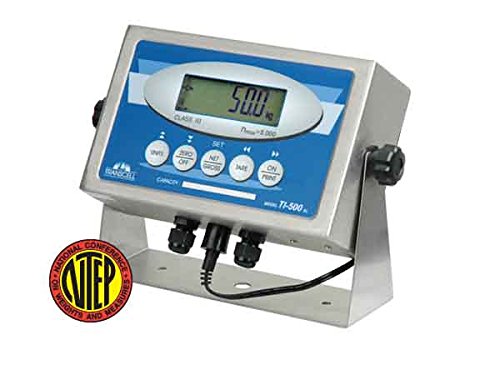
แบบหันหน้าออก view of the Transcell TI-500 SL Weighing Indicator. The device features a stainless steel enclosure with a blue and white control panel. A large digital LCD screen displays '50.0 kg'. Below the screen are several circular buttons for functions like 'UNITS', 'ZERO OFF', 'SET', 'NET GROSS', 'TARE', and 'ON PRINT'. A black cable extends from the bottom of the unit, and an NTEP certification seal is visible in the lower left corner.
2. ข้อมูลด้านความปลอดภัย
Please read all safety instructions carefully before operating the TI-500 SL indicator. Failure to comply with these instructions may result in injury or damage to the device.
ความปลอดภัยทั่วไป
- Operate the device only in environments suitable for its NEMA 4X / IP65 rating.
- Do not attempt to open or repair the indicator yourself. Refer all servicing to qualified personnel.
- Keep the device away from excessive heat, moisture, and corrosive substances.
ความปลอดภัยทางไฟฟ้า
- Use only the provided AC adapter for power and battery charging.
- ตรวจสอบให้แน่ใจว่าเต้ารับไฟฟ้ามีการต่อสายดินอย่างถูกต้อง
- ตัดการเชื่อมต่อไฟฟ้าก่อนทำความสะอาดหรือดำเนินการบำรุงรักษาใดๆ
3. เนื้อหาบรรจุภัณฑ์
ตรวจสอบว่ามีรายการทั้งหมดอยู่ในแพ็คเกจ:
- Transcell TI-500 SL Weighing Indicator
- Stainless Steel Swivel Stand (pre-attached or separate)
- อะแดปเตอร์ AC
- คู่มือการใช้งาน (เอกสารนี้)
4. การตั้งค่า
การติดตั้งทางกายภาพ
- Place the TI-500 SL indicator on a stable, level surface. The integrated stainless steel swivel stand allows for adjustable viewมุมการเอียง
- ให้แน่ใจว่ามีการระบายอากาศเพียงพอรอบๆ เครื่อง
การเชื่อมต่อไฟฟ้า
- Connect the AC power adapter to the power input port on the indicator.
- Plug the AC adapter into a suitable power outlet. The internal rechargeable lead-acid battery will begin charging automatically.
การเชื่อมต่อโหลดเซลล์
The TI-500 SL is designed to drive up to four 350 Ohm load cells.
- Locate the load cell input terminals on the indicator. These are typically sealed connections to maintain the NEMA 4X rating.
- Carefully connect the load cell cables to the corresponding terminals, ensuring correct polarity and wiring as per the load cell manufacturer's instructions.
- Secure all connections to maintain the enclosure's integrity.
เปิดเครื่องเบื้องต้น
กดปุ่ม เปิด/ปิด button to power on the indicator. The display will perform a self-test and then show the current weight reading.
5. คู่มือการใช้งาน
The TI-500 SL features a user-friendly front panel with dedicated function keys.
การชั่งน้ำหนักพื้นฐาน
Once powered on, the indicator will display the weight detected by the connected load cells. Ensure the scale platform is clear before taking a measurement.
Zeroing the Display
To set the display to zero when there is no load on the platform:
- กดปุ่ม ZERO OFF button. The display will reset to 0.00.
Taring (Net/Gross Weight)
To measure the net weight of an item by subtracting the weight of a container:
- Place the empty container on the scale platform.
- กดปุ่ม ทดค่า button. The display will show 0.00 and the 'NET' indicator will illuminate.
- Add the item to be weighed into the container. The display will now show the net weight of the item.
- To return to gross weight, press the ยอดสุทธิ ปุ่ม.
การแปลงหน่วย
To switch between available weighing units (e.g., kg, lb):
- กดปุ่ม หน่วย button. The display will cycle through the configured units.
Printing Weight Data
If connected to a compatible printer via the RS-232 port:
- กดปุ่ม ON PRINT button to send the current weight reading to the connected device.
การสอบเทียบ
Calibration procedures are typically performed by qualified technicians. Refer to the detailed technical manual or contact Transcell Technology support for calibration instructions. All setup parameters can be entered via the front panel keys during calibration mode.
6. การบำรุงรักษา
การทำความสะอาด
The NEMA 4X stainless steel enclosure allows for easy cleaning.
- ถอดอะแดปเตอร์ไฟออกก่อนทำความสะอาด
- Wipe the indicator with a damp ผ้าและผงซักฟอกอ่อนๆ
- Do not use abrasive cleaners or solvents that could damage the display or enclosure.
- Ensure all connections are sealed after cleaning.
การดูแลแบตเตอรี่
The TI-500 SL is equipped with a rechargeable lead-acid battery.
- ชาร์จแบตเตอรี่ให้เต็มก่อนใช้งานครั้งแรก
- Recharge the battery when the low battery indicator appears or when the display dims.
- For long-term storage, ensure the battery is fully charged and store the unit in a cool, dry place. Recharge periodically if stored for extended periods.
7 การแก้ไขปัญหา
This section addresses common issues you might encounter with your TI-500 SL indicator.
| ปัญหา | สาเหตุที่เป็นไปได้ | สารละลาย |
|---|---|---|
| Indicator does not power on. | No power from AC adapter; discharged battery; faulty power button. | Check AC adapter connection and power outlet. Charge battery for several hours. If problem persists, contact support. |
| Display shows 'OVERLOAD' or '-----'. | Load cell overload; faulty load cell connection. | Remove excess weight from the scale. Check load cell wiring and connections. |
| การอ่านค่าน้ำหนักไม่แม่นยำ | Scale not level; calibration required; damaged load cell. | Ensure scale is on a level surface. Perform calibration (if qualified) or contact service. Inspect load cells for damage. |
| RS-232 communication failure. | Incorrect cable; wrong baud rate/settings; faulty port. | Verify cable type and connection. Check communication settings on both indicator and connected device. |
For issues not listed here or if solutions do not resolve the problem, please contact Transcell Technology customer support.
8. ข้อมูลจำเพาะ
| คุณสมบัติ | คำอธิบาย |
|---|---|
| แบบอย่าง | TI-500 SL |
| การก่อสร้าง | Stainless Steel NEMA 4X / IP65 |
| แสดง | 0.8 inch, 6 Digit LCD with LED backlight |
| โหลดเซลล์ | Drives up to four 350 Ohm Load Cells |
| พอร์ตซีเรียล | ฟูลดูเพล็กซ์ RS-232C |
| พลัง | AC Adapter or Rechargeable Lead Acid Battery |
| คุณสมบัติพิเศษ | Backlit Display, High Weight Capacity (up to 50,000 display divisions), Large Display |
| สี | เงิน |
| ขนาดสินค้า | 2.9 x 5.5 x 8.9 นิ้ว |
| น้ำหนัก | 3 ปอนด์ |
9. ข้อมูลการรับประกัน
Transcell Technology products are manufactured to high quality standards. For specific warranty terms and conditions, please refer to the warranty card included with your product or visit the official Transcell Technology webไซต์ โปรดเก็บใบเสร็จรับเงินไว้เป็นหลักฐานการซื้อสำหรับการเรียกร้องการรับประกัน
10. ข้อมูลการสนับสนุน
For technical assistance, troubleshooting beyond this manual, or service inquiries, please contact Transcell Technology customer support. Contact details can typically be found on the manufacturer's official webไซต์หรือบนบรรจุภัณฑ์ผลิตภัณฑ์
Manufacturer: Transcell Technology