
Notifier DAA2-5025
Notifier DAA2-5025 Digital Ampคู่มือการใช้งาน lifier
Model: DAA2-5025 | Brand: Notifier
การแนะนำ
This manual provides essential information for the safe and efficient operation, installation, and maintenance of the Notifier DAA2-5025 Digital Amplifier. The DAA2-5025 is a 50W, 25V digital amplifier designed for integration into fire alarm and emergency communication systems, operating on 120 VAC. Please read this manual thoroughly before installation or operation.
ข้อมูลด้านความปลอดภัย
คำเตือน: อุปกรณ์นี้ทำงานด้วยแรงดันไฟฟ้าสูงtage (120 VAC). Installation and servicing must be performed by qualified personnel only. Disconnect all power sources before servicing to prevent electric shock.
คำเตือน: To reduce the risk of fire or electric shock, do not expose this appliance to rain or moisture. Do not open the enclosure; there are no user-serviceable parts inside. Refer all servicing to qualified service personnel.
- ปฏิบัติตามกฎข้อบังคับเกี่ยวกับไฟฟ้าในระดับท้องถิ่นและระดับชาติเสมอ
- ตรวจสอบให้แน่ใจว่ามีการต่อสายดินของตัวเครื่องอย่างเหมาะสม
- อย่าปิดกั้นช่องระบายอากาศ
- ใช้เฉพาะอะไหล่ที่ระบุเท่านั้น
การติดตั้งและการตั้งค่า
The DAA2-5025 is designed for surface mount installation within a compatible enclosure. Ensure the mounting location is dry, well-ventilated, and free from excessive dust or vibration.
การติดตั้ง Ampชีวิต
- Identify a suitable mounting surface that can support the unit's weight (approximately 2 pounds).
- การรักษาความปลอดภัย amplifier's mounting plate to the surface using appropriate fasteners.
- ให้แน่ใจว่ามีระยะห่างเพียงพอรอบๆ เครื่องเพื่อการระบายอากาศและการเข้าถึงขั้วสายไฟ
การเชื่อมต่อไฟฟ้า
Before making any electrical connections, ensure all power is disconnected at the circuit breaker.
- กำลังไฟเข้า: Connect the 120 VAC power supply to the designated terminals. Observe correct polarity (Line, Neutral, Ground).
- เอาต์พุตเสียง: Connect the 25V audio output to the speaker lines or distribution system. Ensure correct impedance matching.
- อินพุต/เอาต์พุตควบคุม: Connect any necessary control signals (e.g., activation, supervision) as per system design. Refer to the system's specific wiring diagrams.

Figure 1: The Notifier DAA2-5025 Digital Amplifier, showing the main circuit board, power supply unit, and various connection points. This view highlights the internal components and robust construction.
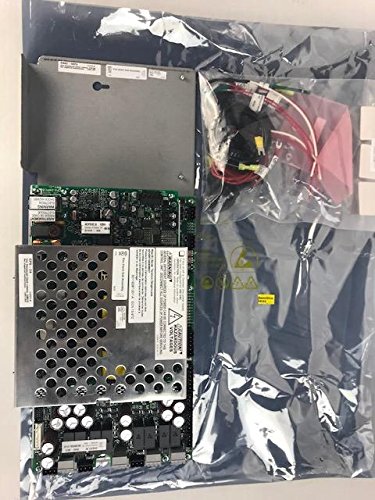
Figure 2: The Notifier DAA2-5025 Digital Amplifier along with its accessory components, as typically received in its packaging. This image provides a view of the complete product and included parts before installation.
คำแนะนำการใช้งาน
The DAA2-5025 operates as part of a larger fire alarm or emergency communication system. Its operation is typically controlled by the main system panel.
- เปิดเครื่อง: Once all connections are secure and verified, apply 120 VAC power to the unit. The amplifier will perform a self-test.
- ตัวบ่งชี้สถานะ: Observe the status LEDs on the unit (if present) for normal operation, fault conditions, or active signals. Refer to the system's specific documentation for LED indicator meanings.
- เอาต์พุตเสียง: การ amplifier will output audio signals (e.g., voice messages, tones) when activated by the control panel. Ensure speaker lines are properly connected and terminated.
- การกำกับดูแล: The DAA2-5025 typically includes supervision circuits to monitor speaker lines and amplifier status, reporting any faults back to the main control panel.
การซ่อมบำรุง
The Notifier DAA2-5025 is designed for reliable, long-term operation with minimal maintenance. However, periodic inspection is recommended.
- การตรวจสอบประจำปี: Visually inspect the unit for any signs of damage, loose connections, or excessive dust accumulation.
- การทำความสะอาด: If necessary, gently clean the exterior of the unit with a soft, dry cloth. Do not use liquid cleaners or solvents. Ensure power is off before cleaning.
- อัพเดตเฟิร์มแวร์: Any firmware updates should only be performed by qualified Notifier service technicians.
- ระบบสำรองไฟแบตเตอรี่ (ถ้ามี): If the system utilizes a battery backup for the amplifier, ensure batteries are inspected and replaced according to manufacturer recommendations.
การแก้ไขปัญหา
Before attempting any troubleshooting, ensure all power is disconnected. If the issue persists after basic checks, contact qualified service personnel.
| ปัญหา | สาเหตุที่เป็นไปได้ | สารละลาย |
|---|---|---|
| No Power/Unit Off | No 120 VAC input; Blown fuse; Internal fault. | Check power supply and circuit breaker. Verify fuse (if accessible and user-replaceable). Contact service if power is present but unit remains off. |
| ไม่มีเอาต์พุตเสียง | Incorrect wiring; Speaker line fault; Amplifier fault; No audio signal from control panel. | Verify speaker wiring and connections. Check speaker line impedance. Confirm audio signal from control panel. Check amplifier status indicators. |
| Fault Indicator Active | Speaker line open/short; Amplifier internal fault; Power supply issue. | Inspect speaker lines for damage. Consult system documentation for specific fault codes. Contact service for internal faults. |
ข้อมูลจำเพาะ
| คุณลักษณะ | รายละเอียด |
|---|---|
| แบบอย่าง | ดีเอเอ2-5025 |
| ยี่ห้อ | แจ้งเตือน |
| คำอธิบาย | ดิจิตอล Amplifier, 50W, 25V, 120 VAC |
| กำลังขับ | 50 วัตต์ |
| ปริมาณการส่งออกtage | 25 โวลต์ |
| อินพุต Voltage | 120 โวลต์ |
| ประเภทการติดตั้ง | การติดตั้งบนพื้นผิว |
| น้ำหนักสินค้า | 2 ปอนด์ (0.91 กก.) |
| ASIN | B07B66SSRY |
| ยูพีซี | 670875920132 |
| วันที่พร้อมใช้งานครั้งแรก | 24 พฤษภาคม 2016 |
| ผู้ผลิต | การแจ้งเตือน |
ข้อมูลการรับประกัน
Notifier products typically come with a manufacturer's limited warranty covering defects in materials and workmanship. For specific warranty terms and conditions, please refer to the documentation provided with your purchase or contact Notifier customer support. Keep your proof of purchase for warranty claims.
การสนับสนุนลูกค้า
For technical assistance, troubleshooting beyond this manual, or information on replacement parts, please contact Notifier customer support or your authorized Notifier distributor. You can find contact information on the official Notifier website or through your system installer.
แหล่งข้อมูลออนไลน์: เยี่ยมชมเว็บไซต์ Notifier อย่างเป็นทางการ webเว็บไซต์นี้รวบรวมเอกสารผลิตภัณฑ์ คำถามที่พบบ่อย และข้อมูลติดต่อฝ่ายสนับสนุน
Ask a question about this manual
Ask about setup, troubleshooting, compatibility, parts, safety, or missing instructions. Manuals+ will review the question and use this page’s manual context to help answer it.