
1. สินค้าหมดview
The Walfront HA-4004 is a digital Islamic Azan alarm clock designed to provide accurate prayer times for major cities worldwide. It features a clear LCD display, multiple alarm functions, and temperature display.
คุณสมบัติหลัก:
- Automatic Azan time calculation for over 1500 cities.
- Five daily Azan times with full Azan sound (volume adjustable) or beep option.
- Daily alarm with optional weekend settings.
- Special Fajr alarm that adjusts relative to Fajr Azan time.
- Qibla direction display relative to North.
- Hijri and Gregorian calendar display.
- Temperature display (Celsius/Fahrenheit switchable).
- Daylight Saving Time (DST) option.
- Snooze function (5 minutes).
- Full screen light for visibility in the dark.

ภาพที่ 1.1: ด้านหน้า view of the Walfront HA-4004 Islamic Azan Alarm Clock.

Image 1.2: Dimensions of the Walfront HA-4004 Islamic Azan Alarm Clock (approx. 33cm H x 21cm W x 3cm D).
2. คำแนะนำในการตั้งค่า
2.1 การติดตั้งแบตเตอรี่
The clock requires 4 x AA batteries (not included). Locate the battery compartment on the back of the clock, insert the batteries according to the polarity indicators, and close the cover.
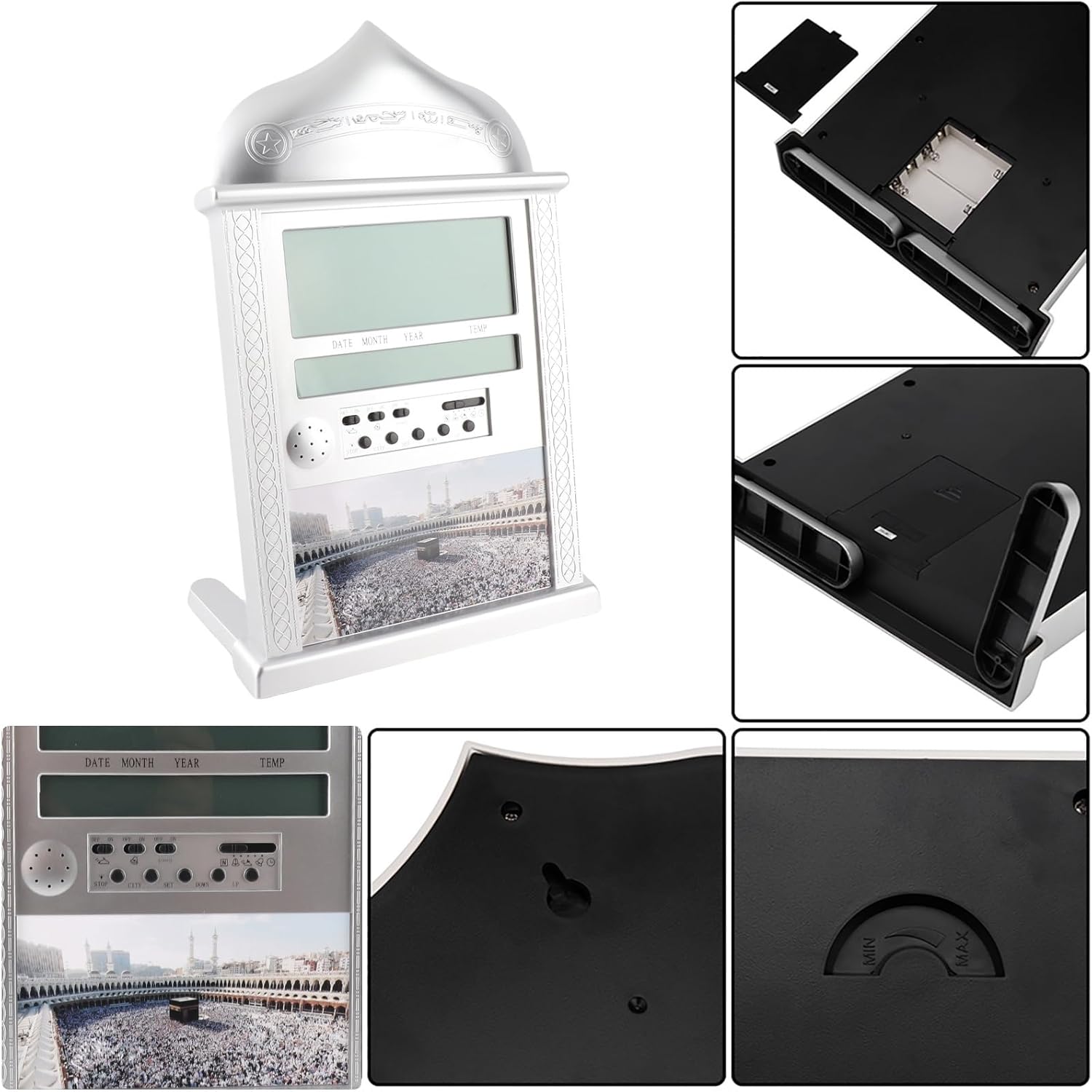
Image 2.1: Detail of the battery compartment and rear controls.
2.2 Initial Settings (Time, Date, City)
Upon first power-on or after battery replacement, you will need to set the current time, date, and your city for accurate Azan times.
การตั้งเวลาปัจจุบัน:
- Move the switch on the back of the clock to the ชุด ตำแหน่ง.
- ใช้ UP or ลง ปุ่มเพื่อปรับชั่วโมง
- กด ชุด again to move to minutes, then use UP or ลง ที่จะปรับเปลี่ยน
- Once time is set, move the switch back to the ปกติ ตำแหน่ง.
Setting Gregorian Calendar:
- เลื่อนสวิตช์ไปที่ ชุด ตำแหน่ง สองครั้ง.
- ใช้ UP or ลง เพื่อปรับปี
- กด ชุด to move to month, then use UP or ลง.
- กด ชุด to move to day, then use UP or ลง.
- Once date is set, move the switch back to the ปกติ ตำแหน่ง.
Note: After setting the Gregorian calendar, the Hijri calendar will be automatically recalculated.
Adding a New City:
The clock has pre-programmed Azan times for 1500 cities. You need to select your city code.
- กดปุ่ม เมือง ปุ่ม.
- ใช้ UP or ลง buttons to scroll through city codes until you find your desired city.
- Alternatively, you can select the country code first, then the city code.
- The Qibla direction and angle relative to North will be displayed once a city is selected.
2.3 เวลาออมแสง (DST)
To activate or deactivate DST:
- กดปุ่มค้างไว้ เวลาออมแสง กดปุ่มนี้สักสองสามวินาที
- The DST icon will appear or disappear on the screen, indicating activation or deactivation.
3. คู่มือการใช้งาน
3.1 Setting Daily Alarm
The daily alarm is a regular alarm that rings at the same time every day. Weekends can be optional.
- เลื่อนสวิตช์ไปที่ ชุด ตำแหน่ง.
- ใช้ UP or ลง ปุ่มสำหรับปรับเวลาปลุก
- กด ชุด to move to minutes, then use UP or ลง ที่จะปรับเปลี่ยน
- หมุนสวิตช์สัญญาณเตือน ON. The alarm icon will be displayed.
- To stop the alarm when it rings, press the หยุด button or turn the alarm switch ปิด.
3.2 Setting Fajr Alarm
This unique feature allows you to wake up at a specific time relative to the Fajr Azan. For example, if you set the alarm for 10 minutes after Fajr Azan, it will automatically adjust daily.
- เลื่อนสวิตช์ไปที่ ชุด ตำแหน่ง.
- ใช้ UP or ลง buttons to adjust the desired offset (e.g., 5:00 for 5 minutes after Fajr).
- หมุนสวิตช์สัญญาณเตือน ON. The alarm icon will be displayed.
Note: If the Fajr alarm is set to ring exactly at the Fajr Azan time, the Azan sound will be disabled for that prayer.
3.3 Setting Special Alarm
This clock includes an extra alarm for special occasions or appointments.
- เลื่อนสวิตช์ไปที่ ชุด ตำแหน่ง.
- ใช้ UP or ลง ปุ่มเพื่อปรับชั่วโมง
- กด ชุด to move to minutes, then use UP or ลง ที่จะปรับเปลี่ยน
- หมุนสวิตช์สัญญาณเตือน ON. The alarm icon will be displayed.
Note: To cancel a special alarm after it has been set, press and hold the หยุด กดปุ่มนี้สักสองสามวินาที
3.4 Azan Sound Control
- The volume of the Azan sound can be controlled using the dial switch located on the side of the clock.
- You can set the clock to beep 3 times instead of playing the full Azan sound.
3.5 Azan Taqweem Systems
The clock calculates Fajr and Isha times based on various Taqweem systems. You can select the system most appropriate for your location.
- กดปุ่มค้างไว้ ตำแหน่ง ปุ่ม.
- ใช้ UP or ลง buttons to select from available Taqweem systems (e.g., Local Taqweem, Muslim League, ISNA, Islamic Scientific University, Egypt Taqweem).
- ปล่อยตัว ตำแหน่ง ปุ่มเพื่อยืนยัน
Note: Re-selecting a city will reset the Taqweem system to the city's default.
4. การบำรุงรักษา
4.1 การเปลี่ยนแบตเตอรี่
When the display dims or the clock functions become erratic, it is time to replace the batteries. Always use 4 new AA batteries. Ensure correct polarity during installation.
4.2 การทำความสะอาด
To clean the clock, use a soft, dry cloth. Do not use abrasive cleaners or solvents, as these may damage the display or casing.
5 การแก้ไขปัญหา
- นาฬิกาไม่เปิดหรือหน้าจอว่างเปล่า: ตรวจสอบการติดตั้งแบตเตอรี่และให้แน่ใจว่าแบตเตอรี่ใหม่และใส่เข้าไปอย่างถูกต้อง
- Incorrect Azan times: Verify that the correct city code, Gregorian calendar date, Daylight Saving Time (DST) setting, and Taqweem system are selected for your location. Refer to Section 2.2 and 3.5 for detailed instructions.
- Azan sound is not playing: Check the volume dial. If a Fajr alarm is set to ring exactly at the Fajr Azan time, the Azan sound for that prayer will be disabled. Also, if any alarm is set at the exact time of an Azan, that specific Azan will be disabled.
- Qibla direction seems inaccurate: Ensure your city code is correctly set. The Qibla direction is calculated based on the selected city.
6. ข้อมูลจำเพาะ
| คุณสมบัติ | รายละเอียด |
|---|---|
| แบบอย่าง | เอชเอ-4004 |
| ยี่ห้อ | Walfront |
| สี | เงิน |
| ประเภทจอภาพ | จอ LCD ระบบดิจิตอล |
| วัสดุ | พลาสติกและโลหะ |
| ขนาดสินค้า | ขนาดโดยประมาณ 33 x 21 x 3 ซม. (12.99 x 8.26 x 1.18 นิ้ว) |
| น้ำหนักสินค้า | 0.66 กิโลกรัม (1.45 ปอนด์) |
| แหล่งพลังงาน | ใช้พลังงานจากแบตเตอรี่ |
| แบตเตอรี่ที่จำเป็น | แบตเตอรี่ AA 4 ก้อน (ไม่รวม) |
| ประเภทการติดตั้ง | Wall Mount or Desk Stand |
| คุณสมบัติพิเศษ | Azan Alarm, Daily Alarm, Fajr Alarm, Qibla Direction, Temperature Display, DST |

ภาพที่ 6.1: ด้านหน้าและด้านหลัง views of the clock, showing wall mount option.
7. การรับประกันและการสนับสนุน
7.1 ข้อมูลการรับประกัน
This Walfront HA-4004 Islamic Azan Alarm Clock comes with a Lifetime Warranty. For any quality-related issues, please contact the seller or manufacturer for assistance.
7.2 การสนับสนุนลูกค้า
If you encounter any problems or have questions not covered in this manual, please contact Walfront customer support or the retailer from whom you purchased the product for further assistance.