การแนะนำ
This manual provides essential instructions for the Jam Audio Out There Active Noise Cancelling On-Ear Bluetooth Headphones. Please read this guide thoroughly to ensure proper use, maintenance, and to maximize your listening experience. These headphones offer active noise cancellation, Bluetooth connectivity, hands-free calling, and a comfortable on-ear design.
มีอะไรอยู่ในกล่อง
ตรวจสอบว่ามีสินค้าทั้งหมดอยู่ในบรรจุภัณฑ์:
- Out There Headphones
- สาย AUX (3.5 มม.)
- สายชาร์จ USB
- คู่มือเริ่มต้นใช้งานฉบับย่อ (ดูคำแนะนำโดยละเอียดในคู่มือนี้)

Image: Contents of the Jam Audio Out There headphone package, including the headphones, AUX cable, and USB charging cable.
สินค้าเกินview และการควบคุม
Familiarize yourself with the headphone's layout and controls for optimal use.
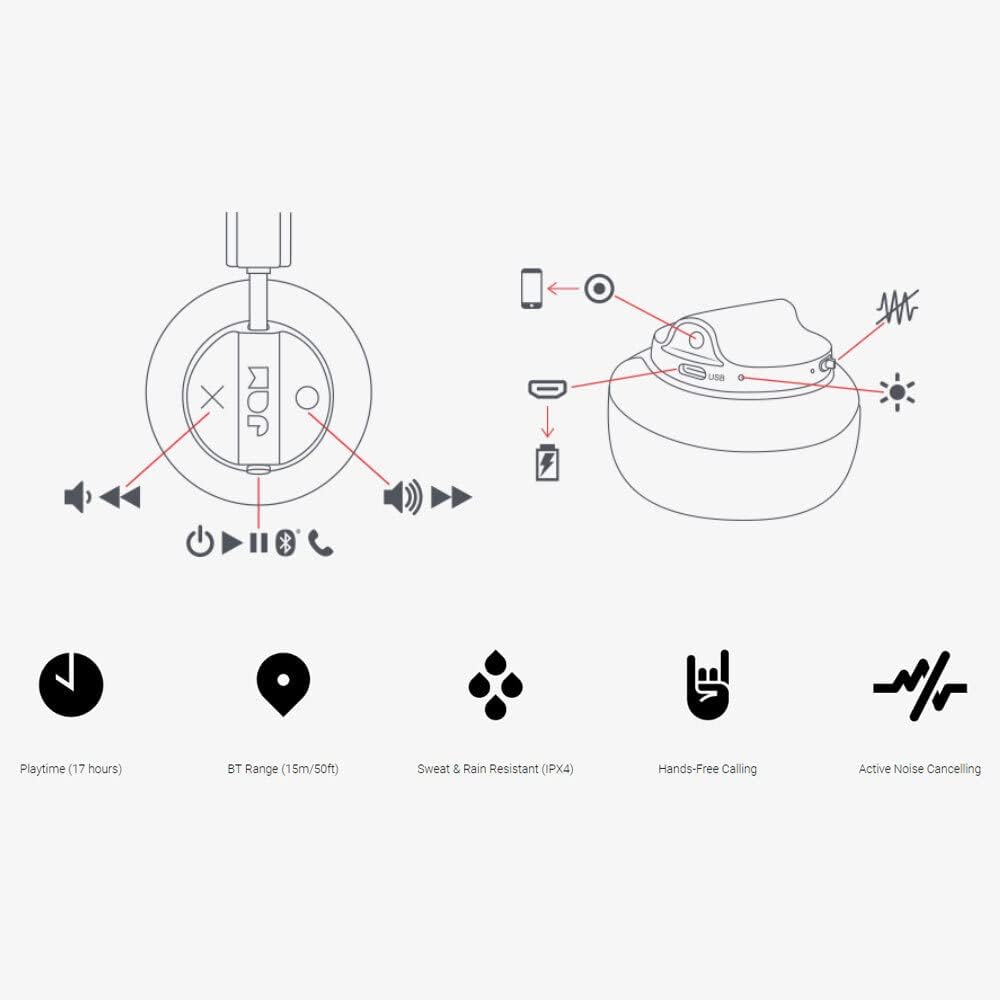
Image: Detailed diagram illustrating the control buttons and ports on the Jam Audio Out There headphones, including power, volume, track navigation, call management, and the charging port.
- ปุ่มเปิด/ปิด: กดค้างไว้เพื่อเปิด/ปิด
- เพิ่มระดับเสียง/เพลงถัดไป: กดสั้นเพื่อเพิ่มระดับเสียง กดยาวเพื่อเล่นเพลงถัดไป
- ลดระดับเสียง/เพลงก่อนหน้า: กดสั้นเพื่อลดระดับเสียง กดยาวเพื่อเล่นเพลงก่อนหน้า
- เล่น/หยุดชั่วคราว/รับสาย: กดเพียงครั้งเดียวเพื่อเล่น/หยุดเพลง หรือรับ/วางสาย
- Active Noise Cancelling (ANC) Switch: Toggle to activate or deactivate noise cancellation.
- พอร์ตชาร์จ: พอร์ต Micro USB สำหรับชาร์จไฟ
- พอร์ต AUX-in: แจ็คขนาด 3.5 มม. สำหรับเชื่อมต่อเสียงแบบมีสาย
การตั้งค่า
1. การชาร์จหูฟัง
Before first use, fully charge your headphones. Connect the provided USB charging cable to the charging port on the headphones and the other end to a USB power source. The LED indicator will show charging status and turn off when fully charged. A full charge takes approximately 2 hours and provides up to 17 hours of playtime.

Image: The Jam Audio Out There headphones provide up to 17 hours of playtime on a single charge.
2. การเปิด/ปิดเครื่อง
- To power on: Press and hold the Power button for 3 seconds. The LED indicator will flash.
- To power off: Press and hold the Power button for 3 seconds. The LED indicator will turn off.
3. การจับคู่บลูทู ธ
- ตรวจสอบให้แน่ใจว่าหูฟังปิดอยู่
- Press and hold the Power button for 5 seconds until the LED indicator flashes red and blue, indicating pairing mode.
- บนอุปกรณ์ของคุณ (สมาร์ทโฟน แท็บเล็ต คอมพิวเตอร์) เปิดใช้งาน Bluetooth และค้นหาอุปกรณ์ที่มีอยู่
- Select "JAM Out There" from the list of devices.
- เมื่อจับคู่เสร็จแล้ว ไฟ LED บนหูฟังจะสว่างเป็นสีน้ำเงินค้าง
- หูฟังรุ่นนี้มีระยะการเชื่อมต่อบลูทูธได้ไกลถึง 15 เมตร (50 ฟุต)

Image: The Jam Audio Out There headphones offer Bluetooth compatibility, allowing a range of up to 15 meters or 50 feet from your connected device.
คำแนะนำการใช้งาน
การเล่นเพลง
- เล่น/หยุดชั่วคราว: กดปุ่มเล่น/หยุดชั่วคราวหนึ่งครั้ง
- เพลงถัดไป: กดปุ่มเพิ่มระดับเสียงค้างไว้
- แทร็กก่อนหน้า: กดปุ่มลดระดับเสียงค้างไว้
- การปรับระดับเสียง: กดปุ่มเพิ่มเสียงหรือปุ่มลดเสียงสั้นๆ
การโทรแบบแฮนด์ฟรี
- รับ/วางสาย: กดปุ่มเล่น/หยุดชั่วคราวหนึ่งครั้ง
- ปฏิเสธสาย: กดปุ่ม Play/Pause ค้างไว้ 2 วินาที
- ทำการโทร: Initiate the call from your connected device. The audio will automatically transfer to the headphones.
- Music will automatically pause during a call and resume after the call ends.
ระบบตัดเสียงรบกวนแบบแอคทีฟ (ANC)
- To activate ANC: Slide the ANC switch to the ON position. The ANC indicator light will illuminate.
- To deactivate ANC: Slide the ANC switch to the OFF position. The ANC indicator light will turn off.
- Using ANC can reduce ambient noise, enhancing your listening experience. Note that ANC can be used independently or with Bluetooth audio.
Wired Connection (AUX-in)
For a wired connection, use the provided 3.5mm AUX cable. Plug one end into the headphone's AUX-in port and the other into your audio device. This allows you to continue listening even if the headphone battery is depleted or if Bluetooth is not available.
การซ่อมบำรุง
- การทำความสะอาด: เช็ดหูฟังด้วยผ้าแห้งนุ่มๆ ห้ามใช้สารเคมีรุนแรงหรือวัสดุที่มีฤทธิ์กัดกร่อน
- พื้นที่จัดเก็บ: เก็บหูฟังไว้ในที่แห้งและเย็น ห่างจากอุณหภูมิที่สูงหรือต่ำเกินไป
- ความต้านทานน้ำ: These headphones are IPX4 rated, meaning they are resistant to sweat and light splashes of water. Do not submerge them in water or expose them to heavy rain. Ensure the charging port cover is securely closed when not charging to maintain water resistance.
- การดูแลแบตเตอรี่ เพื่อยืดอายุการใช้งานแบตเตอรี่ ควรหลีกเลี่ยงการใช้หูฟังจนหมดบ่อย ควรชาร์จหูฟังเป็นประจำ แม้จะไม่ได้ใช้งานเป็นเวลานานก็ตาม
การแก้ไขปัญหา
| ปัญหา | สารละลาย |
|---|---|
| หูฟังเปิดไม่ติด | ตรวจสอบให้แน่ใจว่าหูฟังชาร์จไฟเต็มแล้ว เชื่อมต่อกับแหล่งจ่ายไฟโดยใช้สาย USB |
| ไม่สามารถจับคู่ผ่านบลูทูธได้ |
|
| ไม่มีเสียงหรือเสียงเบา |
|
| Active Noise Cancelling not working | Ensure the ANC switch is in the ON position and the ANC indicator light is illuminated. |
| Headphones falling apart or breaking | While the product is designed for durability, excessive force or improper handling can cause damage. Handle with care. If issues persist, refer to warranty information. |
ข้อมูลจำเพาะ
- ชื่อรุ่น : ข้างนอกนั่น
- หมายเลขรุ่น: HX-HP303BK
- การเชื่อมต่อ: Bluetooth, 3.5 mm Jack (AUX-in)
- ระยะสัญญาณไร้สาย: สูงถึง 15 เมตร (50 ฟุต)
- อายุการใช้งานแบตเตอรี่: นานถึง 17 ชั่วโมง
- การควบคุมเสียงรบกวน: ระบบตัดเสียงรบกวนแบบแอคทีฟ
- ความต้านทานน้ำ: IPX4 Rated (Sweat and Rain Resistant)
- ตำแหน่งหู: บนหู
- วัสดุ: ยาง ซิลิโคน
- น้ำหนักสินค้า: 5.1 ออนซ์ (0.32 ปอนด์)
- ขนาดสินค้า : 8.58 x 3.19 x 8.66 นิ้ว
- ส่วนประกอบที่รวมอยู่: Headphones, Charging Cord, AUX Cable
วิดีโอผลิตภัณฑ์view
ชมวิดีโอผลิตภัณฑ์อย่างเป็นทางการนี้เพื่อดูภาพรวมview of the Jam Audio product line, including the Out There headphones.
Video: An official Jam Audio sizzle video showcasing various products, including the Out There headphones, highlighting their design and features.
การรับประกันและการสนับสนุน
For warranty information, product registration, or technical support, please refer to the official Jam Audio webหรือติดต่อฝ่ายบริการลูกค้า เก็บหลักฐานการซื้อไว้เพื่อใช้ในการเคลมประกัน