
การแนะนำ
Thank you for choosing the PRORECK UK-2000 UHF 2 Channel Wireless Microphone System. This system is designed to provide clear, distortion-free audio for various applications, including parties, weddings, church events, conferences, and speeches. It features a stable UHF signal transmission and offers 560 selectable frequencies for optimal performance. This manual provides detailed instructions for setting up, operating, and maintaining your wireless microphone system.
เนื้อหาแพ็คเกจ
โปรดตรวจสอบว่ารายการทั้งหมดที่ระบุไว้ด้านล่างมีอยู่ในแพ็คเกจของคุณหรือไม่:
- 1 x ตัวรับ หน่วย
- ไมโครโฟนพกพา 2 ตัว
- 1 x 6.35mm TS Cable
- 1 x ที่ชาร์จไฟ
- 1 x คู่มือผู้ใช้ (เอกสารนี้)
สินค้าเกินview
Receiver Unit (Rear Panel)
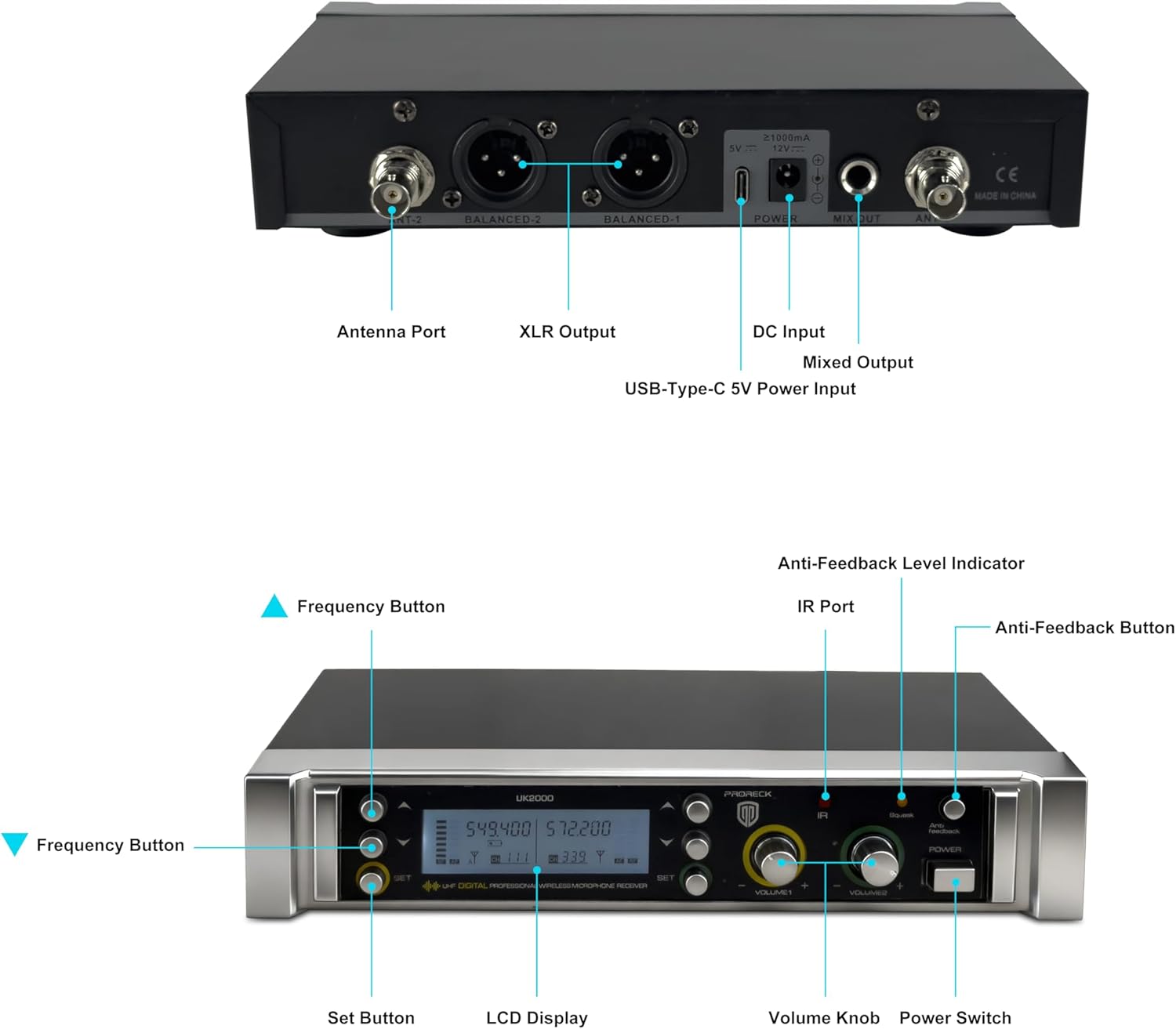
Image: Rear panel of the PRORECK UK-2000 receiver. This view highlights the Antenna Ports, Balanced XLR Outputs (1 and 2), DC Input for power, Mixed Output (6.35mm), and USB-Type-C 5V Power Input.
- พอร์ตเสาอากาศ: Connect the included antennas for signal reception.
- XLR Output (BALANCED 1/2): Balanced audio outputs for connecting to a mixer or ampชีวิต.
- อินพุต DC: Connect the provided power charger.
- Mixed Output (MIX OUT): Unbalanced 6.35mm (1/4") audio output for connecting to various audio devices.
- USB-Type-C 5V Power Input: Alternative power input, useful with a portable power bank.
Receiver Unit (Front Panel)

Image: Front panel of the PRORECK UK-2000 receiver. This view shows the Frequency Buttons, Set Button, LCD Display, IR Port, Volume Knobs, Power Switch, Anti-Feedback Level Indicator, and Anti-Feedback Button.
- Frequency Buttons: Used to adjust the operating frequency.
- ปุ่มตั้งค่า: Confirms frequency selection and other settings.
- จอแสดงผล LCD: Shows channel, frequency, signal strength, and battery status.
- พอร์ต IR: Infrared sensor for syncing frequencies with microphones.
- ปุ่มปรับระดับเสียง: ปรับระดับเสียงเอาต์พุตสำหรับแต่ละช่องสัญญาณไมโครโฟน
- สวิตช์ไฟ: เปิดหรือปิดเครื่องรับสัญญาณ
- Anti-Feedback Level Indicator: Displays the level of anti-feedback processing.
- Anti-Feedback Button: Activates or deactivates the anti-feedback function.
ไมโครโฟนมือถือ

ภาพ: ระเบิด view of the handheld microphone. This shows the Mic Grill, LCD Display, Metal Construction, Battery Compartment, and Battery Cover.
- Mic Grill: ช่วยปกป้องแคปซูลไมโครโฟน
- จอแสดงผล LCD: Shows frequency and battery status.
- โครงสร้างโลหะ: Durable housing for the microphone.
- ช่องใส่แบตเตอรี่: ใช้แบตเตอรี่ AA สองก้อน
- ฝาครอบแบตเตอรี่: Secures the batteries in place.
- IR Sync Sensor: Located on the microphone body, used for automatic frequency synchronization with the receiver.
คำแนะนำการตั้งค่า
1. ติดตั้งแบตเตอรี่ในไมโครโฟน
- Unscrew the battery cover at the bottom of each handheld microphone.
- ใส่แบตเตอรี่ AA สองก้อนลงในช่องใส่แบตเตอรี่ ตรวจสอบให้แน่ใจว่าขั้วถูกต้อง (+/-)
- Screw the battery cover back on securely.
บันทึก: Each microphone requires 2xAA batteries (not included).
2. เชื่อมต่อตัวรับสัญญาณ
- Attach the antennas to the Antenna Ports on the rear panel of the receiver. Position them vertically for optimal signal reception.
- Connect the power charger to the DC Input on the receiver and plug it into a power outlet. Alternatively, you can use a portable power bank with the USB-Type-C 5V Power Input.
- เชื่อมต่อเครื่องรับเข้ากับระบบเสียงของคุณ (มิกเซอร์ amplifier, powered speaker) using either the Balanced XLR Outputs or the Mixed Output (6.35mm TS cable).
3. Power On and Sync
- Turn on the receiver unit using the Power Switch on the front panel. The LCD display will illuminate.
- Turn on each handheld microphone.
- To synchronize the microphone with the receiver, press the ชุด button on the receiver. The display will show "IR---".
- Align the IR Sync Sensor on the microphone with the IR Port on the receiver (within a few inches). The frequency will automatically sync. Repeat for the second microphone.

Image: Connectivity diagram illustrating how the PRORECK UK-2000 system can connect to a mixer, TV, amplifier, PA system, computer, powered speaker, or pad/phone.
คำแนะนำการใช้งาน
การเลือกความถี่
The PRORECK UK-2000 system offers 560 selectable UHF frequencies (280 per channel) to avoid interference.
- If you experience interference, press the ปุ่มความถี่ on the receiver to cycle through available frequencies.
- Once a clear frequency is selected on the receiver, perform the IR sync process again with the corresponding microphone to match its frequency.

Image: Microphone display showing frequency selection. The system offers 560 selectable frequencies, with each channel having 280 options, ranging from 539.000 MHz to 599.000 MHz.
การควบคุมระดับเสียง
Adjust the output volume of each microphone independently using the dedicated ปุ่มปรับระดับเสียง on the receiver's front panel. Start with a low volume and gradually increase it to prevent feedback.
ระยะการทำงาน
The system has an operating range of up to 328 feet (100 meters) within the line of sight. Obstacles, walls, and other wireless devices may reduce this range.
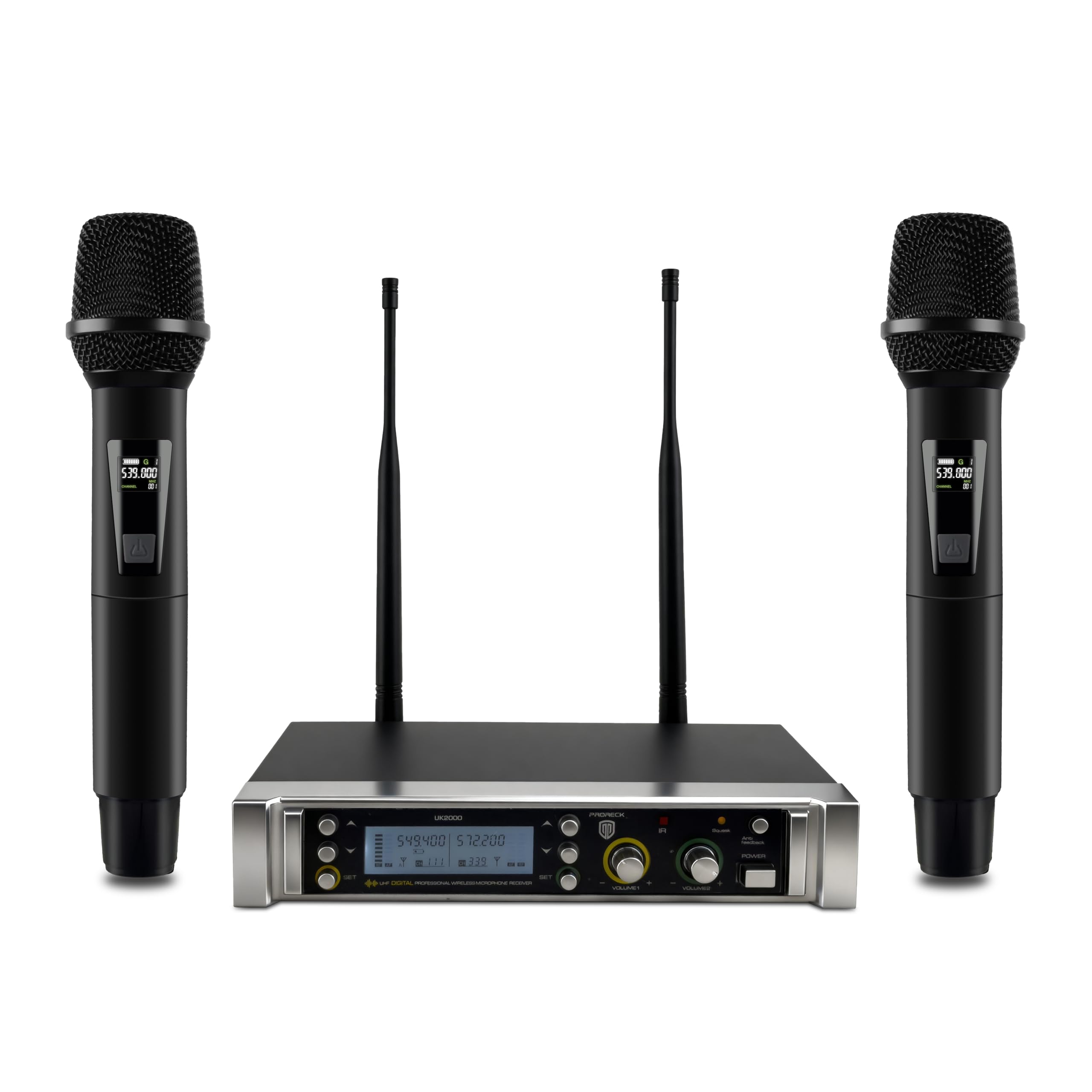
Image: Operating range diagram. A microphone wirelessly transmits to the receiver, indicating an effective operating range of up to 328 feet.
Anti-Feedback Function
The receiver includes an anti-feedback function to minimize unwanted audio feedback. Press the Anti-Feedback Button to activate or deactivate this feature. The Anti-Feedback Level Indicator will show its status.
การซ่อมบำรุง
- Keep the receiver and microphones clean by wiping them with a soft, dry cloth.
- หลีกเลี่ยงการให้ระบบสัมผัสกับอุณหภูมิ ความชื้น หรือแสงแดดโดยตรง
- ถอดแบตเตอรี่ออกจากไมโครโฟนหากไม่ได้ใช้งานเป็นเวลานาน เพื่อป้องกันการรั่วไหล
- Store the system in a dry, dust-free environment.
การแก้ไขปัญหา
| ปัญหา | สาเหตุที่เป็นไปได้ | สารละลาย |
|---|---|---|
| ไม่มีเสียงออก |
|
|
| สัญญาณรบกวนหรือไฟฟ้าสถิต |
|
|
| เสียงอ่อนหรือผิดเพี้ยน |
|
|
| เสียงสะท้อน (เสียงหอน) |
|
|
ข้อมูลจำเพาะ
| ชื่อรุ่น | อังกฤษ-2000 |
| ยี่ห้อ | โปรเร็ค |
| จำนวนช่องสัญญาณ | 2 |
| ช่วงความถี่ | 538.3MHz to 599MHz (560 selectable frequencies) |
| ระยะการทำงาน | สูงถึง 328 ฟุต (ระยะสายตา) |
| เทคโนโลยีการเชื่อมต่อ | ไร้สาย UHF, XLR |
| ประเภทขั้วต่อ | XLR, 6.35mm (1/4") |
| แหล่งพลังงานไมโครโฟน | 2 x AA batteries (per microphone) |
| วัสดุ | โลหะ (ไมโครโฟน) |
| รูปแบบขั้ว | ทิศทางเดียว |
| น้ำหนักสินค้า | 3.79 pounds (system) |
| ขนาดแพ็คเกจ | 11 x 8 x 4 นิ้ว |
การรับประกันและการสนับสนุน
PRORECK products are designed for reliability and performance. For any questions, technical support, or warranty inquiries, please refer to the contact information provided with your purchase or visit the official PRORECK webไซต์ กรุณาเก็บหลักฐานการซื้อไว้เพื่อรับบริการรับประกัน