
Ottimo J 300C
คู่มือผู้ใช้เครื่องทำความเย็นเมล็ดกาแฟ Ottimo Home รุ่น J 300C
Model: J 300C
การแนะนำ
This manual provides instructions for the safe and efficient operation of your Ottimo Home Coffee Bean Cooler J 300C. Please read this manual thoroughly before using the product and retain it for future reference.
สินค้าเกินview
The Ottimo Home Coffee Bean Cooler J 300C is designed to rapidly cool roasted coffee beans, preventing over-roasting and preserving rich flavor. It features an antique wood design with sanitized stainless steel components.
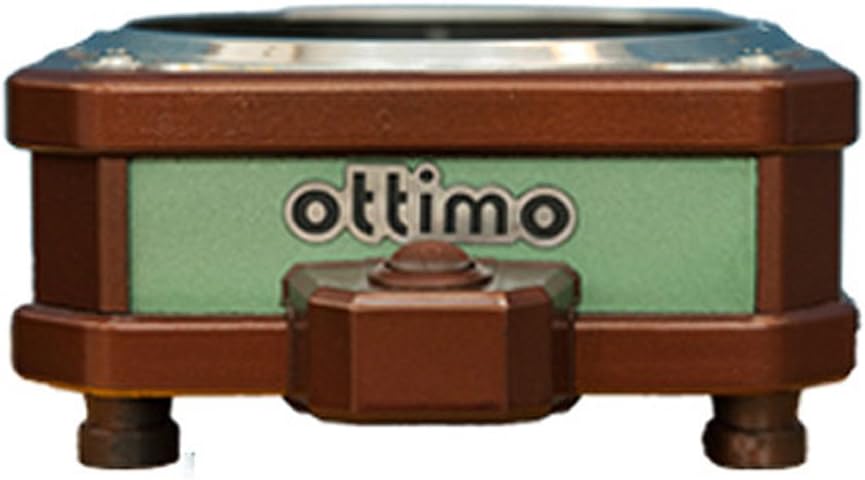
ภาพ: ด้านหน้า view of the Ottimo Home Coffee Bean Cooler J 300C, showcasing its compact design and the 'ottimo' brand logo on a green panel.
ส่วนประกอบ

Image: Diagram illustrating the main components of the coffee bean cooler, including the cooling mesh basket, air outlet, main body (fan), and On/OFF switch/air inlet.
- Cooling Mesh Basket: Holds roasted coffee beans for cooling.
- ช่องระบายอากาศ: Where cooled air exits the unit.
- Main Body (Fan): Houses the cooling fan and internal mechanisms.
- On/OFF Switch / Air Inlet: Controls power and serves as the air intake.
ข้อมูลจำเพาะ
| คุณสมบัติ | รายละเอียด |
|---|---|
| ความจุ | 200 g - 300 g |
| ขนาดสินค้า (กว้าง x ยาว x สูง) | 160 มม. x 192 มม. x 82 มม. |
| น้ำหนัก | 0.8 กก. |
| พลัง | DC 24 V 0.2 A 5 W (adapter 220 V 60 Hz 2 pin) |
| แบบอย่าง | J 300 C |
| ต้นทาง | ผลิตในประเทศเกาหลี |
| ผู้ผลิต | ออตติโม |
ข้อมูลด้านความปลอดภัย
โปรดปฏิบัติตามข้อควรระวังด้านความปลอดภัยต่อไปนี้เพื่อป้องกันการบาดเจ็บหรือความเสียหายต่อผลิตภัณฑ์:
- Ensure the power adapter matches the specified voltage (220V 60Hz) for your region.
- อย่าจุ่มเครื่องในน้ำหรือของเหลวอื่น ๆ
- เก็บให้พ้นจากมือเด็ก
- ห้ามปิดกั้นทางเข้าหรือทางออกของอากาศในระหว่างการทำงาน
- ถอดปลั๊กเครื่องเมื่อไม่ใช้งานหรือก่อนทำความสะอาด
- Use only with dry coffee beans.
การตั้งค่า
- แกะ: นำส่วนประกอบทั้งหมดออกจากบรรจุภัณฑ์อย่างระมัดระวัง
- การจัดวาง: Place the cooler on a stable, flat, and heat-resistant surface. Ensure adequate ventilation around the unit.
- Assemble Basket: Place the cooling mesh basket securely onto the main body of the cooler.
- เชื่อมต่อพลังงาน: Insert the DC 24V adapter into the power port on the cooler. Plug the adapter into a suitable 220V 60Hz power outlet.

Image: The Ottimo Coffee Bean Cooler with the mesh basket in place and the power switch visible, ready for operation.
คำแนะนำการใช้งาน
- เตรียมถั่ว: After roasting, immediately transfer the hot coffee beans into the cooling mesh basket. Ensure the quantity does not exceed the maximum capacity of 300g.
- เริ่มการทำความเย็น: Flip the On/OFF switch to the 'ON' position. The internal fan will activate, drawing air through the beans to cool them rapidly.
- ระบบระบายความร้อนของจอภาพ: Allow the beans to cool completely. This typically takes a few minutes, depending on the bean temperature and ambient conditions.
- Remove Beans: Once cooled, turn the On/OFF switch to the 'OFF' position. Carefully remove the mesh basket and transfer the cooled beans to an airtight container for storage.

ภาพ: ภาพระยะใกล้ view of roasted coffee beans resting in the cooling mesh basket of the Ottimo Cooler, ready for the cooling process.

ภาพ: ด้านล่าง view of the Ottimo Coffee Bean Cooler, revealing the fan mechanism responsible for circulating air to cool the beans.
การบำรุงรักษาและการทำความสะอาด
Regular cleaning ensures optimal performance and longevity of your coffee bean cooler.
- ถอดปลั๊ก: Always unplug the cooler from the power outlet before cleaning.
- Clean Mesh Basket: Remove the cooling mesh basket. Wash it with warm, soapy water and rinse thoroughly. Ensure it is completely dry before reattaching.
- Wipe Main Body: เช็ดภายนอกตัวเครื่องหลักด้วยผ้านุ่มๆamp ผ้า ห้ามใช้น้ำยาทำความสะอาดที่มีฤทธิ์กัดกร่อนหรือจุ่มตัวเครื่องลงในน้ำ
- Clean Fan Area: Periodically inspect the fan area for any accumulated chaff or dust. Use a soft brush or a vacuum cleaner with a brush attachment to gently remove debris.
- พื้นที่จัดเก็บ: Store the cooler in a clean, dry place when not in use.
การแก้ไขปัญหา
| ปัญหา | สาเหตุที่เป็นไปได้ | สารละลาย |
|---|---|---|
| เครื่องไม่เปิด |
|
|
| Cooling is inefficient. |
|
|
| เสียงรบกวนที่ผิดปกติระหว่างการทำงาน |
|
|
การรับประกันและการสนับสนุน
Specific warranty information is not provided in the product details. For warranty claims or technical support, please contact the manufacturer, Ottimo, or your point of purchase. Retain your proof of purchase for any warranty-related inquiries.
ผู้ผลิต: ออตติโม
แบบอย่าง: J 300C
Ask a question about this manual
Ask about setup, troubleshooting, compatibility, parts, safety, or missing instructions. Manuals+ will review the question and use this page’s manual context to help answer it.