
การแนะนำ
Welcome to the user manual for your Mustool G600 Digital Portable Microscope. This guide provides detailed instructions to help you set up, operate, and maintain your device, ensuring optimal performance and longevity. Please read this manual thoroughly before using the microscope.
สินค้าเกินview
The Mustool G600 is a versatile digital portable microscope designed for detailed observation of tiny objects. It features a high-definition display and adjustable magnification, making it suitable for various applications.
คุณสมบัติหลัก
- 4.3-inch HD LCD display for clear viewการไอเอ็นจี
- HD 3.6MP CCD sensor for high-resolution imaging.
- Adjustable magnification from 1x to 600x.
- Eight high-brightness LEDs for optimal illumination.
- Support for Micro SD card up to 64GB (not included) for storage.
- Built-in Li-ion battery providing approximately 6 hours of continuous working time.
- Auto turn-off function for power saving.
- Object distance: 15mm to infinity.
- รองรับหลายภาษา
ส่วนประกอบ

Figure 1: Mustool G600 Digital Portable Microscope in operation, showing a circuit board under its lens and the magnified image on the display.
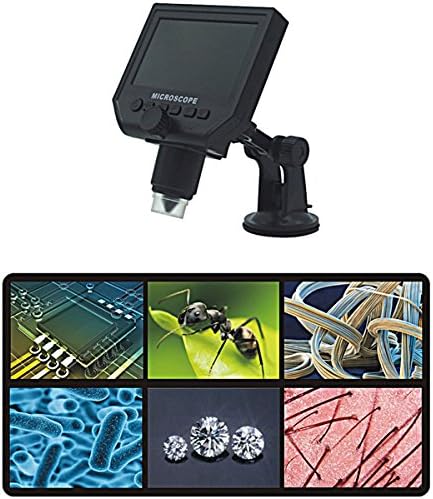
Figure 2: The Mustool G600 Digital Portable Microscope detached from its stand, showcasing the device's compact design and the adjustable stand.

Figure 3: The Mustool G600 Digital Portable Microscope display, illustrating various magnified views such as circuit components, an ant, textile fibers, bacteria, diamonds, and hair strands.

รูปที่ 4 : ด้านหน้า view of the Mustool G600 Digital Portable Microscope mounted on its suction cup stand, highlighting the 4.3-inch LCD screen and control buttons.

รูปที่ 5: ด้านข้าง view of the Mustool G600 Digital Portable Microscope, illustrating the adjustable arm of the stand and the microscope's lens assembly.

รูปที่ 6: ด้านหลัง view of the Mustool G600 Digital Portable Microscope, showing the various ports for power, data, and Micro SD card insertion.
เนื้อหาแพ็คเกจ
โปรดตรวจสอบว่าสินค้าทั้งหมดที่ระบุไว้ด้านล่างนี้รวมอยู่ในแพ็คเกจของคุณแล้ว หากมีสินค้าใดสูญหายหรือเสียหาย โปรดติดต่อฝ่ายสนับสนุนลูกค้า
- 1 x Mustool G600 LCD Digital Microscope
- 1 x EU Plug Power supply (Note: Adapter may vary by region)
- 1 x Data line (USB cable)
- 1 x Multi-functional support (Stand)
- 1 x User’s manual (This document)
การตั้งค่า
การชาร์จแบตเตอรี่
Before first use, fully charge the microscope's built-in Li-ion battery.
- Connect the provided power supply to the microscope's charging port.
- เสียบปลั๊กแหล่งจ่ายไฟเข้ากับเต้ารับไฟฟ้ามาตรฐาน
- ไฟแสดงสถานะการชาร์จจะสว่างขึ้น เมื่อชาร์จเต็มแล้ว ไฟอาจเปลี่ยนสีหรือดับลง
- การชาร์จเต็มหนึ่งครั้งสามารถใช้งานได้ต่อเนื่องประมาณ 6 ชั่วโมง
การประกอบขาตั้ง
The multi-functional support allows for stable positioning of the microscope.
- Attach the microscope unit to the adjustable arm of the stand. Ensure it is securely fastened.
- Place the suction cup base on a clean, flat, non-porous surface. Press down firmly on the suction cup lever to secure the stand.
- Adjust the arm and microscope angle as needed for your viewอิงเรื่อง
Inserting a Micro SD Card (Optional)
To save images and videos, insert a Micro SD card (up to 64GB, not included).
- Locate the Micro SD card slot on the side or back of the microscope unit.
- Gently insert the Micro SD card with the gold contacts facing down (or as indicated by the slot diagram) until it clicks into place.
- ในการถอด ให้ค่อยๆ ดันการ์ดเข้าไปอีกครั้งจนกว่าการ์ดจะเด้งออกมา
คำแนะนำการใช้งาน
การเปิด/ปิดเครื่อง
กดปุ่มค้างไว้ พลัง button (usually marked with a power symbol) for a few seconds to turn the microscope on or off. The LCD screen will illuminate.
การปรับการขยายและโฟกัส
The microscope offers 1x to 600x continuous magnification.
- วางวัตถุที่ต้องการสังเกตไว้ใต้เลนส์กล้องจุลทัศน์โดยตรง
- หมุนขนาดใหญ่ ปุ่มปรับโฟกัส (typically located on the side of the microscope body) to bring the image into sharp focus on the LCD screen.
- Adjust the distance between the lens and the object (object distance: 15mm to infinity) using the stand's adjustment mechanisms to achieve the desired magnification and clarity.
การปรับความสว่างของ LED
The microscope is equipped with 8 adjustable high-brightness LEDs.
ค้นหาตำแหน่ง การควบคุมความสว่าง LED (often a small knob or button) on the microscope body. Rotate or press it to increase or decrease the illumination on your subject.
การถ่ายภาพและวิดีโอ
To capture still images or record videos, ensure a Micro SD card is inserted.
- ในขณะที่ viewing your subject, press the โหมด button to switch between photo mode, video mode, and playback mode.
- ในโหมดถ่ายภาพ ให้กดปุ่ม ตกลง/จับภาพ ปุ่มเพื่อถ่ายภาพ
- ในโหมดวิดีโอ ให้กดปุ่ม ตกลง/จับภาพ กดปุ่มเพื่อเริ่มบันทึก กดอีกครั้งเพื่อหยุดบันทึก
- ถูกจับ files จะถูกบันทึกไว้ในการ์ด Micro SD
การนำทางเมนู
ใช้ เมนู button to access settings and options.
ใช้ ขึ้น/ลง or ซ้าย/ขวา ปุ่มลูกศรใช้สำหรับเลื่อนดูตัวเลือกในเมนู
กดปุ่ม OK ปุ่มเพื่อยืนยันการเลือก
Common settings include resolution (1080P, 720P, VGA), language, date/time, and auto-off timer.
การซ่อมบำรุง
การทำความสะอาด
To ensure clear viewing and extend the life of your microscope:
- Gently wipe the LCD screen with a soft, lint-free cloth. For stubborn smudges, slightly dampชุบผ้าด้วยน้ำหรือน้ำยาทำความสะอาดหน้าจอ
- Use a soft brush or air blower to remove dust from the lens. For smudges on the lens, use a specialized lens cleaning solution and cloth.
- Clean the microscope body with a dry or slightly damp ผ้า ห้ามใช้สารทำความสะอาดที่มีฤทธิ์กัดกร่อนหรือตัวทำละลาย
พื้นที่จัดเก็บ
When not in use, store the microscope in a cool, dry place, away from direct sunlight and extreme temperatures.
Keep the lens covered to prevent dust accumulation.
การดูแลแบตเตอรี่
เพื่อยืดอายุแบตเตอรี่:
- หลีกเลี่ยงการปล่อยแบตเตอรี่จนหมดบ่อยครั้ง
- หากจะเก็บรักษาเป็นเวลานาน ควรชาร์จแบตเตอรี่ให้มีความจุประมาณ 50%
- ควรชาร์จแบตเตอรี่ทุกๆ สองสามเดือนหากไม่ได้ใช้งาน เพื่อป้องกันการคายประจุจนหมด
การแก้ไขปัญหา
| ปัญหา | สาเหตุที่เป็นไปได้ | สารละลาย |
|---|---|---|
| Microscope does not turn on. | แบตเตอรี่หมด | ชาร์จแบตเตอรี่โดยใช้แหล่งจ่ายไฟที่ให้มา |
| ภาพเบลอ | การโฟกัสไม่ถูกต้อง หรือระยะห่างของวัตถุไม่เหมาะสม | Adjust the focus knob and/or the distance between the lens and the object. |
| หน้าจอมืด/สว่างเกินไป | LED brightness not adjusted. | Adjust the LED brightness control. |
| ไม่สามารถบันทึกภาพ/วิดีโอได้ | ไม่ได้เสียบการ์ด Micro SD หรือการ์ดเต็ม/เสียหาย | Insert a Micro SD card, ensure it has sufficient space, or try formatting the card (this will erase all data). |
| Microscope turns off automatically. | Auto turn-off function is enabled or battery is low. | Charge the battery. Check menu settings to adjust or disable the auto turn-off timer. |
หากปัญหายังคงมีอยู่หลังจากลองวิธีแก้ไขเหล่านี้แล้ว โปรดติดต่อฝ่ายสนับสนุนลูกค้า
ข้อมูลจำเพาะ
| คุณสมบัติ | รายละเอียด |
|---|---|
| แบบอย่าง | Mustool G600 |
| แสดง | จอแสดงผล LCD HD ขนาด 4.3 นิ้ว |
| พิกเซล | HD 3.6MP CCD |
| ปณิธาน | 1080P, 720P, วีจีเอ |
| การขยายภาพ | 1-600x (Continuous) |
| ระยะทางวัตถุ | 15mm - infinity |
| แหล่งกำเนิดแสง | 8 Adjustable High Brightness LEDs |
| การสนับสนุนการจัดเก็บข้อมูล | Micro SD card up to 64GB (Not included) |
| แหล่งพลังงาน | แบตเตอรี่ลิเธียมไออนในตัว |
| อายุการใช้งานแบตเตอรี่ | Approx. 6 hours continuous working |
| ปิดเครื่องอัตโนมัติ | ใช่ |
| การรองรับภาษา | English, Spanish, Russian, Korean, Japanese, Thai, Hebrew, Portuguese, German, French, Italian, Turkish, Czech, Chinese |
| วัสดุ | Glass/Glass-like (Lens), Other components as per design |
| สี | สีดำ |
| ยูพีซี | 783050248461 |
การรับประกันและการสนับสนุน
The Mustool G600 Digital Portable Microscope comes with a standard manufacturer's warranty. Please refer to the warranty card included in your package for specific terms and conditions.
For technical support, troubleshooting assistance beyond this manual, or warranty claims, please contact Mustool customer service through the retailer where you purchased the product or visit the official Mustool webเว็บไซต์.
Please have your product model (G600) and purchase information ready when contacting support.