
1. บทนำ
Thank you for choosing the ACOPOWER HY-ACBag-S320 Solar Generator. This portable power station is designed to provide reliable power for your electronic devices, whether you're camping, during emergencies, or for general outdoor use. Please read this manual thoroughly before operating and keep it for future reference.
2. อะไรอยู่ในกล่อง
Upon unboxing your ACOPOWER HY-ACBag-S320, ensure all components are present and in good condition. The package typically includes:
- ACOPOWER HY-ACBag-S320 Solar Generator Unit
- เครื่องชาร์จ AC Wall
- สายชาร์จรถยนต์
- คู่มือการใช้งาน
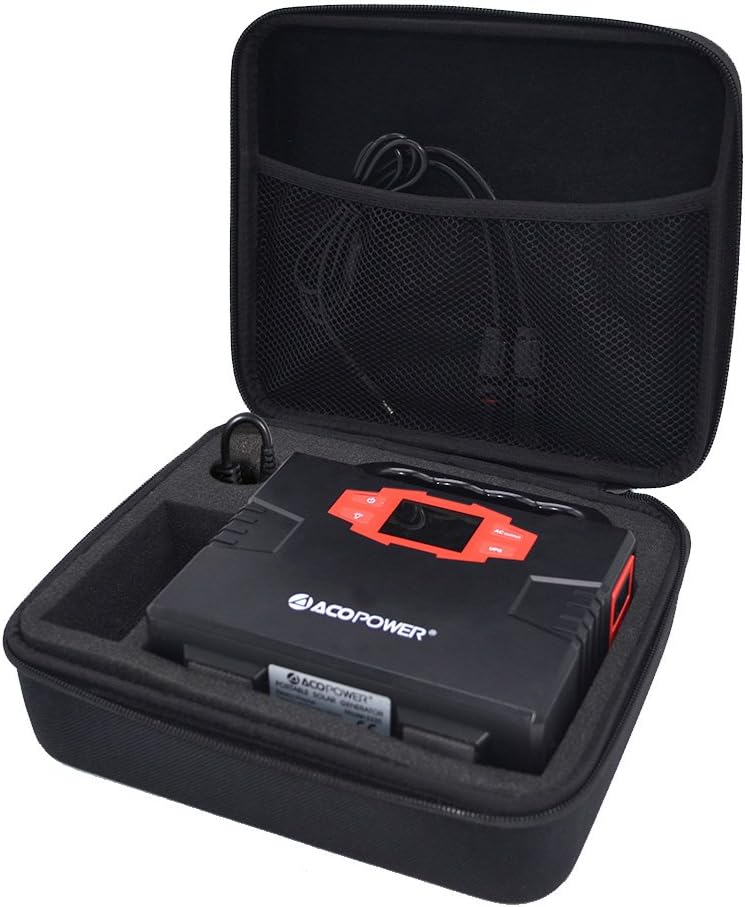
Figure 1: The ACOPOWER HY-ACBag-S320 Solar Generator unit neatly packed within its protective case, alongside its charging cables.

รูปที่ 2: รายละเอียด view of the mesh pocket within the generator's carrying case, designed to store cables and smaller accessories securely.
3. การตั้งค่า
3.1 การชาร์จเริ่มต้น
Before first use, fully charge the solar generator. Connect the AC wall charger to the DC input port on the generator and plug it into a standard wall outlet. The LED display will indicate charging status. Charging is complete when the battery icon is full.
3.2 Connecting Solar Panels (Optional)
If using an external solar panel (sold separately), connect the solar panel to the DC input port of the generator. Ensure the solar panel is placed in direct sunlight for optimal charging efficiency. The unit is compatible with various solar panels, including the ACOPOWER foldable solar panel shown in the video, which is highly portable.

Figure 3: The compact and portable design of the solar generator in its closed case, ready for transport or storage.
4. คู่มือการใช้งาน
4.1 Turning On/Off AC Output
To turn on the AC output, single-click the AC button. The LED display will show 'AC' indicating the output is active. To turn off the AC output, press the AC button again. บันทึก: The AC output will shut down automatically if a short circuit or overload is detected. Remove the device causing the issue to recover from protection.
4.2 การใช้พอร์ต USB
Connect your USB digital appliances (e.g., smartphones, tablets) to the USB output ports. The generator will automatically provide power.
4.3 Emergency Light Function
To use the emergency light, press the light button. Press it again to cycle through different brightness levels or modes. Press and hold to turn off the light.
5. การบำรุงรักษา
- Keep the unit dry and away from all corrosive substances, fire, and water.
- เก็บไว้ในที่แห้งและเย็น หลีกเลี่ยงแสงแดดโดยตรง
- หลีกเลี่ยงการทำตกหรือให้เครื่องได้รับแรงกระแทกหนักๆ
- อย่าพยายามถอดประกอบหรือซ่อมแซมอุปกรณ์ด้วยตนเอง โปรดติดต่อช่างผู้ชำนาญเพื่อขอรับบริการ
6 การแก้ไขปัญหา
6.1 AC Output Shutdown
If the AC output shuts down, it indicates a short circuit or overload. Disconnect the problematic device and restart the generator. Ensure the connected device's wattage does not exceed the generator's capacity.
6.2 อุปกรณ์ไม่ชาร์จ
Check all cable connections. Ensure the power source (wall outlet, car charger, or solar panel) is functioning correctly. If using a solar panel, verify it is receiving adequate sunlight.
7. ข้อมูลจำเพาะ
| คุณสมบัติ | รายละเอียด |
|---|---|
| แบบอย่าง | HY-ACBag-S320 |
| ความจุ | 150 วัตต์ชั่วโมง |
| ประเภทแบตเตอรี่ | High-Quality Lithium Polymer Batteries |
| ขนาด | 10 x 8 x 4 นิ้ว |
| น้ำหนัก | 12 ออนซ์ |
| ป้อนข้อมูลการชาร์จไฟ | กระแสตรง15โวลต์/2แอมป์ |
| เวลาในการชาร์จเต็ม | DC: 8-9 ชั่วโมง |
| เอาท์พุต | USB 5V/3.1A (MAX), DC 9-12.6V/10A (MAX) |
8. การรับประกันและการสนับสนุน
ACOPOWER products are manufactured to the highest quality standards. For warranty information, technical support, or any questions regarding your product, please visit the official ACOPOWER webหรือติดต่อฝ่ายบริการลูกค้า โปรดเก็บหลักฐานการซื้อไว้เพื่อใช้ในการเคลมประกัน